
Real-time Audio to Text
Transcribe as you record, see results instantly with 99% accuracy, never miss important content.
Get StartedCore Features
Powerful real-time transcription features
Real-time Transcription
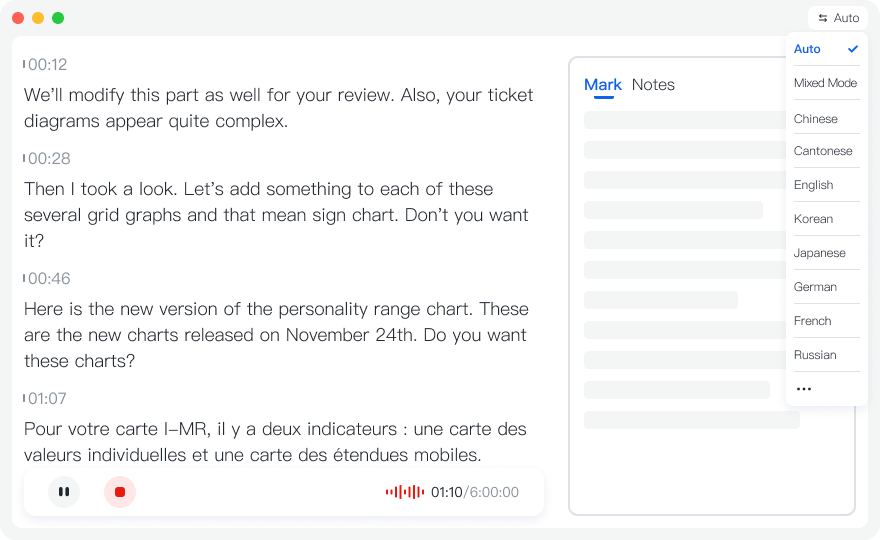
See transcription results in real-time during recording. No need to wait until recording ends to view text content.
High Accuracy
Advanced AI speech recognition technology with 99% accuracy. Supports Chinese, English and more languages.
Multiple Use Cases
Suitable for meeting notes, interview transcription, lecture notes, study records and more scenarios.
Use Cases
Real-time transcription use cases
Meeting Notes
Real-time transcription during meetings, view content instantly, never miss important information.
- ✓View meeting content in real-time
- ✓Multi-speaker recognition
- ✓Auto-generate meeting minutes
Interview Transcription
Real-time transcription during interviews, quickly organize Q&A content, improve interview efficiency.
- ✓Real-time Q&A transcription
- ✓Quickly organize interview content
- ✓Support long recording time
Lecture Notes
Real-time transcription during lectures, automatically generate lecture notes for easy review and organization.
- ✓Real-time lecture notes
- ✓Easy post-lecture review
- ✓Multi-language recognition
How to Use
Three simple steps to start real-time transcription
Start Recording
Click "Start Recording" button, allow browser microphone access, and start recording.
Real-time Transcription
During recording, the system automatically converts speech to text and displays it on screen in real-time.
End and Save
After recording ends, the system automatically saves the audio file and transcription. You can view the complete transcript and AI-generated summary.
Frequently Asked Questions
What is the accuracy of real-time transcription?
Tinrec uses advanced AI speech recognition technology with 99% accuracy for real-time transcription. Accuracy may be affected by background noise, speaking speed, accent, etc. We recommend using in a quiet environment.
What languages are supported?
Tinrec supports Chinese (Simplified, Traditional), English and more languages. You can select the corresponding language before recording for better recognition.
How long can I record?
Web version supports up to 2 hours per recording. For longer recordings, download our App which supports up to 6 hours per recording.
Start Using Real-time Transcription Now
Register now to get 60 minutes of free transcription credit. Experience the power of real-time transcription.
Get Started