
Podcast/Network Video to Text
Support 100+ popular platforms including YouTube, Facebook, Instagram, TikTok, Bilibili, and more. Automatically extract audio and convert to text, generate subtitles and summaries.
Podcast/Network Video Transcription and AI Summary
High Accuracy AI Transcription Model
Equipped with an AI model with excellent speech recognition capabilities, our video to text tool ensures that your video content is transcribed and summarized accurately and clearly every time.
Visualization Rather Than Simple Transcription
What our AI video to text tool provides is not just simple transcription. Automatically generates AI summaries, chapter divisions and action items, making complex video content easy to understand.
Intelligent Speaker Recognition
Tinrec transcription tool uses AI to differentiate between different speakers in videos, ensuring transcripts clearly reflect who said what for better understanding of dialogue content.
Built-in AI Q&A Assistant
You can also chat with our AI in real-time about your video content! Get instant answers to any questions about your video content, allowing you to quickly gain insight into any part of the video.
Transcribe Podcasts in Multiple Languages
Whether the video is in an accent you are unfamiliar with, or a completely different language, our AI video to text tool can always provide accurate and language-appropriate transcription and summaries.
Use Video to Text Anytime, Anywhere
Watching videos on your phone? Use Tinrec mobile app to transcribe your video recordings on the go, and sync the generated transcripts and summaries to all your devices!
Core Features
Powerful video to text features
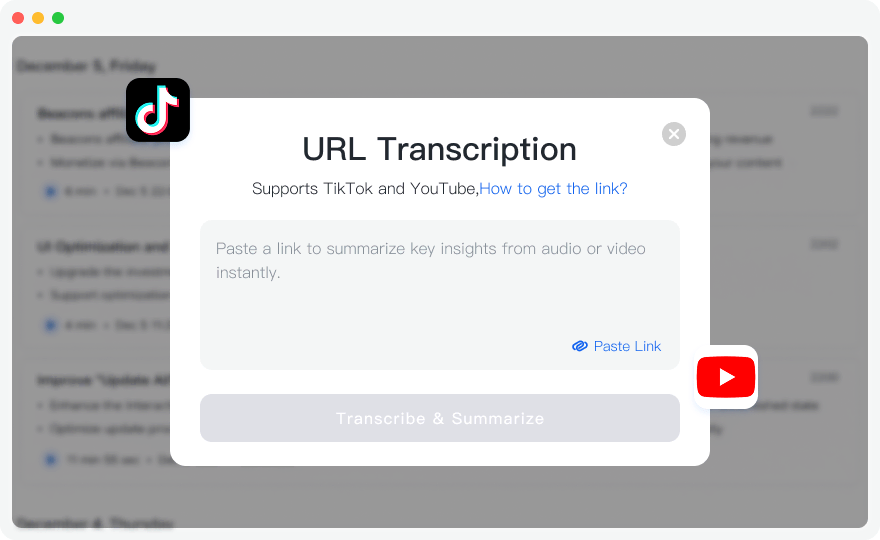
Auto-extract Audio
Paste video link, the system will automatically extract audio from the video, without downloading video files, saving storage space and processing time.
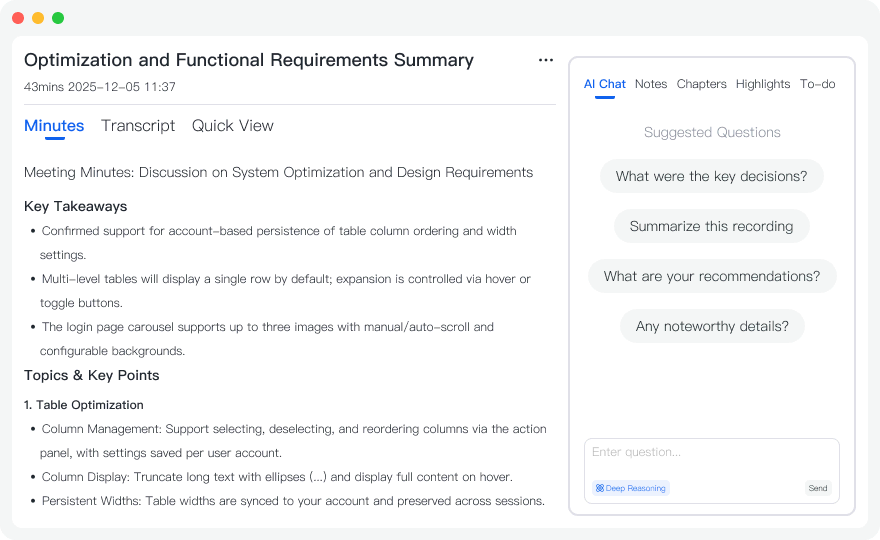
Generate Subtitles and Summary
After transcription, automatically generate SRT subtitle files, AI summaries and chapter divisions for easy use and sharing of video content.
Support 100+ Popular Platforms
Support 100+ popular video and audio platforms including YouTube, Facebook, Instagram, TikTok, Bilibili, covering global popular content platforms



Use Cases
Video to text use cases
YouTube Video to Text
Convert YouTube video links to text, generate subtitle files and content summaries for easy learning and organization.
- ✓Support YouTube links
- ✓Auto-generate subtitles
- ✓Content summary
Online Course Transcription
Convert online course videos to text notes, extract key content for easy study and review.
- ✓Course note generation
- ✓Key content extraction
- ✓Easy review
Video Content Organization
Convert video content to text, generate summaries and chapters for easy content editing and publishing.
- ✓Content conversion
- ✓Chapter division
- ✓Easy editing
Who Can Benefit from Video to Text?
Business Professionals
Too many meetings to keep up with? Upload your meeting recordings and get key summaries and action items in minutes. No more replaying entire recordings. Your team stays aligned and nothing important gets missed.
Students
Too many lecture recordings and not sure where to start reviewing? Convert your lectures to text and get structured notes automatically. Quickly review key points before exams and find what you need for assignments. Study smarter, not harder.
Researchers and Scholars
Too many interviews, seminars, and academic materials to process? Convert audio to text and use AI summaries to extract core insights quickly. Deeper analysis, clearer understanding, smoother paper writing.
Content Creators
Long podcast or video content making it hard to find material and inspiration? Convert audio to text, quickly locate key segments, and easily extract quotes and highlights. Content reuse becomes simple, creative ideation flows smoother, and productivity soars.
How to Use
Three simple steps to start using video to text
Paste Video Link
In the "Network Video" feature, paste YouTube or other supported video platform links. The system automatically identifies link types and starts parsing.
Wait for Parsing and Transcription
The system automatically extracts audio from videos and starts transcription processing. Parsing and transcription time depends on video length, usually completes within minutes.
Get Transcription Results and Subtitles
After transcription completes, you can view the complete transcript, AI-generated summary, and download SRT subtitle files for easy addition to videos.
Frequently Asked Questions
What video platforms are supported?
Tinrec currently supports 100+ major video and audio platforms, including YouTube, Facebook, Instagram, TikTok, Twitter, Bilibili, Reddit, LinkedIn, Twitch, Vimeo, Spotify, SoundCloud, Zoom, Telegram, and more. We are continuously expanding support for more platforms. You can visit the "Supported Platforms" page to view the complete list. If you have specific platform needs, please contact our customer service team.
Is there a video length limit?
There is no strict video length limit, but longer videos require longer processing time. Free users have transcription time limits, Pro users have higher transcription quotas. We recommend videos under 2 hours for best experience.
Can I download subtitle files?
Yes. After transcription completes, you can select SRT subtitle format in the export feature. SRT is a standard subtitle file format that can be added to most video editing software and video platforms.
Start Using Video to Text Now
Register now to get 60 minutes of free transcription credit. Experience the power of video to text transcription.
Get Started