
Turn recordings into transcripts and summaries in minutes
Upload audio or video for multilingual transcription, AI notes, and action items
2026 Comparison of 3 Meeting Recording Transcription Tools: More Than Just Transcription, Which One Helps You Truly Grasp the Content?
Piles of Meeting Recordings, But Do You Really Have Time to Organize Them?

A two-hour meeting followed by another two hours to write up the minutes—that's the daily grind for many office workers. Even more frustrating is when you use different platforms like Google Meet and Microsoft Teams for meetings, leaving recordings and transcripts scattered everywhere. Finding a decision discussed in a past meeting often means digging through multiple cloud drives.
If this sounds familiar, this article is for you. We've compared three common meeting recording and organization solutions to help you find the most efficient and effective approach.
Before Choosing a Meeting Recording Tool, Understand These 3 Key Points
Not all tools marketed as "transcription" are right for you. Before you start, clarify these three things to avoid buying something that doesn't meet your needs.
1. Transcription is Just the First Step; Organization is Key Many tools claim to "transcribe meetings in real time," but what you get is just a plain text file. You still need to read through thirty minutes of verbatim transcript to extract key points and action items. A truly time-saving tool should automatically summarize, identify next steps, and let you ask questions to find answers instantly.
2. Cross-Platform and Multi-Source Support If you only meet on one platform, built-in transcription might suffice. But in reality, you might receive audio files, YouTube videos, or even MP3s from interviews. Whether the tool can import and process all these sources together will greatly affect your productivity.
3. Performance in Chinese and Mixed-Language Environments Many internationally recognized services excel at English but struggle with Chinese, mixed Chinese-English, or regional terms. If you primarily use Chinese, be sure to test tools thoroughly.
These three points seem basic, but few tools deliver on all. Next, let's look at the test results.
Tinrec (Quick Recording Transcription) — The Most Comprehensive Choice After Testing
Tinrec is a multi-platform AI recording and audiovisual transcription tool that does more than convert audio to text—it turns meetings, lectures, interviews, and even online videos into a searchable, summarizable, and queryable database.
Beyond Transcription: Highlights Delivered
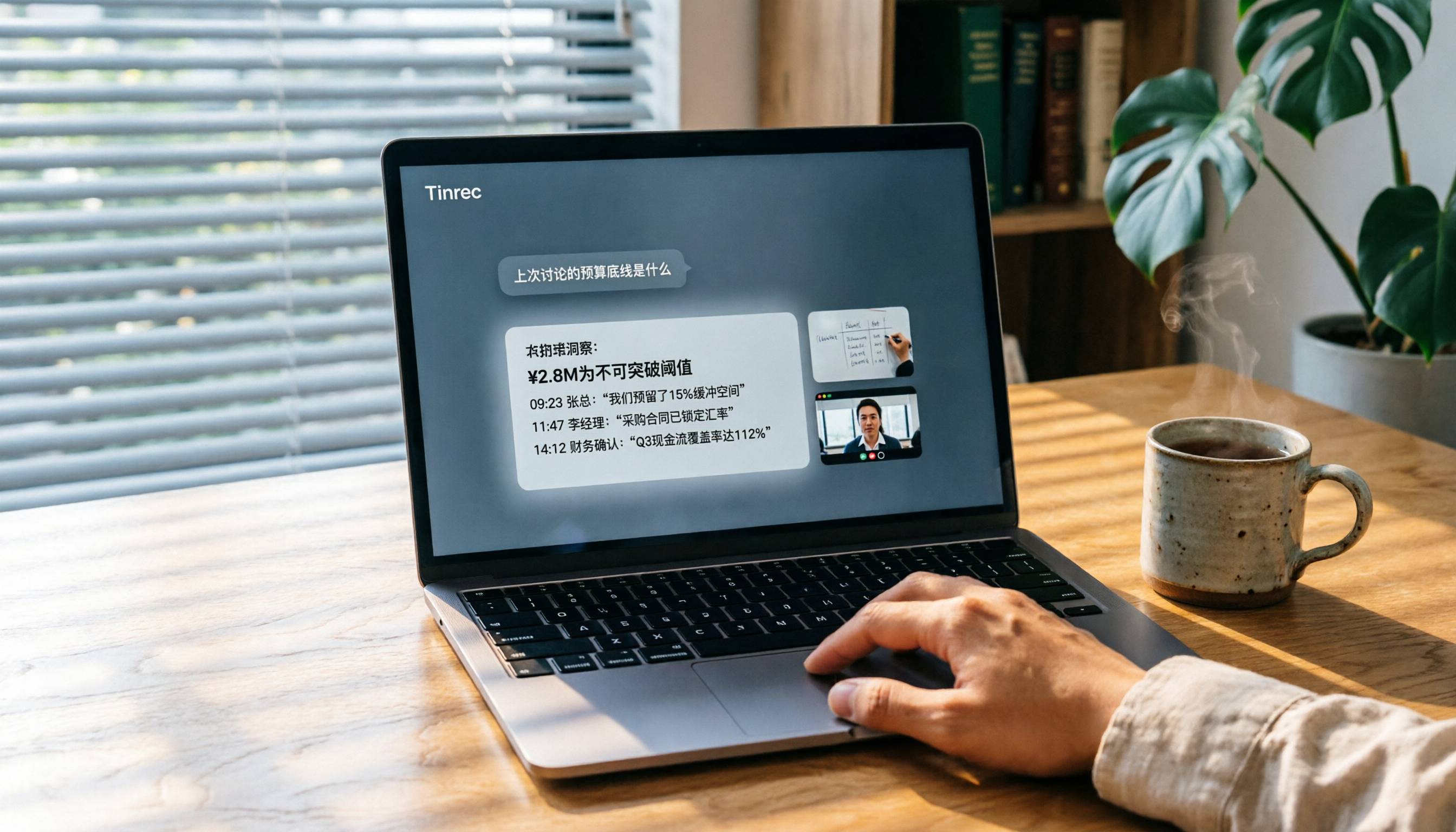
During actual use, Tinrec transcribes in real time as you record. Once the meeting ends, the AI automatically generates a summary, chapter markers, and action items—who needs to do what and by when, all clearly listed. Even better, you can ask Tinrec directly: "Who mentioned the budget in the last meeting?" It will tell you the answer instead of just showing keyword search results.
This "conversational query" feature is nearly unheard of in tools at this price point. Honestly, this alone saves me hours of manually reviewing transcripts.
Import Anything, Organize Everything
Tinrec's strength lies in its broad input sources: live recording, uploading audio or video files, pasting YouTube or Xiaohongshu links, or even directly recording Google Meet or Teams meetings from your computer. No matter where the content comes from, just throw it in, and it will organize everything into a uniform format.
Stop organizing recordings by hand
Upload audio or video and automatically get a transcript, summary, and action items
Pros and Cons

Pros:
- Supports 14 languages, with excellent performance in Chinese (including Traditional Chinese), and accurate recognition of mixed Chinese-English speech.
- Provides not only verbatim transcripts but also summaries, action items, chapters, mind maps, and even direct export to Notion and Google Docs.
- The free plan offers a monthly baseline allowance, so you can try before deciding to upgrade. Pro monthly or yearly cards are reasonably priced, much cheaper than buying dedicated recording hardware.
Limitations:
- The free plan has a small allowance; heavy users may need to pay. But for those with 2-3 meetings per week, it's usually sufficient.
- AI summaries occasionally miss details; for important decisions, it's recommended to cross-check with the verbatim transcript.
Who it's for: If you often need to record Chinese meetings, lectures, or interviews and want AI to quickly extract key points, and you work across phone and computer—Tinrec is the most complete option currently available.
Beyond Tinrec: What Else Is There?
Google Meet Built-in Transcription
Google Meet offers live captions and meeting transcripts, but these require a paid Google Workspace plan. The advantage is that it works directly within the meeting window, no need to switch tools. However, transcripts are stored only in Google Cloud; further organization (e.g., generating summaries or merging other recordings) is cumbersome. Also, it only supports Google Meet meetings, not external audio or video files.
If you only meet on Google Meet and are comfortable within the Google ecosystem, the built-in feature might be enough. But if you want to turn recordings into a long-term knowledge base, its organization capabilities fall short.
Microsoft Teams Built-in Transcription
Teams also offers live transcription and meeting recording, available with standard plans. However, for AI-generated meeting summaries or chapters, you need Teams Premium or a Copilot license (additional cost). Like Google Meet, these features are locked within the Teams platform; external audio files or online videos cannot be imported.
This is suitable for enterprises already deep in the Microsoft 365 ecosystem. But if you need cross-platform information organization or have budget constraints, Teams' plans may feel restrictive.
Avoiding Pitfalls: 3 Common Mistakes When Choosing Meeting Recording Tools
Pitfall 1: Focusing Only on "Transcription" Without Thinking About "What Comes After" Many tools promote "free real-time transcription," but all you get is a large block of text. If you still have to manually extract key points and write meeting minutes, you haven't saved any time. Choose a tool with automatic summarization, action items, and search functionality.
Pitfall 2: Ignoring the Diversity of Data Sources Today you meet on Google Meet, tomorrow you receive an audio file, and the next day you want to organize a YouTube video. If your chosen tool only handles meetings, you'll still need other methods. Go for an all-in-one tool that handles all audio and video sources.
Pitfall 3: Using It Only for Transcription, Not Its AI Post-Processing Many people treat transcription tools like voice recorders—after transcribing, they just leave it. With Tinrec, transcription is just the first step; you can ask questions about the content, generate reports or meeting minutes, and even sync highlights to other note-taking apps. Learn to use these features to maximize the value of your recordings.
Summary: Which One Should You Choose?
If you only occasionally meet on a single platform and don't care about post-meeting organization, the built-in transcription of Google Meet or Teams may suffice. But if you want to turn all audio and video content (meetings, courses, interviews) into a reusable, queryable, and searchable database, Tinrec is currently the most comprehensive choice.
- Primarily Chinese meetings, need cross-platform organization → Tinrec (best language support, strongest organization features)
- Only Google Meet meetings, basic transcription only → Google Meet built-in (but limited)
- Company already on Teams ecosystem, budget available → Teams Premium (platform-bound but high integration)
- Want to try AI Q&A and automatic summarization → Tinrec recommended (free plan to start)
In short, don't rush to pay. First download the Tinrec free plan—it comes with a monthly allowance sufficient for two or three meetings to test the experience. Upgrade only if you find it useful; no need to commit upfront.
Turn every recording into actionable outcomes
Get 60 free transcription minutes when you sign in. No credit card required.
Related Reading
You might also like

5 Board Meeting Minutes Templates Compared for 2026: From Word Tables to AI-Generated Minutes
Board meeting minutes templates are easy to find; what's missing is a process that produces traceable records right after the meeting. This comparison covers five approaches: Word templates, Tinrec, Notta, Otter.ai, and Granola—from field structure and selection criteria to pitfalls to avoid—so you can choose the right fit for your team.

HOA Meeting Minutes Template 2026: 5 Essential Fields + AI-Generated Summaries
Struggling with HOA meeting minutes? Can't find attachments? No one follows up on decisions? This guide breaks down the 5 essential fields of a compliant template and shows how Tinrec turns meeting recordings into transcripts, summaries, action items, and official records ready for posting—all within half an hour after the meeting.

How to Take Online Meeting Notes in 2026: 5 Steps from Recording to AI Summary
After an online meeting, do you still have to write the transcript, summary, and action items yourself? This article breaks down the complete workflow from recording and transcription to AI summaries and team knowledge retention in 5 steps, and compares Tinrec, Granola, Otter.ai, and PLAUD to help you choose the right meeting notes tool within your budget.

2026 Comparison of 4 Meeting Transcription AIs: Free Tiers and Post-Meeting Organization—Which Is More Sufficient?
How to choose a meeting transcription AI? Based on real meeting scenarios, this article outlines 5 key purchasing criteria and compares Tinrec, Notta, Otter.ai, and Granola in terms of bot-free recording, Chinese recognition, post-meeting summaries, and team collaboration. It also lists free tiers and paid pricing honestly to help you decide which tool truly saves time on meeting notes.

2026 Comparison of 3 English Meeting Transcription Tools: Why Tinrec Is Better for Mixed Chinese-English Meetings
English meeting transcription isn't as simple as feeding a recording to AI. This article addresses three common misconceptions and compares Tinrec and Otter on bot-free recording, mixed Chinese-English handling, post-meeting summaries and action items, and team data retention, helping you decide which tool better fits the mixed-language meeting scenarios of teams in Hong Kong and Taiwan.

Best Meeting Transcription Tools in 2026: 5 Methods Tested, Tinrec vs Google
When it comes to meeting transcription, many people first think of Google, but in practice they often get stuck with 'only a summary, no verbatim transcript' or find that Meet's built-in transcription requires payment. This article compares Google's free AI tools and Tinrec across 5 dimensions—speaker identification, online meeting recording, post-meeting organization, quota and cost, and team collaboration—to clarify who each is best for.

2026 Guide: Transcribing Cantonese Meeting Recordings — Cantonese Recognition + Automatic Meeting Minutes
A roundup of key considerations for transcribing Cantonese meeting recordings in 2026, covering Cantonese recognition, mixed Chinese-English speech, post-meeting organization, and team data ownership. Features a hands-on breakdown centered on Tinrec, plus brief competitor reviews and 3 common pitfalls to help you quickly decide which tool to use.

Free Meeting Transcription in 2026: Tinrec vs. Notta Compared
How do you choose a free meeting transcription tool? This article compares Tinrec and Notta across five dimensions: free tier limits, meeting capture methods, post-transcription processing, Chinese and multilingual support, and team governance. It also includes a ready-to-follow checklist to help you decide which tool better fits your meeting scenarios.

2026 Comparison of 4 Meeting Transcription Tools: Which Offers the Best Free Tier and Post-Meeting Organization?
How to choose a meeting transcription tool? Most people compare the wrong things first. This article tests and compares Tinrec, Notta, Otter.ai, and Granola from four angles: meeting capture method, post-meeting organization, audio retention, and free tier, and summarizes three common purchasing pitfalls to help you find the one that truly saves you organization time.