
Turn recordings into transcripts and summaries in minutes
Upload audio or video for multilingual transcription, AI notes, and action items
In Hong Kong's fast-paced business and academic environment, transcribing audio recordings is often the most time-consuming task. A common pain point is that most voice-to-text tools on the market have poor recognition rates for "Cantonese (Yue Chinese)" or "mixed Chinese-English" speech, requiring hours of manual correction after recording. Moreover, simple text conversion is no longer enough—the key to efficiency is quickly extracting "action items" and "summaries" from lengthy conversations.
This article reviews the 6 mainstream voice-to-text tools on the market in 2026, offering an in-depth evaluation based on language support, functionality, pricing, and ease of use. If you prefer hardware recorders, Plaud and iFLYTEK are strong contenders; if you seek highly flexible software solutions with AI conversation analysis, Tinrec and Monica offer different workflow options. Read on to find the tool that best suits your needs.
2026 Top 6 Cantonese Voice-to-Text Tools Review
1. Plaud AI (Integrated Hardware & Software for Business)
Best for: Business professionals who need a physical recording device and prioritize call recording. Plaid AI combines hardware (such as the Note recording card and NotePin capsule) with software services. Its strengths lie in its sleek hardware design, support for 112 languages (including Cantonese), and the ability to generate summaries via models like GPT-5 and Claude Sonnet. For iPhone users, it solves the inconvenience of call recording. However, this type of solution typically requires purchasing the hardware first (approx. HK$1,199 for the device alone), with ongoing subscription costs for transcription credits.
2. Tinrec (Seconds Recording: All-in-One AI Recording Assistant)
Best for: Teams and individuals who value "post-recording decision-making," multi-device syncing, and AI-powered queries. Tinrec (Seconds Recording) is a software service focused on "from recording to action," supporting iOS, Android, and web. It not only automatically recognizes 10 languages, including Cantonese, Chinese, and English, but its key differentiator is the "AI Conversation Query" feature—users can ask questions directly about the recording (e.g., "What's the deadline mentioned by the manager?") and the AI answers based on the content, saving time from sifting through transcripts. Additionally, it can parse YouTube or podcast links, automatically generating meeting minutes and to-do lists, making it ideal for users who don't want to carry extra hardware.

3. iFLYTEK (Professional-Grade Chinese Recognition)
Best for: Professional fields like law and healthcare that demand extremely high accuracy for Chinese/Cantonese. IFLYTEK has long been a leader in Chinese speech recognition, with market-leading transcription accuracy for Cantonese and Mandarin. While its recording devices are pricier (around HK$2,900), they are a reliable choice for scenarios with low tolerance for error and heavy use of specialized terminology. The downside is its relatively closed ecosystem and reliance on proprietary hardware.
4. Otter.ai (Top Choice for English Meetings)
Best for: Multinational companies, fully English meeting environments. Otter.ai is a well-established meeting transcription tool with robust speaker identification and real-time annotation. However, based on testing and official information, it is primarily optimized for English and has poor support for Cantonese. If your work environment is purely English, Otter is excellent; but for local Hong Kong Cantonese or mixed Chinese-English meetings, consider other alternatives.
5. Whisper by OpenAI (Best for Open-Source Developers)
Best for: Engineers, tech enthusiasts, users with high privacy requirements. Whisper is an open-source model by OpenAI with very high speech recognition capabilities. Although it lacks an official graphical user interface (GUI) and does not natively support Cantonese menus (requires prompting or fine-tuning), it offers high multilingual transcription accuracy. This is suitable for tech-savvy users who want to build their own transcription service to ensure full data privacy.
6. Monica (Lightweight Browser Plugin)
Best for: Students, light users, heavy browser users. Monica is an all-in-one AI assistant plugin supporting over 100 languages (including Cantonese). Its advantage is a user-friendly interface integrated into the browser, ideal for quickly processing short voice notes or web content. Convenient for student lecture notes or capturing creative ideas on the fly.
Stop organizing recordings by hand
Upload audio or video and automatically get a transcript, summary, and action items
Comprehensive Comparison: Tool Features & Specs Table
To help readers choose more intuitively, here's a comparison by key criteria:
| Criteria | Tinrec Seconds Recording | Plaud AI | iFLYTEK (IFlytek) | Otter.ai | Whisper (OpenAI) |
|---|---|---|---|---|---|
| Core Format | Software/App (multi-device sync) | Hardware + App | Hardware recorder | Software/App | Open-source model (needs deployment) |
| Cantonese Support | ✅ Supported (including mixed Chinese-English) | ✅ Supported | ✅ Very high accuracy | ❌ Poor support | ✅ High (varies by model version) |
| Real-time Transcription | Supported | Supported | Supported | Supported (English) | No (typically post-processing) |
| Key Features | AI conversation query, video link to text | Call recording, hardware integration | Professional terminology recognition | Speaker identification (English) | Local deployment |
| Output Content | Transcript + Action items + Summary | Transcript + Summary | Accurate transcript | Transcript + Summary | Transcript only |
| Price/Barrier | Free trial / Subscription | Hardware cost + Subscription | High hardware cost | Subscription | Free (requires compute cost) |
Practical Tutorial: How to Turn a Cantonese Meeting Recording into an Action List
Having just a transcript is not enough. An efficient workflow should include "transcription," "understanding," and "distillation." Using a software tool (like Tinrec) as an example, here's how to transform a Cantonese meeting into actionable tasks:
Step 1: Import or Record Audio in Real Time
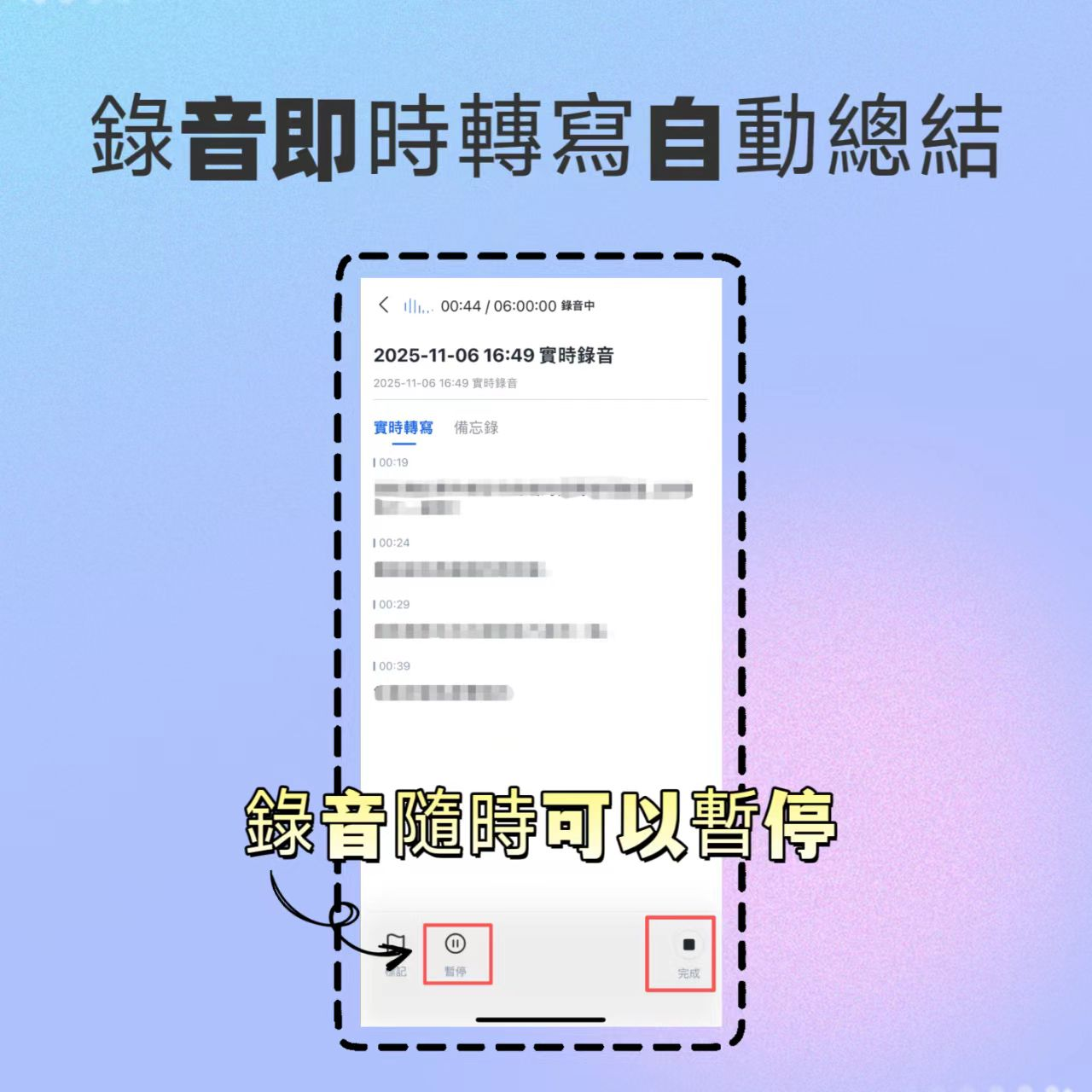
Most tools offer two entry points. If you're in a meeting, open the app's "Record and Transcribe in Real Time" feature; if you have a Teams/Zoom recording file, use "Audio File to Text" upload.
- Tip: Before starting, make sure to set the recognition language to "Cantonese" or "Traditional Chinese (Cantonese)" to ensure the recognition engine works correctly.
Step 2: Identify Speakers and Initial Proofreading
After recording, the AI automatically converts speech into text paragraphs. Advanced tools like Tinrec attempt to differentiate speakers (Speaker A, Speaker B). It's recommended to quickly scan and correct proper nouns or names at this stage.

Step 3: Use AI to Extract Action Items
This is the core value of modern AI tools. Instead of rereading the entire transcript, click the "AI Summary" or "Action Items" feature within the tool. The system analyzes the semantics to extract specific tasks such as "Submit report by next Friday" or "Contact supplier."

Step 4: Use AI Conversation Query for Details
If the meeting is 2 hours long and you only need to confirm a specific detail (e.g., the budget amount), don't use Ctrl+F. Use the "AI Conversation Query" feature available in tools like Tinrec: just type "What is the budget cap for this project?" and the AI will locate the relevant recording segment and provide the answer.


Step 5: Export and Share
Finally, export the compiled "Meeting Minutes" and "Transcript" in PDF or Word format and share with attendees. This ensures everyone is on the same page and has clear action items.
FAQ
Q1: Can these tools accurately recognize Cantonese with mixed Chinese-English? Current AI models (like those used by Whisper, Plaud, and Tinrec) have significantly improved adaptability to mixed Chinese-English. However, it's best to speak clearly and avoid excessive slang or extremely colloquial terms for higher recognition rates.
Q2: iPhone has call recording limitations, how do these tools work around that? iOS restricts call recording due to privacy policies. Common solutions: 1) Use a MagSafe hardware recorder like Plaud; 2) Use apps like Tinrec that record via speakerphone during calls, or use screen recording for online meetings (Zoom/Teams/Meet) and then upload the file for transcription.
Q3: What are the typical limitations of free plans? Most tools follow a "freemium" model. For example, Otter's free plan limits to 300 minutes per month; Tinrec's free plan offers 100 minutes per month. For heavy long-term use, paid subscriptions usually unlock longer single-recording duration and faster processing.
Q4: How is the privacy and security of recorded files ensured? Check the tool's privacy policy. Reputable services (like iFLYTEK, Tinrec, Otter) typically use encrypted transmission and storage and commit not to use user data for unauthorized purposes. For highly sensitive business secrets, consider open-source solutions that support local deployment or enterprise-grade services.
Q5: Can I directly convert YouTube videos to text? Yes. Some tools like Tinrec offer a "Podcast/Web Video to Text" feature—just paste a YouTube link, and the system extracts the audio track to generate a transcript and summary, ideal for content creators or learners.
Q6: Does noisy recording environment affect accuracy? Yes. Even with AI noise reduction, the physical environment has the biggest impact. During meetings, try to stay close to the microphone or use a directional recording device. If using an app, ensure the phone's microphone is not obstructed to significantly improve transcription quality.
Turn every recording into actionable outcomes
Get 60 free transcription minutes when you sign in. No credit card required.
Related Reading
You might also like

2026 User Interview Tool Buying Guide: 4 Tools Tested and Pain Point Extraction Tips
Done with interviews but can't extract pain points? The problem often lies in the post-interview process. This article starts with common pitfalls and outlines 4 key factors for choosing a tool: real-time transcription, semantic Q&A, export integration, and team data ownership. It compares Tinrec, Notta, Granola, and PLAUD, and provides selection advice based on needs.

5 Free Interview Transcription Tools Tested and Compared in 2026: Which One Is Best for User Interviews?
User interview recordings often run one to two hours. Pick the wrong free transcription tool and you go from saving time to listening to the whole thing again. This article breaks down the 4 key points to check before choosing a tool, then puts Google Live Transcribe, Yating Transcription, Easemate AI, and Tinrec head-to-head on Cantonese interviews, post-meeting organization, and team collaboration, with a pitfalls guide and selection advice.

How to Organize User Interviews in 2026: Tinrec Speech-to-Text + AI Summary
After interviews, how should you organize transcripts and recordings? This article shares user interview organization steps, categorization methods, and common mistakes, and introduces how to use Tinrec's real-time transcription, AI summary, AI Q&A, and export features to speed up interview data organization.

Best Free AI Tools for User Interview Transcription in 2026: 4 Options Compared
The most time-consuming part of user interviews isn't conducting them—it's organizing the recordings afterward. This article reviews four AI tools with free plans that can handle interview recordings, including Tinrec, Otter.ai, Notta, and TurboScribe. It compares their free quotas, single-file length limits, Chinese recognition, and post-interview organization capabilities, plus key selection criteria and three common pitfalls to avoid.

2026 Comparison of 5 User Interview Analysis Tools: Which One Turns Transcripts into Actionable Requirement Lists?
The real work begins after the interview ends. This article addresses the practical challenges faced by PMs and researchers, explaining the complete workflow from user interviews to requirement analysis: real-time transcription, AI summaries, action item extraction, cross-session Q&A, and export. It uses Tinrec as the primary example, with free and team plan options, purchasing considerations, and FAQs.

4 Meeting Transcription Tools Tested for 2026: From Notta to Tinrec, Which Saves More Time on Post-Client-Visit Follow-Up?
The follow-up begins the moment a client visit ends. This article starts with the three most common pitfalls of post-meeting follow-up, explains why pure transcription tools often fall short, and uses Tinrec as the main focus to compare meeting transcription tools on summaries, action items, AI Q&A, export, and team knowledge retention, with team plan pricing and an FAQ included.

Best Free Team Meeting Knowledge Base Tools in 2026: 5 Options Compared
A team meeting knowledge base isn't just about taking notes during a meeting—it's about being able to find, search, and build on that information three months later. Drawing from real student group experience, this article compares 5 common approaches, explains how Tinrec can help, and breaks down the free tiers and paid thresholds that students care about most.

4 Requirements Interview Tools Tested in 2026: How to Quickly Turn User Interviews into Requirements Documents
User interviews are the first step in creating a requirements document, but interview recordings, transcripts, and requirements organization often take time. This article uses Tinrec as an example to explain how to use an AI meeting notes tool to quickly turn interview content into transcripts, summaries, action items, and requirements documents, and it compiles 5 purchasing considerations and common questions.

6 Best Client Visit Note-Taking Tools in 2026: Which Saves the Most Time on Recording, Notes, and Follow-Up Emails?
After a client visit, organizing notes and writing follow-up emails often takes the most time. This article reviews 6 meeting note-taking tools for client visits, covering live recording, transcripts, AI summaries, action item extraction, post-meeting documents, and follow-up email material. It compares free vs. paid plans, Chinese language support, and team collaboration features to help you find the best fit for your workflow.