

Turn recordings into transcripts and summaries in minutes
Upload audio or video for multilingual transcription, AI notes, and action items
How to Write an Agenda for a Meeting
Writing a meeting agenda might seem straightforward: think about topics you want to discuss, list them in an outline, and send the notes to attendees. However, how you craft the agenda can significantly impact the overall efficiency of the meeting. To help you make the most of every meeting, here are key tips for writing a meeting agenda.
Confirm Core Meeting Information
The core function of an agenda is to share important information and keep attendees focused. Therefore, the first step to writing a quality agenda is to gather the following key details:
- Attendee List: Who will attend the meeting? Who must be present, and who can join optionally? Does every attendee have an opportunity to speak, or are some just listening? Noting attendees' departments and titles in the agenda can help with introductions.
- Meeting Objective: What do you hope to achieve in this meeting? A good meeting should not just gather people but have a clear action goal, such as solving a problem, making a plan, or updating progress.
- Discussion Topics: Based on the meeting objective, list specific agenda items. For example, a sales team meeting might include sharing sales data, new product updates, or role-playing sales objections.
An agenda containing just this information can already greatly improve meeting efficiency. But there are more advanced practices to further enhance meeting effectiveness.

Communicate the Meeting Purpose in Advance
Create and send the agenda at least 48 hours before the meeting whenever possible so attendees have time to prepare. This is especially important when discussing sensitive topics—if a hot-button issue is raised unexpectedly, attendees won't have time to organize their thoughts, diminishing the meeting's effectiveness.
Beyond sharing the agenda early, clearly indicate what attendees need to prepare in advance. For example, if performance data needs to be shared, ask them to compile reports ahead of time; if you'll discuss major industry news, include reference materials so the team can review beforehand.
Stop organizing recordings by hand
Upload audio or video and automatically get a transcript, summary, and action items
Allocate Time Wisely
We've all been in meetings where the host packed the agenda too tightly. Without proper time planning, key topics may not be fully discussed before attendees have to rush off.
Before the meeting, estimate the discussion time for each agenda item. Can your planned content be covered within the allotted time? Is there room for open discussion? Enough time for interaction?
Remember, ending a meeting early and giving people back their time is far more welcome than asking for an extension.
Invite Attendees to Lead Agenda Items
Nobody likes listening to one person talk for hours. But many managers find it challenging to get attendees to participate actively.
An ideal balance is to invite attendees to take ownership of different agenda items. After setting the agenda, evaluate which topics could be led by specific members and ask them in advance to facilitate that part of the discussion. This not only boosts engagement but also incorporates diverse perspectives.
But be sure to give them advance notice—avoid catching them off guard or unprepared!
Consider Company Culture and Executive Participation
If you work in a more formal corporate environment and plan to invite senior executives, keep these etiquette tips in mind:
- Coordinate with Executive Teams: Executives often have tight schedules and rely on assistants. Plan early and ask their assistants to help distribute the agenda in advance.
- Respect Organizational Hierarchy: If executives are attending, prioritize listing their names in emails or calendar invites.
- Allow Buffer Time for Executives: While meeting time should be tightly managed, when executives participate, add some flexibility in case they start deep discussions.
Include Post-Meeting Follow-Up
Finally, make sure to include a "post-meeting follow-up" section in the agenda. This can be a simple review of action items to confirm everyone understands their responsibilities; if the meeting was more free-form, this item helps focus on specific feedback and next steps.
If you use TinRec to record meetings, an important post-meeting action is ensuring all attendees have access to the meeting transcript. You can automatically share the TinRec transcript with all attendees through the calendar event:
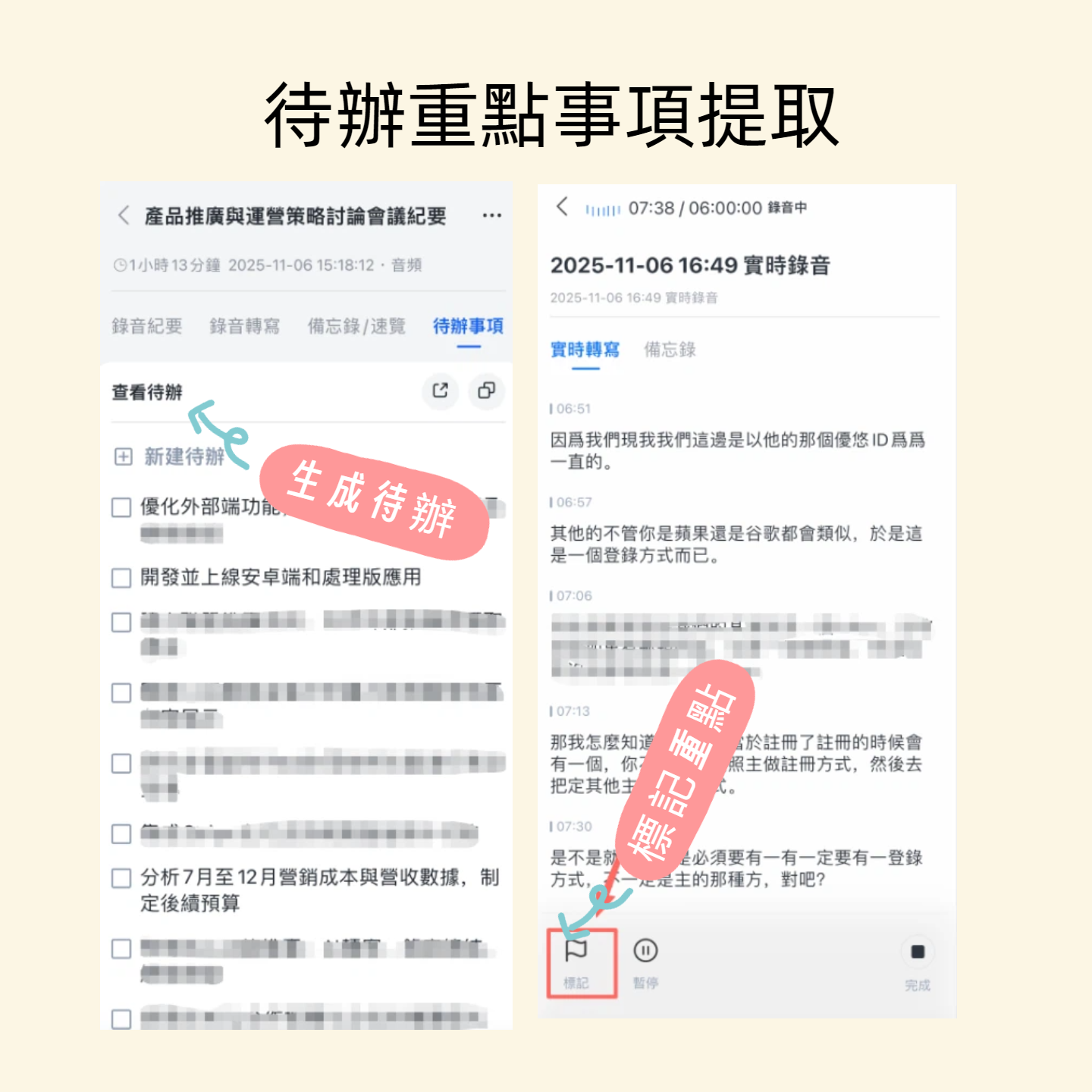
- Encourage attendees to collaborate on the transcript generated by TinRec Assistant, highlighting what they consider important conclusions. If team members participate in this process, they can jointly build a detailed meeting record that anyone can easily reference later.
TinRec supports live recording, speech-to-text, AI summaries, to-do list generation, and multilingual recognition including Chinese, English, Japanese, Cantonese, and Taiwanese Hokkien, helping teams efficiently capture meeting highlights.
Visit TinRec now to boost your meeting productivity.
Turn every recording into actionable outcomes
Get 60 free transcription minutes when you sign in. No credit card required.
Related Reading
You might also like

How to Transfer iPhone Voice Memos to Computer in 2026: 3 Methods + AI Auto Transcription
Learn 3 practical ways to transfer iPhone voice memos to your computer, including iTunes File Sharing, iCloud Drive, and Documents wireless transfer. Plus, discover how to use Tinrec to automatically turn recordings into transcripts, summaries, and action items.
iPhone Microphone Locations in 2026: Where Are the 3 Mics? How to Choose a Recording Organizer
Where exactly are the iPhone microphones? This guide shows the actual locations of the three mics—bottom, earpiece, and rear—explains what each one captures, and compares recording organizers. From Voice Memos to Tinrec, see the full workflow from recording to transcript, summary, and action items.
3 Ways to Transfer iPhone Recordings to a Computer in 2026: How Tinrec Turns Audio into Meeting Materials
We tested 3 ways to transfer iPhone recordings to a computer and compared traditional file transfer with Tinrec: instead of just moving an m4a file to your computer, Tinrec turns recordings into transcripts, summaries, action items, and AI Q&A—ideal for mid-level managers and teams with frequent weekly meetings.
How to Choose an AI Meeting Notes App in 2026: 5 Steps from Recording to Team Data
How do you choose an AI meeting notes app? This article first highlights three common pitfalls, then outlines four key purchasing factors, and uses Tinrec as an example to demonstrate a 5-step workflow from recording, transcription, summary and action items, to team workspace storage. It also compares the use cases and pricing limitations of Otter.ai, Notta, and PLAUD to help you decide based on your budget and meeting style.
Best Way to Transfer iPhone Voice Memos to Windows PC: 3 Methods Tested in 2026, This One Saves the Most Time
Struggling to transfer iPhone voice memos to a Windows PC? We tested 3 transfer and organization methods, broke down common mistakes, and recommend Tinrec for instant transcription and summaries after transfer—no more overtime listening.
Best Way to Transfer iPhone Voice Memos to Windows in 2026: 4 Tools Tested, This One Works Best for Chinese
Struggling to transfer iPhone voice memos to Windows due to format and transfer issues? We tested 4 tools, comparing transfer methods, cross-platform support, and post-meeting organization, and listed the 4 most common mistakes.
2026 iPhone Recording Organization: 3 Methods Compared — What to Know Before Replacing Voice Memos
The 'Replace' feature in iPhone Voice Memos only patches audio clips; the real time sink is organizing recordings afterward. This article examines the decision factors for recording organization, explains how Tinrec turns recordings into transcripts, summaries, and action items, and covers buying considerations and FAQs.
4 iPhone Recording Management Tools Compared in 2026: Solve the Problem of Missing or Unfinished Recordings
iPhone recordings going missing actually falls into three different situations: files can't be found, found but can't be listened to completely, or wanted to record but didn't. This article first explains the limitations of native iPhone recording and file locations, then compares 4 recording management tools side by side, and summarizes the key points and common pitfalls to note when choosing.
2026 Comparison of 3 iPhone Recording Tools: Voice Memos Not Saving? Tinrec Ensures You Never Miss a Recording
iPhone recordings not saving is a common pain point. This article focuses on decision-making, comparing iPhone's built-in Voice Memos with Tinrec. It explains why Tinrec's bot-free recording, real-time transcription, AI summaries, and team spaces are better suited for those who need reliable recording storage.