
Turn recordings into transcripts and summaries in minutes
Upload audio or video for multilingual transcription, AI notes, and action items
Facing hours of meeting recordings or interview files, especially those with heavy Taiwanese Hokkien or Chinese-English-Taiwanese mixed content, manual transcription is time-consuming and labor-intensive. On average, 1 hour of audio takes 3 to 5 hours to transcribe. Fortunately, with breakthroughs in AI speech recognition, several tools now effectively address this pain point.
This article compares the leading speech-to-text tools on the market in 2026, including local powerhouse Yating, international favorite GoodTape, high-value LexiTranscript, and action-oriented Tinrec. Whether you need precise dialect recognition or high efficiency that generates to-dos right after a meeting, this article provides specific recommendations and practical tutorials.
Quick Navigation Conclusions:
- Prioritize pure Taiwanese Hokkien recognition and data security: Go with Yating.
- Seek high value and unlimited recording length: Recommend LexiTranscript.
- Need meeting summaries, AI chat, and multi-device sync: Try Tinrec.
- International interviews and multilingual needs: GoodTape fits best.
In-Depth Review of Popular Speech-to-Text Tools in 2026
For Taiwanese Hokkien speech-to-text and mixed language scenarios, we selected four representative tools for analysis.
1. Yating: Taiwan's Local Dialect Expert
For Taiwanese users, Yating is almost synonymous with "Taiwanese Hokkien recognition." Developed by Taiwan AI Labs, it boasts being "100% Made in Taiwan," giving it an innate advantage in understanding Taiwan's unique accents, Chinese-English code-switching (Jingjing style), and Taiwanese Hokkien.
- Pros: Data stays in Taiwan for better security; top-tier recognition of Taiwanese accents and Hokkien; provides real-time captioning for the hearing impaired.
- Cons: Pay-per-time pricing (NT$100/hour) can be costly for heavy use; conversion is relatively slow (1 minute of audio takes about 10 minutes); users report occasional failures of the summary feature.
2. Tinrec: From Transcription to AI Decision Assistant
Tinrec is more than a transcription tool; it's an AI assistant emphasizing workflow. Besides supporting 10 languages including Taiwanese Hokkien, Chinese, and English, its standout feature solves "what to do after transcription." Tinrec automatically generates meeting minutes, action items, and even allows AI chat to query recording content—ideal for professionals who need high efficiency.
- Key Features: Real-time speech-to-text recording, automatic speaker diarization, smart generation of meeting conclusions and to-do lists.
- Best Suited For: Enterprises and teams needing to quickly turn Taiwanese Hokkien or mixed-language meetings into formal reports or action plans.
3. GoodTape: International Choice for Journalists and Media Pros
GoodTape, from Denmark, uses OpenAI's Whisper technology and was originally designed for journalists. Although not built specifically for Taiwanese Hokkien, its powerful underlying model handles multiple languages reasonably well.
- Pros: Extremely clean interface, fast processing (2-hour audio in about 20 minutes), compliant with EU GDPR.
- Cons: Free plan is restrictive (3 files per month); paid plan is priced in euros (approx. NT$480/month) with a 20-hour monthly cap, making it less accessible for Taiwanese users.
4. LexiTranscript: High Value Economic Option
LexiTranscript targets price-sensitive users with a "cheap and generous" offering, solving the problem of expensive international services and limited free credits.
- Pros: Competitive promotional membership (NT$260 for unlimited use), no file length limit, and promises data is not stored or used for AI training.
- Cons: As a newer service, some advanced features are still being optimized, and promotional pricing may change.
Stop organizing recordings by hand
Upload audio or video and automatically get a transcript, summary, and action items
Tool Specifications and Feature Comparison
For a quick decision, here is a core comparison:
| Dimension | Yating | GoodTape | LexiTranscript | Tinrec |
|---|---|---|---|---|
| Taiwanese Hokkien/Dialect Support | Specially optimized (excellent) | Supported (depends on model) | Supported | Supported |
| Core Advantage | Accurate local accent, data security | Fast, minimalist UI | Cheap, unlimited length | Meeting notes, action items, AI chat query |
| Free Credits | 20 minutes + free real-time recording | 3 files/month (30 min each) | Daily free credits | 100 minutes free per month |
| Paid Model | Credit-based (~NT$100/hour) | Subscription (~NT$480/month) | Subscription (promo NT$260/month) | Subscription (Basic $4.9/month) |
| AI Value-Added | Summary (occasionally fails) | Summary (paid) | Summary, AI editing | Meeting conclusions, to-dos, conversational search |
| Platform Support | Web, App | Web | Web | Web, iOS, Android |
Practical Tutorial: Using AI Tools for Mixed-Language Meetings
Once you choose the right tool, how do you operate for maximum efficiency? Using Tinrec as an example, here's how to quickly turn a meeting with Taiwanese Hokkien discussions into executable task lists.
Step 1: Record or Import File
Open the app on your phone or computer to "Record & Real-time Transcribe" for live meetings or classes. If you have pre-recorded MP3 or M4A files, use the "Audio File to Text" feature to upload.

Step 2: Select Language and Transcribe
Before uploading or recording, confirm the language settings. For mixed-language scenarios, the AI can transcribe speech into text. Tinrec processes in the cloud quickly—even a 1-hour recording is transcribed in minutes.

Step 3: Speaker Diarization and Proofreading
The system automatically labels different speakers (Speaker A, Speaker B). You can listen while quickly reviewing the transcript. Since Taiwanese Hokkien transcription may have homophone errors, use the "timeline marker" feature to click on text and jump to playback for quick correction of key terms.

Step 4: AI-Generated Action Items
This is the critical step. Traditional transcripts leave you wondering what to do. Use Tinrec's AI summary feature to extract "Meeting Conclusions" and "To-Do Items" with one click.


Step 5: AI Chat for Details
If a manager spoke in Taiwanese Hokkien about budget numbers and you forgot specifics, no need to re-listen the entire recording. Just type in the chat box: "What did Manager Chen say about the budget?" The AI will answer based on the understood content.

FAQ
Q1: Can these software really understand Taiwanese Hokkien?
AI's recognition of Taiwanese Hokkien has greatly improved. Yating performs best in pure Hokkien scenarios; Tinrec and other tools using large language models can handle common Hokkien conversations, but obscure slang may still need manual tweaks.
Q2: Can I transcribe iPhone voice memos?
Yes. iPhone's built-in Voice Memos are usually in M4A format, supported by GoodTape, LexiTranscript, and Tinrec. Tinrec also offers an iOS app for recording and transcribing directly on your phone.
Q3: Do I need to pay for speech-to-text?
Most tools offer free trials. For example, LexiTranscript provides daily free credits, Tinrec gives 100 free minutes per month, and Yating offers free real-time recording. For heavy users, paid subscriptions are usually more cost-effective.
Q4: Is my meeting data secure?
If you care about data staying in-country, Yating (data stored in Taiwan) is the top choice. GoodTape complies with EU GDPR. Tinrec and LexiTranscript emphasize not using user audio for model training and offer deletion options.
Q5: Can it handle Zoom, Google Meet, or Teams meetings?
Yes. Use Tinrec's web version to record system audio in real time, or export meeting videos and upload them for transcription.
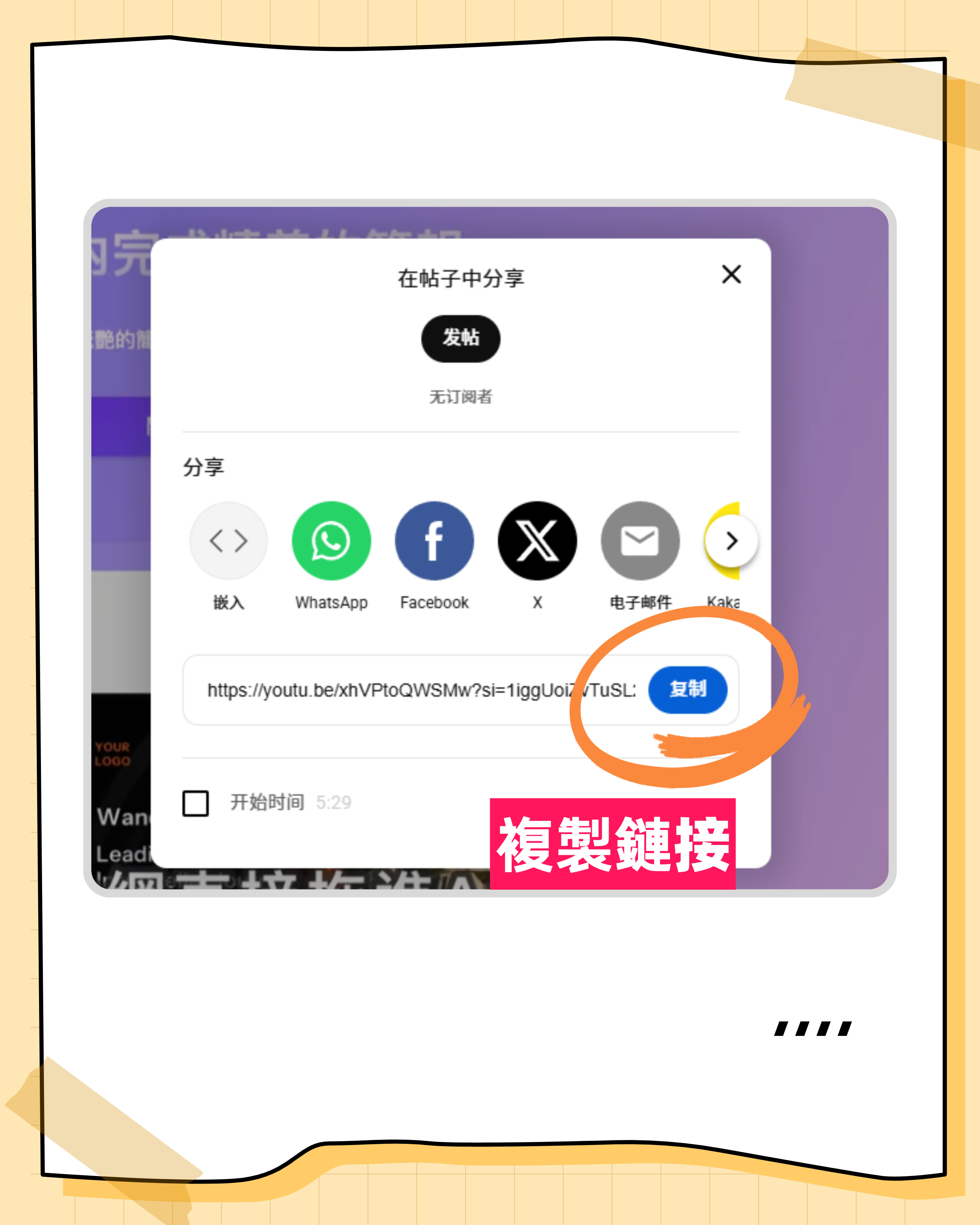
Q6: Can video links be directly transcribed?
Some tools support this. Tinrec accepts YouTube or TikTok links, directly parsing and generating transcripts and summaries, saving the hassle of downloading video files.
Conclusion: How to Choose the Right Tool for You?
When choosing Taiwanese Hokkien speech-to-text software, base your decision on core scenarios:
- For academic research or in-depth interviews requiring high Hokkien accuracy, Yating remains the top choice.
- For daily work meetings where post-meeting efficiency and action item tracking matter most, Tinrec's AI chat and summary features save significant time.
- For budget-conscious long-term users, LexiTranscript's unlimited plan offers the best value.
No tool is inherently better; it's about fit. We recommend trying each free tier with a 5-minute test to personally evaluate recognition accuracy before deciding.
Turn every recording into actionable outcomes
Get 60 free transcription minutes when you sign in. No credit card required.
Related Reading
You might also like

2026 AI Meeting Assistant Comparison: 4 Tools Tested for Chinese Transcription and Post-Meeting Organization — Which One Actually Saves Time?
A 2026 hands-on comparison of 4 AI meeting assistants, starting with the most common pre-download misconceptions. We break down 4 key buying factors, share real-world experience with Tinrec, compare the positioning of Otter.ai, Notta, and Granola, and highlight 3 pitfalls to avoid — so you can think clearly before hitting install.

How to Choose an AI Meeting Notes Tool in 2026: 7 Tools Compared + Summaries and Action Items in One Go
Most people compare AI meeting note tools only by minutes and price, overlooking who will actually use the notes after the meeting. This guide starts with three key questions and compares seven tools—Tinrec, Otter.ai, Fireflies.ai, Notta, Granola, PLAUD, and TurboScribe—on meeting capture methods, Chinese-language experience, post-meeting output, and team management, with clear recommendations by scenario.

Best AI Meeting Recorder in 2026? We Tested 2 Options — This One Saves the Most Time for Chinese Meetings
Many people think the pain point of meeting notes is whether the recording captures audio, so they buy a recorder first—only to still spend time organizing afterward. This article compares Tinrec and Plaud Note across online meeting recording, Chinese transcription, post-meeting organization, team collaboration, and cost structure to help you choose the truly time-saving option in 2026.

How to Download AI Meeting Assistants in 2025: Bot-Free Recording + Chinese Transcripts
Tired of recording meetings but never organizing them? This guide walks you through downloading and using two AI meeting assistants, Tinrec and Otter.ai, comparing them across five dimensions: recording methods, Chinese and mixed-language handling, post-meeting outputs, file import/export, and team collaboration governance. Find out which one fits your meeting scenarios and budget.

Tinrec vs Granola 2026: 5-Dimension Comparison — Which Wins for Chinese Meetings and Team Knowledge Retention?
Looking for the best AI meeting assistant in 2026? This article compares Tinrec and Granola across 5 dimensions: meeting capture and audio retention, Chinese transcription and real-time translation, post-meeting organization and AI follow-up, team workspace governance, and platform coverage and export. It also lists pricing and ideal use cases to help Hong Kong office workers decide which tool fits them best.

3 Smart Meeting Notes Solutions Tested for 2026: Which Saves the Most Time?
Still replaying recordings and manually taking notes after meetings? This article walks through the smart meeting notes workflow using Tinrec, from pre-meeting preparation and in-meeting recording to post-meeting proofreading and archiving. It also provides a ready-to-use meeting minutes format, buying tips, and FAQs.

4 Smart Meeting Notes Tools Tested: How to Go from Recording to Action Items with the Least Time in 2026
How do smart meeting notes work? This article breaks down the five-step workflow—record, transcribe, summarize, query, and create action items—and compares Tinrec, Otter.ai, Granola, and TurboScribe on Chinese meetings, bot-free recording, post-meeting organization, and team collaboration. It includes quota and pricing comparisons, pitfalls to avoid, and selection advice to help you choose the right tool at once.

2026 Smart Meeting Minutes Comparison: Tinrec vs Otter.ai on 5 Dimensions — Which Saves More Time?
Good meeting minutes aren't about verbatim transcription—they're about conclusions and action items. This article compares Tinrec's instant recording and Otter.ai dimension by dimension, from note-taking style, meeting capture, Chinese transcription, post-meeting workflow to team governance and pricing, to help you choose the smart meeting minutes solution that truly saves time.

How to Use AI Meeting Assistants in 2026: Tinrec 6-Step Guide + Auto-Generated Meeting Minutes
A student's hands-on guide to using AI meeting assistants, featuring Tinrec: six steps to get started, how to record online meetings without bots, how to generate post-meeting summaries and action items, and an honest comparison of Google Meet, Tactiq, Notta, and Granola for student use cases. Also covers whether the free version is enough.