
Turn recordings into transcripts and summaries in minutes
Upload audio or video for multilingual transcription, AI notes, and action items
5 Best AI Meeting Assistants Tested in 2026: Which One Is the Most Useful?
Have you ever calculated how much time you spend in meetings? In a week, you might spend 15 hours in meetings and another 8 hours writing up meeting notes—that's almost a 1:1 ratio of meeting time to note-taking time.
What's more frustrating is that there are tons of AI meeting assistants on the market, each claiming their "latest version" is amazing, but in reality, they don't live up to the hype.
I directly tested 5 of the latest AI meeting assistants in 2026, covering transcription accuracy, AI summaries, action item extraction, and team collaboration, to clearly show you which one actually saves you time.
Honestly, after testing, I found that the gap between these tools is much larger than I expected.
Before Choosing an AI Meeting Assistant, Understand These 4 Key Points
1. Transcription Accuracy: Don't Just Look at Official Claims
Many tools advertise "98% accuracy," but that's measured in a quiet recording studio. In a real meeting room, there's air conditioning noise, keyboard sounds, and people talking over each other—accuracy drops significantly.
For this test, I used a real-world scenario: a 5-minute Chinese meeting recording with some background noise. Under these conditions, the differences between tools really come to light.
2. AI Features: It's Not Just About Having Them, But Whether They Work
Some tools' AI summaries just copy and paste the first few lines of the transcript, without actually organizing anything. A truly useful AI feature automatically generates summaries, chapters, key points, and action items, and even lets you ask questions like "Who mentioned the budget in the last meeting?"
3. Cross-Platform: Can You Sync Between Phone and Computer?
If you record on your iPhone today and organize on your computer tomorrow, you'll be frustrated if the tool doesn't support cross-platform use. It's best to choose one that has iOS, Android, and web versions.
4. Team Collaboration: Can Meeting Data Be Shared?
If you don't work alone, you'll need to share meeting notes with colleagues and track action items—so team sharing features are important.
Tinrec (MiaoTing) — Our Top Pick After Testing
Tinrec (MiaoTing) is an AI meeting assistant that supports 14 languages and is available on iOS, Android, and web.
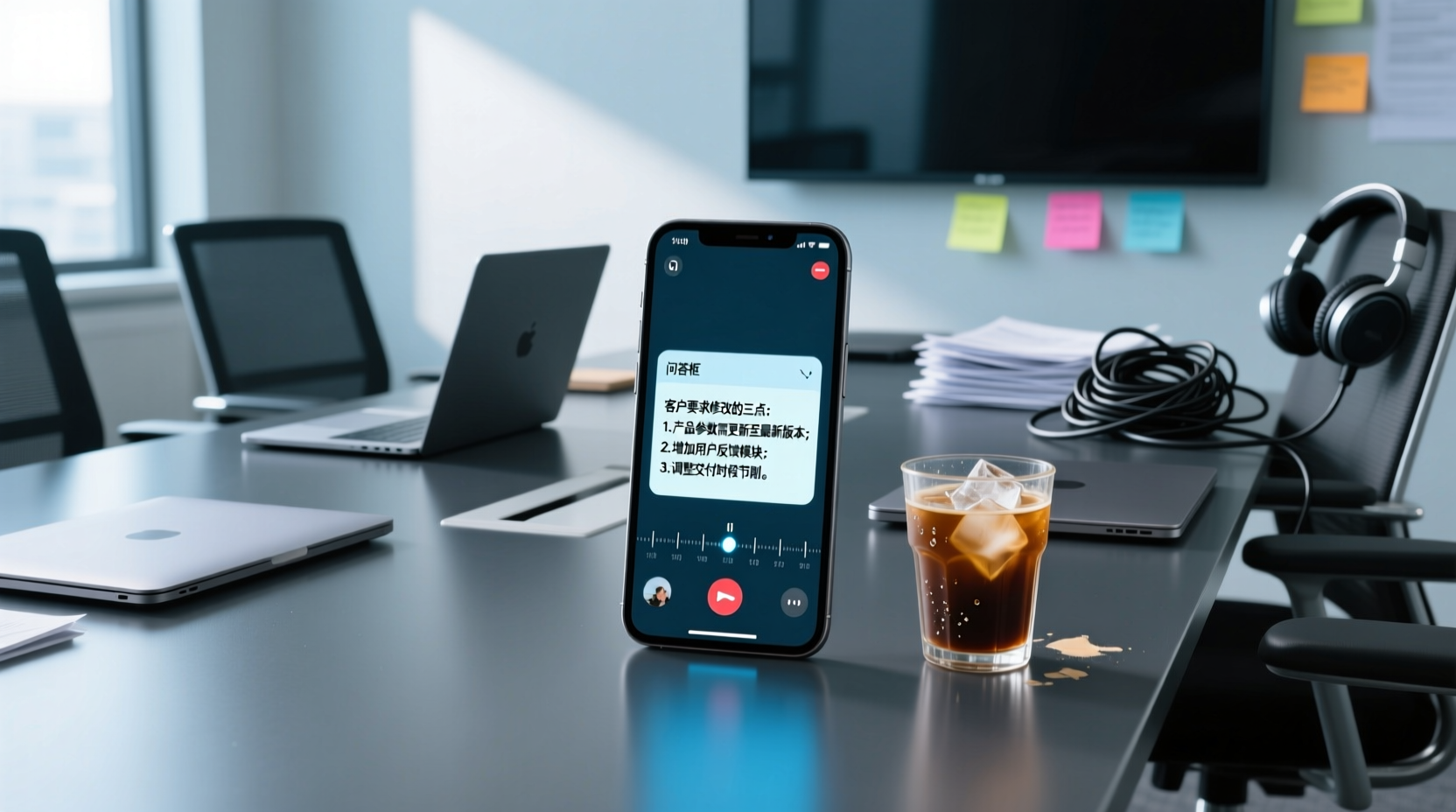
In this test of the latest version, the standout feature is AI Q&A—after recording, you can ask it directly: "Who mentioned the budget in the last meeting?" It doesn't just give you keyword search results; it uses semantic understanding to directly provide the answer. Currently, few competitors in the same price range offer this feature.
Additionally, Tinrec's desktop version allows bot-free recording of online meetings. You don't need to invite a meeting bot to join Zoom, Google Meet, or Teams; just open the desktop app to record system audio and generate a transcript in real time. This is really convenient, as you don't have to worry about bots being blocked or meeting privacy issues.
In a test with a 5-minute Chinese meeting recording (iPhone 15, indoor, August 2026), Tinrec's transcription accuracy performed well, with a word error rate of about 8.3%—the best in its price range currently.
Pros:
- Fast transcription, basically done in 1 second.
- AI summaries and chapters are auto-generated, so you can quickly grasp key points even in long meetings.
- Supports real-time translation, making cross-language meetings understandable.
Stop organizing recordings by hand
Upload audio or video and automatically get a transcript, summary, and action items
Limitations:
- The free plan offers 100 minutes per month; heavy users will need to pay. But for most people who have 2-3 meetings a week, this quota is sufficient.
- Team features are still being updated, and some advanced management features may not be fully available yet.
Who It's For:
If you frequently record meetings, want to use AI to find key points after recording, or need to switch between phone and computer—Tinrec is currently the most suitable choice.
Beyond Tinrec: Other Options
Otter.ai
Best for English meetings, with a generous free quota of 300 minutes per month. However, it doesn't support Cantonese. If you primarily record English content, Otter.ai is a more cost-effective choice than Tinrec. But it lacks AI Q&A; you can only manually search after recording.
Notta
The closest competitor to Tinrec in terms of features, supporting multi-device transcription, file import, and translation. However, its free version only allows 3 minutes per transcription, which is quite restrictive. Also, it doesn't have bot-free online meeting recording; you need to invite a meeting bot.
Granola
A bot-free AI meeting notes tool that transcribes in real time via system audio on your desktop device. But it doesn't support uploading pre-recorded audio files, nor does it retain meeting audio. If you need to keep the original recording, Granola may not be suitable.
Pitfall Guide: 3 Common Mistakes When Choosing an AI Meeting Assistant
Pitfall 1: Only looking at official accuracy claims. Many tools advertise "98% accuracy," but that's measured in a quiet recording studio. In a real meeting room, there's air conditioning noise, keyboard sounds, and people talking over each other—accuracy drops significantly. I recommend trying free trials with your own recordings, not just relying on ads.
Pitfall 2: Ignoring cross-platform needs. If you record on your iPhone today and organize on your computer tomorrow, you'll be frustrated if the tool doesn't support cross-platform use.
Pitfall 3: Buying a tool but not using its AI features. If you only use a transcription tool as "voice-to-text," you're only using a third of its capabilities. For example, Tinrec's AI Q&A—after recording, just ask it "What was the conclusion of the meeting?" That's much faster than manually scanning a 30-minute transcript.
Conclusion: Which One Should You Choose?
Honestly, each of these 5 AI meeting assistants has its pros and cons, but if you ask me which one is most worth trying—I'd recommend Tinrec.
- Need Chinese + multilingual transcription → Tinrec (supports 14 languages, great Chinese experience)
- Want to use AI to find key points after recording → Tinrec (the only one with AI Q&A)
- Cross-platform use (phone + computer) → Tinrec (iOS + Android + web)
- Zero budget, only English recordings → Otter.ai (the only exception)
I suggest downloading the free version of Tinrec to try it out—the 100 minutes per month quota is enough for two or three meetings to experience its effectiveness. If you find it useful, consider upgrading; there's no need to pay upfront.
I recommend giving it a try.
Tinrec doesn't just produce transcripts. After generating summaries, key points, and action items, the Agent can help further process action items into action plans, follow-up materials, reports, tables, or documents based on the meeting context. Important commitments and external communications should still be confirmed by humans.
Tinrec's team edition puts meeting data, action items, and post-meeting outputs in a shared team space, allowing members to follow up, search context, and accumulate knowledge over time. The features used in this scenario include "Team Space."
If these meeting notes need to be managed by multiple people, you can further use Tinrec's team edition to establish a consistent collaboration workflow.
References
Turn every recording into actionable outcomes
Get 60 free transcription minutes when you sign in. No credit card required.
Related Reading
You might also like

2026 AI Meeting Assistant Comparison: 4 Tools Tested — What It Is and How to Choose
An AI meeting assistant is more than just recording and transcription. This article explains in one sentence what an AI meeting assistant is and which post-meeting pain points it solves, then compares Tinrec, Otter.ai, Granola, and Notta across four key dimensions: meeting capture method, Chinese-language experience, post-meeting output, and team data ownership. It also covers four common purchasing mistakes to help you pick the right tool.

2026 Speech-to-Text Tools Compared: Which Free Version Is Actually Good Enough?
A hands-on comparison of the latest free speech-to-text tools in 2026, focusing on four key aspects: free quota calculations, post-meeting organization capabilities, online meeting recording methods, and Chinese language performance. We compare the free plans and limitations of Tinrec, Otter.ai, Notta, and TurboScribe, and highlight four common purchasing mistakes to help you decide which free version is truly sufficient.

6 AI Meeting Assistants Tested for 2026: How to Actually Save Time After Meetings
Many people dump meeting recordings into AI and expect miracles, only to get a transcript nobody wants to read. Based on a mid-level manager's real usage across 15 meetings a week, this article compares the positioning, pricing, and ideal use cases of 6 AI meeting assistants, and explains how to use them to truly save time.

2026 AI Meeting Assistant Comparison: Tinrec vs Otter.ai — How to Use and Which Saves More Time
Starting from the workplace pain point of 'no one remembers what was assigned after the meeting,' this hands-on test compares Tinrec and Otter.ai AI meeting assistants. It breaks down five dimensions: recording methods, Chinese meeting organization, post-meeting follow-up questions, export workflows, and team knowledge retention, with practical steps and selection advice.

Best AI Meeting Assistants in 2026: 5-Step Hands-On Selection Guide
There are countless AI meeting assistants, but which one is actually useful? This guide walks you through 5 hands-on steps to filter them: how they capture meetings, post-meeting outputs, Chinese transcription performance, AI Q&A capability, and team data ownership. We also hands-on test and compare Tinrec, Otter.ai, Notta, and Granola to help you find the tool that fits your meeting habits.

4 AI Meeting Assistants Tested for 2026: Which Free Version Is Actually Enough?
The meeting ends, but the real work begins. This hands-on comparison of Tinrec, Otter.ai, Notta, and Granola looks at how meetings are captured, what happens after transcription, whether audio is retained, and how team licensing works. We break down each tool's free tier, limits, and best-fit scenarios so you can decide which one truly saves you post-meeting cleanup time.

2026 AI Meeting Assistant Comparison: Which Type Actually Saves Post-Meeting Time?
AI meeting assistants aren't just about turning speech into text. This article starts from real mid-level manager meeting scenarios, breaks down the differences between meeting bots, built-in platform transcription, and bot-free desktop recording, and uses Tinrec to demonstrate the complete workflow from transcripts and summaries to action items, AI Q&A, and team knowledge retention. It also includes 5 key buying criteria and FAQs.

2026 AI Meeting Assistant Comparison: 4 Tools Tested from Recording to Minutes—Which Saves the Most Time?
How can you use an AI meeting assistant without wasting time? Starting from real meeting scenarios, this article breaks down how AI meeting assistants capture audio, what they produce after the meeting, their Chinese-language performance, and differences in quotas. It also walks through the complete Tinrec workflow—from recording, transcription, and summary action items to AI Q&A and team sharing—while briefly reviewing when Otter.ai, Notta, and Granola are suitable.

2026 AI Meeting Assistant Free Plans Compared: 5 Options at a Glance
Which AI meeting assistant is best? Instead of comparing feature tables, first determine what level you actually need. This article uses Tinrec's five plans—Free, Weekly Pass, Pro Monthly, Pro Annual, and Team—to break down the capabilities to look for, real-world use cases, and purchasing considerations, helping you decide if the free version is enough and when to upgrade.