
Turn recordings into transcripts and summaries in minutes
Upload audio or video for multilingual transcription, AI notes, and action items
When watching online courses or videos that are often one to two hours long, manually taking notes can consume a lot of time and energy. Traditional note-taking methods are not only tedious but also prone to missing important information, especially when the video doesn't have captions—rewinding and replaying can be frustrating.
This article provides an in-depth review of popular video summary apps and speech-to-text tools, along with a detailed multi-dimensional comparison table, step-by-step tutorials, and FAQs to help you build an efficient knowledge management workflow.
Quick navigation suggestion: If you just need a quick mind map from Bilibili videos in your browser, choose the "BiliBili Video Summary Tool"; if you value cross-scenario support (physical meetings, YouTube, podcasts) and automatic extraction of action items after meetings, and want AI Q&A capabilities to query content directly, consider all-in-one recording assistants like "Tinrec".
Why You Need a Powerful Video Summary App
1. Overcome the Low Information Density of Time-Based Content
Whether it's a long video or an audio recording, they are "time-based content," meaning you have to spend the same amount of time as the video to get the full information. A qualified video summary app can instantly convert this content into scannable, searchable, and actionable text, significantly reducing the cost of re-listening.
2. Break Through Language Barriers
Many high-quality learning resources or industry insights come from abroad. For language learners or researchers, a summary tool with multilingual translation capabilities not only provides transcripts but also helps quickly grasp the cultural context and core points of foreign videos.
2024 In-Depth Comparison of Popular Video Summary Apps & Tools
With so many tools on the market, we've selected the most talked-about solutions for an objective comparison to help you understand their positioning.
Option 1: BiliBili Video Summary Tool (Bilibili Ecosystem Focused)
This is a web-based tool designed specifically for the Bilibili platform, known for fast parsing. Simply input a video link, and the tool typically generates a deep summary, mind map, and transcript within 5 seconds. According to real users (such as college students, content creators, and market analysts), the mind map feature is very helpful for organizing creative ideas and market insights. It supports multilingual translation (English, Japanese, Korean, French, etc.) and allows export to PDF or Word, making it ideal for heavy Bilibili users.
Option 2: Tinrec Instant Recording (Multi-Scenario Complete Workflow)
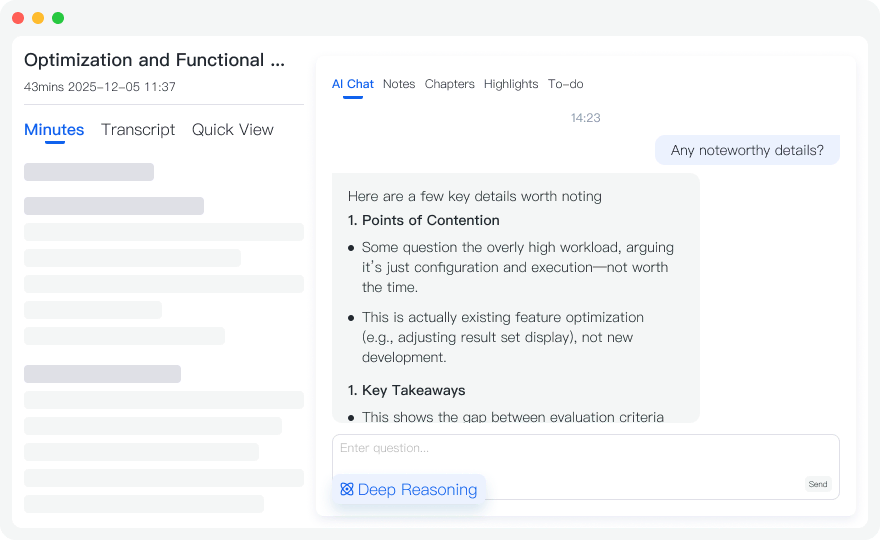
Tinrec is a multi-platform AI recording assistant. Its differentiator is not just speech-to-text but a complete workflow from recording to understanding to action. Besides parsing online videos (supports YouTube, etc.), it offers real-time recording-to-text capabilities and automatically generates meeting minutes and action items (to-do lists). For professionals managing meeting decisions or diving into content details, its built-in AI chat query makes searching for key points as intuitive as asking a personal assistant.
Core Evaluation Comparison Table
| Dimension | BiliBili Video Summary Tool | Tinrec (Instant Recording) | Traditional Speech-to-Text App |
|---|---|---|---|
| Use Cases | Mainly Bilibili video analysis | Physical meetings, online courses, YouTube/podcasts, audio files | Basic recording transcription |
| Language Support | Chinese, English, Japanese, Korean, French, etc. | Auto-detects 10 languages including Chinese, English, Japanese, Korean, German, Taiwanese, Cantonese | Usually only 1-2 major languages |
| Real-Time Support | No (based on existing videos) | Real-time transcription during recording | Partial support |
| Summary & Action Items | Deep summary & mind map | Auto-generates meeting minutes, conclusions, and action items | Mostly just raw transcript |
| AI Q&A Interaction | AI chat for content discussion | AI chat query based on semantics | Not available |
| Export & Integration | Export as PDF, Word; save to workspace | Multi-format export, cross-device sync (iOS/Android/Web) | Basic text copy only |
| Pricing & Free Tier | Free basic version; premium ad-free version available | Free: 100 min/month; Paid: from $4.9/month (600 min) | Varies; usually very limited free minutes |
Stop organizing recordings by hand
Upload audio or video and automatically get a transcript, summary, and action items
Step-by-Step Tutorial: 4 Steps to Unlock the Full AI Potential of Video Summary Apps
Using Tinrec as an example (feature-rich), here are 4 common scenarios and steps to get started quickly.
Step 1: Parse Online Videos, Get Key Points with One Click
For creators or students, you don't need to watch entire YouTube or podcast videos from start to finish. Use the Podcast/Online Video to Text feature, directly input the URL, and the system quickly converts the content into text, auto-generating a transcript and AI summary.

Step 2: Real-Time Recording to Text, Capture Live Insights
In a classroom or physical meeting, open the mobile app and use the Real-Time Recording to Text feature. The system converts speech to text instantly while recording, with no waiting. You can mark key points anytime, and when the meeting ends, the full transcript and action list are ready simultaneously.

Step 3: Upload Historical Audio Files, Auto-Generate Transcripts
If you have interview recordings or past meeting audio files, use the Audio File to Text feature to upload various formats. AI quickly differentiates speakers and organizes a structured transcript, drastically reducing manual typing.
Step 4: Use AI Chat Query to Find Answers Like Asking an Assistant
Traditional transcripts rely on Ctrl+F to search keywords. But if you want to ask, "What was the boss's conclusion on Project A?", simply use the AI Chat Query feature to have an intelligent conversation based on the recording content. The AI quickly retrieves and answers questions, making it easy to grasp key points.

Selection Guide: How to Evaluate a Summary Tool for You?
- Look Beyond Transcription to "Output Quality": A good tool shouldn't just turn speech into a block of text. Check if it offers speaker differentiation, paragraph splitting, and action item extraction.
- Check "Multi-Platform Support & Cloud Sync": Workflows are often cross-device (e.g., record on phone, edit on computer). Choose tools that offer Web, iOS, and Android support to avoid file transfer hassle.
- Evaluate "Free Tier & Value for Money": Many tools claim to be free but may only offer a few minutes of trial. Confirm monthly free minutes (e.g., 100 min/month) and the cost of paid tiers based on your usage frequency.
Frequently Asked Questions (FAQ)
Q1: Do these video summary apps support iPhone or Android? Most quality tools offer good cross-platform experience. For example, the BiliBili Video Summary Tool can be used via mobile browser; Tinrec provides full iOS, Android apps, and web version with seamless cross-device sync.
Q2: Can I summarize remote meetings from Teams or Google Meet? Yes. For remote meetings, you can use the web or desktop client to record and transcribe simultaneously while playing audio, or import recorded video/audio files from Teams/Google Meet into the tool to generate meeting minutes and transcripts.
Q3: What if the AI-generated transcript is inaccurate? Modern AI tools have high accuracy, but environmental noise can affect it. Choose tools that support mixed Chinese-English or multilingual (e.g., Taiwanese, Cantonese, etc. 10 languages auto-detection), and use the built-in editor to fine-tune by comparing with the audio track.
Q4: Can I summarize only by providing a video link? Can I upload my own audio files? Different tools have different focuses. Some only parse links from specific sites (e.g., Bilibili). If you have local audio files (interviews, class recordings), choose a comprehensive AI recording assistant that supports audio file to text.
Q5: How much free usage do these tools offer? Most offer basic free plans. For example, Tinrec Free gives up to 100 minutes per month, suitable for light users. For higher frequency, its Basic ($4.9/month for 600 min) or Pro plans meet advanced needs.
Q6: What formats can I export the summarized content to? Depending on the tool, common Bilibili summary tools support PDF or Word export; professional meeting tools typically support TXT, Markdown, Word, etc., for easy integration into your note-taking software.
Turn every recording into actionable outcomes
Get 60 free transcription minutes when you sign in. No credit card required.
Related Reading
You might also like

2026 Meeting Transcription Showdown: Tinrec vs Otter.ai on 5 Key Dimensions — Which Is Right for Chinese-Speaking Teams?
A practical comparison of Tinrec and Otter.ai across five dimensions — meeting capture, Chinese-language experience, post-meeting outputs, team governance, and historical data import — to help Chinese-speaking teams decide which meeting transcription platform fits them best.

4 Meeting Transcription Tools Tested in 2026: Is the Free Version Enough, and How to Choose for Chinese Meetings?
The real question with meeting transcription usually isn't which tool is free—it's whether the output is usable right away. This article breaks down the correct approach before, during, and after recording based on a real meeting workflow, and compares Tinrec, Otter.ai, Notta, and Granola on Chinese-language experience, free quotas, post-meeting organization, and team collaboration to help you decide which fits your meeting scenario.

2026 Comparison of 4 Meeting Transcription Software: Which AI Meeting Notes Actually Save Time?
How to choose meeting transcription software? This article tests 4 tools in real meeting scenarios, comparing transcription readability, post-meeting summaries, action item extraction, and team collaboration. It also outlines 4 key purchasing factors and a guide to avoid pitfalls, helping you find a solution that truly saves time on post-meeting organization.

2026 Comparison of 4 Meeting Transcription Tools: Which Saves More Time for Chinese Meetings and AI Summaries?
How to choose a meeting transcription tool? This article compares Tinrec, Granola, TurboScribe, and PLAUD across three scenarios: Chinese online meetings, mixed Chinese-English interviews, and existing audio files. It examines capture methods, post-meeting organization, team collaboration, and pricing, and provides key buying points and pitfalls to help you choose the right tool within your budget.

2026 Smart Meeting Notes Tools Compared: Chinese Transcription, Bot-Free Recording, and Post-Meeting Organization
Starting from common buying mistakes, this comparison of Tinrec, Otter.ai, Fireflies.ai, and Notta covers meeting capture methods, Chinese transcription, post-meeting organization, and team management to help you choose the right smart meeting notes tool.

2026 Comparison of 4 Meeting Transcription Tools: Which One Actually Saves You Time?
How do you transcribe meeting recordings? We tested Tinrec, Notta, Otter.ai, and Granola using the same real meeting recording with mixed Chinese and English. We compared their transcription and post-meeting organization workflows, identified 5 key buying factors and 3 common mistakes, and compared free tiers, paid pricing, and team collaboration capabilities to help you decide which tool best fits your meeting habits.

2026 Comparison of 5 Meeting Transcription Tools: Free Tiers, Chinese Recognition, and Post-Meeting Organization—Which Saves the Most Time?
Comparing five common meeting transcription approaches from four angles: free tiers, Chinese recognition, post-meeting organization, and team collaboration. Explains why Tinrec is suitable for users who need Chinese meeting transcripts and team knowledge retention.

Best Meeting Transcription Tools in 2026: 4 Tested, Top Pick for Chinese Meetings & Team Knowledge
Most people choose meeting transcription tools based on free minutes, overlooking the cost of organizing transcripts afterward. This article addresses common pitfalls, outlines 4 key buying criteria, tests Tinrec, Otter.ai, Notta, and Granola, and provides a guide to avoid mistakes plus scenario-based recommendations.

Tinrec vs Notta 2026: 5-Dimension Comparison for Chinese Meeting Transcription
How to choose a meeting transcription tool? This article compares Tinrec and Notta across 5 practical dimensions: online meeting capture, post-meeting output, Chinese and bilingual experience, team data management, and plan quotas. It also covers real-world use cases and purchasing considerations to help you decide which tool better fits your workflow.