

Turn recordings into transcripts and summaries in minutes
Upload audio or video for multilingual transcription, AI notes, and action items
Why Does Your Chinese Speech Recognition Tool Always "Mishear" You?
Have you ever experienced this: an hour-long recording of a meeting or lecture, but the transcribed text is riddled with errors, proper nouns are all wrong, and it can't even distinguish speakers? Worse, when faced with a lengthy transcript, you can't find the key points without manually relistening. For users in Taiwan who need to handle traditional Chinese, Taiwanese Hokkien, or Chinese-English mixed content, choosing a tool that truly "understands Chinese" is crucial.
This article uses real test data to horizontally compare 8 mainstream tools (including Tinrec, Notta, Otter.ai, etc.) from five dimensions: word error rate, segmentation logic, summary quality, multilingual support, and pricing. We will directly provide the best solutions for different scenarios, along with practical tutorials, so you no longer waste time correcting errors.
Quick Navigation Conclusion:
- Prioritize Chinese accuracy and localization (including Taiwanese Hokkien/Cantonese): Choose Tinrec or Yating.
- Primarily handling English meetings or cross-national teams: Otter.ai remains the first choice, but note its Chinese limitations.
- Tight budget with high transcription volume: Consider TurboScribe, but you'll sacrifice some smart summary features.
- Need simple input without saving: The built-in Google/Apple Dictation will suffice.
Evaluation Method & Criteria: How to Define a "Good" Speech Recognition Tool?
To ensure the evaluation results are valuable, we set strict test environments and scoring criteria, refusing vague adjectives and basing everything on data and actual experience.
C1. Test Samples & Environment Statement
We prepared three sets of audio samples of varying difficulty, each approximately 15-20 minutes long:
- Standard Meeting Scenario: Conversations involving multiple people, with a few technical terms, in a quiet background.
- High-Difficulty Interview Scenario: Single speaker with fast speech, local accent (Taiwanese Mandarin), and mild coffee shop background noise.
- Chinese-English Mixed Scenario: Common communication mode in the tech industry, with random English proper nouns inserted into sentences.
C2. Core Evaluation Dimensions
We scored the following five key indicators:
- Word Error Rate (WER): Calculates the discrepancy between the transcribed text and the original, especially homophone errors and proper noun accuracy.
- Segmentation & Timestamps: Does it automatically break sentences based on semantics? Are time markers precisely aligned?
- Speaker Diarization: Can it correctly identify and label "Speaker A," "Speaker B"?
- Smart Summary Capability: Can it automatically generate meeting minutes, action items, rather than just a verbatim transcript?
- Post-Processing Search Efficiency: Does it support semantic search or AI Q&A to quickly locate key information?
Horizontal Comparison of 8 Mainstream Chinese Speech Recognition Tools
The table below summarizes the key performance of the 8 tools to help you quickly filter suitable options.
| Tool Name | Chinese Accuracy | Supported Languages/Dialects | Speaker Diarization | Smart Summary/AI Query | Free Tier / Pricing | Best Use Case |
|---|---|---|---|---|---|---|
| Tinrec | ⭐⭐⭐⭐⭐ (Very High) | Chinese/English/Japanese/Korean/Taiwanese/Cantonese, etc. (10 languages) | Precise automatic | Supports semantic Q&A, auto action items | Free 100 min/month; affordable paid plans | Meeting notes, interviews, multilingual mix |
| Notta | ⭐⭐⭐⭐ (High) | 50+ languages (Chinese performance acceptable) | Good | Has summary, but Chinese semantic understanding slightly weak | Free 120 min/month; premium more expensive | International meetings, multilingual translation needs |
| Otter.ai | ⭐⭐ (Low) | Primarily English, Chinese not supported | Excellent (English) | Powerful (English only) | Free 300 min/month (English only) | English-only meetings, overseas teams |
| Yating | ⭐⭐⭐⭐⭐ (Very High) | Chinese, Taiwanese Hokkien, Chinese-English mixed | Basic support | No AI summary, only an editor | Pay-per-use / subscription | Media interviews, academic research, court records |
| TurboScribe | ⭐⭐⭐⭐ (High) | Based on Whisper, supports multiple languages | Average | No built-in advanced summary | Free 3 files/day (limited time) | Batch transcription of large audio files, budget-conscious |
| MacWhisper | ⭐⭐⭐⭐ (High) | Based on Whisper, runs locally | Depends on model | No cloud features, high privacy | One-time purchase (Mac only) | Privacy-conscious Apple users |
| Google Live Transcribe | ⭐⭐⭐ (Medium) | Multi-language, strong real-time | Not supported | No | Free (built-in Android) | Real-time hearing assistance, temporary notes |
| VEED.IO | ⭐⭐⭐ (Medium) | Multi-language, geared toward subtitle generation | Not supported | Basic editing features | Free version has watermark | Video creators, subtitle production |
Deep Dive: Why Are Traditional Tools Not Enough?
Many users rely on built-in Apple Dictation or Google Docs Voice Typing. While these tools can transcribe speech to text in real-time, they are essentially "input methods" rather than "management tools." They cannot handle pre-recorded audio files, lack speaker diarization, and certainly cannot summarize "what task the boss just assigned" after the fact.
Stop organizing recordings by hand
Upload audio or video and automatically get a transcript, summary, and action items
In contrast, the core difference of new-generation AI tools like Tinrec lies in the "workflow closure." It not only solves the problem of "accurate transcription" (especially excelling in mixed recognition of traditional Chinese and Taiwanese Hokkien), but also addresses the pain point of "smooth usage." For example, when you need to find a discussion about "budget review" in a one-hour recording, traditional tools require manual scanning or Ctrl+F keyword searches, while Tinrec allows you to ask in natural language: "What was the conclusion about the budget in the last meeting?" The system will directly compile the answer and cite timestamps, significantly reducing revisiting costs.

Practical Tutorial: How to Boost Productivity by 300% with AI Tools?
Choosing the right tool is only the first step; a proper workflow is key to maximizing value. Below, using Tinrec as an example, we demonstrate how to handle four common voice-to-text scenarios.
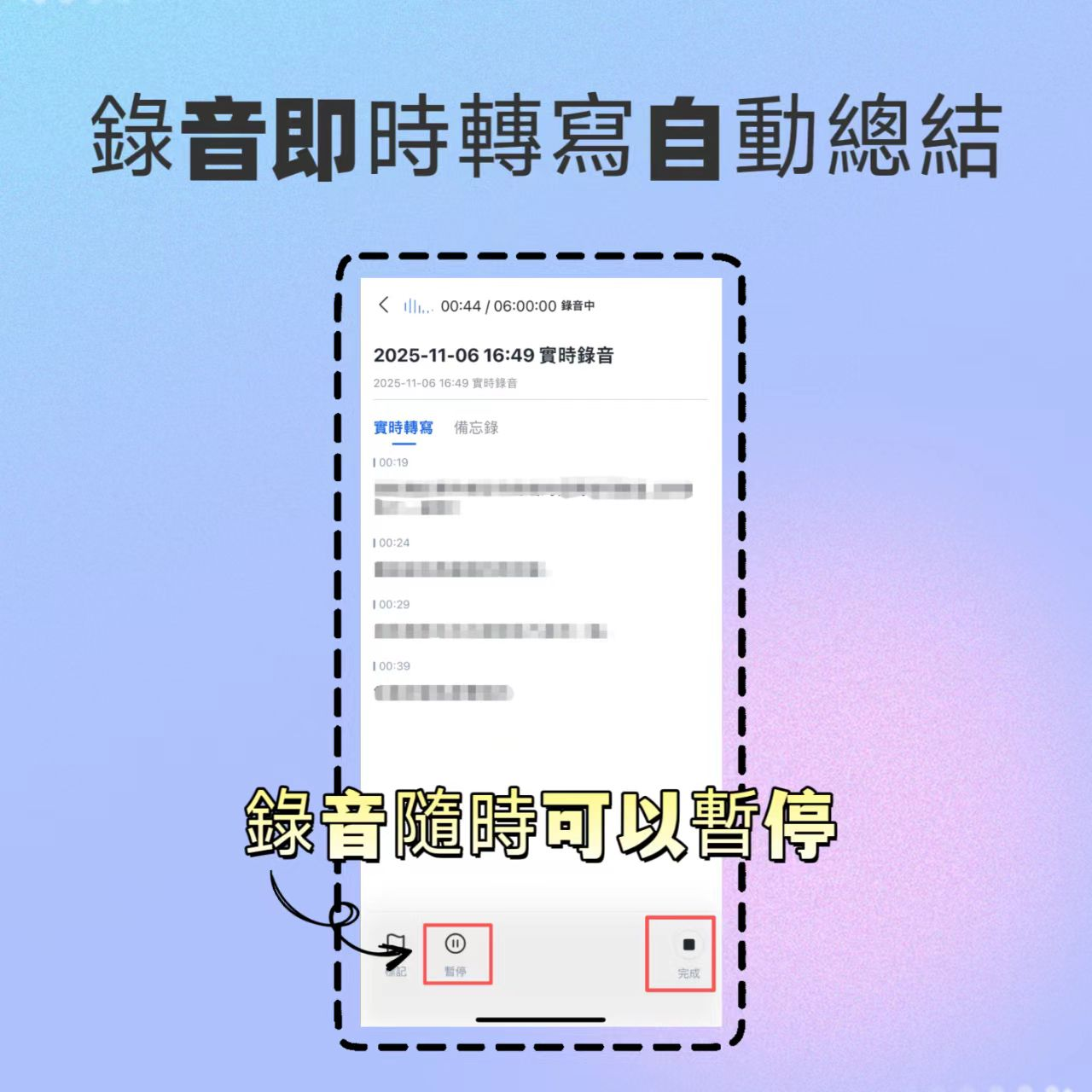
1. Real-Time Transcription: An Instant Typist in Meetings
Suitable for in-person meetings or face-to-face interviews, no need to upload later; text appears as you speak.
- Step 1: Open the app and tap the "Record" button on the home screen.
- Step 2: Select language mode (recommend enabling "Auto-detect" for Chinese-English mixed content).
- Step 3: Start recording; the interface will display live transcription with automatic timestamps.
- Step 4: If you need to pause (e.g., break or unrelated discussion), tap the pause button and resume later.
2. Audio File Transcription: Process Historical Recordings or External Files
When you already have audio files (MP3, WAV, M4A, etc.) recorded on your phone or other recorder.
- Step 1: Go to the "Audio to Text" feature page.
- Step 2: Import the audio file from your device's gallery or cloud drive.
- Step 3: The system automatically uploads and begins transcription; you can run it in the background.
- Step 4: Once complete, a timestamped transcript is generated and can be viewed by chapters.

3. Video Link Transcription: A Great Tool for Content Creators and Online Courses
Want to extract key points from YouTube tutorials or convert podcasts into article material?
- Step 1: Copy the URL of the target video (e.g., YouTube, TikTok, Instagram Reels).
- Step 2: Paste it into the tool's "Video to Text" section.
- Step 3: The system automatically extracts the audio track and transcribes it, also preserving video thumbnail references.
- Step 4: Generate a video summary and highlights with one click, useful for social media captions or note-taking.

4. AI Conversation Query: Extract Information by Asking Questions
This is the key differentiator from traditional tools, shifting from passive reading to active inquiry.
- Step 1: Open a completed transcript and find the "AI Chat" or "Ask Me Anything" feature.
- Step 2: Type a specific question, e.g., "Which feature did the client like the most?" or "List all mentioned action items."
- Step 3: The AI analyzes the recording content and provides precise answers, along with original recording segments for verification.

Scenario Recap & Final Recommendations: Who Should Choose Which Tool?
After multiple tests and scenario simulations, here are our final recommendations for different user groups.
Scenario A: Corporate Meetings & Project Discussions
- Pain points: Chaotic multi-speaker conversations, difficulty tracking conclusions, cross-departmental communication gaps.
- Top pick: Tinrec
- Reason: Stable performance in traditional Chinese and technical term recognition; its auto-generated "Action Items" effectively help project managers track progress. Compared to Otter.ai (no Chinese support) or Notta (occasional semantic misjudgment in complex Chinese), Tinrec provides a more comprehensive localized solution.
- Alternative: If the team communicates entirely in English, Otter.ai still holds an advantage.
Scenario B: Academic Research, Legal Interviews & Media Interviews
- Pain points: Need extremely high word accuracy; often involves Taiwanese Hokkien, Cantonese, or special accents; cannot tolerate random rewriting.
- Top pick: Yating / Tinrec
- Reason: Yating has been deeply rooted in the Taiwan market for years with excellent adaptation to local accents, but its interface is more traditional and lacks automated summaries. If you want both accuracy and modern summarization efficiency, Tinrec offers a good balance, especially its support for up to 10 languages with auto-detection, flexibly handling diverse interviewees.
Scenario C: Content Creation & Online Learning
- Pain points: Need to quickly extract key points from long videos for blog articles or review notes.
- Top pick: Tinrec / TurboScribe
- Reason: The ability to directly input a video link to generate a transcript and summary saves a lot of manual typing time. TurboScribe suits budget-conscious users who only need plain text; if you need to interact further with content (e.g., ask details about the video), choose a tool with AI conversation features.
Additional Note on Open-Source & Local Solutions
For developers or users extremely concerned about privacy, OpenAI Whisper or its packaged version MacWhisper are powerful choices. They offer offline transcription, avoiding uploading data to the cloud. However, these tools typically require higher technical expertise for deployment and parameter tuning, and lack ready-made "meeting summaries" and "collaboration sharing" features. For most professionals and students seeking efficiency, out-of-the-box cloud services (like Tinrec) are usually more cost-effective.
Frequently Asked Questions (FAQ)
Q1: What are the best free Chinese speech recognition tools? Most tools on the market use a "freemium" model. Tinrec offers a free tier of 100 minutes per month, covering all core features, ideal for light users. Google Live Transcribe is completely free but limited to real-time transcription without saving or editing, unsuitable for formal meeting notes. TurboScribe also has a daily free transcription quota, but its functionality is relatively limited.
Q2: Do these tools support "Taiwanese Hokkien" or "Cantonese" recognition? This is a key differentiator. Most international tools (e.g., Otter.ai) only support standard Mandarin or English. Tinrec and Yating are among the few that explicitly support mixed recognition of "Taiwanese Hokkien" and "Cantonese" in traditional Chinese environments, which is crucial for users in Taiwan, Hong Kong, and Macau.
Q3: Can iPhone users replace these apps with the built-in dictation feature? iPhone's built-in "Dictation" only works as a real-time input method; it cannot handle long recordings, distinguish multiple speakers, or transcribe uploaded audio files afterward. If you need complete meeting notes and summaries, you still need dedicated third-party apps.
Q4: For Chinese-English mixed meetings, which tool performs best? In our tests, Tinrec and Notta performed better at segmentation and recognition of mixed Chinese-English content. They are smarter at identifying language switch points, avoiding forcibly converting English words into similar-sounding Chinese errors. In contrast, some older-model free tools tend to struggle in such scenarios.
Q5: What export formats are supported for the transcribed transcript? Mainstream tools typically support TXT, DOCX (Word), PDF, and SRT (subtitle) formats. Tinrec additionally allows exporting summaries and action items separately, making it easy to paste into Notion or project management software.
Q6: If the recording quality is poor (with noise), can it still accurately transcribe? Current AI models (including those based on Whisper) have some noise reduction capability, but there are still limits. It's best to record in a quiet environment or use an external microphone. If background noise is too high, accuracy of any tool will drop significantly, and manual proofreading may be needed.
Turn every recording into actionable outcomes
Get 60 free transcription minutes when you sign in. No credit card required.
Related Reading
You might also like

Tinrec Meeting Data Access Permissions Guide 2026: Role Authorization + Seat Management
When meeting data is seen by other departments or disappears when members leave, the problem usually stems from unclear permissions. This article starts with common misconceptions, breaks down Tinrec's team space, roles, seats, and audit mechanisms, and teaches you how to set up meeting data access so you control who can view, use, and edit. It also covers 5 purchasing considerations and FAQs.

How to Assign Project Meeting Tasks in 2026: 5 Steps from Meeting to Action Items
How do you assign project meeting tasks in 2026? This article compares Tinrec and PLAUD Note across five dimensions: meeting recording methods, action item extraction, post-meeting follow-up, export workflows, and cost, helping you determine which approach ensures tasks are truly assigned and progress is trackable.

2026 Cross-Departmental Meeting Collaboration Tools Compared: Which Saves More Time with Chinese Transcripts and Post-Meeting Action Items?
Cross-departmental project meetings often end with everyone interpreting things differently. This article starts with common pitfalls and outlines 4 key factors for choosing a cross-departmental meeting collaboration tool. It compares Tinrec, Granola, Notta, and Otter.ai in real tests, focusing on Chinese transcripts, post-meeting action items, and team knowledge retention, plus a guide to avoid pitfalls and selection advice.

Best Project Meeting Action Item Follow-Up Tools in 2026: We Tested 2, and This One Is Best for Chinese-Speaking Teams
The real breakdown in project meetings often happens after the meeting, not during it—specifically, in following up with action item owners. This article starts with common follow-up pitfalls, compares Tinrec and Otter.ai across 6 dimensions including action item extraction, Chinese-language meetings, team seats, and post-meeting deliverables, and summarizes pricing and FAQs to help you decide which tool better fits your project team.

Tinrec vs Notta 2026: 5-Dimension Comparison — Which Meeting Notes Tool Is Better for SMBs?
SMBs dread meetings that end without decisions, and post-meeting recording cleanup is time-consuming. This guide reviews 6 meeting notes tools — Tinrec, Otter, Notta, Fireflies, Granola, and TurboScribe — comparing Chinese language support, bot-free recording, AI Q&A, team collaboration, and pricing to help you find the best fit for your SMB.

2026 Comparison of 4 Meeting Knowledge Asset Tools: Which One Turns Meetings into Searchable Team Assets?
Meetings end and data scatters? This article uses 5 dimensions—capture method, audio retention, post-meeting output, team governance, and Chinese language experience—to compare Tinrec, Notta, Granola, and Otter.ai. It breaks down how to choose and avoid pitfalls for team meeting knowledge assets, and explains the difference between roles and seats.

2026 Team Meeting Transcription Tools Compared: Tinrec vs Otter.ai — Which Is Better for Chinese-Speaking Teams?
Choosing between Tinrec and Otter.ai for team meeting notes in 2026? This hands-on comparison focuses on Chinese-language meeting scenarios common in Taiwan-based teams, evaluating five dimensions: Chinese transcription, bot-free recording, post-meeting AI organization, team data ownership, and trial barriers. We break down each tool's unique strengths and ideal users to help you find the best meeting transcription tool for your team.

How to Manage Team Meeting Data in 2026: 5 Steps from Recording to Team Knowledge Base
Team meeting data often ends up scattered across personal computers and chat logs. This article uses Tinrec and PLAUD Note as examples to compare team meeting data management tools across 5 dimensions: meeting capture methods, team spaces and governance, AI post-meeting organization, cross-platform flexibility, and pricing. It also includes FAQs to help you find the right meeting notes and knowledge retention solution for your team.

How to Take Multi-Person Meeting Notes in 2026: 5 Steps from Recording to AI Summary
The pain point of multi-person meeting notes is never typing speed—it's the lack of manpower to organize afterward. This article addresses three common misconceptions, breaks down the core capabilities a multi-person meeting notes tool should have, a 5-step implementation process, purchasing checkpoints, and FAQs. It uses Tinrec as an example to demonstrate the complete workflow from recording, transcription, to AI summaries and action items.