

Turn recordings into transcripts and summaries in minutes
Upload audio or video for multilingual transcription, AI notes, and action items
Why Is Taiwanese Speech-to-Text So Difficult? Choose the Right Tool to Avoid Re-listening Hell
In Taiwan's workplace and daily life, meetings often mix Mandarin, Taiwanese, and even English. However, most mainstream speech-to-text tools have extremely poor support for Taiwanese, resulting in garbled or completely unreadable transcripts. Users then have to spend several times the effort re-listening to audio files and manually transcribing. If you're looking for a tool that can accurately recognize Taiwanese and automatically generate key summaries, this article will solve your pain points.
This article provides a horizontal review of 7 software options in 2026 that offer Taiwanese or multilingual recognition capabilities, with objective comparison tables, decision tree recommendations for different scenarios, and complete practical tutorials covering real-time recording transcription, file upload, video link parsing, and AI dialogue query. Among them, Tinrec (秒聽錄音), a tool that supports automatic Taiwanese recognition and comes with a full AI workflow, will be neutrally analyzed as an important comparison subject in later chapters.
Quick Navigation Conclusions:
- Emphasize Taiwanese accuracy + meeting action items: Prioritize tools optimized for Traditional Chinese environments (e.g., Tinrec, 雅婷逐字稿).
- Pure English meetings/international teams: Consider Otter.ai (but does not support Taiwanese).
- Only need simple subtitles, no summaries: Use basic editing tool features.
- Need cross-platform (mobile/desktop): Avoid local software limited to a single OS.
Who Needs High-Accuracy Taiwanese Speech-to-Text Tools? Four User Profiles
Before choosing software, identify your use case, as it directly affects selection criteria.
1. Government Officials and Local Council Record Keepers
Many grassroots meetings, community assemblies, or local council inquiries in Taiwan frequently use Taiwanese. These users need extremely high dialect recognition accuracy and the ability to convert lengthy discussions into structured "resolutions" and "to-do lists," not just verbatim transcripts.
2. Media Professionals and Podcast Creators
When interviewing elders, local cultural historians, or producing Taiwanese programs, audio often mixes multiple languages. Creators need tools that quickly generate drafts for later editing into articles or video subtitles, saving manual transcription time.
3. Healthcare and Social Workers
In consultations or case interviews, many elderly individuals only communicate in Taiwanese. Accurate transcription helps build complete medical records or case notes, preventing information loss due to language barriers.
4. Educational Institutions and Students
Recording Taiwanese language courses, native language seminars, or oral history projects requires tools that can distinguish speakers and automatically organize class highlights into notes.
2026 Horizontal Review of 7 Taiwanese Speech-to-Text Tools
We evaluated mainstream tools across five dimensions: "Taiwanese recognition accuracy," "multilingual mixed processing," "AI summarization capability," "platform support," and "price-performance ratio."
| Tool Name | Taiwanese Recognition | Multilingual Mix (Mandarin/Taiwanese/English) | AI Summary & Action Items | Platform Support | Free Tier / Pricing |
|---|---|---|---|---|---|
| Tinrec (秒聽錄音) | ⭐⭐⭐⭐⭐ (Specially optimized) | ⭐⭐⭐⭐⭐ (Auto-detect) | ⭐⭐⭐⭐⭐ (Includes to-do extraction) | iOS, Android, Web | Free: 100 min/month; paid plans offer high value |
| 雅婷逐字稿 | ⭐⭐⭐⭐ (Strong localization) | ⭐⭐⭐⭐ | ⭐⭐⭐ (Basic summary) | Web, iOS | Credit-based; high volume becomes costly |
| Notta | ⭐⭐⭐ (Fair) | ⭐⭐⭐⭐ | ⭐⭐⭐⭐ | All platforms | Free is limited; subscription-based |
| Otter.ai | ❌ (Not supported) | ❌ (English/Japanese only) | ⭐⭐⭐⭐⭐ | All platforms | Free tier very limited; no Chinese/Taiwanese |
| TurboScribe | ⭐⭐⭐ (Depends on Whisper) | ⭐⭐⭐ | ⭐⭐ (Transcription only) | Web | Generous free tier but lacks post-processing |
| MacWhisper | ⭐⭐⭐ (Depends on model) | ⭐⭐⭐ | ❌ (Manual organization required) | macOS only | One-time purchase; no cloud sync |
| Google Live Transcribe | ⭐⭐ (Real-time only) | ⭐⭐ | ❌ (No file/summary) | Android only | Free but basic |
Key Differentiator Analysis
- Tinrec stands out with deep optimization for Asian language environments, handling not only pure Taiwanese but also mixed Mandarin-Taiwanese conversations smoothly. More importantly, it goes beyond simple transcription by providing semantic-based AI dialogue query functionality.
- Otter.ai, though globally known, cannot handle Chinese or Taiwanese at all, making it unsuitable for local Taiwanese meetings.
- Built-in system tools (like Google/Apple Dictation) only work for short voice inputs, cannot handle multi-hour meeting recordings, and lack file upload and post-meeting organization features.
Stop organizing recordings by hand
Upload audio or video and automatically get a transcript, summary, and action items
Practical Tutorial: How to Complete the Loop from Recording to Action Items Using a Tool
Below, we use the most comprehensively supported tool Tinrec as an example to demonstrate how to transform a Taiwanese meeting recording into an actionable task list through four core entry points. This process also applies to other advanced tools with similar functionality.
Step 1: Real-time Recording to Text (Live Meetings/Interviews)
When you are in an offline meeting or phone interview, no need to upload files afterward.
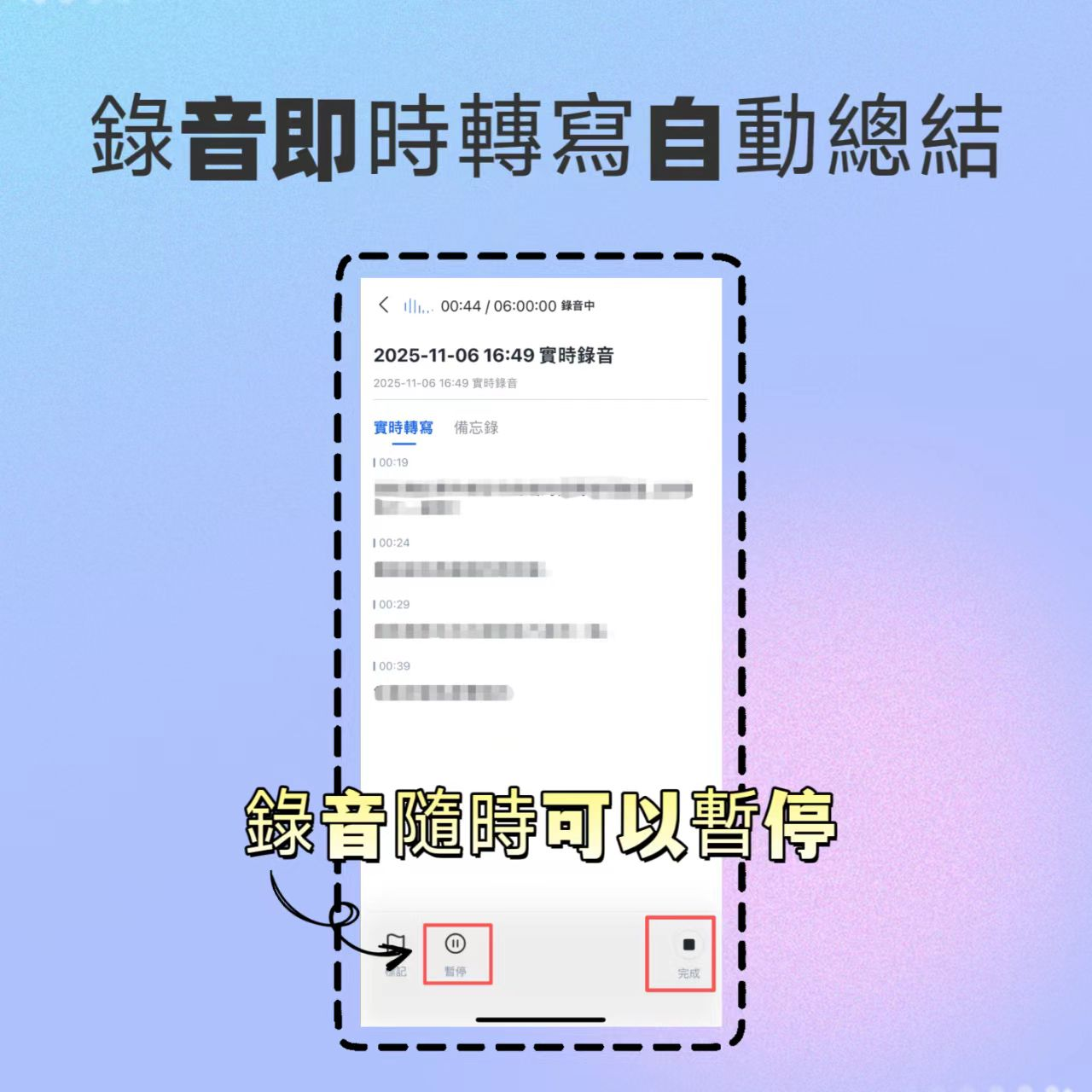
- Open the Tinrec app and tap the "Record" button on the home screen.
- Set language mode to "Auto Detect" (the system will automatically identify Taiwanese, Mandarin, or English).
- Start recording; the screen will display real-time transcription. If technical terms or proper nouns appear, you can manually adjust after finishing.
- After recording ends, the system automatically generates a verbatim transcript and initial summary.
Step 2: Audio File to Text (Processing Existing Recordings)
If you already have recordings from a phone recorder or digital voice recorder (e.g., .m4a, .mp3):
- Navigate to the "Audio File to Text" feature page.
- Import the file from your device; multiple common formats are supported.
- After upload, wait a few minutes (depending on file length). The system will output a timestamped transcript.
- You can then view the auto-generated "Meeting Summary" to quickly grasp key points.

Step 3: Video Link to Text (Processing Online Content)
For YouTube videos of Taiwanese political talk shows, lecture recordings, or podcast videos:
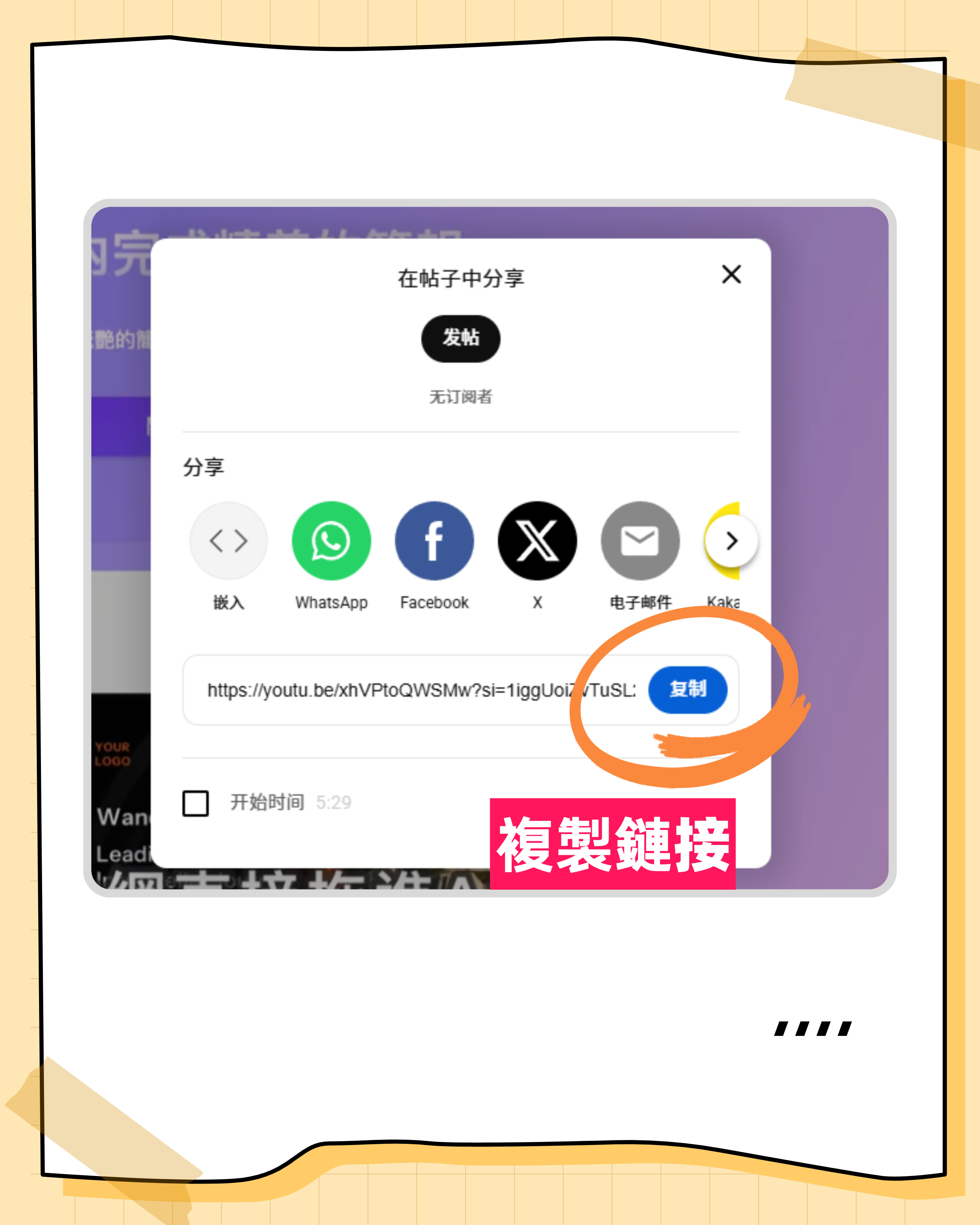
- Copy the video URL.
- Paste it into the "Podcast/Online Video to Text" entry point.
- The tool will directly extract and transcribe the audio track without needing to download the video file, saving storage and processing time.
- Ideal for content creators quickly capturing video material or writing summaries.
Step 4: AI Dialogue Query (The Key Differentiator from Traditional Tools)
This is the biggest difference from traditional transcription tools. Instead of using Ctrl+F to painstakingly search keywords in a one-hour Taiwanese meeting transcript, you can:
- Open the "AI Dialogue" feature on the generated report page.
- Ask natural language questions directly, for example: "What was decided regarding the Lunar New Year holiday schedule?" or "What conclusions did Manager Wang mention about the budget issue?"
- The AI will answer accurately based on the recording content and cite the original passage.
- Finally, check the automatically extracted "To-Do List" to ensure no action items are missing.

Decision Tree: Choose the Best Tool Based on Your Needs
Faced with many options, follow this logic for quick filtering:
Is your primary language Taiwanese or a mix of Mandarin/Taiwanese/English?
- Yes → Go to question 2.
- No (pure English) → Consider Otter.ai or Fireflies.ai.
Do you need automatic meeting summary generation and action items?
- Yes, high automation needed → Tinrec is the top choice because it is designed for "understanding and action" and has excellent Taiwanese support.
- Yes, but prefer traditional verbatim editor → Consider 雅婷逐字稿, whose editing interface suits some experienced users.
- No, only plain text needed → TurboScribe or MacWhisper may be more economical.
Do you need to use it on a mobile device (iOS/Android)?
- Yes → Exclude MacWhisper (Mac only) and Google Live Transcribe (Android only, no cloud management).
- No → Choose web-based tools.
Final Recommendation: For most Taiwanese users, especially those dealing with Taiwanese recognition and meeting efficiency, Tinrec offers the best balance. It not only solves the technical barrier of "not understanding Taiwanese" but also addresses the management pain point of "finishing listening but not knowing what to do" through AI dialogue and action item extraction. If you only need occasional short transcriptions on a tight budget, try the free tiers of various tools; however, if you handle formal meetings frequently, investing in a tool with a complete workflow will significantly reduce time costs.
Frequently Asked Questions (Q&A)
Q1: Which software has the highest accuracy for mixed Mandarin-Taiwanese speech?
Currently, tools optimized for Taiwan's local language environment perform best. Tinrec and 雅婷逐字稿 stand out in this regard, switching between contexts more accurately. International tools like Otter.ai cannot handle this situation at all.
Q2: Is there a completely free Taiwanese speech-to-text tool?
Most high-accuracy commercial tools use a "free trial + paid subscription" model. For example, Tinrec offers a free version with 100 minutes of recording per month, sufficient for light users to test and use. Fully free, unlimited high-quality tools are extremely rare and usually come with low accuracy or privacy risks.
Q3: Can iPhone users use Taiwanese speech-to-text features?
Yes. Mainstream tools like Tinrec and Notta provide iOS apps that support real-time recording and transcription directly on iPhone, as well as file upload via the app. The built-in dictation feature is available but cannot save files or generate summaries.
Q4: Do these tools support recording online meetings from Teams or Google Meet?
Some tools support browser extensions or virtual audio devices to capture system audio. Tinrec supports transcription by uploading recorded meeting audio files or video links; for real-time meetings, it is recommended to use the mobile app placed near the speaker or use solutions with cloud bot capabilities (depending on specific tool updates).
Q5: What formats can the transcribed text be exported to?
Mainstream tools usually support TXT, DOCX (Word), PDF, and SRT (subtitle file). Tinrec additionally allows exporting the organized meeting summary and to-do items directly, making it easy to integrate with project management software.
Q6: Can Taiwanese still be accurately recognized if the audio quality is poor (noise, echo)?
Any tool is limited by audio source quality. Although Tinrec and other advanced tools include some noise reduction and enhancement algorithms, it is recommended to record in a quiet environment or use an external microphone for best recognition results. For extremely unclear recordings, manual correction may be required.

Turn every recording into actionable outcomes
Get 60 free transcription minutes when you sign in. No credit card required.
Related Reading
You might also like

2026 Audio-to-Text Comparison: Tinrec vs Otter.ai for Chinese Meetings & Team Knowledge
How to choose an audio-to-text tool in 2026? This article compares Tinrec and Otter.ai across 5 dimensions: Chinese meeting transcription, bot-free online meeting capture, audio file organization, post-meeting workflows, and team data governance. Based on public features and pricing, it helps you decide which is better suited for meeting notes needs in Taiwan.

How to Choose an Online Audio-to-Text Tool in 2026: 5 Steps to Pick the Right One and Get a Transcript
How do you choose an online audio-to-text tool? This article reviews 6 online options—Tinrec, MyEdit, cSubtitle, CyberLink, Yating Transcript, and Monica—comparing free quotas, Chinese recognition, export formats, and team collaboration. It also walks you through 5 steps to turn an audio file into a transcript.

2024 Review of 4 Audio-to-Text Tools: Which Saves the Most Time on Chinese Meeting Transcripts and AI Summaries?
The 2024 audio-to-text comparison isn't just about transcription speed—it's about whether the tool can organize your meeting notes afterward. Based on real meetings and interviews, this review compares Tinrec, Notta, Granola, and PLAUD on audio sources, transcripts, AI summaries, action items, team collaboration, and pricing limits to help you choose the right tool.

4 Free Online Audio-to-Text Tools Compared (2026): Which Offers the Best Free Tier and Chinese Recognition?
A comparison of Tinrec, MyEdit, cSubtitle, and Monica's free online audio-to-text offerings, covering free quotas, Chinese recognition, export formats, and post-meeting AI organization to help you decide which suits meetings, interviews, and subtitles.

4 Free AI Audio-to-Text Tools Tested: Which Free Tier Is Enough in 2026?
There are many free AI audio-to-text tools, but free quotas, single-recording length limits, Chinese recognition, and post-meeting organization capabilities vary widely. This article compares the free plans and use cases of 4 tools, using Tinrec's no-bot recording, AI Q&A, and team spaces as selection references.

2026 Comparison of 2 Online Audio-to-Text Tools: Tinrec vs Otter.ai — Which Is Better for Chinese Meetings?
Starting from common misconceptions, this comparison examines Tinrec and Otter.ai in Chinese meetings, bot-free recording, post-meeting organization, real-time translation, and team data retention to help you decide which online audio-to-text tool fits your daily work.

2026 Comparison of 2 Audio-to-Text Platforms: Free Tiers, Chinese Recognition, and Post-Meeting Organization at a Glance
A side-by-side comparison of Tinrec and Notta across free tiers, Chinese recognition, online meeting recording, post-meeting organization, and team collaboration, helping you decide whether the free version is enough and when to upgrade.

iPhone Voice Memos vs Tinrec in 2026: 5-Dimension Comparison — Is Free Transcription Enough?
iPhone's built-in Voice Memos can now transcribe recordings for free, so do you still need a separate tool? This article compares iPhone's built-in features with Tinrec across 5 practical dimensions and honestly explains where the free limits are, helping you decide which approach fits your meeting volume.

4 Free Audio-to-Text Tools Tested for 2026: Which Free Tier Is Actually Enough?
There are plenty of free audio-to-text tools, but few can handle a full meeting. This hands-on comparison tests the free plans of Tinrec, Otter.ai, Notta, and TurboScribe—breaking down how limits are calculated, transcript post-processing, audio retention, and team collaboration—to help you decide which free version is truly usable.