

Turn recordings into transcripts and summaries in minutes
Upload audio or video for multilingual transcription, AI notes, and action items
Why You Need a True AI Recording Assistant
In today's remote work and digital learning environment, we face a deluge of meeting, online course, and interview recordings daily. The traditional approach—recording audio and then spending hours replaying and manually taking notes—is not only inefficient but also prone to missing key decisions or action items. When users search for "TinRec review," the core pain points are often: among the many tools on the market, which truly solves problems like "poor Chinese recognition," "lack of intelligent summaries," and "inability to quickly search content"?
This article provides an in-depth horizontal comparison of 5 mainstream AI voice-to-text tools: TinRec (Miaoting Voice), Otter.ai, Notta, Yating, and TurboScribe. We analyze them across five dimensions: language support, real-time capability, AI intelligence, integration, and pricing, and provide a hands-on tutorial for TinRec to help you make the best choice based on your scenario.
Quick Navigation Conclusion:
- If you prioritize Chinese/Taiwanese/Cantonese accuracy and AI workflow: Choose TinRec, whose strength lies in a complete closed loop from recording to generating action items.
- Pure English meeting environment: Otter.ai remains a strong choice for the international market.
- Limited budget and need only basic transcription: TurboScribe offers cost-effective basic services.
- Need cross-platform and multi-language support: Notta is a decent alternative, but note its Chinese stability.
In-Depth Comparison of 5 Popular Recording-to-Text Tools in 2026
When choosing a tool, don't just look at brand recognition; consider whether it fits your language environment and workflow. Below is an analysis of five representative tools.
1. TinRec (Miaoting Voice): Focused on Chinese Context and AI-Driven Action
TinRec is an AI recording assistant that supports multiple platforms (iOS, Android, Web). Unlike traditional tools that only provide transcripts, TinRec emphasizes a workflow "from recording to understanding to action." It supports automatic recognition of 10 languages including Chinese, English, Japanese, Korean, German, Taiwanese Hokkien, and Cantonese.
Its key differentiator is the built-in AI model that automatically generates meeting minutes, conclusions, and action items, plus an "AI Chat Query" feature that lets users search recording content by asking questions, rather than just using Ctrl+F to find keywords. For Asian users dealing with mixed Chinese-English or dialects, its localization optimization stands out.

2. Otter.ai: The Global Standard for English Meetings
Otter.ai is a globally renowned meeting transcription tool, known for its powerful speaker identification and real-time sync features. However, its biggest limitation is that it does not support Chinese. For teams communicating primarily in English across borders, Otter.ai remains the top choice; but for Chinese discussions, it is completely unsuitable.
3. Notta: A Multi-Language Competitor
Notta supports over 50 languages and offers meeting notes and AI summaries. It has some advantages in cross-language scenarios, but according to most user feedback, its recognition stability with fast Chinese or specialized terminology is slightly inferior to tools specialized in Chinese optimization. Also, its free tier and advanced pricing strategy are somewhat complex.
4. Yating: A Local Taiwanese Traditional Option
Yating has been deeply rooted in the Taiwanese market for years, with unique capabilities in recognizing Taiwanese Hokkien and mixed Chinese-English. However, its product experience is relatively traditional, lacking modern AI workflows (e.g., automatic action item generation, semantic search). It's suitable for users who only need a plain transcript and don't mind manual post-processing.
5. TurboScribe: High-Cost-Effectiveness Whisper Wrapper
TurboScribe is based on the open-source OpenAI Whisper model, offering generous free credits and long audio support. Its advantages are low cost and decent accuracy; its downside is that it's merely a "transcription tool" without subsequent AI analysis, summaries, or chat query features—users must still process the text themselves.
Stop organizing recordings by hand
Upload audio or video and automatically get a transcript, summary, and action items
Comprehensive Tool Comparison Table
| Dimension | TinRec (Miaoting Voice) | Otter.ai | Notta | Yating | TurboScribe |
|---|---|---|---|---|---|
| Language Support | 10 languages incl. Chinese/English/Japanese/Korean/German/Taiwanese/Cantonese | English only | 50+ languages | Chinese/English/Taiwanese | 99 languages (Whisper) |
| Chinese Recognition Accuracy | ⭐⭐⭐⭐⭐ (Optimized well) | ❌ Not supported | ⭐⭐⭐ (Average) | ⭐⭐⭐⭐ (Good) | ⭐⭐⭐⭐ (Good) |
| AI Summary & Action Items | ✅ Auto-generates minutes/tasks | ✅ English summary only | ✅ Basic summary | ❌ None | ❌ None |
| AI Chat Query | ✅ Semantic Q&A | ✅ Supported | ✅ Partial support | ❌ None | ❌ None |
| Real-Time Transcription | ✅ Supported | ✅ Supported | ✅ Supported | ✅ Supported | ❌ File upload only |
| Free/Starter Limit | 100 min/month | 300 min/month (limited) | 120 min/month | Trial-based | 3 hours/month (limited time) |
| Best For | Asian professionals, students, content creators | English-only meeting teams | Multilingual international teams | Traditional transcription users | Developers, budget-conscious users |

TinRec Hands-On Tutorial: Four Steps from Recording to Knowledge Management
To help readers understand how to apply these tools practically, here we use TinRec as an example to show how to turn messy audio into structured knowledge through four key steps.
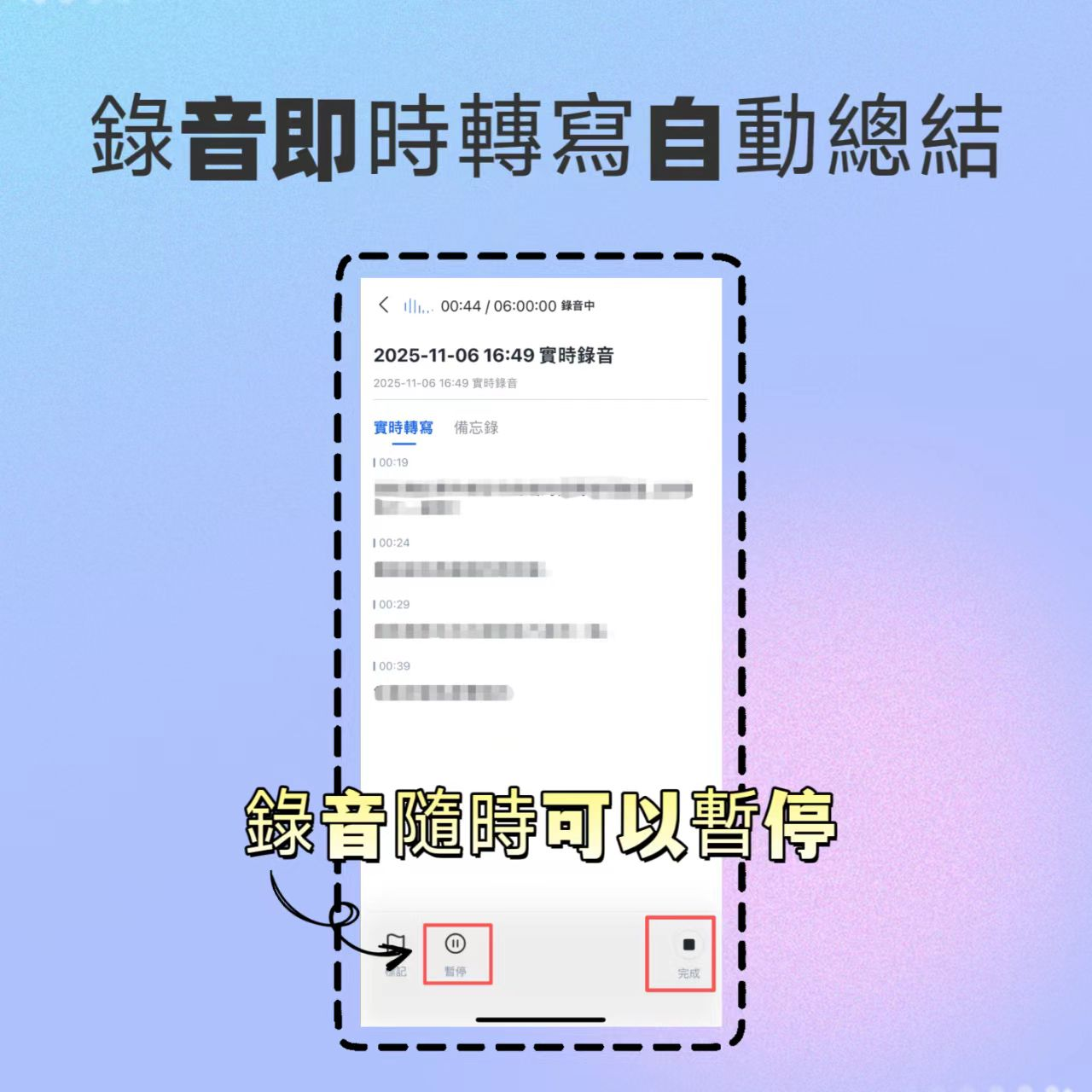
Step 1: Real-Time Voice-to-Text (In Meetings/Classes)
In face-to-face meetings or classrooms, real-time transcription lets you immediately confirm that key points are captured correctly.
- Open the TinRec app or web version, tap the "Real-Time Recording" button on the main interface.
- The system starts recording and displays transcribed text in real time. If you need to pause or stop, use the pause button to keep paragraphs clear.
- After recording, the system automatically saves and begins backend processing to generate a preliminary transcript.
Step 2: Audio File to Text (Post-Event Processing)
If you already have recorded audio files (e.g., from your phone's built-in voice recorder), you can upload them directly.
- Go to the "Audio File to Text" feature page.
- Upload supported audio files (MP3, WAV, M4A, etc.).
- Select the corresponding language (or enable auto-detection), and the system will quickly convert to text, automatically tagging speakers.
Step 3: Video Link to Text (Content Creation/Learning)
For YouTube videos, podcasts, or online courses, no need to download files—just use the link.
- Copy the URL of the target video or podcast.
- Paste it into TinRec's "Podcast/Online Video to Text" input box.
- The system automatically grabs the audio track, transcribes it, and generates a video summary—ideal for creating scripts or review notes.

Step 4: AI Chat Query (Precise Information Retrieval)
This is the key differentiator between traditional tools and modern AI assistants. When you need to find a specific decision or detail:
- Open the completed recording project.
- Enter the "AI Chat Query" interface.
- Ask directly, e.g., "What was the conclusion about the marketing budget in this meeting?" or "What were the three key points the instructor mentioned?"
- The AI will provide precise answers based on the recording content, with timestamps, dramatically reducing search time.

Frequently Asked Questions (FAQ)
1. Is TinRec's free version sufficient? What are the limitations?
TinRec's free plan offers up to 100 minutes of recording per month, including real-time recording, file upload, and basic AI features. For individual users who occasionally need to take meeting or class notes, this is sufficient for trial and light usage. If you have frequent needs, consider upgrading to Basic or Pro plans.
2. Does TinRec support iPhone iOS?
Yes, TinRec offers an iOS app that fully supports iPhone and iPad. Users can download it from the App Store and use iOS background recording permissions for meetings. It also supports Android and Web versions for multi-device sync.
3. How well does it handle mixed Chinese-English, Taiwanese Hokkien, or Cantonese?
TinRec is specifically optimized for Asian language environments, supporting automatic recognition of 10 languages including Chinese, English, Japanese, Korean, German, Taiwanese Hokkien, and Cantonese. In real tests, its recognition accuracy for common workplace mixed Chinese-English and Taiwanese/Cantonese conversations outperforms many tools that only optimize for standard Mandarin.
4. Can I export transcripts to Word or Notion?
TinRec supports multiple export formats including TXT, DOCX, and PDF, making it easy to further edit or archive. Although direct API integration with Notion is not mentioned, exported DOCX or TXT files can be easily copied and pasted into any note-taking app.
5. What is TinRec's biggest advantage over Otter.ai?
The biggest advantage is "language support" and "localized workflow." Otter.ai does not support Chinese, while TinRec not only perfectly supports Chinese and regional dialects but also provides meeting minutes, action item generation, and AI chat query tailored to Asian users' habits, solving the pain point of "understanding but struggling to organize" in Chinese contexts.
6. Is there a refund policy if I'm not satisfied with the transcription results?
TinRec offers a 30-day refund policy. If users find the product doesn't meet their needs after subscribing, they can apply for a refund within the specified time. In addition, it's recommended to fully use the free 100-minute allowance first to verify recognition quality and workflow fit before deciding to upgrade to a paid plan.
Conclusion: The Key to Choosing a Tool Is "Post-Processing Efficiency"
When evaluating "TinRec review," we should not only focus on transcription accuracy but also consider whether the tool reduces the time spent on post-processing. Traditional recording tools only "save" audio; modern AI assistants like TinRec go further—they "understand" and "enable action."
If your work heavily relies on Chinese communication and you need to quickly extract decisions and action items from meetings, courses, or interviews, TinRec's complete workflow will significantly boost your productivity. We recommend starting with the free version, trying its AI chat query and auto-summary features, and experiencing the efficiency shift from "listening to recordings" to "viewing key points."
Turn every recording into actionable outcomes
Get 60 free transcription minutes when you sign in. No credit card required.
Related Reading
You might also like

2026 Audio-to-Text Comparison: Tinrec vs Otter.ai for Chinese Meetings & Team Knowledge
How to choose an audio-to-text tool in 2026? This article compares Tinrec and Otter.ai across 5 dimensions: Chinese meeting transcription, bot-free online meeting capture, audio file organization, post-meeting workflows, and team data governance. Based on public features and pricing, it helps you decide which is better suited for meeting notes needs in Taiwan.

How to Choose an Online Audio-to-Text Tool in 2026: 5 Steps to Pick the Right One and Get a Transcript
How do you choose an online audio-to-text tool? This article reviews 6 online options—Tinrec, MyEdit, cSubtitle, CyberLink, Yating Transcript, and Monica—comparing free quotas, Chinese recognition, export formats, and team collaboration. It also walks you through 5 steps to turn an audio file into a transcript.

2024 Review of 4 Audio-to-Text Tools: Which Saves the Most Time on Chinese Meeting Transcripts and AI Summaries?
The 2024 audio-to-text comparison isn't just about transcription speed—it's about whether the tool can organize your meeting notes afterward. Based on real meetings and interviews, this review compares Tinrec, Notta, Granola, and PLAUD on audio sources, transcripts, AI summaries, action items, team collaboration, and pricing limits to help you choose the right tool.

4 Free Online Audio-to-Text Tools Compared (2026): Which Offers the Best Free Tier and Chinese Recognition?
A comparison of Tinrec, MyEdit, cSubtitle, and Monica's free online audio-to-text offerings, covering free quotas, Chinese recognition, export formats, and post-meeting AI organization to help you decide which suits meetings, interviews, and subtitles.

4 Free AI Audio-to-Text Tools Tested: Which Free Tier Is Enough in 2026?
There are many free AI audio-to-text tools, but free quotas, single-recording length limits, Chinese recognition, and post-meeting organization capabilities vary widely. This article compares the free plans and use cases of 4 tools, using Tinrec's no-bot recording, AI Q&A, and team spaces as selection references.

2026 Comparison of 2 Online Audio-to-Text Tools: Tinrec vs Otter.ai — Which Is Better for Chinese Meetings?
Starting from common misconceptions, this comparison examines Tinrec and Otter.ai in Chinese meetings, bot-free recording, post-meeting organization, real-time translation, and team data retention to help you decide which online audio-to-text tool fits your daily work.

2026 Comparison of 2 Audio-to-Text Platforms: Free Tiers, Chinese Recognition, and Post-Meeting Organization at a Glance
A side-by-side comparison of Tinrec and Notta across free tiers, Chinese recognition, online meeting recording, post-meeting organization, and team collaboration, helping you decide whether the free version is enough and when to upgrade.

iPhone Voice Memos vs Tinrec in 2026: 5-Dimension Comparison — Is Free Transcription Enough?
iPhone's built-in Voice Memos can now transcribe recordings for free, so do you still need a separate tool? This article compares iPhone's built-in features with Tinrec across 5 practical dimensions and honestly explains where the free limits are, helping you decide which approach fits your meeting volume.

4 Free Audio-to-Text Tools Tested for 2026: Which Free Tier Is Actually Enough?
There are plenty of free audio-to-text tools, but few can handle a full meeting. This hands-on comparison tests the free plans of Tinrec, Otter.ai, Notta, and TurboScribe—breaking down how limits are calculated, transcript post-processing, audio retention, and team collaboration—to help you decide which free version is truly usable.