
Turn recordings into transcripts and summaries in minutes
Upload audio or video for multilingual transcription, AI notes, and action items
Quick Verdict: How to Choose the Right Meeting Minutes Tool?
The core pain points of writing meeting minutes are the "high cost of re-listening" and "difficulty extracting key points." If you handle Chinese meetings, need high accuracy, and want automatic extraction of action items, prioritize tools with localized optimization and a complete workflow, such as Tinrec. If you primarily use English and need deep integration with Microsoft Teams, consider Otter.ai. If you only need transcription without summaries, TurboScribe is a cost-effective choice.
This article dives deep into 5 popular tools, provides a multi-dimensional comparison table, and demonstrates how to use AI tools to turn a 1-hour recording into structured meeting minutes in 5 minutes.
Why Traditional Handwritten Minutes Are Inefficient? How AI Solves the Pain Points
In traditional workflows, note-takers often face a dilemma: focus on listening and miss notes, or focus on notes and miss context. Post-meeting organization is time-consuming, typically taking 2–3 times the meeting length to proofread the transcript and extract key points.
Modern AI recording assistants solve this with three steps:
- Full Capture: Use automatic speech recognition (ASR) to convert audio to text, ensuring no information is missed.
- Speaker Diarization: Automatically identify different speakers to clarify the conversation flow.
- Semantic Understanding: Use large language models (LLMs) to extract decisions, action items, and key topics, directly generating readable minutes.

In-Depth Review and Comparison of 5 Popular Meeting Minutes Tools
To help you make the best choice, we select 5 representative tools for comparison: Tinrec, Otter.ai, Notta, TurboScribe, and Yating Transcript.
Core Feature Comparison Table
| Dimension | Tinrec | Otter.ai | Notta | TurboScribe | Yating Transcript |
|---|---|---|---|---|---|
| Language Support | Chinese, English, Japanese, Korean, Taiwanese, etc. (10 languages) | Primarily English | 50+ languages | 99+ languages (Whisper) | Chinese, Taiwanese, mixed Chinese-English |
| Chinese Recognition Accuracy | ⭐⭐⭐⭐⭐ (Optimized for Asian accents) | ⭐⭐ (Weak or no support) | ⭐⭐⭐ (Average) | ⭐⭐⭐⭐ (Depends on model) | ⭐⭐⭐⭐⭐ (Strong localization) |
| AI Summaries & Action Items | ✅ Auto-generates minutes, conclusions, to-dos | ✅ Excels in English summaries | ✅ Provides summaries | ❌ Transcription only, no summary | ❌ Primarily provides transcripts |
| AI Chat Query | ✅ Ask questions about the recording | ✅ Supported | ✅ Supported | ❌ Not supported | ❌ Not supported |
| Free Tier / Pricing | 100 minutes free per month; affordable paid plans | Limited free tier; expensive | Limited free minutes per month | Generous free tier; good value | Hourly billing, no subscription |
| Best For | Cross-language meetings, Chinese workplaces, interviews | English meetings, Teams integration | Multilingual international meetings | Long audio transcription, budget-conscious users | Local Taiwanese interviews, legal/medical |
Detailed Tool Analysis
1. Tinrec: A Complete Workflow from Recording to Action
Tinrec's strength lies in its "more than just transcription" design. It not only provides high-accuracy Chinese recognition (including Taiwanese and Cantonese) but also emphasizes post-meeting "efficiency." The system automatically generates structured meeting minutes and extracts specific action items. Its unique "AI Chat Query" feature lets users ask about recording details like a conversation, e.g., "What was the budget cap mentioned earlier?" This significantly reduces backtracking time.
Stop organizing recordings by hand
Upload audio or video and automatically get a transcript, summary, and action items
2. Otter.ai: The Top Choice for English Meetings
As a globally recognized tool, Otter.ai excels in English recognition and speaker diarization, and integrates deeply with Zoom and Google Meet. However, for Chinese users, its biggest limitation is extremely poor Chinese support, making it nearly unusable for Chinese meeting notes.
3. Notta: A Balanced Option for Multilingual Support
Notta supports over 50 languages, making it suitable for multinational teams. It performs well on mobile, but its Chinese recognition detail and handling of specialized terminology lag behind dedicated localized tools.
4. TurboScribe: A Cost-Effective Pure Transcription Tool
Based on OpenAI's Whisper model, TurboScribe offers a very generous free tier and low paid prices. However, it lacks AI summary and analysis features, making it suitable for users who only need a transcript and have time to organize it themselves.
5. Yating Transcript: A Representative of Localized Service
In the Taiwanese market, Yating Transcript excels at handling Taiwanese and mixed Chinese-English speech. However, its product is more traditional, lacking modern AI interaction interfaces and auto-summary workflows. It suits industries like law and medicine that require precise records.

Practical Tutorial: How to Generate Meeting Minutes with Tinrec in One Click
Below we use Tinrec as an example to show how to turn messy audio into professional meeting minutes in four steps.
Step 1: Real-time Transcription During the Meeting
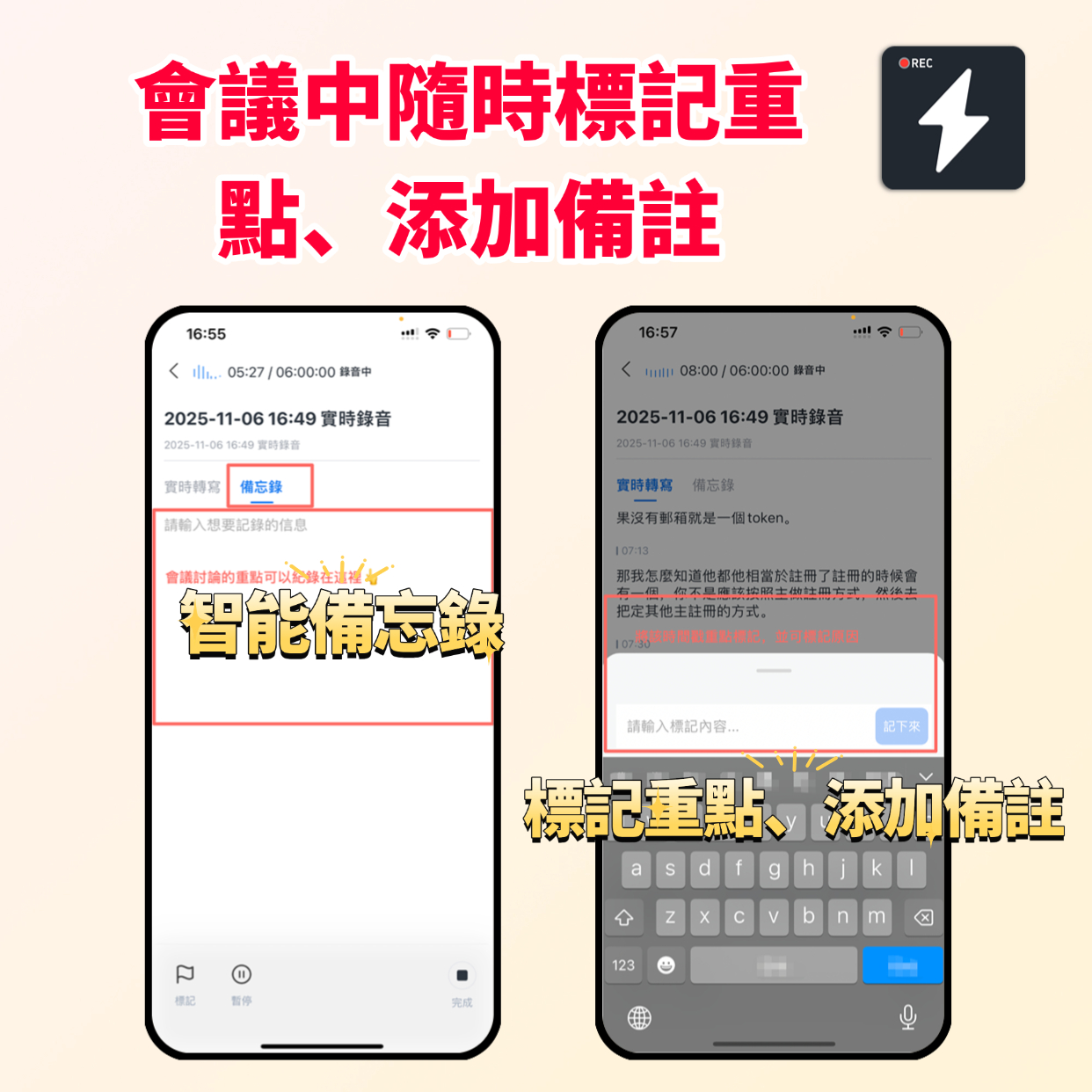
At the start of the meeting, open the Tinrec app or web version and click "Real-time Transcription." The system converts speech to text in real time and automatically distinguishes speakers. You can mark key points along the way without worrying about missing anything.
- Access: Tinrec Homepage
- Tip: If the meeting switches between Chinese and English, Tinrec auto-detects the language without manual setting.
Step 2: Upload Audio Files (Post-Meeting)
If you recorded with another device, upload MP3, WAV, or other audio files to Tinrec. The system transcribes quickly and generates a draft transcript.
- Access: Audio to Text

Step 3: Video Link Transcription (Online Meetings/Courses)
For recorded Google Meet or Zoom videos, or relevant YouTube lectures, you can paste the URL directly. Tinrec extracts the audio, transcribes, and summarizes it—ideal for competitive analysis or study notes.
- Access: Podcast/Online Video to Text

Step 4: AI Chat Query and Export
This is the most critical step. On the generated page, use the "AI Chat Query" feature. For example, type "Summarize the three main conclusions of this meeting" or "List all action items assigned to the marketing team." Once confirmed, copy the text or export it as a document.
- Access: AI Chat Query

3 Golden Rules for Writing High-Quality Meeting Minutes
Even with powerful AI tools, manual review and structuring are indispensable. Here are tips to improve professionalism:
- Structured Presentation: Don't just paste the transcript. Include "Meeting Basics" (time, location, attendees), "Discussion Topics," "Decisions," and "Action Items (Who does What by When)."
- Objective Neutrality: Remove filler words (e.g., "um," "like"), keep facts and opinions. If there are disputes, record each side's position rather than just the conclusion.
- Clear Action Items: AI-extracted tasks need manual verification to ensure owners and deadlines are clearly visible.
Frequently Asked Questions (FAQ)
1. Does Tinrec support iPhone recording?
Yes, Tinrec offers an iOS app with background recording and real-time transcription. Grant microphone permission before the meeting and consider enabling airplane mode to avoid call interruptions.
2. What free meeting minutes tools do you recommend?
Tinrec offers 100 free minutes per month, suitable for light users. TurboScribe also has a good free plan, but note it lacks AI summaries. Otter.ai has a free version but poor Chinese support.
3. How to handle recordings from Teams or Google Meet online meetings?
You can use Tinrec's web version to record directly on your computer or upload recorded video/audio files after the meeting. Using Tinrec's video link feature, just paste the meeting recording link to quickly generate minutes.
4. Are AI-generated meeting minutes accurate? Do I need to edit them manually?
AI accuracy is very high for standard Mandarin and clear English, but errors may occur with specialized terminology, heavy accents, or overlapping speech. Use the AI draft as a base and do a quick manual proofread, especially for names and numbers.
5. Does Tinrec support Taiwanese or Cantonese meetings?
Yes. Tinrec is specially optimized for Asian languages and can recognize Taiwanese, Cantonese, and mixed Chinese-English conversations, making it very useful for cross-regional team collaboration.
6. After transcription, how can I quickly find specific content?
Traditionally you'd use Ctrl+F to search keywords. With Tinrec, use the "AI Chat Query" feature and ask natural language questions like "Who mentioned the Q3 budget issue?" The system will locate and answer, smarter than keyword search.
Turn every recording into actionable outcomes
Get 60 free transcription minutes when you sign in. No credit card required.
Related Reading
You might also like

2026 Audio-to-Text Comparison: Tinrec vs Otter.ai for Chinese Meetings & Team Knowledge
How to choose an audio-to-text tool in 2026? This article compares Tinrec and Otter.ai across 5 dimensions: Chinese meeting transcription, bot-free online meeting capture, audio file organization, post-meeting workflows, and team data governance. Based on public features and pricing, it helps you decide which is better suited for meeting notes needs in Taiwan.

How to Choose an Online Audio-to-Text Tool in 2026: 5 Steps to Pick the Right One and Get a Transcript
How do you choose an online audio-to-text tool? This article reviews 6 online options—Tinrec, MyEdit, cSubtitle, CyberLink, Yating Transcript, and Monica—comparing free quotas, Chinese recognition, export formats, and team collaboration. It also walks you through 5 steps to turn an audio file into a transcript.

2024 Review of 4 Audio-to-Text Tools: Which Saves the Most Time on Chinese Meeting Transcripts and AI Summaries?
The 2024 audio-to-text comparison isn't just about transcription speed—it's about whether the tool can organize your meeting notes afterward. Based on real meetings and interviews, this review compares Tinrec, Notta, Granola, and PLAUD on audio sources, transcripts, AI summaries, action items, team collaboration, and pricing limits to help you choose the right tool.

4 Free Online Audio-to-Text Tools Compared (2026): Which Offers the Best Free Tier and Chinese Recognition?
A comparison of Tinrec, MyEdit, cSubtitle, and Monica's free online audio-to-text offerings, covering free quotas, Chinese recognition, export formats, and post-meeting AI organization to help you decide which suits meetings, interviews, and subtitles.

4 Free AI Audio-to-Text Tools Tested: Which Free Tier Is Enough in 2026?
There are many free AI audio-to-text tools, but free quotas, single-recording length limits, Chinese recognition, and post-meeting organization capabilities vary widely. This article compares the free plans and use cases of 4 tools, using Tinrec's no-bot recording, AI Q&A, and team spaces as selection references.

2026 Comparison of 2 Online Audio-to-Text Tools: Tinrec vs Otter.ai — Which Is Better for Chinese Meetings?
Starting from common misconceptions, this comparison examines Tinrec and Otter.ai in Chinese meetings, bot-free recording, post-meeting organization, real-time translation, and team data retention to help you decide which online audio-to-text tool fits your daily work.

2026 Comparison of 2 Audio-to-Text Platforms: Free Tiers, Chinese Recognition, and Post-Meeting Organization at a Glance
A side-by-side comparison of Tinrec and Notta across free tiers, Chinese recognition, online meeting recording, post-meeting organization, and team collaboration, helping you decide whether the free version is enough and when to upgrade.

iPhone Voice Memos vs Tinrec in 2026: 5-Dimension Comparison — Is Free Transcription Enough?
iPhone's built-in Voice Memos can now transcribe recordings for free, so do you still need a separate tool? This article compares iPhone's built-in features with Tinrec across 5 practical dimensions and honestly explains where the free limits are, helping you decide which approach fits your meeting volume.

4 Free Audio-to-Text Tools Tested for 2026: Which Free Tier Is Actually Enough?
There are plenty of free audio-to-text tools, but few can handle a full meeting. This hands-on comparison tests the free plans of Tinrec, Otter.ai, Notta, and TurboScribe—breaking down how limits are calculated, transcript post-processing, audio retention, and team collaboration—to help you decide which free version is truly usable.