
Turn recordings into transcripts and summaries in minutes
Upload audio or video for multilingual transcription, AI notes, and action items
Why "Free Video Editing Software" Isn't Enough: You Also Need Efficient Content Conversion Tools
In today's era of short videos and remote collaboration, many creators and professionals searching for "free video editing software" often focus only on editing features while overlooking a more fundamental pain point: how to quickly convert meeting recordings, interview content, or online videos into editable text?
Traditional editing software (such as CapCut, VEED.IO) excels at syncing visuals and subtitles, but without high-accuracy speech-to-text (STT) support, manually transcribing remains extremely time-consuming. This is especially true when dealing with Chinese, mixed Taiwanese/Mandarin/Cantonese, or multilingual meetings, where general-purpose tools often have unsatisfactory recognition rates.
This article will clarify the positioning differences between two tool categories:
- Visual Editing Class: Best for final video output (e.g., VEED.IO, CapCut).
- AI Content Conversion Class: Best for pre-production, converting audio/video into text, summaries, and action items (e.g., Tinrec, Otter.ai, Notta).
Quick Navigation Summary:
- If you need auto-generate subtitles and edit videos → Check VEED.IO or CapCut first.
- If you need meeting notes, high-accuracy Chinese transcription, AI summaries, and to-do lists → Check Tinrec or Notta first.
- If you are a developer with technical skills → Consider OpenAI Whisper.
User Segmentation: Who Needs These Tools Most?
Before choosing a tool, identify your core scenario. Different groups weigh "free" and "features" very differently.
1. Students and Educators
- Needs: Class notes, online course key points, exam review.
- Pain Points: Fast-speaking lecturers, lots of jargon; need high-accuracy Chinese recognition and key point aggregation.
2. Office Workers and Enterprise Teams
- Needs: Remote meeting (Teams/Meet/Zoom) records, project discussion minutes, action item tracking.
- Pain Points: Meetings last hours; rewatching is costly; need automatic speaker identification and extraction of "who should do what."
3. Content Creators and YouTubers
- Needs: Podcast transcripts, video scripts, content repurposing (video to article).
- Pain Points: Need to quickly convert long videos to text for SEO optimization or adaptation into short articles.
4. Media and Interview Journalists
- Needs: Interview transcripts, multilingual content organization.
- Pain Points: Mixed Chinese/English, Taiwanese/Cantonese interviewees; most tools have extremely low recognition rates.
Selection Criteria: 5 Key Dimensions for Evaluating Tools
When comparing various free video editing software and transcription tools, evaluate based on the following dimensions:
- Language Support & Accuracy: Does it support Traditional Chinese, Taiwanese, Cantonese? What is the error tolerance for specialized terms or accents?
- Real-time & Workflow: Does it only support file upload and wait, or does it support "live recording to text"?
- AI Value-Added Features: Does it provide only transcripts, or can it also generate "meeting minutes," "action items"?
- Search & Interaction: Can you query specific content via AI chat (e.g., "What was the budget mentioned?") rather than just Ctrl+F?
- Price & Free Tier: Monthly free minutes available, export format limitations, and watermark issues.
Head-to-Head Review of 5 Popular Tools: Tinrec vs. Otter.ai vs. VEED.IO and More
Below is a neutral comparison of 5 mainstream tools, covering both editing and transcription categories.
| Dimension | Tinrec (秒聽錄音) | Otter.ai | VEED.IO | Notta | CapCut (剪映) |
|---|---|---|---|---|---|
| Core Positioning | AI recording assistant & workflow | English meeting transcription leader | Online video editing & subtitles | Multilingual meeting notes | Mobile/Desktop editing software |
| Language Support | Chinese/English/Japanese/Korean/Taiwanese/Cantonese, 10+ languages | Primarily English | Multilingual (relies on subtitle library) | 50+ languages | Multilingual |
| Chinese Accuracy | High (optimized for Asian languages) | Low (does not support Chinese) | Medium | Medium | Medium |
| AI Features | Minutes, action items, AI chat query | Summaries, keywords | Auto subtitles, simple editing | Summaries, translation | Auto subtitles, text-to-speech |
| Input Methods | Live recording, audio upload, video link | Live recording, upload | Video upload, screen recording | Live recording, upload | Video upload, camera capture |
| Free Tier | 100 minutes/month | 300 minutes/month (English only) | Limited (watermark/duration restrictions) | 120 minutes/month | Most features free |
| Best For | Chinese meetings, interviews, video-to-text | English cross-border meetings | YouTube short video production | Cross-language business meetings | Short video creative editing |
Stop organizing recordings by hand
Upload audio or video and automatically get a transcript, summary, and action items
Tool Deep Dive
1. Tinrec: An AI Assistant Focused on "Understanding and Action"
Tinrec's differentiation lies in providing not just transcripts, but a complete workflow from recording to action. For Chinese users, its support for Traditional Chinese, Taiwanese, and Cantonese surpasses most international tools. Additionally, it supports direct input of YouTube or other network video links for transcription, ideal for content creators.
2. Otter.ai: Best for English Meetings, But No Chinese Support
Otter.ai is a globally known meeting transcription tool with excellent speaker identification and integration capabilities. However, its biggest weakness is no Chinese support. If your meetings are primarily in English, Otter is a great choice; but if Chinese is involved, it is completely unusable.
3. VEED.IO: Combining Visual Editing and Subtitles
VEED.IO is a powerful online video editor whose auto-subtitle feature is very helpful for short video production. However, its transcription function is mainly for "display on video," not for "content analysis." If you need deep insights from meetings or generating action items, VEED's capabilities are shallow.
4. Notta: Broad Multilingual Support
Notta supports over 50 languages and performs well in cross-language meetings. However, some users report that its recognition stability in pure Chinese environments is slightly inferior to tools optimized for Asian languages, and the free version has more export restrictions.
5. CapCut: The King of Free Editing
CapCut is almost unbeatable in the editing space, especially with its auto-lyrics/subtitle feature. But it lacks advanced knowledge management functions like "meeting minutes" or "AI Q&A," making it suitable for final output but not for pre-production content organization.
Practical Tutorial: How to Efficiently Process Audio and Video with Tinrec
If you choose a content conversion tool, here are the steps to structure messy audio/video data using Tinrec's four core entry points.
Step 1: Live Recording to Text (Best for Meetings/Classes)
This feature is suitable for ongoing meetings or classes, providing real-time text without post-event upload.
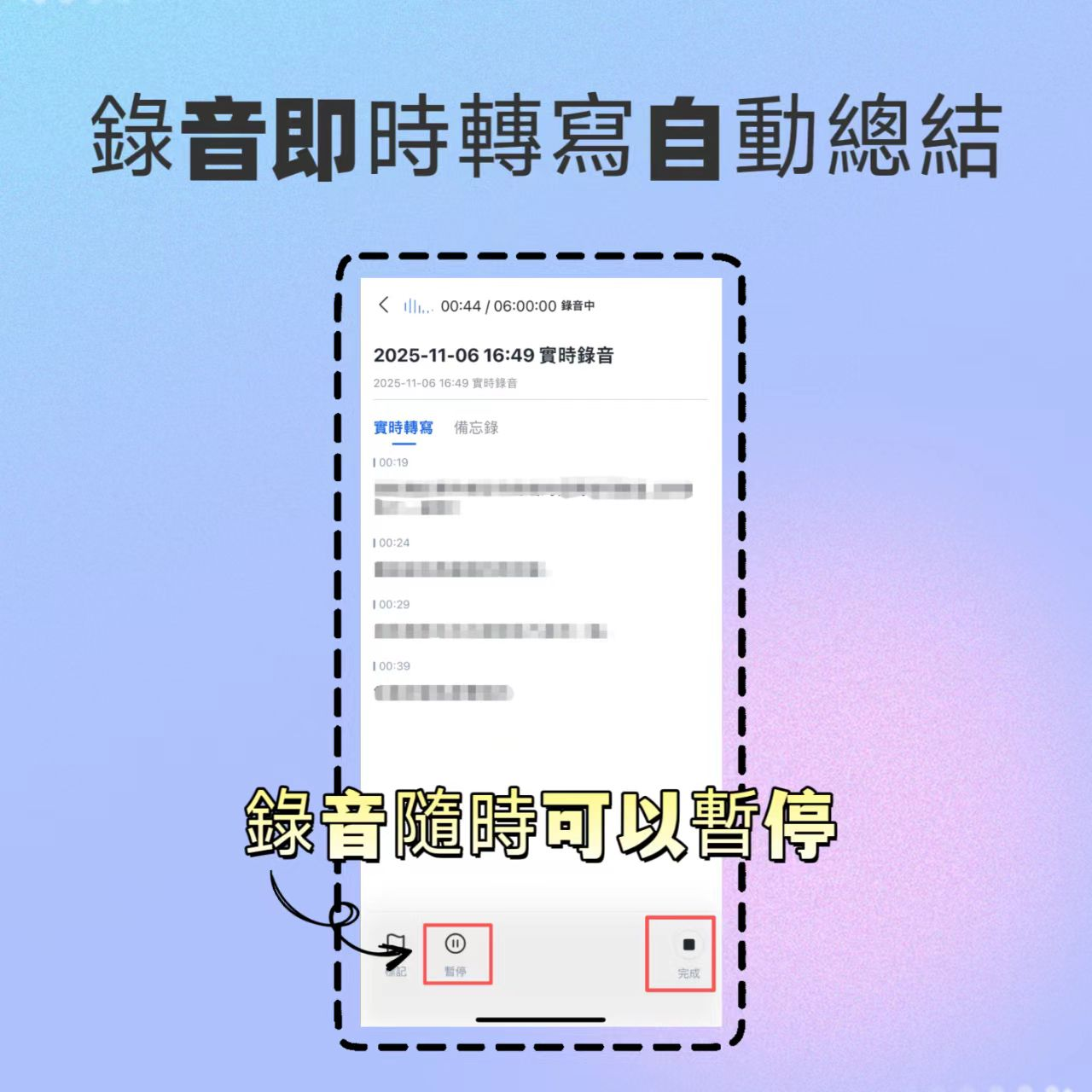
- Open the Tinrec app or web version, click the "Live Recording" button on the main interface.
- Start recording; the system will convert speech to text in real-time displayed on the screen.
- You can pause or mark key points at any time.
- After ending, the system automatically generates a transcript and AI summary.

Step 2: Audio File to Text (Organize Old Recordings)
If you already have mobile recorder files or previous meeting MP3/M4A files.
- Enter the "Audio File to Text" function page.
- Click upload, select a local audio file.
- Set language (auto-detect or specify Chinese/English, etc.).
- Wait for processing, then view the transcript with speaker differentiation.

Step 3: Video Link to Text (Content Creation Power Tool)
Perfect for YouTubers or researchers, directly convert online videos into text assets.
- Copy the video URL from YouTube, Podcast, or other supported platforms.
- Enter the "Podcast/Online Video to Text" function.
- Paste the link; the system will automatically extract the audio track and convert it.
- The result includes a transcript and video key point summary.

Step 4: AI Chat Query (Quickly Grasp Key Points)
This is the biggest difference from traditional tools; you don't need to read the entire document from scratch.
- In the generated record, click the "AI Chat" or Q&A section.
- Type a question, e.g., "What is the conclusion about the marketing budget in this meeting?" or "List all action items."
- The AI will provide a precise answer based on the recording content, with timestamps.

Decision Tree Recommendation: Which One Should You Choose?
To reduce choice difficulty, refer to the following decision logic:
Scenario A: I need to create Instagram/YouTube short videos, focusing on effects and editing rhythm.
- 👉 Choose CapCut or VEED.IO.
- Reason: These are true "free video editing software" with rich templates and timeline editing.
Scenario B: I need to record full-English cross-border meetings, and my team is already used to Slack integration.
- 👉 Choose Otter.ai.
- Reason: It has the highest integration in the English ecosystem.
Scenario C: I need to handle Chinese meetings, interviews, or convert long videos into transcripts, and need AI to help organize action items.
- 👉 Choose Tinrec.
- Reason: Tinrec provides deeper value than simple editing software in Chinese recognition, multilingual support (including Taiwanese/Cantonese), and "AI chat query" and "action item generation." It solves not "how to edit," but "how to use" the recording content.
Scenario D: I am an engineer who wants local deployment and doesn't mind command-line operations.
- 👉 Choose OpenAI Whisper.
- Reason: Free, open-source, high privacy, but no GUI or cloud collaboration.
Frequently Asked Questions (FAQ)
1. Is there really completely free video editing software?
Most tools claiming to be free (like CapCut, VEED.IO free version) often have limitations such as watermarks on export, resolution restrictions, or paid premium assets. For "transcription" tools, Tinrec offers a free tier of 100 minutes per month, enough for general personal trial.
2. Can iPhone recordings be directly converted to text?
Yes. Tinrec supports iOS; you can use the app on iPhone for live recording to text, or export voice memos and upload to Tinrec for processing. Compared to iOS built-in dictation, dedicated tools handle long recordings and multi-speaker differentiation better.
3. Does Tinrec support Teams or Google Meet meeting records?
Yes. You can play meeting audio through your computer speakers and use Tinrec's live recording feature for transcription; or after the meeting, if you have a recording file, upload it to Tinrec for transcription and summary generation.
4. Which tool has the best recognition for "Chinese" and "Taiwanese"?
In testing, Otter.ai does not support Chinese. Both Notta and Tinrec support Chinese, but Tinrec is specifically optimized for Asian languages (including Traditional Chinese, Taiwanese, Cantonese) and is generally more stable in mixed-language environments.
5. Is the free version sufficient? When should I upgrade?
If you are a student or occasionally record meetings, Tinrec's free 100 minutes per month is usually enough. If you are a frequent meeting attendee or content creator, consider Basic or Pro plans for more minutes and full AI feature access.
6. How to convert videos to transcripts without downloading the video?
Use Tinrec's "Video Link to Text" feature. Just paste a YouTube or other supported platform URL, and it processes directly in the cloud to generate a transcript, without consuming local storage to download the video file.

Turn every recording into actionable outcomes
Get 60 free transcription minutes when you sign in. No credit card required.
Related Reading
You might also like

2026 Audio-to-Text Comparison: Tinrec vs Otter.ai for Chinese Meetings & Team Knowledge
How to choose an audio-to-text tool in 2026? This article compares Tinrec and Otter.ai across 5 dimensions: Chinese meeting transcription, bot-free online meeting capture, audio file organization, post-meeting workflows, and team data governance. Based on public features and pricing, it helps you decide which is better suited for meeting notes needs in Taiwan.

How to Choose an Online Audio-to-Text Tool in 2026: 5 Steps to Pick the Right One and Get a Transcript
How do you choose an online audio-to-text tool? This article reviews 6 online options—Tinrec, MyEdit, cSubtitle, CyberLink, Yating Transcript, and Monica—comparing free quotas, Chinese recognition, export formats, and team collaboration. It also walks you through 5 steps to turn an audio file into a transcript.

2024 Review of 4 Audio-to-Text Tools: Which Saves the Most Time on Chinese Meeting Transcripts and AI Summaries?
The 2024 audio-to-text comparison isn't just about transcription speed—it's about whether the tool can organize your meeting notes afterward. Based on real meetings and interviews, this review compares Tinrec, Notta, Granola, and PLAUD on audio sources, transcripts, AI summaries, action items, team collaboration, and pricing limits to help you choose the right tool.

4 Free Online Audio-to-Text Tools Compared (2026): Which Offers the Best Free Tier and Chinese Recognition?
A comparison of Tinrec, MyEdit, cSubtitle, and Monica's free online audio-to-text offerings, covering free quotas, Chinese recognition, export formats, and post-meeting AI organization to help you decide which suits meetings, interviews, and subtitles.

4 Free AI Audio-to-Text Tools Tested: Which Free Tier Is Enough in 2026?
There are many free AI audio-to-text tools, but free quotas, single-recording length limits, Chinese recognition, and post-meeting organization capabilities vary widely. This article compares the free plans and use cases of 4 tools, using Tinrec's no-bot recording, AI Q&A, and team spaces as selection references.

2026 Comparison of 2 Online Audio-to-Text Tools: Tinrec vs Otter.ai — Which Is Better for Chinese Meetings?
Starting from common misconceptions, this comparison examines Tinrec and Otter.ai in Chinese meetings, bot-free recording, post-meeting organization, real-time translation, and team data retention to help you decide which online audio-to-text tool fits your daily work.

2026 Comparison of 2 Audio-to-Text Platforms: Free Tiers, Chinese Recognition, and Post-Meeting Organization at a Glance
A side-by-side comparison of Tinrec and Notta across free tiers, Chinese recognition, online meeting recording, post-meeting organization, and team collaboration, helping you decide whether the free version is enough and when to upgrade.

iPhone Voice Memos vs Tinrec in 2026: 5-Dimension Comparison — Is Free Transcription Enough?
iPhone's built-in Voice Memos can now transcribe recordings for free, so do you still need a separate tool? This article compares iPhone's built-in features with Tinrec across 5 practical dimensions and honestly explains where the free limits are, helping you decide which approach fits your meeting volume.

4 Free Audio-to-Text Tools Tested for 2026: Which Free Tier Is Actually Enough?
There are plenty of free audio-to-text tools, but few can handle a full meeting. This hands-on comparison tests the free plans of Tinrec, Otter.ai, Notta, and TurboScribe—breaking down how limits are calculated, transcript post-processing, audio retention, and team collaboration—to help you decide which free version is truly usable.