
Turn recordings into transcripts and summaries in minutes
Upload audio or video for multilingual transcription, AI notes, and action items
Why You Need AI to Summarize Bilibili Videos
Bilibili (B Station) is no longer just an entertainment platform; it's a key source of professional knowledge, technical tutorials, and industry insights for many students and professionals. However, facing courses or interviews that last tens of minutes or even hours, taking manual notes is time-consuming and easy to miss key details. Traditional re-listening is inefficient, and relying solely on browser extensions to capture subtitles often lacks structured key points.
This article addresses the need for "how to use AI to summarize Bilibili video content," thoroughly reviewing 5 mainstream tools and providing step-by-step instructions. We will compare them across dimensions like language support, summary quality, and ease of use, with a focus on how Tinrec transforms unstructured audio-visual content into actionable knowledge assets through its "link parsing" and "AI chat query" features.
Quick Navigation Conclusion:
- Priority on Chinese accuracy and structured notes → Choose Tinrec
- Need pure subtitle files for editing → Consider cSubtitle or VEED.IO
- Developer focused on privacy → Try local deployment of OpenAI Whisper
- Budget-limited and only need basic transcription → TurboScribe offers more free minutes
Who Needs AI Video Summarizers Most? User Scenario Breakdown
Before choosing a tool, identify your use case. It directly affects which tool is best.
1. Students and Self-Learners
Pain Points: Online courses move fast, making it hard to keep up with notes; difficult to quickly locate key sections during review.
Needs: High-accuracy transcripts, automatic chapter segmentation, keyword search.
2. Content Creators and Media Professionals
Pain Points: Need to review many competitor videos or interview materials; manually organizing scripts or references is inefficient.
Needs: Quickly extract video outlines, distinguish speakers, export editable text files.
3. Professionals and Project Managers
Pain Points: After watching industry lectures or internal training videos, need to produce meeting minutes or learning reports.
Needs: Auto-generated summaries, extraction of action items, multi-language support.
4 Core Criteria for Choosing an AI Video Summarizer
With so many tools on the market, evaluate based on these four dimensions to avoid pitfalls:
- Language Support and Accuracy: Bilibili content is mainly in Chinese, often with technical terms or colloquialisms. Is the tool optimized for Chinese? Can it recognize Taiwanese Hokkien, Cantonese, or mixed languages?
- Input Flexibility: Does it support direct video link (URL) parsing? Or must you download the video first and then upload the audio file? The former saves significant time.
- AI Summarization and Interactivity: Providing only transcripts is not enough. A good tool should generate structured summaries and allow users to query specific details via a "conversation" (e.g., "What are the three main points mentioned in the video?").
- Cost and Free Tier: For frequent users, are the free minutes per month sufficient? How cost-effective are paid plans?
Head-to-Head Comparison of 5 Popular Tools
Below is a comprehensive comparison of Tinrec, Notta, TurboScribe, VEED.IO, and cSubtitle.
| Dimension | Tinrec (Sec Memo) | Notta | TurboScribe | VEED.IO | cSubtitle |
|---|---|---|---|---|---|
| Core Focus | AI voice assistant & knowledge management | Multi-language meeting notes tool | High-value online transcription | Video editing & subtitle tool | Chinese subtitle generation |
| Video Link Parsing | ✅ Supported (YouTube, podcasts, etc.) | ❌ Upload audio required | ❌ Upload audio required | ✅ Supported | ❌ Upload file required |
| Chinese Recognition Accuracy | ⭐⭐⭐⭐⭐ (Well optimized) | ⭐⭐⭐ (Occasionally unstable) | ⭐⭐⭐⭐ (Whisper-based) | ⭐⭐⭐⭐ | ⭐⭐⭐⭐ |
| AI Summary & Chat | ✅ Auto-summary + AI chat query | ✅ Auto-summary | ❌ Transcript only | ❌ None | ❌ None |
| Free Tier | 100 minutes per month | Limited trial | 30 minutes per month (free version) | Watermark/restrictions | Basic features free |
| Best For | Students, professionals, content creators | International meeting teams | Budget-sensitive users | YouTubers/editors | Subtitle creators |
Stop organizing recordings by hand
Upload audio or video and automatically get a transcript, summary, and action items

Analysis Highlights:
- Tinrec's strength lies in its "complete workflow." It not only handles video links but also uses an AI chat query feature that lets users dig into video content through Q&A, rather than just reading lengthy transcripts.
- Notta supports multiple languages but occasionally shows errors in Chinese speech recognition and is less flexible in direct video link support than Tinrec.
- TurboScribe is based on the Whisper model with decent accuracy, but lacks summarization and interaction features—good for users who only need pure text.
- VEED.IO and cSubtitle are more oriented toward visual and editing support. If your goal is "understanding content" rather than "creating subtitles," these are not the best choices.
Practical Tutorial: How to Efficiently Summarize Bilibili Videos with Tinrec
Although Tinrec officially supports YouTube and major podcast links mainly, for Bilibili videos you can use either "link parsing" or "audio upload" strategies. Here are the detailed steps:
Method 1: Using Video Link Parsing (for supported platforms)
If your Bilibili video has been synced to another platform, or if Tinrec expands its support in the future, this method is fastest.
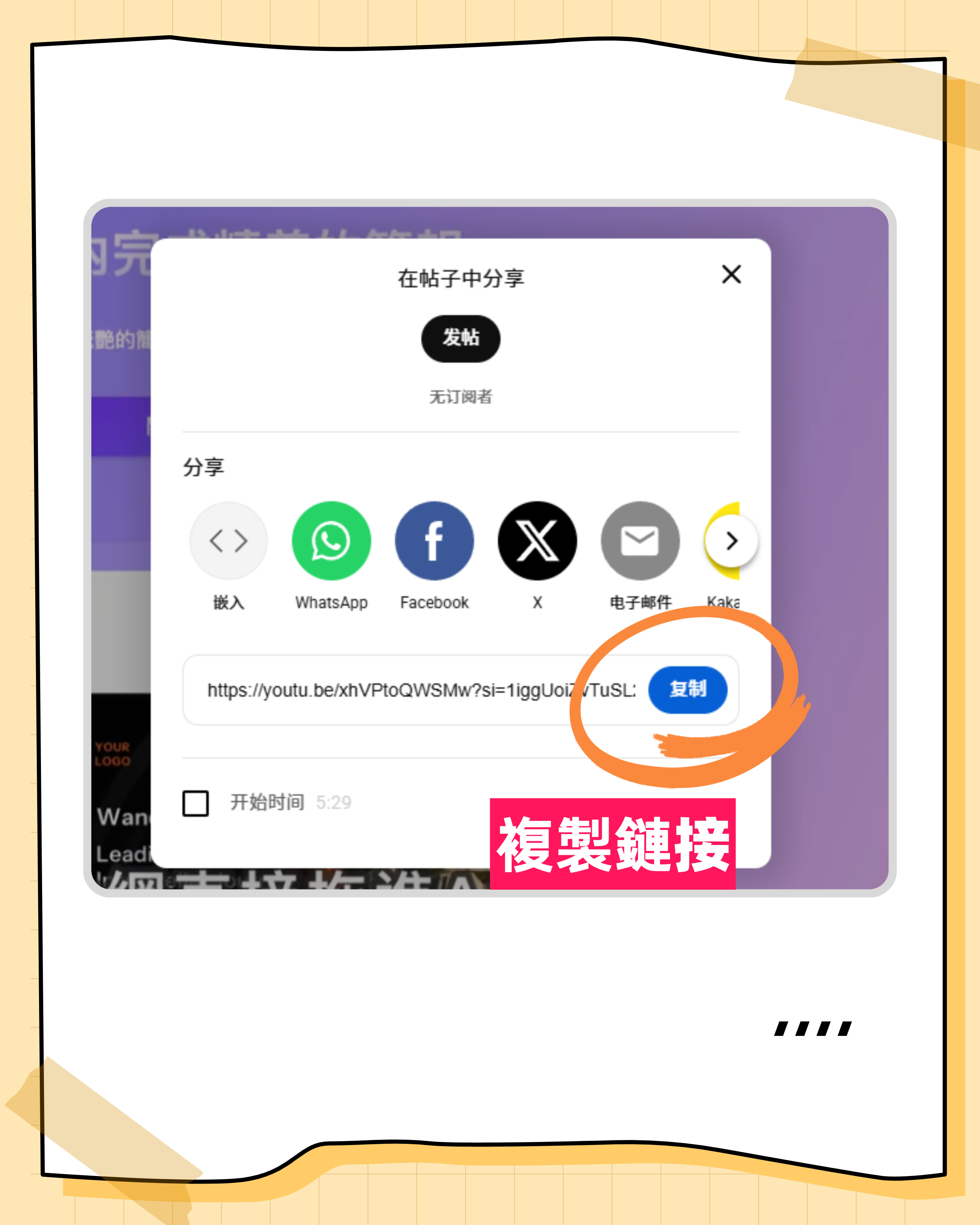
- Copy the video link: Open the video in your browser and copy the URL.
- Go to Tinrec web version: Log in and select "Podcast/Online Video to Text."
- Paste the link and start conversion: The system will automatically capture the audio track and transcribe it.
- View AI summary: After conversion, the right sidebar will automatically generate a key summary.

Method 2: Audio File Upload (for all Bilibili videos)
This is the most universal way to handle Bilibili videos currently.
- Get the audio file: Use a legitimate download tool to download the Bilibili video as MP4 or extract the audio as MP3.
- Upload to Tinrec: Select "Audio File to Text" and upload the file.
- Wait for transcription: Tinrec will automatically detect the language and generate a transcript.
- Use AI chat query: This is the key step. Type questions in the right-side chat box, for example:
- "Summarize the three core arguments of this video."
- "At what minute did the instructor mention trends in AI development?"
- "List all reference resources mentioned in the video."
Method 3: Live Recording (for playing video on computer)
If downloading is inconvenient, use Tinrec's live recording feature.
- Open Tinrec recording interface: Select "Record and Transcribe in Real-Time."
- Play the Bilibili video: Ensure your computer's audio output can be captured by the microphone (or set up stereo mix).
- View real-time transcription: As the video plays, text appears in real-time.
- Generate summary after finishing: Stop recording, and the system will automatically organize key points.

Tinrec's Differentiating Advantage: From "Transcription" to "Understanding"
Compared to other tools, Tinrec's core value is not in "accurate transcription" (a basic requirement), but in "deep usage."
- AI Chat Query (Chat with Audio): Traditional tools only let you Ctrl+F search keywords, but if you forget the exact phrase, you can't find the content. Tinrec allows you to ask questions in natural language, and the AI searches by semantics and answers, greatly improving information retrieval efficiency.
- Structured Action Items: For professional users, Tinrec can automatically identify and extract "to-dos" or "decision conclusions," which is highly valuable for meeting notes or study planning.
- Multi-Device Sync and Integration: Supports iOS, Android, and Web. Whether capturing ideas on your phone or deep-diving on your computer, data syncs seamlessly.

Frequently Asked Questions
1. Can Tinrec directly parse Bilibili video links?
Currently, Tinrec is mainly optimized for YouTube and major podcast platforms. For Bilibili videos, we recommend using "download audio and upload" or "live recording" to ensure the best transcription quality and compatibility.
2. Is the free version enough? What are the limitations?
Tinrec's free version offers 100 minutes of transcription per month. This is usually sufficient for users who occasionally process short videos or meeting notes. If you need more, consider the Basic or Pro plans.
3. How accurate is the Chinese transcription? Can it recognize technical terms?
Tinrec is deeply optimized for Chinese, supporting Mandarin, Taiwanese Hokkien, Cantonese, and more. For common technical terms, the AI model can correct based on context, with accuracy superior to most general-purpose tools.
4. Can I export the transcript? What formats are supported?
Multiple formats are supported, including TXT, DOCX, SRT, etc., making further editing or subtitle creation easy.
5. If there are multiple speakers in the video, can Tinrec distinguish them?
Yes, Tinrec has speaker identification, marking different speakers in the transcript and clarifying each person's views in the summary.
6. Compared to other free tools, is Tinrec worth paying for?
If you only need simple speech-to-text, free tools might suffice. But if you need "AI summaries," "conversational queries," and "structured notes" to boost learning or work efficiency, Tinrec's complete workflow saves significant post-processing time, offering high return on investment.
Conclusion: Choose the Right AI Assistant for You
In summary, if your goal is to quickly extract knowledge from Bilibili videos, generate notes, and conduct deep queries, Tinrec provides the most complete solution. It not only solves the problem of "forgetting after listening" but also makes knowledge searchable and actionable through AI interaction.
We recommend that you first use Tinrec's free tier to experience the "audio upload" and "AI chat query" features, feel the difference from traditional transcript tools, and then choose a plan based on your usage frequency.
Turn every recording into actionable outcomes
Get 60 free transcription minutes when you sign in. No credit card required.
Related Reading
You might also like

2026 Audio-to-Text Comparison: Tinrec vs Otter.ai for Chinese Meetings & Team Knowledge
How to choose an audio-to-text tool in 2026? This article compares Tinrec and Otter.ai across 5 dimensions: Chinese meeting transcription, bot-free online meeting capture, audio file organization, post-meeting workflows, and team data governance. Based on public features and pricing, it helps you decide which is better suited for meeting notes needs in Taiwan.

How to Choose an Online Audio-to-Text Tool in 2026: 5 Steps to Pick the Right One and Get a Transcript
How do you choose an online audio-to-text tool? This article reviews 6 online options—Tinrec, MyEdit, cSubtitle, CyberLink, Yating Transcript, and Monica—comparing free quotas, Chinese recognition, export formats, and team collaboration. It also walks you through 5 steps to turn an audio file into a transcript.

2024 Review of 4 Audio-to-Text Tools: Which Saves the Most Time on Chinese Meeting Transcripts and AI Summaries?
The 2024 audio-to-text comparison isn't just about transcription speed—it's about whether the tool can organize your meeting notes afterward. Based on real meetings and interviews, this review compares Tinrec, Notta, Granola, and PLAUD on audio sources, transcripts, AI summaries, action items, team collaboration, and pricing limits to help you choose the right tool.

4 Free Online Audio-to-Text Tools Compared (2026): Which Offers the Best Free Tier and Chinese Recognition?
A comparison of Tinrec, MyEdit, cSubtitle, and Monica's free online audio-to-text offerings, covering free quotas, Chinese recognition, export formats, and post-meeting AI organization to help you decide which suits meetings, interviews, and subtitles.

4 Free AI Audio-to-Text Tools Tested: Which Free Tier Is Enough in 2026?
There are many free AI audio-to-text tools, but free quotas, single-recording length limits, Chinese recognition, and post-meeting organization capabilities vary widely. This article compares the free plans and use cases of 4 tools, using Tinrec's no-bot recording, AI Q&A, and team spaces as selection references.

2026 Comparison of 2 Online Audio-to-Text Tools: Tinrec vs Otter.ai — Which Is Better for Chinese Meetings?
Starting from common misconceptions, this comparison examines Tinrec and Otter.ai in Chinese meetings, bot-free recording, post-meeting organization, real-time translation, and team data retention to help you decide which online audio-to-text tool fits your daily work.

2026 Comparison of 2 Audio-to-Text Platforms: Free Tiers, Chinese Recognition, and Post-Meeting Organization at a Glance
A side-by-side comparison of Tinrec and Notta across free tiers, Chinese recognition, online meeting recording, post-meeting organization, and team collaboration, helping you decide whether the free version is enough and when to upgrade.

iPhone Voice Memos vs Tinrec in 2026: 5-Dimension Comparison — Is Free Transcription Enough?
iPhone's built-in Voice Memos can now transcribe recordings for free, so do you still need a separate tool? This article compares iPhone's built-in features with Tinrec across 5 practical dimensions and honestly explains where the free limits are, helping you decide which approach fits your meeting volume.

4 Free Audio-to-Text Tools Tested for 2026: Which Free Tier Is Actually Enough?
There are plenty of free audio-to-text tools, but few can handle a full meeting. This hands-on comparison tests the free plans of Tinrec, Otter.ai, Notta, and TurboScribe—breaking down how limits are calculated, transcript post-processing, audio retention, and team collaboration—to help you decide which free version is truly usable.