
Turn recordings into transcripts and summaries in minutes
Upload audio or video for multilingual transcription, AI notes, and action items
Still staying late to transcribe meeting recordings manually? Facing a one-hour interview or meeting audio, manual transcription is not only time-consuming but also easy to miss key details. Many users, when searching for a solution, first think of the globally renowned Otter.ai, but then quickly ask: "Can Otter.ai transcribe Chinese?"
In fact, while Otter.ai excels in English transcription, its support for Chinese is far from ideal. If your work involves a lot of Chinese meetings, class notes, or Traditional/Simplified Chinese content, blindly choosing an international brand may lead to "low transcription accuracy" or "inability to recognize."
This article will delve into Otter.ai's language limitations and, based on real use cases, comparatively review 10 mainstream voice-to-text tools including Tinrec, Notta, and GitMind. We will compare them from three dimensions: "Chinese recognition capability," "AI summary features," and "price threshold," and provide specific recommendations to help you choose the most suitable tool based on your needs (e.g., student notes, journalist interviews, corporate meetings).
Quick Navigation Summary:
- Priority for Chinese accuracy and real-time transcription: Consider Tinrec or Notta first.
- Need visual organization and mind maps: Choose GitMind.
- Content creators/YouTubers: Descript is the top choice for editing and subtitle generation.
- Limited budget/light use: Google Voice Typing or SpeechTexter for simple needs.
- Pursuing ultimate accuracy with sufficient budget: Rev's human proofreading service is unmatched.
Why Otter.ai Is Not the First Choice for Chinese Users?
Otter.ai has long been considered a benchmark for meeting transcription tools. Its strengths lie in powerful English speech recognition, real-time speaker identification, and deep integration with Zoom and Google Meet. However, for Chinese users, it has obvious shortcomings:
- Limited Chinese support: Otter.ai is primarily optimized for English environments. Although it has recently tried to expand to multiple languages, its recognition accuracy for Chinese (especially in cases with accents, professional jargon, or mixed languages) is significantly lower than for English, often producing incorrect sentence breaks or word confusion.
- Free tier limitations: The free version only offers 600 minutes of transcription per month, which can be tight for frequent users.
- Lack of localization optimization: Compared to tools designed for Asian markets, Otter's handling of Traditional Chinese punctuation and modal particles is rather awkward.
Therefore, if your core need is "high-accuracy Chinese transcription," it's wiser to look at other tools specialized in multilingual or Asian markets.
How to Choose a Suitable Voice-to-Text Tool?
Before introducing specific tools, we suggest confirming the following three evaluation dimensions, which can help you filter out 80% of unsuitable options:
- Language and accent support: Does it support Traditional/Simplified Chinese? How well does it recognize Taiwanese, Cantonese, or code-switching between Chinese and English?
- Workflow integration: Does it only provide a transcript, or can it automatically generate "meeting minutes" and "action items"? Does it support AI conversation queries, allowing you to ask questions about the recording as if talking to a person?
- Platform and price: Does it require cross-device sync (iOS/Android/Web)? Does the free tier meet your monthly needs?
Hands-on Review of 10 Voice-to-Text Tools
Below, based on different user groups and use cases, we present 10 tools worth considering.
1. Tinrec (Secs录): From Recording to Action - A Complete Workflow

Tinrec is an AI recording assistant designed to improve information processing efficiency. Unlike traditional tools that only provide "transcripts," Tinrec emphasizes the "Record → Understand → Act" loop.
- Core advantages:
- High-precision Chinese recognition: Supports automatic recognition of 10 languages including Chinese, Japanese, English, Korean, German, Taiwanese, and Cantonese, specifically optimized for Asian language environments.
- AI conversation query: This is a significant differentiator. Traditional tools only allow Ctrl+F keyword search, while Tinrec lets users have intelligent conversations based on recording content. For example, you can ask: "What was the conclusion about the budget in the meeting just now?" The system will directly extract the relevant section and provide a summarized answer, rather than dumping unrelated keyword sentences.
- Automatic action item generation: After recording, AI automatically organizes meeting minutes, conclusions, and to-do items (Action Items), greatly reducing post-meeting sorting time.
- Multiple input sources: Besides real-time recording, it supports uploading audio files, or even inputting YouTube or podcast links to convert to text and generate summaries.
Stop organizing recordings by hand
Upload audio or video and automatically get a transcript, summary, and action items

- Use cases: Remote meeting records, cross-language business negotiations, podcast content sorting, online course notes.
- Price: Free tier (100 minutes/month), Basic $4.9/month, Pro $8.25/month. High cost-effectiveness, suitable for frequent use by professionals and students.
2. Notta: Top Choice for Multilingual Beginners
Notta is a popular multilingual transcription tool known for its intuitive interface and multi-platform support.
- Pros: Supports 50+ languages including Chinese, English, Japanese. Offers real-time transcription and basic meeting summary features. App experience is smooth, ideal for beginners.
- Cons: Some users report that Chinese transcription accuracy in noisy environments is slightly lower than Tinrec or professional paid tools; free version has certain limitations.
- Use cases: Daily notes, international student class records, simple communication in cross-border teams.
3. GitMind: Visual Tool for Voice-to-Mind Maps
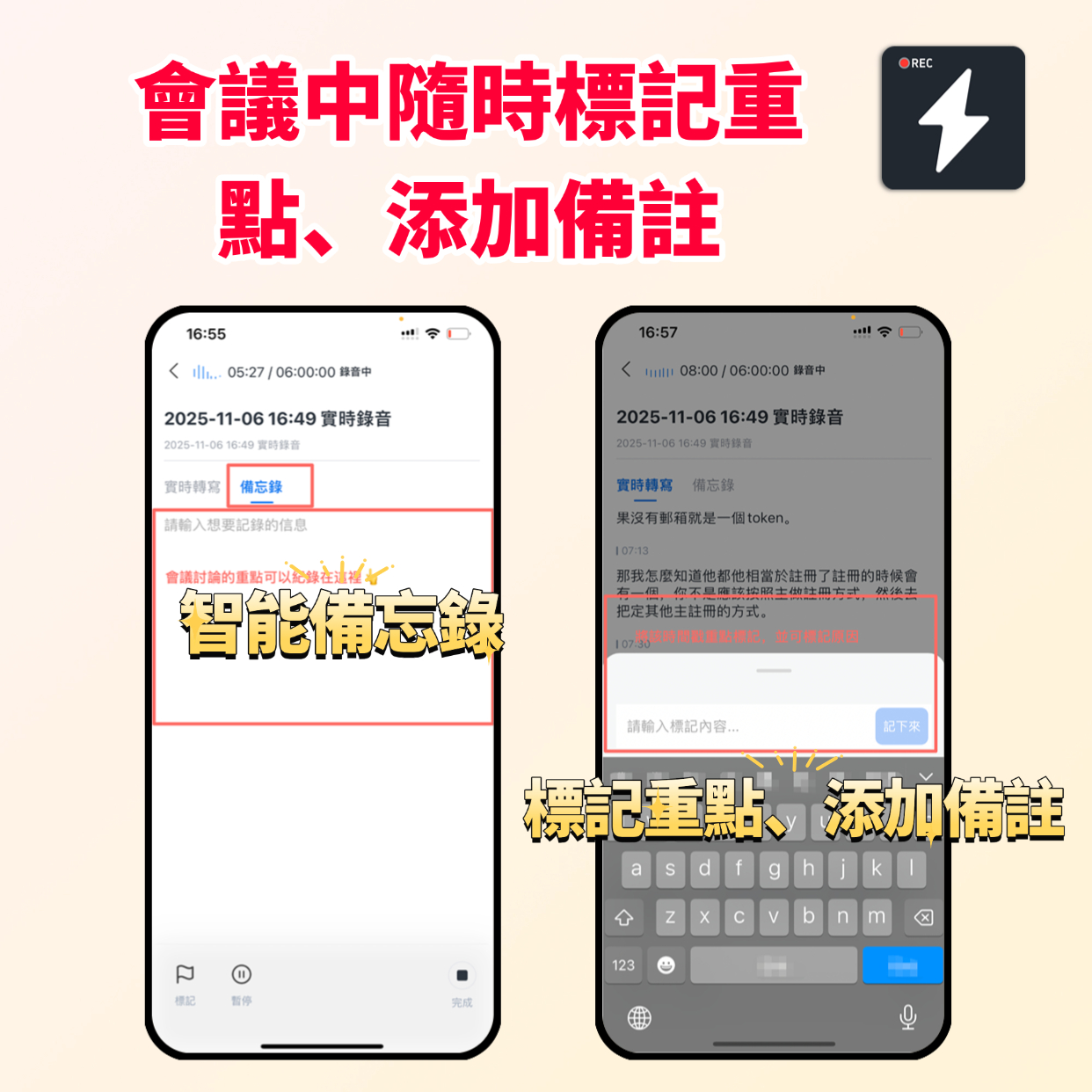
If you are a "visual thinker," GitMind offers unique value. It not only converts speech to text but also structures the content into mind maps.
- Pros: Automatically generates mind maps from audio-to-text, helping clarify logical relationships; supports team collaboration and cloud storage; offers multiple templates.
- Cons: Learning curve slightly higher than general note-taking tools; free version has many limits; advanced features require payment.
- Use cases: Project planning, brainstorming meetings, complex course note organization.
4. Descript: Editing Tool for Content Creators
Descript breaks traditional audio editing logic—it lets you edit audio like editing a document.
- Pros: Deleting text deletes the corresponding audio segment, greatly simplifying podcast and video editing; automatic subtitle generation with high accuracy; supports multi-user collaboration.
- Cons: Main strength is editing rather than pure transcription; higher price; too feature-heavy for plain note-taking users.
- Use cases: Podcast production, YouTube subtitle generation, content creators.
5. Otter.ai: Classic Choice for English Meetings
- Pros: Extremely high English recognition rate; deep integration with Zoom/Teams; powerful real-time speaker identification.
- Cons: Poor Chinese support; not recommended as primary Chinese transcription tool; free tier limited.
- Use cases: All-English meetings, foreign client interviews, English learners.
6. Trint: Professional Tool for News Media
- Pros: High accuracy, especially optimized for professional terminology; supports multi-user collaboration and advanced editing; suitable for high-quality interview audio.
- Cons: Expensive (starting at $48/month); mainly for enterprises or professional media organizations.
- Use cases: Journalist interview sorting, professional document processing, large team projects.
7. Sonix: Automated Translation and Multilingual Expert
- Pros: Supports automatic translation, ideal for scenarios needing Chinese transcription translated into other languages; robust cloud collaboration features.
- Cons: Billed per hour, cost increases with audio length; free trial has many restrictions.
- Use cases: Cross-border company meetings, multilingual academic research, professional document archiving.
8. Rev: Accuracy Ceiling with Human Proofreading
- Pros: Offers "AI + human" proofreading service with accuracy close to 100%; fast turnaround (about 12 hours).
- Cons: Extremely expensive (starting at $1.25 per minute); not real-time, requires waiting for human processing.
- Use cases: Legal litigation records, publication-grade transcripts, scenarios demanding ultimate accuracy.
9. Happy Scribe: Simple and Easy European Star
- Pros: Clean, intuitive interface; supports multiple export formats (SRT, TXT, PDF); suitable for small businesses or individual users.
- Cons: Accuracy drops in high background noise or strong accents; free version has time limits.
- Use cases: Daily notes, small team meetings, multilingual short audio transcription.
10. Google Voice Typing / SpeechTexter: Free Lightweight Solutions
- Pros: Completely free; no additional software required (Google built-in); supports many languages.
- Cons: Basic features, no editing, summary, or management capabilities; relies on internet connection; cannot handle long audio uploads.
- Use cases: Temporary idea capture, short dictated letters, zero-budget light users.
Frequently Asked Questions (FAQ)
Q1: How to improve voice-to-text accuracy? Regardless of the tool, audio quality is key. Use an external microphone or record in a quiet environment. If using a phone, get as close to the sound source as possible. Also, choosing a tool optimized for that language (e.g., Tinrec or Notta for Chinese, not Otter) can significantly improve results.
Q2: What is the biggest difference between free and paid tools? Free tools usually limit transcription duration, language variety, or lack AI-assisted features (like summaries, speaker identification). Paid tools offer higher accuracy, data security, team collaboration, and more efficient post-processing (like AI queries, action item extraction).
Q3: How to choose between Tinrec and Otter.ai? If your meetings or content are primarily in English and you deeply use Zoom/Google Meet, Otter.ai is a good choice. However, if your scenarios involve Chinese, Taiwanese, or Cantonese, or you need to quickly extract "action items" from recordings and retrieve content via AI conversation, Tinrec offers a more complete and localized experience.
Summary: Choose the Right Tool to Make Voice an Asset
The core value of voice-to-text tools is not "converting voice to text" but "reducing the cost of information acquisition." From Otter.ai's English strength to Notta's multilingual balance, to Tinrec's emphasis on "AI conversation queries" and "action item extraction," each tool has its specific niche.
For Chinese users, the first step to abandoning "manual transcription" is to choose a partner that truly understands your language and helps you organize key points. Start with a free trial, observe which tool best fits into your workflow, and achieve a real efficiency leap.
Turn every recording into actionable outcomes
Get 60 free transcription minutes when you sign in. No credit card required.
Related Reading
You might also like

2026 Audio-to-Text Comparison: Tinrec vs Otter.ai for Chinese Meetings & Team Knowledge
How to choose an audio-to-text tool in 2026? This article compares Tinrec and Otter.ai across 5 dimensions: Chinese meeting transcription, bot-free online meeting capture, audio file organization, post-meeting workflows, and team data governance. Based on public features and pricing, it helps you decide which is better suited for meeting notes needs in Taiwan.

How to Choose an Online Audio-to-Text Tool in 2026: 5 Steps to Pick the Right One and Get a Transcript
How do you choose an online audio-to-text tool? This article reviews 6 online options—Tinrec, MyEdit, cSubtitle, CyberLink, Yating Transcript, and Monica—comparing free quotas, Chinese recognition, export formats, and team collaboration. It also walks you through 5 steps to turn an audio file into a transcript.

2024 Review of 4 Audio-to-Text Tools: Which Saves the Most Time on Chinese Meeting Transcripts and AI Summaries?
The 2024 audio-to-text comparison isn't just about transcription speed—it's about whether the tool can organize your meeting notes afterward. Based on real meetings and interviews, this review compares Tinrec, Notta, Granola, and PLAUD on audio sources, transcripts, AI summaries, action items, team collaboration, and pricing limits to help you choose the right tool.

4 Free Online Audio-to-Text Tools Compared (2026): Which Offers the Best Free Tier and Chinese Recognition?
A comparison of Tinrec, MyEdit, cSubtitle, and Monica's free online audio-to-text offerings, covering free quotas, Chinese recognition, export formats, and post-meeting AI organization to help you decide which suits meetings, interviews, and subtitles.

4 Free AI Audio-to-Text Tools Tested: Which Free Tier Is Enough in 2026?
There are many free AI audio-to-text tools, but free quotas, single-recording length limits, Chinese recognition, and post-meeting organization capabilities vary widely. This article compares the free plans and use cases of 4 tools, using Tinrec's no-bot recording, AI Q&A, and team spaces as selection references.

2026 Comparison of 2 Online Audio-to-Text Tools: Tinrec vs Otter.ai — Which Is Better for Chinese Meetings?
Starting from common misconceptions, this comparison examines Tinrec and Otter.ai in Chinese meetings, bot-free recording, post-meeting organization, real-time translation, and team data retention to help you decide which online audio-to-text tool fits your daily work.

2026 Comparison of 2 Audio-to-Text Platforms: Free Tiers, Chinese Recognition, and Post-Meeting Organization at a Glance
A side-by-side comparison of Tinrec and Notta across free tiers, Chinese recognition, online meeting recording, post-meeting organization, and team collaboration, helping you decide whether the free version is enough and when to upgrade.

iPhone Voice Memos vs Tinrec in 2026: 5-Dimension Comparison — Is Free Transcription Enough?
iPhone's built-in Voice Memos can now transcribe recordings for free, so do you still need a separate tool? This article compares iPhone's built-in features with Tinrec across 5 practical dimensions and honestly explains where the free limits are, helping you decide which approach fits your meeting volume.

4 Free Audio-to-Text Tools Tested for 2026: Which Free Tier Is Actually Enough?
There are plenty of free audio-to-text tools, but few can handle a full meeting. This hands-on comparison tests the free plans of Tinrec, Otter.ai, Notta, and TurboScribe—breaking down how limits are calculated, transcript post-processing, audio retention, and team collaboration—to help you decide which free version is truly usable.