
Turn recordings into transcripts and summaries in minutes
Upload audio or video for multilingual transcription, AI notes, and action items
According to statistics, executives spend an astonishing average of 23 hours per week in meetings, but human attention typically only lasts 10 to 18 minutes. This means that during long remote meetings, it's easy to miss key decisions or details. Have you ever felt anxious after a Teams or Google Meet session, facing fragmented notes?
Modern "AI meeting note tools" are no longer just simple recorders; they can transcribe in real time, differentiate speakers, and even automatically generate meeting summaries and to-do items. This article provides an in-depth comparison of mainstream solutions and offers a detailed buying guide and practical tutorials.
Quick Navigation Conclusions:
- If you prioritize English meetings and ecosystem integration: Consider Otter.ai or Fireflies.ai first.
- If you value Chinese/multilingual recognition and "conversational query": Consider Notta or Tinrec (MiaoTing).
- If you have a tight budget and infrequent meetings: Check out free tiers (e.g., Fathom or Tinrec free plan).
Why You Need AI-Powered Meeting Recording Solutions?
Before choosing a tool, you must understand the difference between "recording" and "AI note-taking." Traditional recordings are "cold data"—re-listening to an hour of audio takes an hour. AI tools turn voice into "searchable, actionable hot data."
According to a Harvard Business Review analytics report, an excellent AI meeting assistant should have the following traits:
- Accurate transcription: Not just dictation, but also speaker diarization.
- Automatic summary and action item extraction: The software should automatically organize "who needs to do what by when," not just a wall of text.
- Security and compliance: Meeting content involves business secrets; tools must have encryption or comply with GDPR.
- Seamless integration: Auto-join Zoom, Teams, or Meet meetings to reduce friction.
2026 Top 5 Real-Time Meeting Transcription Tools Compared
Below, we analyze five noteworthy tools based on market popularity and feature completeness.
1. Notta: A Multilingual Powerhouse
Notta is known for high accuracy, especially suitable for cross-border teams.
- Core features: Supports 58 languages, with bilingual translation in 11 languages. Calendar integration allows its bot to auto-join meetings.
- Pros: High transcription accuracy (claimed up to 98.86% under ideal conditions), supports multiple export formats (DOCX, PDF, SRT).
- Cons: Free version has restrictions (3-minute limit per recording), accuracy drops in noisy environments.
2. Otter.ai: Veteran Choice for English Meetings
Otter is a leader in the US market, focusing on English real-time transcription and collaboration.
- Core features: OtterPilot auto-joins Zoom/Teams meetings and captures presentation slides (Slide Capture) into notes.
- Pros: Excellent English recognition, powerful keyword search, smooth web and app experience.
- Cons: Weak support for Chinese and other languages; free version limits uploaded pre-recorded files.
3. Tinrec (MiaoTing): From Recording to Action in a Complete Workflow
Tinrec is designed not just to save recordings but to emphasize "understanding and action." It integrates an AI conversational query feature, allowing users to extract key points via Q&A.
- Core features: Supports iOS/Android/Web sync. Besides real-time transcription, it supports uploading audio files and YouTube/Podcast links to text. Its AI engine auto-generates structured meeting notes and action items.
- Pros:
- Multilingual advantage: Supports 10 languages including Chinese, Japanese, English, Korean, Cantonese, with optimized Asian language support.
- AI conversational query: A key differentiator—ask "What was the budget conclusion from this meeting?" without searching the transcript.
- Free tier: 100 minutes of free transcription per month, friendly for individuals.
- Best for: Office workers needing efficient meeting conclusions, students organizing lecture notes.

4. Fireflies.ai: Favorite for Heavy CRM Users
Fireflies.ai emphasizes integration with business systems, perfect for sales teams.
Stop organizing recordings by hand
Upload audio or video and automatically get a transcript, summary, and action items
- Core features: Strong integration ecosystem, connecting to 50+ apps like Salesforce, HubSpot, Slack. Offers sentiment analysis and talk-time statistics.
- Pros: High automation; automatically archives to CRM without manual intervention.
- Cons: Dense interface with a learning curve for beginners; free version only allows one meeting recording.
5. Fathom: High Value for Individual Users
Fathom emphasizes a "set and forget" minimalist experience.
- Core features: Generates AI summaries within 30 seconds after a meeting and allows quick sharing of clips to Slack.
- Pros: Generous free plan with unlimited recording time.
- Cons: Primarily designed for live video meetings; weak support for importing external files.
Feature Comparison Table
To help you decide quickly, here's a comparison across key dimensions:
| Dimension | Tinrec (MiaoTing) | Notta | Otter.ai | Fireflies.ai |
|---|---|---|---|---|
| Key Strength | AI conversational query, cross-device sync, video/link parsing | Multilingual translation, accuracy | English recognition, slide capture | CRM integration, sentiment analysis |
| Chinese Support | Excellent (incl. dialects/Cantonese) | Excellent | Weak | Average |
| Live Recording | Yes (App/Web) | Yes | Yes | Yes (Bot join) |
| AI Interactivity | High (Q&A) | Medium (summary focus) | Medium (chat assist) | Medium (search focus) |
| Input Sources | Recording, files, YouTube/URL | Recording, files | Recording, files | Meeting software integration |
| Free Plan | 100 mins/month | 120 mins/month (3-min limit per session) | 300 mins/month | Limited storage & usage |
Practical Tutorial: How to Complete a "Recording to Action" Workflow with AI Tools
After choosing a tool, integrating it into your daily workflow is key. Below we use Tinrec (with its intuitive interface) as an example to show how to turn a messy meeting into a clear action list.
Step 1: Start Live Recording or Import an Audio File
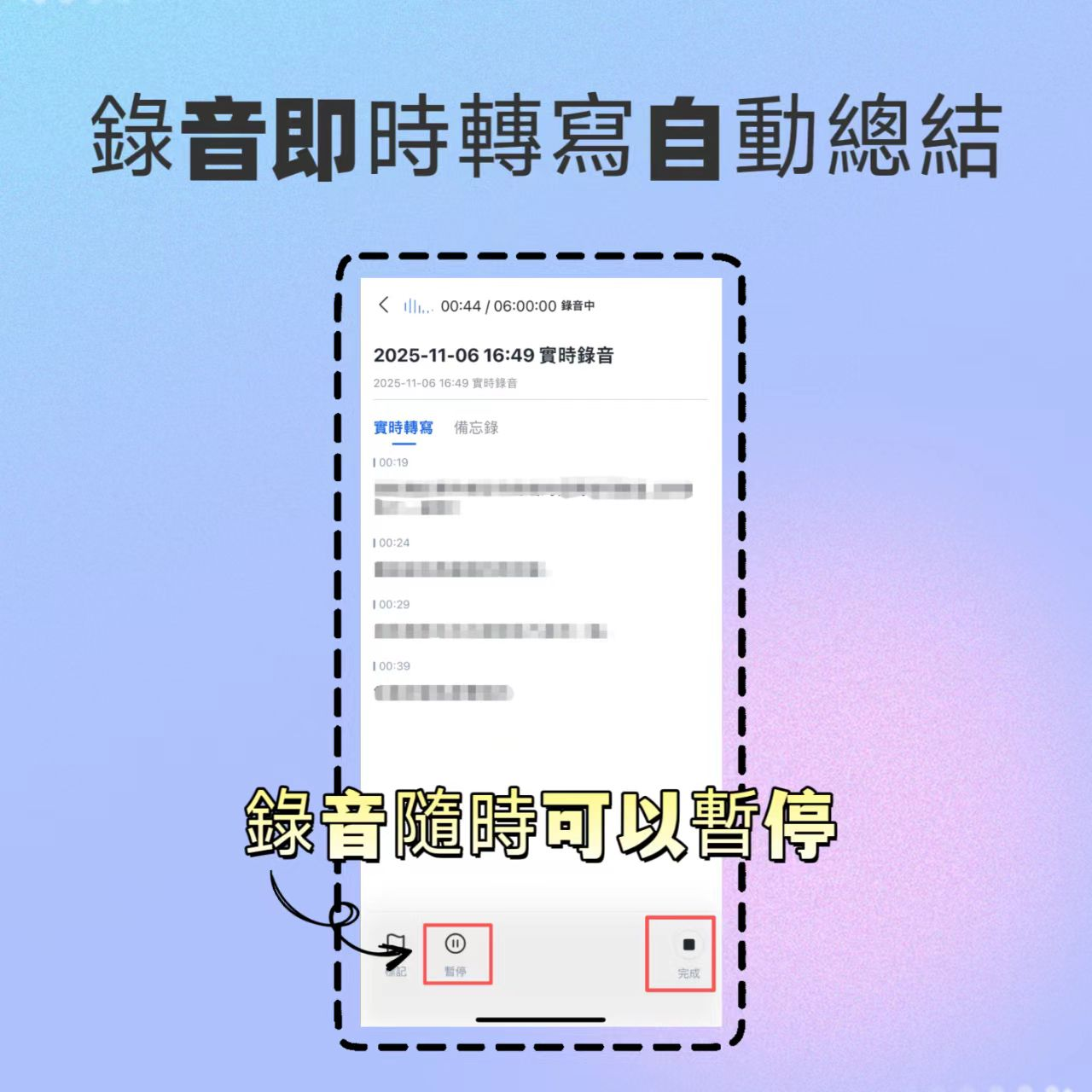
At the start of the meeting, log into the web version or open the app. If you are in person or using a phone, click "Record & Transcribe in Real Time"; if you have a pre-recorded file, choose "Audio File to Text."
- Entry guide: Record & Transcribe in Real Time
- Tips: Ensure clear microphone reception; for remote meetings, use internal recording on your computer or place your phone near the speaker.
Step 2: View Live Transcript with Speaker Labels
During recording, AI transcribes speech simultaneously. Tinrec uses voiceprint recognition to auto-label "Speaker 1," "Speaker 2"; you can manually rename them to actual names (e.g., PM, Engineer) for easy reference later.


Step 3: Use AI to Extract Action Items
After the meeting, this is the most important step. Instead of re-listening, click AI analysis. Tinrec automatically generates "Meeting Summary" and "Action Items," listing who needs to do what by when.

Step 4: Use AI Conversational Query for Missed Details
If the summary doesn't mention a detail (e.g., "What was the marketing budget?"), don't scroll through the transcript. Use Tinrec's "AI Conversational Query" feature—just type your question, and AI answers based on the recording content, saving significant time.
- Entry guide: AI Conversational Query

Frequently Asked Questions (FAQ)
Q1: Can these tools record Zoom, Google Meet, or Teams meetings? Most tools like Otter and Fireflies use a bot to join meetings and record. Tools like Tinrec support on-site recording via app or web by capturing audio from the device's speaker.
Q2: Can AI handle mixed Chinese-English (Chinglish) in meetings? This is a challenge. Multilingual tools like Notta and Tinrec generally perform better; select "auto-detect language" or the primary language in settings for higher accuracy.
Q3: Is transcription data secure? Enterprise users should pay attention. Most paid tools meet encryption standards. Choose services with cloud encryption and clear privacy policies. For extremely sensitive content, verify if they support on-premise processing or enterprise security plans.
Q4: Are there restrictions for iPhone users recording phone calls? Due to iOS privacy limits, third-party apps cannot background-record phone calls. Solutions: use speakerphone and record with another device, or use a dedicated hardware recorder. For VoIP meetings, using the desktop version is usually the most stable.
Q5: What are common free plan limits? Common limits include: monthly recording minutes (e.g., 100–300 minutes), per-session length limits, or inability to export certain formats. For students or light users, Tinrec's 100 minutes/month or Fathom's free plan are good starting points.
Q6: Can I transcribe YouTube videos directly? Yes. Some tools like Tinrec offer "Video Link to Text"—just paste the URL to generate a transcript and summary, perfect for online courses or competitor analysis.

Turn every recording into actionable outcomes
Get 60 free transcription minutes when you sign in. No credit card required.
Related Reading
You might also like

4 Meeting Transcription Tools Tested for 2026: From Notta to Tinrec, Which Saves More Time on Post-Client-Visit Follow-Up?
The follow-up begins the moment a client visit ends. This article starts with the three most common pitfalls of post-meeting follow-up, explains why pure transcription tools often fall short, and uses Tinrec as the main focus to compare meeting transcription tools on summaries, action items, AI Q&A, export, and team knowledge retention, with team plan pricing and an FAQ included.

Best Free Team Meeting Knowledge Base Tools in 2026: 5 Options Compared
A team meeting knowledge base isn't just about taking notes during a meeting—it's about being able to find, search, and build on that information three months later. Drawing from real student group experience, this article compares 5 common approaches, explains how Tinrec can help, and breaks down the free tiers and paid thresholds that students care about most.

4 Requirements Interview Tools Tested in 2026: How to Quickly Turn User Interviews into Requirements Documents
User interviews are the first step in creating a requirements document, but interview recordings, transcripts, and requirements organization often take time. This article uses Tinrec as an example to explain how to use an AI meeting notes tool to quickly turn interview content into transcripts, summaries, action items, and requirements documents, and it compiles 5 purchasing considerations and common questions.

6 Best Client Visit Note-Taking Tools in 2026: Which Saves the Most Time on Recording, Notes, and Follow-Up Emails?
After a client visit, organizing notes and writing follow-up emails often takes the most time. This article reviews 6 meeting note-taking tools for client visits, covering live recording, transcripts, AI summaries, action item extraction, post-meeting documents, and follow-up email material. It compares free vs. paid plans, Chinese language support, and team collaboration features to help you find the best fit for your workflow.

5 Meeting Action Plan Templates Tested and Compared for 2026: Which One Actually Tracks To-Dos to Completion?
The key to a meeting action plan template isn't how good it looks—it's whether to-dos are fully captured and tracked to completion. This article compares five templates in real-world tests: 1:1, project weekly, client call, stand-up, and manager review. It explains how Tinrec turns discussions into action lists with owners and due dates using live transcription, AI summaries, action item extraction, and AI Q&A, plus five buying considerations and FAQs.

Best AI Meeting Assistants for Business in 2026: 5 Solutions Compared, AI Note-Taking and Integration Are the Deciding Factors
How to choose an AI meeting assistant for your business in 2026? This article compares 5 common solutions—Google Workspace, Microsoft Teams, Virsical, Manus, and hardware integrators—across 5 dimensions: automated meeting notes, multilingual support, room booking, hardware integration, and security management. It also includes a must-ask checklist before purchase to help you find the best fit for your team.

4 Post-Meeting Deliverable Templates Tested and Compared in 2026: Which Saves the Most Time from Transcript to To-Do List?
The biggest fear after a meeting isn't missing a recording—it's that no one remembers who promised what. This article covers the 3 most common mistakes in post-meeting deliverables, the fields a practical template should have, and demonstrates how Tinrec automatically goes from transcript to summary, to-dos, and team knowledge retention, plus purchasing considerations and FAQs.

2026 AI Meeting Assistant Comparison: 4 Tools Tested — How Meeting Agents Differ from AI Assistants
What's the difference between a meeting agent and an AI meeting assistant? Starting from real meeting scenarios, this article breaks down 4 key buying factors and compares Tinrec, Otter.ai, Granola, and Notta on recording methods, post-meeting output, Chinese language support, and team collaboration — plus 3 common pitfalls to avoid when choosing a tool.

2026 Post-Meeting Deliverables Tools Free Plans Compared: 4 Options at a Glance
Compare the free plans of post-meeting deliverables tools including Tinrec, Notta, Otter, and Granola, with a focus on how Tinrec turns meeting content into actionable deliverables through bot-free recording, AI summaries, action item extraction, and team spaces.