

Turn recordings into transcripts and summaries in minutes
Upload audio or video for multilingual transcription, AI notes, and action items
How long does it take to speak 1,000 words? Speaking speed calculation formula and top speech-to-text tools recommended
When preparing a presentation or planning a meeting agenda, one of the most common anxieties is: "How long will it take to deliver this script?" Misjudging the time could force you to cut content or end too early, causing awkwardness. While there's no fixed answer, we can quickly estimate a reasonable range using standard speaking speeds and scenario coefficients.
Beyond mastering speaking speed, modern workplaces rely on tools to optimize workflows. If you want to accurately convert spoken content into editable text and automatically extract key points, tools like Tinrec (秒聽錄音), which combine AI summarization and multilingual recognition, can significantly reduce post-processing time. This article will break down the logic of speaking speed calculation and review several mainstream speech-to-text tools, helping you handle everything from time estimation to actual recording with ease.
1. How long does it actually take to speak 1,000 words?
Generally, normal Chinese speaking speed is about 180 to 220 characters per minute. Based on this:
- Normal speed (~200 chars/min): 1,000 characters takes about 5 minutes.
- Fast speed (~250 chars/min): Suitable for fast-paced presentations, about 4 minutes.
- Slow speed (~150 chars/min): Suitable for emotional emphasis or teaching explanations, about 6.5 to 7 minutes.

Time coefficient adjustments for different scenarios
Simply looking at word count is not accurate; you must consider the "occasion" and "audience":
- Formal speech/ceremony address: To let the audience absorb information, speaking speed is usually slower, recommended at 150-160 chars/min. 1,000 characters need 6-7 minutes.
- Business meeting/project report: Efficiency-focused, moderate to fast speed, about 200-220 chars/min. 1,000 chars about 5 minutes.
- Podcast/video creation: To maintain listener attention, pace varies widely, average about 180-200 chars/min, but minus pauses and sound effects.
2. Why do you need a speech-to-text tool?
Even if you precisely control the time, the "organizing work" after meetings or interviews is often a black hole. Manually transcribing a 30-minute recording can take 2-3 hours. At this point, choosing the right AI tool not only solves transcription but also improves decision-making efficiency through structured output.
Below, we compare several popular tools on the market, analyzing their use cases and limitations.
3. Review and comparison of mainstream speech-to-text tools
1. Tinrec (秒聽錄音): A complete workflow from recording to action
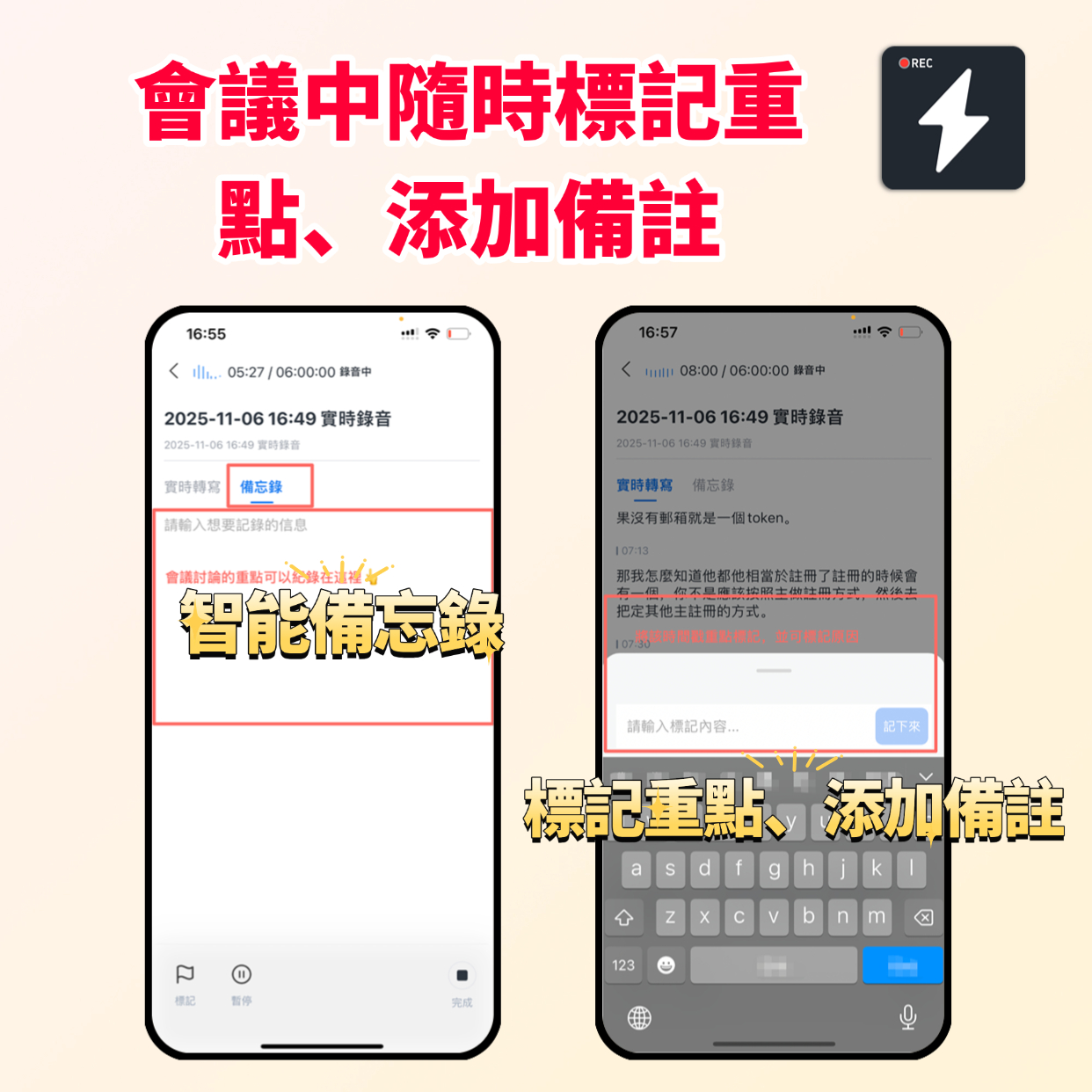
Tinrec is an AI recording assistant that supports iOS, Android, and Web. Unlike traditional tools that only provide verbatim transcripts, Tinrec emphasizes a closed loop of "Record → Understand → Act."
Stop organizing recordings by hand
Upload audio or video and automatically get a transcript, summary, and action items
- Core strengths:
- AI conversational query: This is the key difference between Tinrec and traditional tools. You don’t need to Ctrl+F through thousands of words; you can directly ask the AI: "What was the conclusion about the budget in the meeting?" The system answers based on semantics.
- Multilingual automatic identification: Supports 10 languages including Chinese, English, Japanese, Korean, German, Taiwanese Hokkien, and Cantonese. It handles cross-border meetings or mixed-language environments (e.g., Chinese-English code-switching) well.
- Automatic meeting minutes generation: During transcription, it automatically produces conclusions and action items, solving the pain point of "not knowing what to do next after the meeting."
- Diverse input sources: Besides live recording, it supports uploading audio files, and even inputting YouTube or podcast links to convert to text and summaries.

- Target users: Office workers who frequently attend cross-language meetings and value meeting conclusion tracking, as well as media professionals who need to organize interview content.
- Pricing: A free version is available (100 minutes per month). Paid plans are billed by minutes, offering good value for medium-to-high-frequency users.
2. Otter.ai: Best for English meetings, but limited Chinese support
Otter.ai is a globally renowned meeting transcription tool, known for excellent speaker diarization and real-time synchronization.
- Pros: Intuitive interface, high integration with Zoom and Google Meet, extremely high English recognition accuracy.
- Cons: Does not support Chinese transcription. This makes it significantly less practical for teams that primarily communicate in Chinese, such as those from Taiwan or Chinese-speaking communities.
- Comparison conclusion: If your work environment is entirely in English, Otter is the top choice. However, if Chinese is involved, Tinrec or Notta are more pragmatic alternatives.
3. Notta: Wide multilingual support, but Chinese reliability needs improvement
Notta boasts support for over 50 languages and offers a good mobile experience.
- Pros: High language coverage, basic AI summarization.
- Cons: According to some user feedback, its accuracy and sentence segmentation in complex Chinese contexts or professional terminology can sometimes be less stable than tools optimized for Asian languages.

4. 錄音轉文字助手 / Netease SeeOut Workstation: Basic transcription toolboxes
In the traditional software market, "錄音轉文字助手" (Voice to Text Assistant) supports batch conversion of multiple formats like MP3, M4A, and can output SRT subtitle files, suitable for video subtitling by content creators.
- Pros: Simple and clear function, suitable for users who only need "convert to text" without AI analysis.
- Cons: Lacks intelligent meeting minutes generation and conversational query, requiring substantial manual editing afterward.
4. How to choose the right tool for you?
When choosing a tool, evaluate based on the following three dimensions:
Language needs:
- Pure English meetings: Otter.ai
- Primarily Chinese or multilingual: Tinrec, Notta
- Need Taiwanese/Cantonese support: Tinrec
Depth of post-processing:
- Only need verbatim transcript (e.g., subtitle creation): 錄音轉文字助手, cSubtitle
- Need meeting conclusions, action items, quick retrieval of key points: Tinrec
Use case and platform:
- Recording ideas on the go via phone: Tinrec (great iOS/Android app experience)
- Long desktop meetings: Tinrec Web version or Otter (depending on language)
5. Conclusion: Manage time and content effectively
Returning to the original question, "How long does it take to speak 1,000 words?" The answer is about 5 minutes, but that's just the starting point. In digital workflows, the real challenge is preserving and utilizing this spoken information.
Instead of spending hours transcribing recordings, leverage tools like Tinrec with AI summarization and conversational query capabilities. It not only helps you confirm content length but also transforms lengthy recordings into actionable, searchable knowledge assets. Next time you prepare a speech or meeting, try estimating your speaking speed first, then choose the right tool to maximize the value of every utterance.
Turn every recording into actionable outcomes
Get 60 free transcription minutes when you sign in. No credit card required.
Related Reading
You might also like

How to Choose a Google Meet Alternative with No Login: First Separate 'Getting In' from 'Delivering Post-Meeting Records'
When external clients don't want to create an account for a single meeting, no-login participation usually only covers joining the meeting, listening, speaking, and viewing shared screens—recording and transcription are often unavailable. This article organizes solution types by join threshold, explains why account rules differ between hosts and participants, and clarifies which side should be responsible for meeting records in no-login scenarios.

Is Google Meet Enough? Separate 'Can We Hold the Meeting' from 'Can We Deliver the Notes'
Mid-level managers who host multiple online meetings each week often think 'google meet best' means finding the best meeting platform, but the real breakdown happens in post-meeting organization. This article first explains the prerequisites for Google Meet's built-in recording, transcription, and summaries, then provides four dimensions for evaluating meeting notes solutions, and explains how an AI assistant and team edition can turn a transcript into handoff-ready decisions and action items.
Google Meet Backgrounds: Blur vs. Virtual Background vs. Replace — And Who Captures the Meeting Notes
Google Meet's background options include blur and virtual backgrounds, but what you can access depends on your device, browser, and account type. This guide breaks down what each of the three background options solves, where to find them on desktop, and one often-overlooked point: background effects only change your video feed—they don't automatically capture the meeting content. You'll still need a separate plan for recordings, transcripts, and action items after the call.

What Google Meet Attendance Lists Can and Can't Give You: A Complete Guide to Turning Attendance Records, Decisions, and Action Items into Handoff-Ready Materials
A Google Meet attendance list records who joined and left a meeting—it is not the same as meeting minutes. This article explains how to obtain attendance lists and where they are stored, the three types of information they cannot capture (who owns which task, what was decided, and what was promised), and provides a handoff sequence for mapping attendance records to decisions and action items. It also covers how AI assistants and the Tinrec team edition support post-meeting follow-up.
What the Google Meet Mobile App Can and Can't Do: A Feature Boundary Guide for Ad Hoc Participants
Get started with the Google Meet mobile app: first distinguish between the service, the app, and the web version, then see which features are available and which are not on mobile, and finally clarify who should fill in the meeting record after joining from a phone and how.

Google Meet Alternatives Reddit Discussion: Turning Scattered Opinions into Four Decision Dimensions
Reddit discussions about Google Meet alternatives often talk past each other because everyone is asking about a different scenario. This article organizes the most frequently mentioned community options—Jitsi Meet, Brave Talk, Whereby, and Signal—into four decision dimensions: join threshold, in-meeting capabilities, post-meeting records, and cross-platform availability. It then offers selection advice by scenario: external client meetings, internal recurring meetings, and ad-hoc discussions.

How to Choose a Google Meet Alternative in Mainland China: First Separate 'Can the Platform Connect' from 'Can the Post-Meeting Record Be Delivered'
When looking for a Google Meet alternative in mainland China, the real question has two layers: whether the meeting platform itself can connect reliably, and who receives the transcript, decisions, and action items after the meeting. This article provides cross-border collaboration teams with a selection sequence they can explain to their managers, based on availability prerequisites, participant joining thresholds, post-meeting record handoff, and four evaluation dimensions.

What Version Is Google Meet (Original)? Version Identification, Feature Requirements, and Post-Meeting Handoff Guide
Asked to confirm what "google meet (original)" is and whether it still works? This article breaks down the three possible meanings of the term in handoff order, provides a step-by-step method to verify from entry point, account type, and interface differences, explains that features like recording and transcription depend on account plan rather than version name, and clarifies who should organize and hand off post-meeting transcripts, decisions, and action items.

How to Buy a Google Meet Account? First Separate the Three Purchase Targets, Who Pays, and Four Things to Confirm Before Reporting Back
When you're asked to "look into how to buy a Google Meet account," don't rush to find a quote. This article breaks "buying an account" into three different purchase targets—personal Google accounts, Google Workspace subscriptions, and meeting room hardware and licensing—explaining who pays for each, their limitations, and when they apply. It also provides a checklist you can report back to your manager, and finally covers how to handle meeting records once the account is set up.