

Turn recordings into transcripts and summaries in minutes
Upload audio or video for multilingual transcription, AI notes, and action items
Two hours in a meeting, two more hours taking notes?
Choosing between Google Meet and Zoom, most people first look at price. But honestly, whichever you use, the real pain starts after the meeting ends—how do you get a transcript? Who remembers the key points? Who follows up on action items? And don't even get me started on meetings mixing English jargon and people talking over each other.
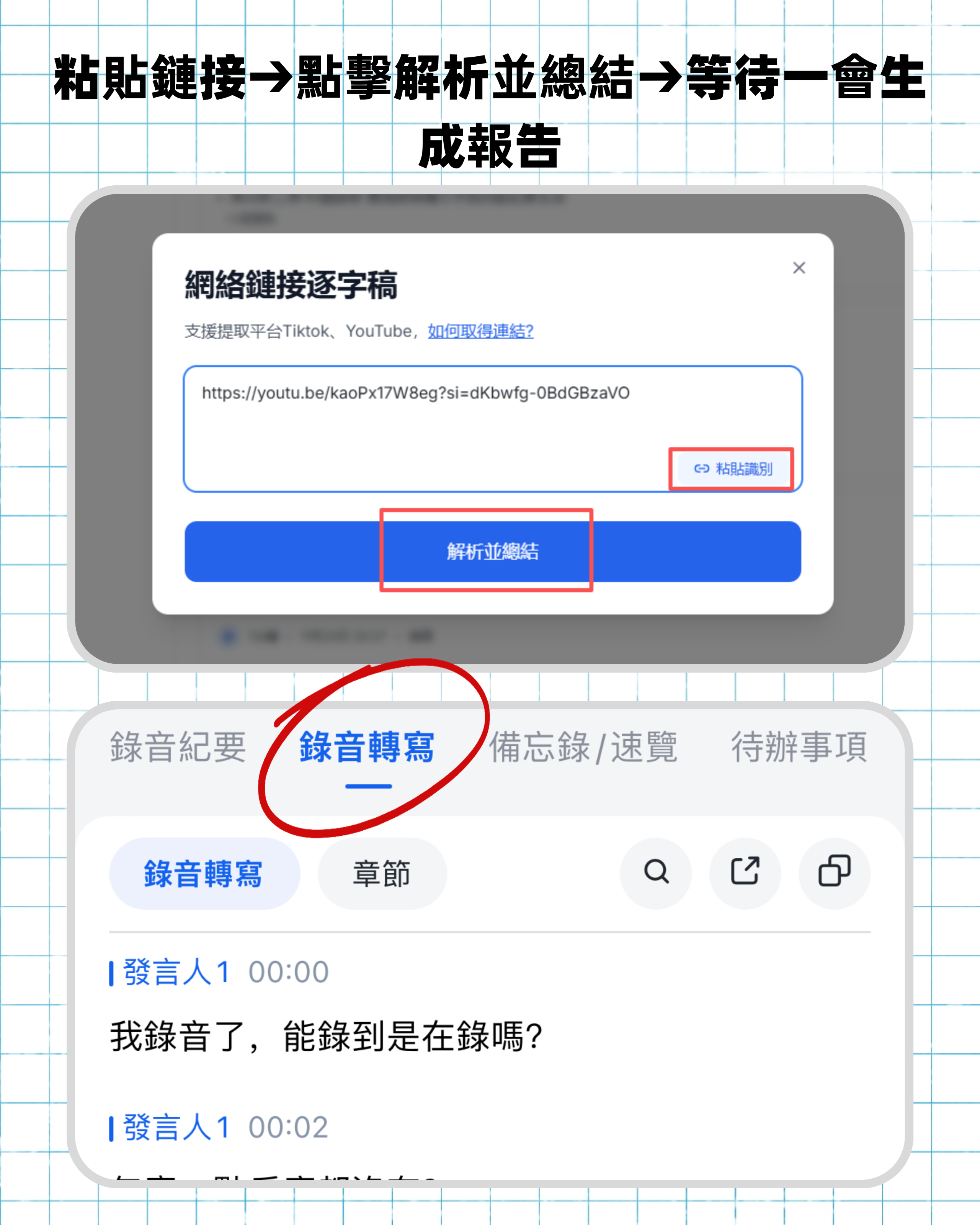
If you're tired of replaying recordings and manually jotting down notes, this article will solve both problems at once: first, compare the costs and limitations of Meet and Zoom, then show you how to use one tool to automatically turn any meeting content into clear, organized data.
Don't rush to compare prices—first understand these 3 key factors for choosing a meeting minutes solution
Many people think "I'll just use the video software's built-in recording feature," only to find out later:
Transcription accuracy isn't just about marketing numbers. Official high accuracy claims are usually tested in a quiet studio. In a real office with AC, keyboards, paper rustling, and network latency, actual accuracy varies a lot. Our hands-on tests later will use real meeting clips to show the difference.
"Recording" and "extracting key points" are two different things. A recording is like a raw piece of meat—you have to cut and season it yourself. What really saves time is getting a transcript with auto-generated chapters, action items, and even the ability to ask "Who said we need to change the budget?" just like asking a colleague.
Cross-platform and export capabilities determine how smooth your workflow is. What if you start a meeting on your laptop but want to view the transcript on your phone? Or paste the summary into Notion or Google Docs? If the tool is locked to one device or format, the organizational cost quietly adds up.
Tinrec—get transcript, highlights, and action items right after the meeting
Tinrec (Instant Voice Recording) is not a video conferencing tool; it's an AI-powered recording and audio/video organizer focused on "post-meeting organization." Whether you use Google Meet, Zoom, Teams, or even in-person meetings, Tinrec turns audio into searchable, queryable, and reusable data.
Real-time transcription during the meeting, ready when it ends. When on a Google Meet call, open Tinrec's computer meeting recorder—it automatically captures system audio and transcribes on the fly. Works the same with Zoom, no extra setup. Once the meeting ends, the transcript is instantly synced across your phone, computer, and web.
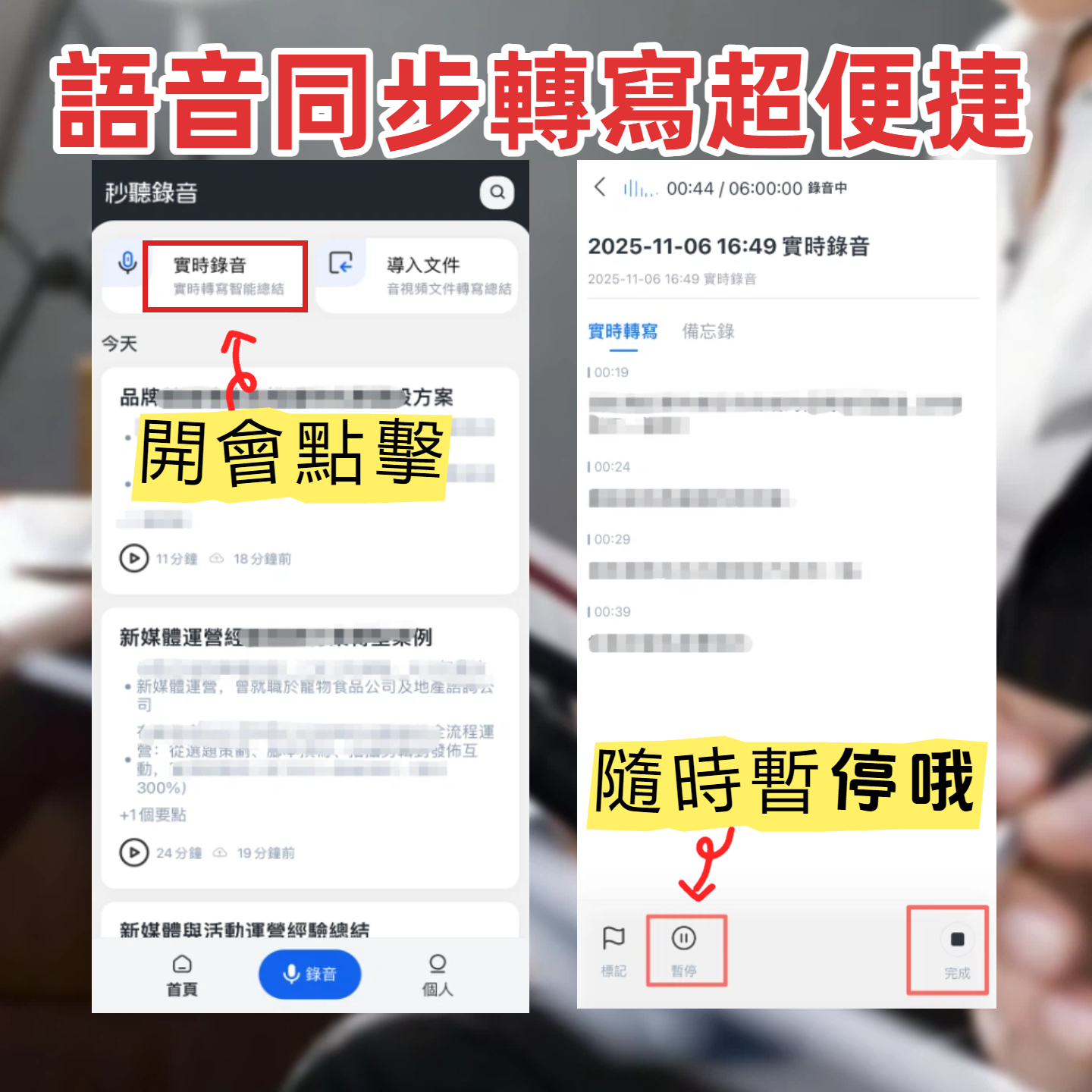
AI automatically generates summaries, chapters, and action items. While you're reviewing the transcript, Tinrec has already produced a three-part summary, divided the discussion into topic sections, and listed who needs to do what and by when. This is far more powerful than most built-in recording features in video tools.
Find key points by asking, just like asking a colleague. Someone mentioned "Q3 budget" in last week's meeting. Just ask Tinrec: "Who mentioned the Q3 budget last time?" It will directly tell you the answer, not just show keyword search results. This feature is nearly unheard of in tools at this price point.
Stop organizing recordings by hand
Upload audio or video and automatically get a transcript, summary, and action items
Pros summary:
- Cross-platform (iOS, Android, web), seamlessly pick up a meeting across devices.
- Beyond meetings, supports uploading audio files and pasting video links (YouTube, Xiaohongshu, etc.), so one tool handles all "listen-to-text" scenarios.
- Free plan offers basic transcription credits each month—enough for most people with 2-3 meetings per week. Try it before committing.
Limitations to note: To get full AI summaries and Q&A features, you need to upgrade to the Pro plan; free plan stops transcription after credit runs out. Heavy meeting users might consider a monthly or annual plan.
Who is it for? If you have regular meetings every week and need quick output of notes and action items, without wanting to switch between Meet and Zoom for recording features, Tinrec is currently the most integrated and polished solution.
Can you rely on Google Meet or Zoom's built-in features? (Besides Tinrec)
Google Meet built-in transcription & recording Google Meet's paid plans (Google Workspace) offer live captions and recording, but caption accuracy in Chinese varies significantly, and recordings need manual playback. It has no auto-summary or action item extraction. Suitable if you only need occasional captions and don't require post-meeting organization. Note that Meet's recording and captions work fully only on the desktop Chrome browser with specific plans—cross-platform experience is limited.
Zoom built-in transcription & AI summary Zoom's paid plans (Pro, Business) include cloud recording and audio-to-text, and recently added AI summaries. However, Chinese transcription accuracy still lags behind specialized tools, and AI summaries are English-only. Best for teams already heavily using Zoom with mostly English meetings. If you need mixed Chinese-English or want to query meeting details afterward, only Tinrec offers conversational Q&A.
Quick reminder: Free plans for both Meet and Zoom have limited meeting recording features—Meet's free plan doesn't even offer cloud recording, so post-meeting organization is purely manual.
Pitfall guide: The 3 most common mistakes when choosing a meeting minutes solution
Pitfall 1: Assuming recording is enough. A recording is like a book without a table of contents—finding one sentence means listening from start to finish. The efficient way: use a tool that gives you a searchable, queryable transcript. Like Tinrec, where you can ask "What was the conclusion?" right after recording. That's the efficiency modern professionals need.
Pitfall 2: Only looking at the video software's price tag, missing hidden costs. Many people choose a free plan to save a few dollars a month, then spend hours organizing notes afterward—when you calculate your hourly rate, that's more expensive than a subscription. First estimate how much time you spend on meeting notes each month, then decide between manual work or a tool.
Pitfall 3: Ignoring how you'll use the data later. Notes aren't just for storage. If you need to put meeting outcomes into a report, post to Slack, or save to Notion, check whether the tool can export to TXT, Word, PDF, or even sync directly to other services. Besides basic formats, Tinrec supports export to Notion, Google Docs, etc., pushing meeting results straight into your workflow.
Summary: How to choose between Google Meet and Zoom? And who handles the meeting minutes?
First, the video tools themselves:
- Simple one-on-one calls, near-zero cost → Google Meet free plan is enough.
- Frequent multi-person meetings over 40 minutes, need breakout rooms → Zoom Pro offers better stability.
- Company already uses Google Workspace → Meet integrates well; using Microsoft 365 → Teams might be smoother.
But whichever you choose, Tinrec seamlessly handles post-meeting organization:
- Want a summary with action items within 3 minutes after the meeting? → Just record with Tinrec—works with any video tool.
- Need to find the conclusion from a meeting six months ago? → Ask Tinrec and it surfaces the answer.
- Want to turn meeting content into a document, spreadsheet, or continue editing? → One-click export, no copy-pasting.
We recommend starting with Tinrec's free plan. Next time you're on a Meet or Zoom call, record it and see how the auto-generated summary and action items save you time. If it works for you, upgrade—no need to commit upfront.
Turn every recording into actionable outcomes
Get 60 free transcription minutes when you sign in. No credit card required.
Related Reading
You might also like

Best Free AI Meeting Notes Tools in 2026: 4 Options Compared
Spending two hours after a meeting to organize transcripts? This article compares 4 free AI meeting tools: whether the free tier is truly usable, if there's a per-meeting length limit, whether recordings are kept, and if you can ask the AI questions afterward. It also tests Tinrec's desktop version for recording online meetings without a bot, including its limitations.

2026 AI Meeting Tools Compared: Tinrec, Otter.ai, Notta & Granola — From Transcripts to Team Collaboration
A side-by-side comparison of four AI meeting productivity tools in 2026. This article examines how meetings are recorded, what you get after the meeting, whether audio files are retained, and how teams manage data. It compares Tinrec, Otter.ai, Notta, and Granola on positioning, pricing, and limitations, and highlights four common pitfalls when choosing an AI meeting tool to help you find the one that truly saves time.
How to Use AI Agents to Generate Documents in 2026: 5 Steps from Recording to Report
Many people use AI agents to generate documents but end up with vague templates—often because the AI lacks meeting context. This article walks you through 5 steps, starting from meeting recordings, using Tinrec's transcripts, summaries, action items, and agent post-processing to produce deliverable meeting minutes, reports, and tables. It also covers key purchasing considerations, team plan benefits, and FAQs.

5 AI Meeting Transcription Tools Compared for 2026: From Free to Team Plans, Which One Best Boosts Meeting Efficiency?
Instead of just looking at transcription minutes, first assess recording method, Chinese language support, post-meeting organization, team governance, and budget. This article compares common AI meeting solutions across five decision factors and uses Tinrec as an example to show how to turn meetings into searchable, collaborative, and actionable data.

Tinrec vs Otter.ai 2026: 4-Dimension Comparison — Which AI Agent Structured Output Is More Practical?
When AI Agent responses don't match your expected format, many teams only discover the pain after deployment. This article examines four dimensions — JSON Mode, JSON Schema, Function Calling, and observability — to explain how to evaluate structured output, and compares Tinrec and Otter.ai on structuring meeting content. Includes pitfalls to avoid and scenario-based selection advice.

Tinrec vs Notta 2026: 5-Dimension Comparison — Which Handles End-to-End Meeting Processing Better?
The value of an AI Agent isn't just having an 'AI button' — it's whether it can take a meeting from recording to transcript, summary, and action items all the way to deliverable documents. This article compares Tinrec and Notta across 5 dimensions, breaking down processing chain completeness, follow-up Q&A and verification, team governance, language support, and actual cost to help you make a purchasing decision.

2026 AI Meeting Assistant Comparison: Why Tinrec May Fit Chinese Meetings Better Than Fireflies
Starting from the pain point of rushing to write meeting minutes after a meeting ends, this compares Tinrec and Fireflies on meeting capture, Chinese-language experience, post-meeting workflows, team governance, and pricing/quotas, and summarizes Tinrec's core features, real-world scenarios, and buying considerations.

2026 AI Meeting Recorder Showdown: Tinrec vs Granola — Which Is Better for Chinese-Speaking Teams?
This comparison of Tinrec and Granola, two bot-free AI meeting note tools, covers meeting capture, input sources, audio retention, Chinese-language experience, post-meeting outputs, and team management. It outlines each tool's ideal use cases and pricing to help you decide which fits your meeting workflow.

2026 AI Meeting Productivity Tools Buyer's Guide: 4 Hands-On Tests and Selection Advice
How do you choose an AI meeting tool? This guide examines four key criteria—meeting capture method, post-meeting outputs, Chinese-language experience, and team data governance—and hands-on tests Tinrec, Otter.ai, Notta, and Granola to compare their differences. It also includes a pitfalls guide and scenario-based selection advice to help you pick the one tool you'll actually use after meetings.