

Turn recordings into transcripts and summaries in minutes
Upload audio or video for multilingual transcription, AI notes, and action items
Two Hours in a Meeting, Two More Hours Transcribing—You Need a Solution
Many office workers and students in Hong Kong or Guangdong have had this experience: you record a Cantonese meeting or class with a recorder or phone, and later, when you need to turn it into text, it's time-consuming and painful.
What's worse, many voice-to-text tools on the market only support Mandarin and English, and they stumble when it comes to Cantonese. Even if you find one that supports Cantonese, the free version either limits you to a few minutes or has disappointingly poor accuracy.
If you've run into these issues, this article is for you. Based on my hands-on experience, I'll compare three tools in terms of free plans, Cantonese recognition, and post-processing capabilities to help you find a truly adequate option.
Before Choosing a Cantonese Voice-to-Text Tool, Understand These 3 Key Points
First: Free allowances aren't about having the most minutes; it's about having "enough." Some tools offer 300 free minutes but only support English; others give you 120 minutes but do a great job with Cantonese. Think about how much you'll record each month. If you only occasionally transcribe a meeting or class recording, 100–200 minutes is plenty.
Second: How much time will you spend organizing the text after transcription? A transcript is just the first step. The real time sink is extracting key points, action items, or conclusions. Some tools stop at transcription, leaving you to sift through everything manually; others automatically generate summaries, chapters, and even let you ask questions about the recording in a Q&A format. The latter is what truly saves you time.
Third: What's your recording source? Is it a live meeting, a phone recording, or a YouTube video? Most tools only accept file uploads; a few let you paste a video link and transcribe directly. If you often work with online videos, this feature is crucial.
Based on these three points, I compared Tinrec, Otter, and Notta to see which one is most worth using under its free plan.
Tinrec (秒听录音)—Our Top Pick After Testing
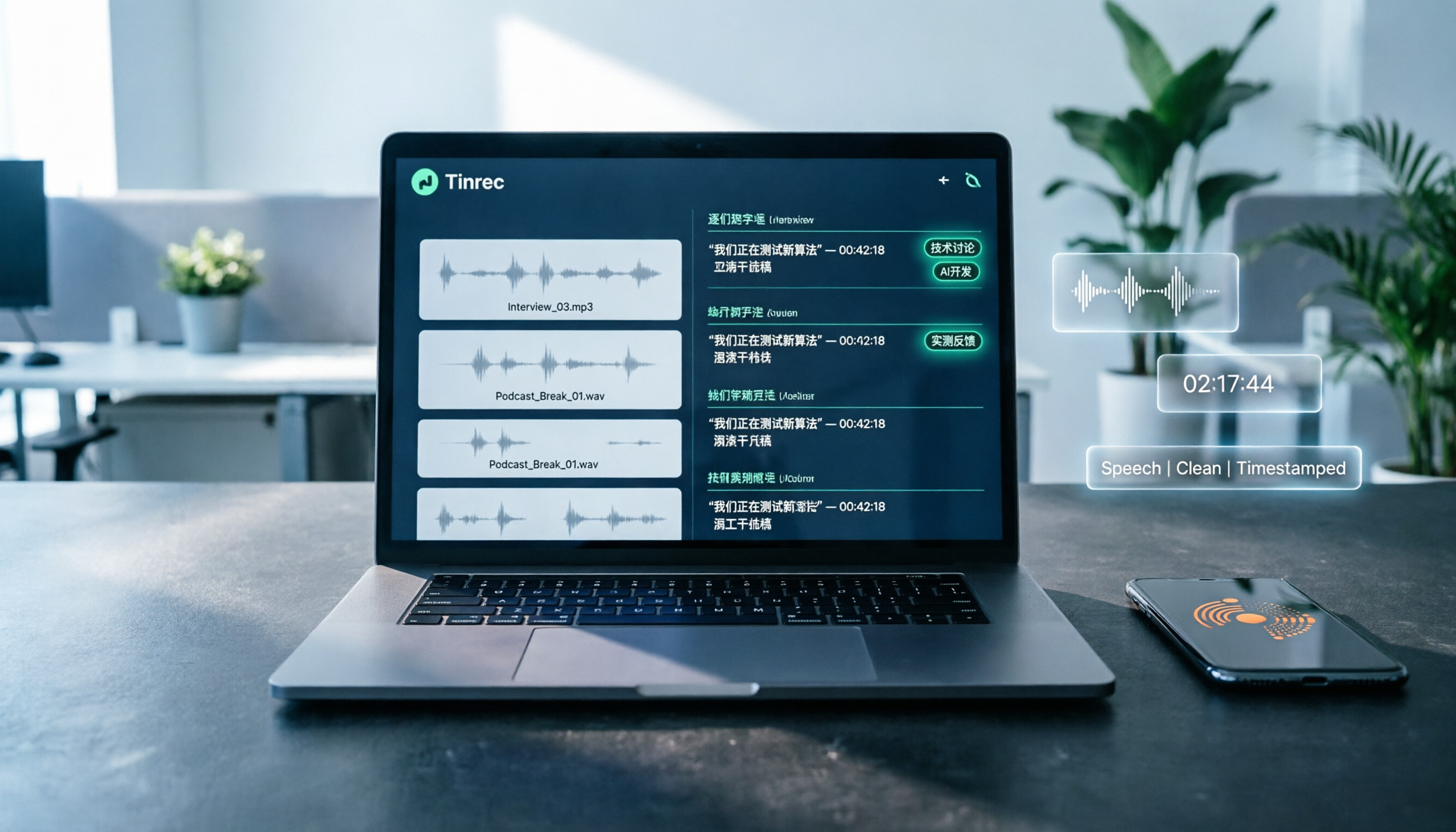
Tinrec is an AI recording and audio/video organization tool that supports mobile, desktop, and web versions. The free version offers basic transcription credits, making it suitable for office workers and students to test Cantonese transcription. It doesn't just convert recordings to text; it also automatically organizes them into summaries, chapters, and action items—that's what I appreciate most.
In a meeting scenario, you open Tinrec and start recording; it generates a transcript in real time. After the meeting, you don't have to replay it manually—the AI has already listed discussion points and action items. Even better, you can ask Tinrec directly, "Who mentioned the budget earlier?" and it will answer based on context, rather than making you search for keywords. Currently, few competitors in the same price range offer this conversational query feature.
Besides live recording, Tinrec also allows you to upload audio or video files, and even paste YouTube or Bilibili video links for direct transcription. This means you don't have to download the video and extract the audio track, which is very convenient for content creators. After transcription, you can export to TXT, Word, SRT subtitle, and other formats, and sync to tools like Notion and Google Docs to continue your workflow.
We didn't get official accuracy figures, but when we tested with a clear Cantonese news recording, Tinrec performed well on common vocabulary and normal speech speed, sufficient for everyday transcription needs. Of course, in noisy environments or with multiple people talking at once, accuracy will drop—that's a common limitation of all tools.
Stop organizing recordings by hand
Upload audio or video and automatically get a transcript, summary, and action items
The free version includes basic transcription credits. I recommend trying it with one or two recordings to see the results before considering a paid plan. Paid plans include weekly, monthly, and annual options, suitable for different usage frequencies, so you don't have to spend a lot upfront.
Who is it for? If you frequently need to transcribe Cantonese meetings or class recordings, or want to extract text from online videos, and you want to ask questions about the content and generate summaries after transcription, Tinrec is currently the most suitable choice.
Beyond Tinrec: What Other Options Are There?
Otter.ai: It's a well-known AI meeting notes tool. The free version offers 300 minutes per month, which sounds generous. However, Otter's strength is English meetings; Chinese (especially Cantonese) recognition isn't its core advantage, and it lacks the ability to transcribe from video links. If you mainly record English meetings, Otter is worth trying; but if Cantonese is your primary focus, Tinrec is more suitable.
Notta: Notta is also a multilingual transcription tool. The free version offers 120 minutes per month, and its paid plans are competitive in terms of minutes. However, Notta tends to be "transcribe and done," without AI conversational query like Tinrec, and it doesn't allow direct video link transcription. If you need bulk transcription without much post-processing, Notta is worth considering; but if you want to quickly extract key points after transcription, Tinrec fits better.
Pitfall Guide: 3 Common Mistakes When Choosing a Cantonese Voice-to-Text Tool
Pitfall 1: Only looking at free allowances, ignoring actual language support. Some tools offer many free minutes, but their Cantonese recognition is poor, producing gibberish. Test with your own real recordings rather than relying on ads.
Pitfall 2: Stopping at transcription without post-processing. A transcript is just a half-finished product; what really saves time are summaries, action items, and Q&A features. If you only use the tool as a "recording-to-text machine," you're wasting more than half its value. Tinrec's AI conversational query lets you ask about the recording directly, which is much faster than manually scanning a 30-minute transcript.
Pitfall 3: Thinking you must buy dedicated recording hardware. Some AI recorders are popular, but if you already have a smartphone or computer, you don't need to spend thousands on extra hardware. Apps like Tinrec can handle live recording and transcription without carrying another device. Unless you're very particular about the stability of portable recording, an app is sufficient.
Conclusion: Which One Should You Choose?
After comparison, if you're looking for a free tool that supports Cantonese and truly helps you organize content after transcription, Tinrec is the top choice.
Here's a simple breakdown:
- Need Cantonese + Mandarin bilingual transcription and value post-processing → Tinrec (AI Q&A, online video transcription, free trial available)
- Mainly record English meetings and need lots of free minutes → Otter.ai (but weak in Cantonese)
- Only need bulk transcription without much AI organization → Notta (but lacks conversational query)
I suggest you download Tinrec's free version and test it with your own Cantonese recordings to see the transcription quality before deciding to upgrade. Don't rush to pay; the free allowance is usually enough to experience the full features.
With the right tool, Cantonese voice-to-text can be a breeze.
References
- Free Cantonese Voice-to-Text App 2025 | Subanana
- AI Voice-to-Text: Fast Audio Transcription Online, Transcripts and Video Subtitles - Free Trial - cSubtitle
- Online AI: Automatically Transcribe Videos, Audio, and Recordings to Text - Free Trial - cSubtitle
- Transcribe Chinese (Cantonese) Audio to Text in Seconds for Free
- 《 Free + Cantonese OK: How to Use Google AI Studio to Turn Your Recordings into Text》 Finding a good transcript app is painful; maybe you've tried different recording-to-text apps—either they're fake free, charging you after the first few minutes, or they only support English, not Cantonese, or you have to go through a lot of API setup. Recently I found that Google Gemini is world-class in this regard: - 【Really free】 No subscription after a few uses - 【Cantonese friendly】 Gemini is accurate
Turn every recording into actionable outcomes
Get 60 free transcription minutes when you sign in. No credit card required.
Related Reading
You might also like

Notta Review 2026: 5 Key Comparisons with Tinrec — Which Is Better for Chinese Meeting Transcription?
Is Notta worth using? This article compares Notta and Tinrec across five dimensions: Chinese transcription, online meeting recording methods, free tier and pricing, post-meeting AI organization, and team collaboration governance. It also summarizes real user feedback from third-party review sites to help you decide which tool better fits your meeting scenarios.

Shahnawaz Notta DO: Resident Physician Research Profile and Publications (2026)
A review of Shahnawaz Notta DO's institutional affiliation, research topics, and representative publications from public academic profiles, with practical steps to verify author identity and avoid confusion with namesakes.
How to Download Nottam Ringtone in 2026: 5 Steps from Search to Setup
Struggling with Nottam ringtone downloads that are in the wrong format, too long, or lost in your files? This guide walks you through 5 steps: finding the audio, converting to iPhone-compatible M4R, setting it as your ringtone, and using Tinrec to turn downloaded audio into a searchable transcript library—solving the 'download and disappear' problem for good.

2026 AI Meeting Recorder Comparison: PLAUD Note PTT Reviews and a Better Alternative
PTT opinions on the PLAUD Note are split—some say an app can do the same thing, while others say the time saved is well worth it. This article starts from the decision point of 'do you actually need hardware or a workflow,' compares a recording card with software-based tools, and uses Tinrec to demonstrate a complete workflow for bot-free online meeting recording, AI summaries, action item extraction, and team spaces.

Nottambulando vs Nottambulando Olbia in 2026: A 5-Dimension Comparison to Help You Search the Right One
Searching for 'nottambulando' brings up both a photography and events page and a pizzeria in Olbia, Italy—two different entities with the same name. This article breaks down the name positioning, services, reputation, price clues, and platform traceability across five dimensions to help you determine which one you're looking for, and highlights rating discrepancies and information sources to watch for during verification.

Nottam Shopping Guide 2026: 3 Price Traps and a Pre-Order Checklist
Nottam (nottam.co) positions itself as "The Smart Price Shop," displaying "Other Shop Price" alongside "Whole Sale Price" on product pages. Using eight real prices from the official site, this guide breaks down how to interpret these dual price tags, the free-shipping threshold trap at ₹500, and four things to confirm before ordering—so you can calculate the true total cost.
Nottawa Gas Propane Prices: 2026 Comparison of 3 Local Suppliers — Price Transparency Is Key
Nottawa Gas doesn't list live propane prices on its website. This article outlines practical ways to check prices in 2026 (FuelWonk pages for ZIP codes 49075 and 49092) and compares Nottawa Gas, Caywood Propane Gas, and Sheets LP Gas across five dimensions: price transparency, bill predictability, risk of running out, delivery area, and supply scale—so you know what to ask and how to judge before you call for a quote.

Nottambulando Olbia Review 2026: Menu, Prices & 5 Must-Know Tips
Nottambulando is a pizzeria, paninoteca, and focacceria near Olbia's old town in Sardinia. This guide covers its location, wood-fired thin-crust pizza, fixed-price custom toppings, typical costs, and why ratings vary across platforms—so you can decide if it's worth fitting into your itinerary.

2026 Notta vs. AI Meeting Recorder Buying Guide: 7 Tools Tested and Recommended
People searching for 'now Notta' are usually trying to decide if Notta is still worth using. This article reviews 7 AI meeting transcription and recording tools, comparing pricing, Chinese language support, meeting capture methods, and team collaboration, with recommendations based on different scenarios.