

Turn recordings into transcripts and summaries in minutes
Upload audio or video for multilingual transcription, AI notes, and action items
Boost Productivity: Top 5 Note-Taking Apps in 2026
For most people, using virtual software for note-taking has become a part of daily life. Traditional pen-and-paper methods can no longer meet modern needs—they are difficult to organize, hard to share with others, and ineffective at integrating multimedia content (such as audio, video, etc.). Therefore, a high-quality digital note-taking tool allows you to quickly capture ideas while maintaining efficient organization and communication.
So, which note-taking apps are worth using in 2026? This article details the five best note-taking apps on the market today, comparing basic features and pricing, and delving into their respective advantages, disadvantages, and unique features to help you find the most suitable tool.
Top 5 Note-Taking Apps in 2026
- TinRec — A smart note-taking app that supports real-time voice-to-text
- Evernote — A powerful and easy-to-collaborate note-taking platform
- Apple Notes — A free note-taking tool deeply integrated with the Apple ecosystem
- OneNote — A free note-taking app that seamlessly integrates with Microsoft products
- Notability — A multi-format and presentation-oriented note-taking app
What Makes a Great Note-Taking App?
Before diving into these five apps, we need to understand the core characteristics of a 'great note-taking app.' Modern users, whether in personal life or at work, use notes to manage everything from shopping lists to project progress. Many also combine different recording methods, such as drawing and voice memos.
Therefore, an excellent note-taking tool must have the following key elements:
- An intuitive and easy-to-use interface that supports text input
- The ability to organize by topic, time, or workspace
- Real-time collaboration features supporting multi-user editing and comments
- Integration with existing software for cross-platform operation
Based on these criteria, let's look at the five most recommended note-taking apps in 2026.
TinRec
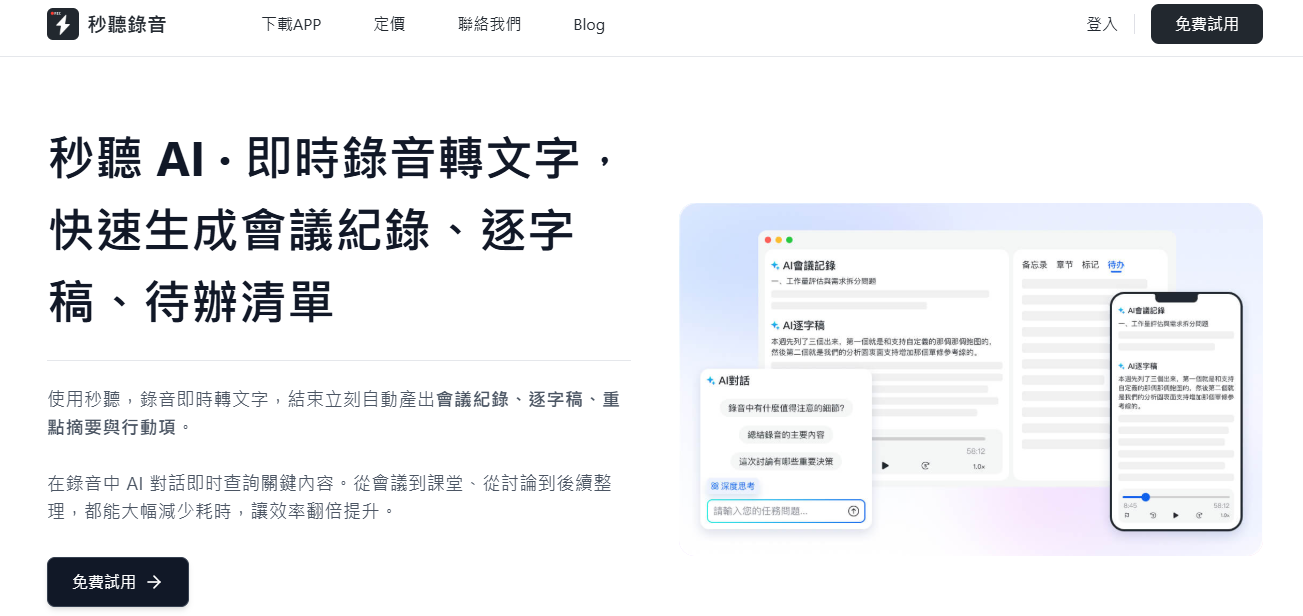
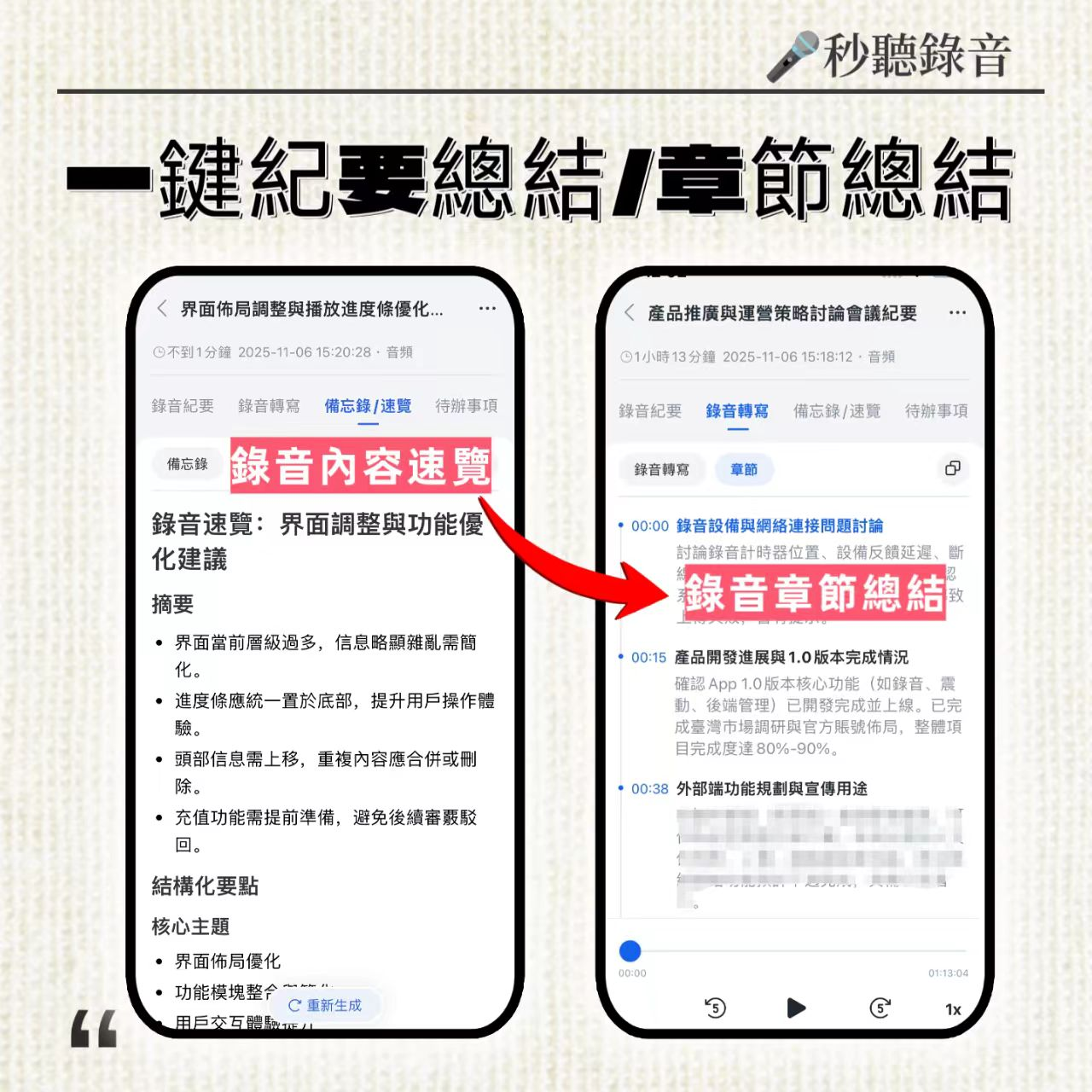
TinRec is a platform dedicated to revolutionizing the note-taking experience, especially suitable for students, professionals, and businesses. In addition to basic note-taking and organization features, its biggest highlight is the advanced 'voice-to-text' technology, which automatically converts meetings, interviews, or brainstorming sessions into clear text records—all without manual operation. This is particularly helpful for users with hearing or mobility impairments.
'Voice-to-text technology can help students unlock their potential. The system instantly transcribes spoken content into text, allowing students to quickly edit and produce clear content, making the process more efficient and boosting confidence.' — LDRFA Foundation
TinRec's voice transcription is real-time, allowing you to keep up with discussions. You can also highlight key points, add comments, or share with team members in one click. Additionally, it seamlessly integrates with major video conferencing tools like Zoom, Google Meet, and Microsoft Teams, making it the top choice for efficient note-taking and voice transcription.
Key Features:
- Full note creation and storage
- Real-time voice-to-text note generation
- AI summary and auto-generated to-do lists
- Keyword analysis and highlighting
- Integration with calendar, video conferencing, and cloud services
- File sharing and team collaboration
- Supports multiple languages including Chinese, English, Japanese, Cantonese, and Hokkien
Pros:
- High-quality real-time voice transcription
- Fast and accurate conversion of existing audio files
- Both free and paid plans available
- Smooth operation for easy note creation and sharing
Cons:
- Automatic transcription still requires manual proofreading for 100% accuracy
- Some advanced features are limited to paid users
Evernote
Evernote is one of the most popular note-taking apps, known for its clean and efficient note-taking and sharing capabilities. You can quickly open the app to record ideas or important items without navigating complex menus. It also supports easy insertion of images and videos, and can instantly convert notes into PDFs for sharing.
Stop organizing recordings by hand
Upload audio or video and automatically get a transcript, summary, and action items
Evernote's biggest advantage is that it doesn't complicate note-taking. It makes text input and categorization fast and simple, and integrates with Google Calendar and Google Drive to ensure data is securely stored and synced with your schedule.
Key Features:
- Standard note and storage functions
- Annotation, revision, and commenting
- Calendar and cloud service integration
- File sharing and collaboration
Pros:
- Quick note creation and easy sharing
- Free version with full features, paid plans reasonably priced
- Excellent keyword search
- Regular updates to improve user experience
Cons:
- Lacks automatic voice-to-text functionality
- Limited storage on the free version
- Occasional integration issues with apps like Microsoft Outlook
Apple Notes
Apple Notes is the built-in note-taking software on Apple devices such as iPhone, iPad, and MacBook. Although simple in design, it has become one of the most widely used note-taking tools thanks to its automatic sync with iCloud and intuitive interface. Regardless of the device, you can easily create, organize, search, and share notes.
'I really love minimalist app design. Apple Notes has folders on the left and content on the right, with a clean interface, few controls, and is very intuitive.' — Mark, Tech Reviewer
Apple Notes' biggest advantage is that it's completely free, with all core features available at no extra cost. If you need to store a lot of notes with audio and video, you can consider upgrading iCloud or other cloud storage.
Key Features:
- Standard note and storage functions
- Annotation and editing
- Calendar and cloud integration
- File sharing and collaboration
Pros:
- Quick voice recording via Siri
- Seamless integration with iCloud
- Clean and easy-to-use interface
- Completely free
- Supports sharing and collaboration
Cons:
- Siri transcription requires manual correction, not suitable for long meetings
- Possible formatting issues when sharing
- Less convenient on non-Apple devices
Microsoft OneNote
Similar to Apple Notes, OneNote deeply integrates with Microsoft operating systems and applications. In addition to basic note-taking, it seamlessly connects with products like Outlook and PowerPoint, making project management more efficient from concept to execution. The free version includes most necessary features; for more advanced tools, you can subscribe to Microsoft 365.
However, OneNote performs less well outside the Microsoft ecosystem. Although it can work with iCloud or Gmail, the process may be cumbersome. Therefore, it's best suited for individuals or businesses that long-term use Microsoft products.
Key Features:
- Standard note and storage functions
- Content tagging for easy retrieval
- Full integration with Microsoft products
- File sharing and team collaboration
- More features for Microsoft 365 paid users
Pros:
- Quick voice recording via Cortana
- Seamless sync with OneDrive
- Completely free
- Supports sharing and collaboration
Cons:
- Cortana transcription requires manual correction, not suitable for long meetings
- Poor integration with non-Microsoft products
- Mobile version lacks some desktop formatting features
Notability
Compared to other apps, Notability is a newer choice, but it stands out with powerful presentation and sharing features. Although popular among students and professionals, it's also suitable for general users seeking creative expression.
'I use Notability in class every day. I use Note Replay to record lectures and annotate textbook PDFs; I've never seen an app load large files this fast.' — Kim
Notability is not just for text notes; it excels at creating visual content. It supports drawing, recording, inserting videos and images, and offers a variety of customization tools. It works particularly well with a stylus and screen effects, allowing you to turn notes into presentations, storyboards, meeting summaries, or business plans.
Key Features:
- Standard note and storage functions
- Drawing, annotation, and visual editing tools
- Quick conversion to PDF and other formats
- File sharing and team notes
- Free and low-cost plans available
Pros:
- Dozens of templates and visualization tools
- Seamless integration with iCloud storage
- Both free and paid versions available
- Regular updates and fixes
- More affordable than competitors
Cons:
- Focused on visual creation, may not suit everyone
- Free version lacks most advanced features
- Audio recordings can take up a lot of storage space
Which Note-Taking App Is Right for You?
After the above analysis, we find that each app has its strengths. No single app meets all needs, but you can choose the best one based on your requirements.
Best Free Note-Taking App: Apple Notes. It wins because it's completely free and feature-rich.
Best Note-Taking App for Students: Notability. It offers diverse creation tools to meet learning and report needs.
Best Note-Taking App for Business: TinRec. With real-time voice-to-text, AI summaries, multi-language support, and team collaboration, it's the top choice for improving meeting efficiency in enterprises.
Conclusion
There are many excellent note-taking apps on the market, and the five above represent the top choices in 2026. Based on your budget, role, and use case, you'll find the most suitable tool. Try TinRec today and let AI help you effortlessly capture every conversation!
Turn every recording into actionable outcomes
Get 60 free transcription minutes when you sign in. No credit card required.
Related Reading
You might also like

2026 Audio Summarizer Guide: Auto Summaries + AI Q&A to Find Key Points
How do you choose an audio summarizer? This guide covers common pitfalls and key factors like summary quality, AI Q&A, and cross-platform export. We recommend Tinrec, which supports bot-free online meeting recording, automatic summaries, action item extraction, and team spaces. Also includes alternatives like Granola and PLAUD, plus tips to avoid mistakes.

5 Best AI Transcription Tools in 2026: Which One Saves the Most Time?
We tested 5 recording-to-transcript tools, comparing Chinese recognition, post-meeting organization, AI Q&A, and team collaboration. See how Tinrec stacks up against Otter.ai, Notta, and TurboScribe, plus key buying tips and pitfalls to avoid.

Tinrec vs Otter.ai: Which AI Meeting Summary Tool Is Better for Chinese-Speaking Teams in 2026?
Many people think a transcript means the meeting notes are done, but the real time sink is post-meeting organization. This hands-on comparison of Tinrec and Otter.ai—two tools that automatically generate meeting summaries from recordings—evaluates them across six dimensions: Chinese-language meeting experience, recording method, post-meeting outputs, audio retention, team governance, and pricing/quotas, helping Chinese-speaking teams decide which tool better fits their workflow.

4 Best Meeting Transcription Tools in 2026: Free Tiers, Chinese Accuracy, and Post-Meeting Efficiency Compared
Tired of spending hours writing meeting minutes? This article compares Tinrec, Notta, Granola, and PLAUD Note across four key areas: how they record online meetings, Chinese and mixed-language transcription accuracy, post-transcription summarization and AI Q&A, and team data ownership. It also includes a pitfalls guide and selection advice.

How to Auto-Generate Transcripts in 2026: Tinrec vs Yating + Bot-Free Meeting Recording
Auto-generating transcripts isn't a one-click job. This article breaks down the three most common pitfalls, then compares Tinrec and Yating Transcript across five dimensions to clarify how to choose for Hong Kong office scenarios.

2026 AI Meeting Notes Tools Compared: 5 Top Picks for Transcription & Team Collaboration
Tired of spending hours after meetings organizing transcripts? This article reviews 5 AI meeting notes tools based on real testing, breaking down 5 key dimensions: audio capture methods, post-meeting outputs, audio retention, and team governance. It focuses on Tinrec as the primary example, comparing its use cases with Notta, Otter.ai, Granola, and TurboScribe, and includes a pitfalls guide and selection advice.

2026 AI Meeting Summary Comparison: 5 Common Misconceptions and Tinrec in Practice
Many people think having a transcript means having a meeting summary, but after the meeting they still have to read through it themselves. This article examines 5 common misconceptions to explain where AI meeting summaries truly help, their core capabilities, practical use cases, and key purchasing considerations, using Tinrec as a concrete example.

How to Summarize Meeting Highlights in 2026: 5 Steps from Recording to AI Summary
The problem with meeting notes usually isn't slow typing—it's trying to capture and organize at the same time. This article breaks down a 5-step workflow from recording, transcription, AI summarization, to action item tracking, and explains how Tinrec (秒听录音) uses desktop bot-free recording, AI Q&A, and multi-format export to turn meetings into searchable, collaborative team data.

Tinrec Audio to Text Tutorial 2026: Chinese Transcripts + AI Meeting Notes in One Go
How to choose an audio-to-text tool? This article compares Tinrec and Yating Transcript across five dimensions: Chinese and multilingual transcription, bot-free online meeting recording, post-transcription summaries and action items, cross-platform export, and team seats and usage management. It then tells you directly which one to choose for which situation.