
Turn recordings into transcripts and summaries in minutes
Upload audio or video for multilingual transcription, AI notes, and action items
How to Create Client Visit Records in 2026: 5 Steps from Recording to Trackable Minutes
After a client visit, sitting in the taxi back to the office, only three things remain in your head: what they said, what I promised, and when we'll talk next. You open your phone—one voice memo, two business cards, three WhatsApp messages—and everything else relies on memory. Three days later, when you need to report in a meeting, you realize you even got the client's budget ceiling wrong.
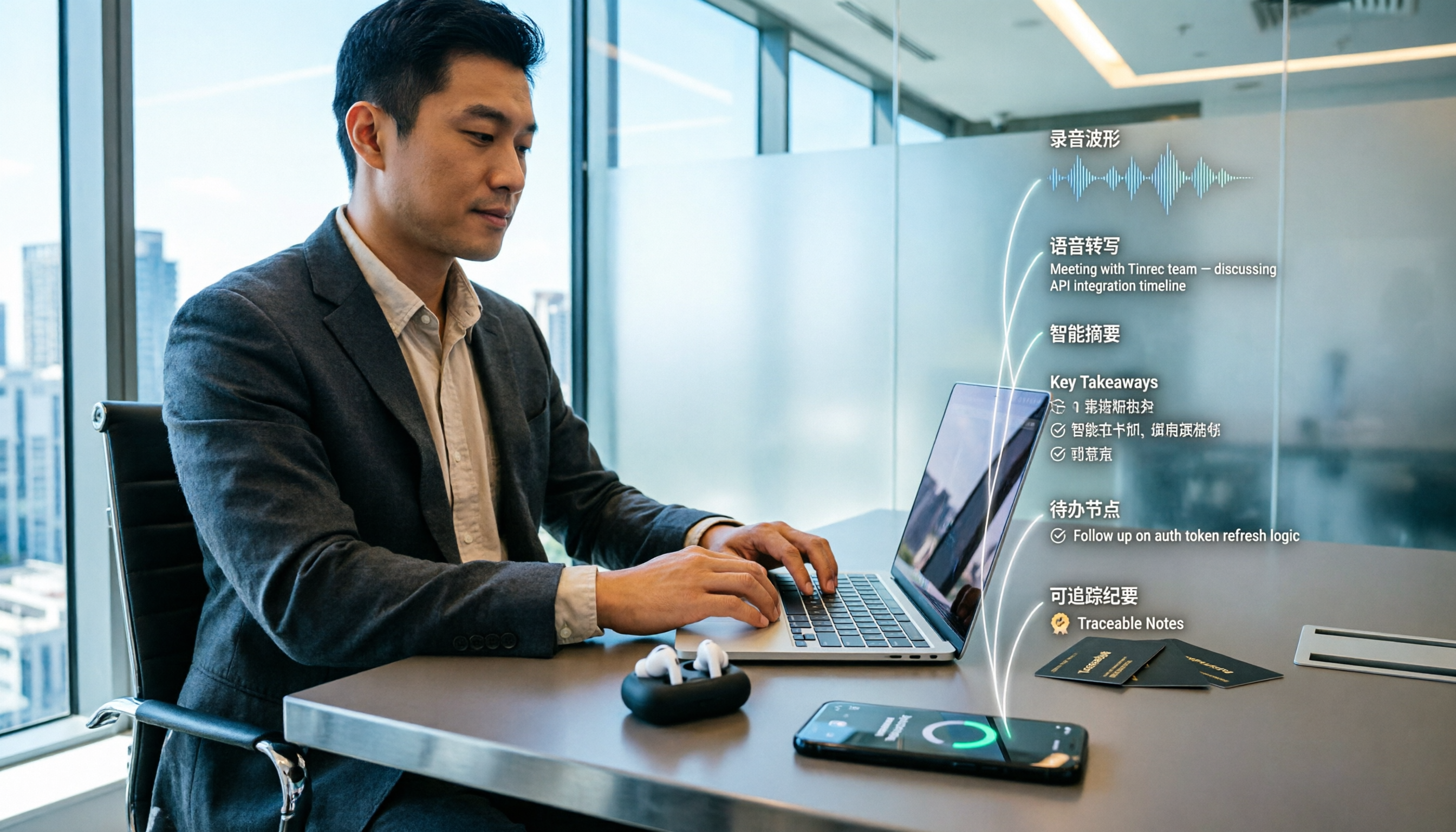
The hard part of client visit records has never been "writing"—it's "writing completely, writing quickly, and being able to find it later." The 2026 approach is clear: record during the visit, transcribe afterward, use AI to compress the transcript into summaries and action items, then export to the tools you already use. The following 5 steps, plus a copy-ready template with example fields, and a comparison of two common tools, will help you get this right the first time.
Tinrec vs Notta | Quick Overview
Tinrec positions itself as an AI meeting notes and team collaboration tool. Beyond transcription, it also provides summaries, chapters, action items, AI Q&A, and export. Notta is a general-purpose transcription tool covering multi-platform transcription, meeting notes, file import, translation, and team plans, with significant overlap with Tinrec.
| Item | Tinrec | Notta |
|---|---|---|
| Core positioning | AI meeting notes and team collaboration | Transcription, translation, and file processing |
| Visit recording method | Real-time mobile recording, desktop system audio capture without a bot, audio/video import | Meeting bot, desktop app, or upload |
| Post-meeting output | Transcript, summary, chapters, action items, mind map, AI Q&A, reports/tables/documents | Transcript, subtitles, translation, summary |
| Team capabilities | Team spaces, roles and seats, usage analytics, audit logs, audio recycle bin | Business plan offers role permissions and usage reports |
| Pricing (refer to official pages) | Personal plan: free tier, weekly pass, Pro monthly and annual; Team plan: USD 29.80 per paid seat per month | Free: 120 minutes per month; Pro annual equivalent USD 8.17/month; Business annual equivalent USD 16.67 per seat per month |
This article compares five dimensions: Chinese transcription, post-meeting organization, online visit recording, mobile cross-device use, team governance, and pricing. First, let's clarify what a visit record itself should look like.
Visit Record Template: A Copy-Ready Field List
Many people think a visit record is just "what was discussed," but what salespeople actually look up later is six categories of decision-related information. The following field list can be copied directly into any CRM, Notion, or Google Docs (illustrative example):
| Field | What to fill in | Example |
|---|---|---|
| Client and contact | Company, contact name, title, decision-making role | Chain tea brand / Procurement manager (decision maker), Store operations (user) |
| Visit time and format | Date, duration, online or on-site | March 12, 45 minutes, on-site visit |
| Attendees | Our side and client side attendees | Our sales and product; client procurement and operations, one each |
| Current situation and needs | Client's current approach, what they want to solve | Manual scheduling, cross-store transfers by phone, want unified query |
| Objections and competitor mentions | Client concerns, alternatives mentioned | Worried store staff won't learn new system, mentioned existing POS add-on features |
| Commitments and next steps | What we promised, who is responsible, when | Provide two pilot store plans by next Tuesday; our sales responsible |
| Attachments | Links to recording, transcript, and summary | Visit recording + transcript + action item list |
Look closely and you'll see: the truly hard fields to fill are "current situation and needs," "objections," and "commitments"—they're all buried in conversation details, and relying on after-the-fact recall will definitely miss things. That's why you need to turn visit recordings into searchable text.
5 Steps: From Visit Recording to Trackable Minutes
Step 1: Before the visit, clearly state that you will record. Inform the other party before the meeting starts that it will be recorded for documentation purposes, and comply with local regulations and company policy; obtain consent when needed—this step should not be skipped.
Step 2: During the visit, start real-time recording. For on-site or offline visits, use mobile recording; Tinrec transcribes while recording. For online visits, use the desktop version to directly capture computer system audio, handling Zoom, Google Meet, Microsoft Teams, Webex, and other meetings without an extra bot joining the meeting.
Step 3: After the visit, review the transcript before reading. The value of a transcript is that it's searchable and reviewable. Actual transcription quality is affected by recording quality, background noise, accents, overlapping speech, and technical terminology. Always verify names, amounts, and dates against the recording timestamps.
Step 4: Use AI summaries and action items to compress into key points. Turn a 45-minute transcript into summaries, chapters, and action items, then use AI Q&A to follow up on unclear points, such as "What concerns did the client mention?"—much faster than rereading paragraph by paragraph.
Step 5: Export and write back to your record system. Export summaries and action items as documents or tables, paste them into your CRM's notes field, or convert them into tasks. Note that the tool handles "organization," while your CRM still manages the customer database—keep the division of labor clear.
Stop organizing recordings by hand
Upload audio or video and automatically get a transcript, summary, and action items
Dimension 1 | Chinese and Mixed Chinese-English Visit Transcription
Visits in Hong Kong rarely stay in a single language throughout; clients speaking Chinese then inserting a few English product names is the norm. Notta has broader coverage in multilingual transcription, which is its consistent strength. Tinrec emphasizes Chinese meeting transcription, mixed Chinese-English content organization, and real-time translation during recording to view original text, translation, or bilingual content. The team plan also offers team hotwords to maintain industry terminology and reduce misheard proper nouns.
Neither should promise a fixed accuracy rate, as actual performance depends on audio quality and scenario. But if your visits are mainly in Chinese with occasional English, Tinrec's feature set is more aligned with this scenario.
→ This dimension: For Chinese-dominant visit scenarios, Tinrec is a better fit.
Dimension 2 | What You Get Within 30 Minutes After the Visit
Notta's post-meeting output focuses on transcripts, subtitles, translation, and summaries—sufficient for "I need some text." Tinrec focuses on what comes after transcription: automatically generating summaries and chapters, extracting action items from conversations, supporting AI Q&A around meeting content, and using Agent post-processing to generate reports, tables, and documents, with export to Notion, Google Docs, OneNote, Dropbox, and other tools.
In a visit scenario: what you need to deliver is "visit minutes + next steps," not a transcript. The gap is most obvious here.
→ This dimension: Tinrec wins.
Dimension 3 | Online Visits and Meeting Recording Methods
Clients switching to online meetings at the last minute is common. Notta supports meeting bots joining, desktop app, and upload, but a meeting bot means an extra participant in the meeting list, which some clients find conspicuous or even objectionable. Tinrec's desktop version directly captures computer system audio; users simply start recording, no bot invitation needed, and it won't be mistaken for official integration with Zoom or Teams.
Note that this does not mean "automatically joining all calendar meetings"—you still need to actively initiate recording.
→ This dimension: If you don't want an extra bot participant, Tinrec is more suitable.
Dimension 4 | Mobile Visits and Cross-Device Use
Business trips, store visits, rushing to the next appointment—that's daily life for sales. Tinrec supports mobile recording, desktop, and web. Record on your phone at the visit, then organize and export on the web back at the office or a coffee shop. Meeting audio is retained for later review and verification. Notta also supports multi-device use and file upload; both satisfy "usable on the go."
The difference lies in audio retention and post-meeting processing completeness: Tinrec puts recording, transcript, summary, and action items in a single workflow, reducing file transfers between tools.
→ This dimension: Tie, but Tinrec has higher workflow completeness.
Dimension 5 | Team Sharing, Permissions, and Data Handover
Visit records usually need to be handed over to managers, teams, or customer service. Notta's Business plan offers role permissions and usage reports, sufficient for small to medium teams. Tinrec's team plan is an independent team collaboration space where meeting data belongs to the team: you can create multiple team spaces, invite members via link, set owner/admin/member, and distinguish "roles" from "seats"—roles determine who can manage the team and audit, seats determine who can record, upload, edit, and export; members with valid access but no seat can still view, play, and read team data.
There are also team usage trends and member rankings, audit log queries and exports, an audio recycle bin (currently retained for 30 days, recoverable or submitted for permanent deletion), and handover of team resources when a member leaves or loses a seat to other valid members. Note that currently it's team-level sharing, not file-level granular permissions.
→ This dimension: Tinrec wins, with more complete governance and handover mechanisms.
Dimension 6 | How to Evaluate Pricing and Quotas
Notta's entry barrier: free plan 120 minutes per month, max 3 minutes per item; Pro annual equivalent USD 8.17/month, 1,800 minutes per month; Business annual equivalent USD 16.67 per seat per month. Tinrec personal plan offers free tier, weekly pass, Pro monthly, and Pro annual, chosen by usage tasks; team plan is USD 29.80 per paid seat per month, annual USD 199 per paid seat per year (about USD 16.58/month), each paid seat provides 2,000 minutes of team shared import quota per month, while real-time recording under valid team plans and valid seats currently does not deduct minutes; file and web imports consume team shared quota.
Looking at monthly fees alone, Notta Pro's entry price is lower; but if your team has "daily meetings and frequent visits," the structure where real-time recording doesn't deduct minutes makes budgeting easier. Also, the first eligible team trial is 7 days, 1 free seat, 300 minutes of team shared import quota. Prices and benefits may change; refer to the official purchase page before ordering.
→ This dimension: Choose based on usage pattern; call it a tie.
What Are Each One's Unique Advantages?
Tinrec's unique advantages
- Desktop bot-free recording of online meetings: no extra participant, clients won't see an unfamiliar account in the meeting list.
- Post-transcription workflow: summaries, chapters, action items, AI Q&A, Agent post-processing to generate reports and tables.
- Team governance: separate role and seat management, plus usage analytics, audit logs, and audio recycle bin.
- Team hotwords and real-time translation: practical support for industry terminology and cross-language visits.
Notta's unique advantages
- Broader multilingual transcription coverage, easier for cross-language teams to adopt.
- Business plan offers unlimited transcription, role permissions, and usage reports; mature plan structure.
Conclusion: Which One Should You Choose?
- Visits mainly in Chinese/mixed Chinese-English, want minutes and action items in one go → Tinrec (summaries, chapters, action items, AI Q&A in one workflow)
- Online visits without an extra meeting bot → Tinrec (desktop captures system audio)
- Visit data to be handed over to the team, need seat management and auditing → Tinrec team plan (roles and seats, audit logs, resource handover)
- Needs mainly multilingual transcription and subtitle translation → Notta is sufficient
- Very small team, only basic permissions and usage reports → Notta Business can handle it
In one sentence: The real cost of visit records isn't "writing"—it's "missing." For most Hong Kong teams that need Chinese visit records and post-meeting actions, Tinrec is the more complete choice. Actual results are affected by the recording environment; for important names, amounts, and commitments, verify against transcript timestamps and recordings; also remember to inform the other party about recording before the visit and comply with local regulations.
References
- CR92S Customer Relationship Management System Lite | Simplest CRM Software | Pota Software
- CRM Customer Relationship Management Module: Precisely Grasp Customer Matters
- Ragic Cloud CRM Customer Management System | Built-in AI Agent
- Customer Relationship Management System Professional Edition | CRM Solutions | Pota Software
- (No coding needed!) Build Your Own Lightweight CRM Customer Relationship Management Form | Record Customer Info, Contact History, and Deal Results - YouTube
Turn every recording into actionable outcomes
Get 60 free transcription minutes when you sign in. No credit card required.
Related Reading
You might also like

2026 Comparison of 3 Transcription Tools: Is Yating Transcription Good? Which Saves More Time on Post-Meeting Cleanup?
Is Yating Transcription good? Based on the real needs of a mid-level manager with 15 meetings per week, I tested Yating Transcription, Good Tape, and Tinrec, comparing them on how they join online meetings, Taiwanese accent recognition, post-meeting output, data ownership, and pricing. I also summarize the 4 most common selection pitfalls and offer recommendations.

4 Client Visit Recording Tools Tested for 2026: Forms, Recordings, and AI Notes—Which Actually Captures Client Needs?
Do client visit forms end up in a drawer? This article compares 4 visit recording methods—from paper forms and audio recordings to AI meeting notes—and tests the real differences between Tinrec, Fireflies, Granola, and Notta. It outlines 4 key selection criteria and 4 common pitfalls to help sales reps turn a single visit into data they can revisit and follow up on.

2026 Comparison of 3 Free Transcription Options: Quotas, Chinese Recognition, and Post-Meeting Organization
Free transcription isn't just about finding a free tool. This article breaks down three common misconceptions and explains that "free" can mean free quota, time-based credit packs, or team-shared quota. Using Tinrec as an example, it shows how to handle summaries, action items, AI Q&A, and team knowledge retention after transcription, helping you determine which option truly meets your needs.
2026 Comparison of 3 Transcription Tools: Yating Transcription Referral Code and Free Quota Explained
If you're looking for a Yating Transcription referral code, you likely want to save money and avoid buying the wrong tool. This article compares Yating Transcription, Tinrec, and Notta from four angles: pricing, free quota, post-meeting organization, and team collaboration. It also clarifies whether a referral code exists for Yating Transcription, what truly saves money, and provides selection advice based on use cases.

2026 Free Transcription Plans Compared: Yating vs. Tinrec
How far can Yating's free transcription plan really take you? This article tackles common misconceptions, compares the free tiers, post-transcription processing, and team collaboration features of Yating and Tinrec, and outlines 5 key factors to consider before choosing a tool, plus FAQs, to help you find a transcription solution that truly saves time.

2026 Online Transcription Showdown: Yating vs. Tinrec vs. Otter.ai vs. Granola
Yating's online transcription works right in your browser, but what about post-meeting organization, follow-up questions, and team collaboration? We tested Yating, Tinrec, Otter.ai, and Granola on four key points: accent recognition, online meeting audio capture, post-meeting processing, and team permissions. We also highlight three common pitfalls to help you choose the right tool.

Yating Transcript vs Tinrec: Which Online Transcription Tool Is Right for You in 2026?
People searching for "Yating Transcript online" are usually looking for a transcription service they can use right in their browser. This article compares Yating Transcript and Tinrec across five dimensions—online access, free quota, post-meeting organization, language recognition, and team collaboration—to help you decide which one better fits your needs.

Yating Transcription: Which Country Is It From? Taiwan Background & Tinrec Alternative Comparison (2026)
Yating Transcription is an AI speech-to-text service developed by a Taiwan team. This article answers the 'which country' question, then compares Tinrec and Yating Transcription across four dimensions: meeting recording methods, post-meeting organization, multilingual experience, and team collaboration, helping you decide which fits your workflow better.

How to Choose a Transcription Tool in 2026: 5 Steps to Compare Yating Transcript vs Tinrec
Yating Transcript or Tinrec? This guide compares them across 5 checkpoints: how audio gets in, post-meeting organization, transcript readability, team sharing, and pricing, to help you decide which fits your meetings and interviews.