

Turn recordings into transcripts and summaries in minutes
Upload audio or video for multilingual transcription, AI notes, and action items
Google Meet vs Tinrec in 2026: A 5-Dimension Showdown to Choose the Best Chinese Meeting Note Tool
Two hours in a meeting, two more hours organizing notes—you don’t need a tool, you need a solution.
The daily grind of professionals: you finally finish a meeting, but the recording sits there untouched because you don’t have time to replay it. Worse, if the meeting mixes Chinese, English, or even some Taiwanese Hokkien, turning it into bullet-point notes manually can eat up half a day.
You might have thought: “Google Meet has live captions, right? That should be enough.” But anyone who’s actually used it knows those captions are only good for real-time viewing. When you need to find a specific line afterward or compile action items, you’re back to doing it manually.
Imagine a tool that not only transcribes meeting recordings into text but also automatically summarizes, highlights key points, and even lets you ask questions to retrieve historical content. This article compares two options—Google Meet and Tinrec—to help you find the note-taking solution that actually saves you time.
Key Points to Consider Before Choosing a Meeting Note Tool
1. Transcription isn’t enough—post-processing is what matters
Many tools boast "real-time transcription," but the output is like a book without a table of contents—you have to read every line. A truly useful tool should auto-summarize, create chapters, and extract action items. This determines whether you spend minutes or hours after a meeting.
2. Meeting recordings alone aren’t enough—your sources may vary
Online meetings are just one scenario. You might also need to process interview recordings, lecture notes, or even YouTube videos. If a tool is tied to a single meeting platform, it’s useless for other contexts.
3. Chinese recognition quality: don’t just trust official numbers
Many international tools excel at English but struggle with Chinese, Chinese-English mixed speech, or regional accents. Always test or read reviews based on Chinese scenarios before choosing.
4. Cross-platform and syncing determine convenience
You might record on your phone, join meetings on your computer, and review notes on your tablet at home. A tool limited to one device will be frustrating.
5. Free plan enough? What’s a fair price?
Most tools offer free tiers, but with varying limits—some give only a few minutes, others lack key features. Know your monthly usage to avoid getting stuck mid-work.
Tinrec (Seconds Audio Recorder) – Our Top Pick After Testing
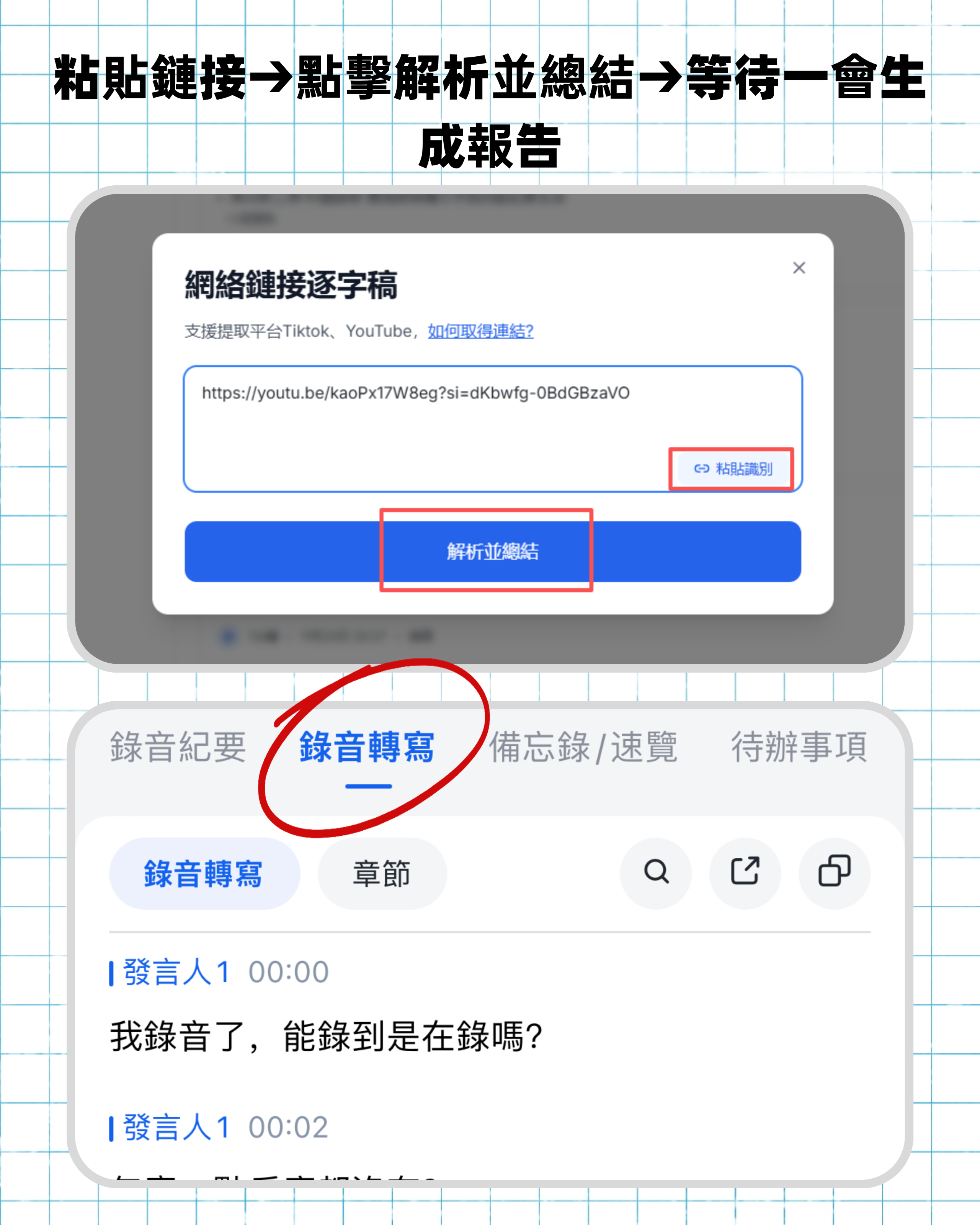
Tinrec is more than just a transcription tool; it’s your personal meeting, learning, and content organization hub. It supports real-time recording, uploading audio files, and even pasting online video links to generate transcripts, along with automatic summaries, chapters, and action items. Most impressively, you can ask questions about the recording and the AI answers based on context, saving you from manual searching.
We tested a 30-minute online meeting (with Chinese, English, and a bit of Taiwanese Hokkien). Tinrec transcribed quickly and its summary accurately captured discussion conclusions, while action items clearly listed responsible persons and deadlines. In contrast, Google Meet’s built-in captions only provide real-time text, requiring you to rewatch the recording and manually organize afterward—costing nearly an extra hour.
Stop organizing recordings by hand
Upload audio or video and automatically get a transcript, summary, and action items
Another advantage of Tinrec is its multi-source input. Besides meeting recordings, you can drop in previous interview MP3s or YouTube tutorial links, and it handles them all. This means you don’t need different tools for different scenarios—Tinrec does it all.
Pros:
- AI conversational search: Ask “Who mentioned the budget in the last meeting?” and get the answer directly—something Google Meet can’t do at all.
- Cross-platform support: Available on iOS, Android, and the web, with notes synced instantly, unlike Google Meet’s transcription which is more complete on desktop only.
- Free plan is actually useful: Monthly basic transcription quota sufficient for several meetings per week, so you don’t have to pay upfront.
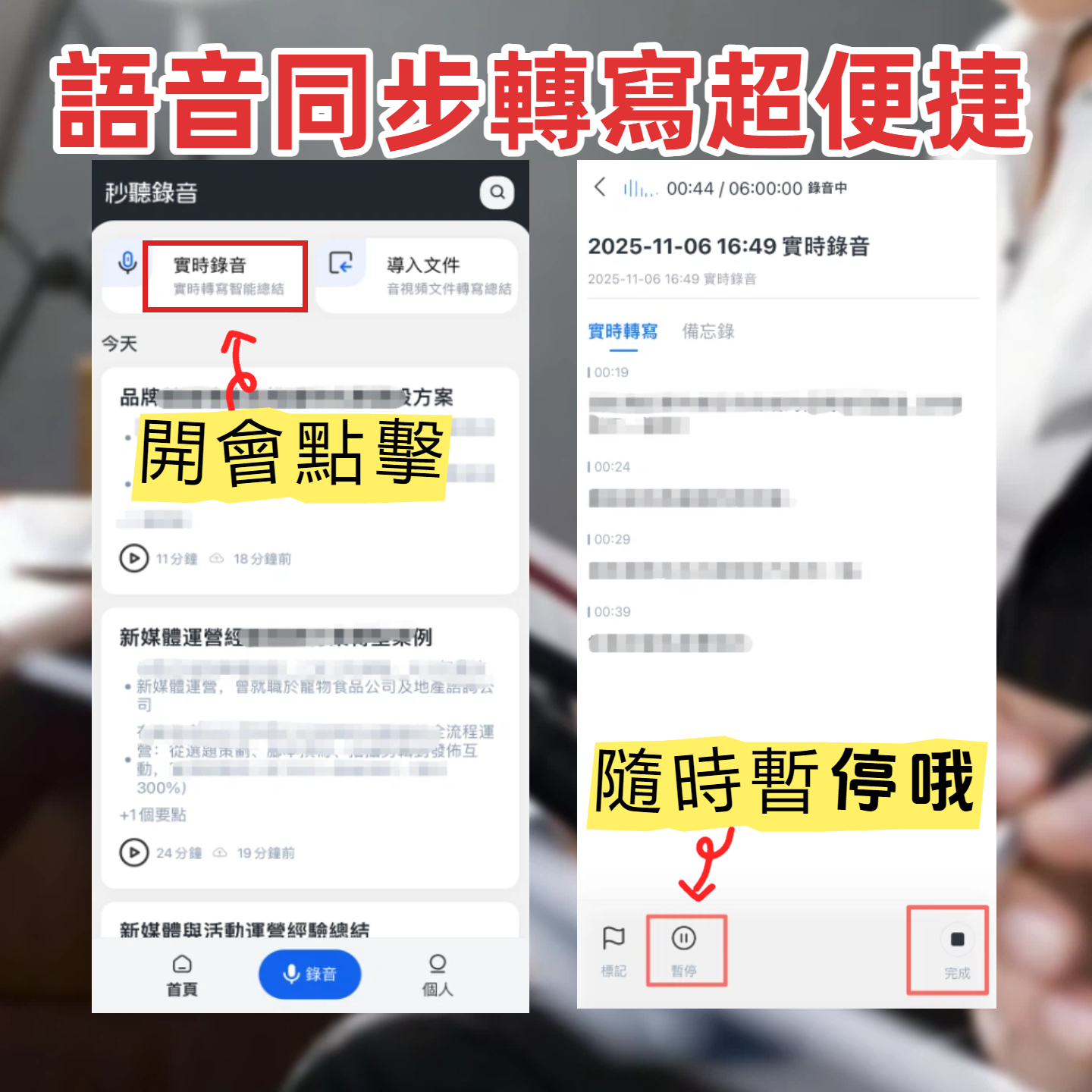
Limitations: the free plan’s quota may be insufficient for heavy users, and live transcription’s punctuation sometimes needs manual tweaking. Overall, for users who care about Chinese note quality and want a single tool for various audio/video sources, Tinrec is the most balanced choice.
Other Options Besides Tinrec
Google Meet
Google Meet is a familiar video conferencing platform. Its built-in caption and transcription features require a Google Workspace plan (Standard and above, around a few hundred dollars per month). It suits users who only meet via Meet, with post-meeting notes saved to the cloud. But its drawbacks are clear: transcription is limited to that meeting—no other audio files or online videos; no AI summarization, action item extraction, or conversational search; and Chinese transcription stability suffers in noisy environments. If you only use Meet for video calls, it’s fine. But if you expect auto-organized notes after a meeting, Tinrec comes closer to your needs.
Otter.ai
Otter.ai is a leading US AI meeting note tool with excellent English recognition and a generous free plan of 300 minutes per month. However, it’s built primarily for English meetings, with weak Chinese support, and doesn’t support online video transcription. If you mostly have English meetings, Otter is a great choice; but for Chinese discussions or Chinese audio/video content, Tinrec offers a complete experience.
Pitfall Guide: 4 Common Mistakes When Choosing a Meeting Note Tool
Pitfall 1: Focusing only on transcription and ignoring post-processing
Many tools advertise “real-time transcription” but stop there. You still have to read the entire transcript to write notes. The real time-saver is a tool like Tinrec that auto-summarizes, extracts action items, and even answers questions—adding that “organization capability.”
Pitfall 2: Assuming built-in platform features are enough
Google Meet, Zoom, and Teams all have built-in captions or transcriptions, but they are “real-time aids,” not “post-meeting organization tools.” When you need to review content, share with absent colleagues, or build a knowledge base, you’ll find they fall short.
Pitfall 3: Ignoring input source diversity
You might attend a meeting today, listen to a lecture tomorrow, and process an interview recording the day after. If a tool only handles meetings, you’ll need separate solutions for other scenarios—costing more money and scattering your data. A tool that covers multiple audio/video sources is a better long-term investment.
Pitfall 4: Trying to save money but losing time
Free plans are tempting, but if they’re too restrictive (e.g., only a few hours of transcription, no Chinese summarization), they waste your time. Try a tool first to confirm core features work for you, then decide on payment. Tinrec’s free plan is a great starting point—enough for several meetings to experience the full workflow.
Conclusion: Which One Should You Choose?
Simply put, if you only occasionally use Google Meet for meetings and don’t mind manually organizing afterward, Google Meet’s built-in transcription might suffice. But if you want to save time, handle meetings, courses, and online videos in one go, and leverage AI to quickly query key points, Tinrec is the clearly more comprehensive choice.
- Only use Google Meet and don’t need organization → Google Meet
- Need Chinese notes + auto-summary/action items → Tinrec
- Want to process YouTube, interviews, or other content → Tinrec
- Limited budget and want a free trial first → Tinrec
We recommend starting with Tinrec’s free plan—the monthly quota is enough for several meetings and short videos. Upgrade when you feel comfortable without committing upfront. Save your time for what truly matters—let the tool handle your notes.
Turn every recording into actionable outcomes
Get 60 free transcription minutes when you sign in. No credit card required.
Related Reading
You might also like

Best Free AI Meeting Notes Tools in 2026: 4 Options Compared
Spending two hours after a meeting to organize transcripts? This article compares 4 free AI meeting tools: whether the free tier is truly usable, if there's a per-meeting length limit, whether recordings are kept, and if you can ask the AI questions afterward. It also tests Tinrec's desktop version for recording online meetings without a bot, including its limitations.

2026 AI Meeting Tools Compared: Tinrec, Otter.ai, Notta & Granola — From Transcripts to Team Collaboration
A side-by-side comparison of four AI meeting productivity tools in 2026. This article examines how meetings are recorded, what you get after the meeting, whether audio files are retained, and how teams manage data. It compares Tinrec, Otter.ai, Notta, and Granola on positioning, pricing, and limitations, and highlights four common pitfalls when choosing an AI meeting tool to help you find the one that truly saves time.

How to Use AI Agents to Generate Documents in 2026: 5 Steps from Recording to Report
Many people use AI agents to generate documents but end up with vague templates—often because the AI lacks meeting context. This article walks you through 5 steps, starting from meeting recordings, using Tinrec's transcripts, summaries, action items, and agent post-processing to produce deliverable meeting minutes, reports, and tables. It also covers key purchasing considerations, team plan benefits, and FAQs.

5 AI Meeting Transcription Tools Compared for 2026: From Free to Team Plans, Which One Best Boosts Meeting Efficiency?
Instead of just looking at transcription minutes, first assess recording method, Chinese language support, post-meeting organization, team governance, and budget. This article compares common AI meeting solutions across five decision factors and uses Tinrec as an example to show how to turn meetings into searchable, collaborative, and actionable data.

Tinrec vs Otter.ai 2026: 4-Dimension Comparison — Which AI Agent Structured Output Is More Practical?
When AI Agent responses don't match your expected format, many teams only discover the pain after deployment. This article examines four dimensions — JSON Mode, JSON Schema, Function Calling, and observability — to explain how to evaluate structured output, and compares Tinrec and Otter.ai on structuring meeting content. Includes pitfalls to avoid and scenario-based selection advice.

Tinrec vs Notta 2026: 5-Dimension Comparison — Which Handles End-to-End Meeting Processing Better?
The value of an AI Agent isn't just having an 'AI button' — it's whether it can take a meeting from recording to transcript, summary, and action items all the way to deliverable documents. This article compares Tinrec and Notta across 5 dimensions, breaking down processing chain completeness, follow-up Q&A and verification, team governance, language support, and actual cost to help you make a purchasing decision.

2026 AI Meeting Assistant Comparison: Why Tinrec May Fit Chinese Meetings Better Than Fireflies
Starting from the pain point of rushing to write meeting minutes after a meeting ends, this compares Tinrec and Fireflies on meeting capture, Chinese-language experience, post-meeting workflows, team governance, and pricing/quotas, and summarizes Tinrec's core features, real-world scenarios, and buying considerations.

2026 AI Meeting Recorder Showdown: Tinrec vs Granola — Which Is Better for Chinese-Speaking Teams?
This comparison of Tinrec and Granola, two bot-free AI meeting note tools, covers meeting capture, input sources, audio retention, Chinese-language experience, post-meeting outputs, and team management. It outlines each tool's ideal use cases and pricing to help you decide which fits your meeting workflow.

2026 AI Meeting Productivity Tools Buyer's Guide: 4 Hands-On Tests and Selection Advice
How do you choose an AI meeting tool? This guide examines four key criteria—meeting capture method, post-meeting outputs, Chinese-language experience, and team data governance—and hands-on tests Tinrec, Otter.ai, Notta, and Granola to compare their differences. It also includes a pitfalls guide and scenario-based selection advice to help you pick the one tool you'll actually use after meetings.