
10x Efficiency Boost: This AI Recording Tool is a Game-Changer

This article addresses common meeting pain points for professionals, such as keeping up with speech speed, tracking accountability in multi-speaker meetings, and inefficient post-meeting organization. It introduces four core features of 'MiaoTing Recording' (instant voice-to-text, smart memos, speaker differentiation, and chapter summary extraction) that streamline the entire meeting process, helping users quickly generate meeting minutes and save time.

Tinrec Insights
Dinel
November 20, 2025
32 min
37 views

Turn recordings into transcripts and summaries in minutes

Upload audio or video for multilingual transcription, AI notes, and action items

In the corporate world, who hasn't struggled with meeting notes? Either you're scrambling to keep up with the pace of speech, or you spend hours organizing afterward. The good news is, these problems aren't hard to fix—just pick the right tool. Today, I'm sharing "MiaoTing Recording," an app that with its four core features helps countless professionals overcome meeting note challenges. Let's see how it works.

1. Common Meeting Pain Points – How Many Do You Have?

When it comes to meeting notes, almost every professional has complaints. These common pain points not only waste time but can also hinder work progress:
First pain point: "Can't keep up with speech pace, notes are fragmented." During meetings, speakers talk fast. Your brain is still processing the last sentence when the next one starts. Your pen scribbles frantically, and later you can't decipher key data or important decisions.
Second pain point: "Multi-speaker meetings, hard to trace accountability." Cross-department meetings involve many people and topics. Everyone's input matters, but notes easily become muddled—you can't tell who proposed what or who made the final call. When following up, unclear responsibility leads to finger-pointing.
Third pain point: "Post-meeting organization is time-consuming and inefficient." Just listening to the recording takes over half an hour, plus you have to sift through hours of audio for key points and logical flow. The time you could spend on core tasks is eaten up by organizing minutes, seriously hurting productivity.
The truth is, these issues aren't about you not being diligent enough—it's that traditional note-taking can't keep up with modern meeting rhythms. That's why choosing the right tool is crucial. MiaoTing Recording's four core features precisely address these pain points.

2. Four Core Features Unlock a New Efficient Meeting Mode

Every feature of MiaoTing Recording is designed around real meeting scenarios. Simple to use yet packed with practicality, it boosts meeting efficiency from start to finish.

1. Real-time Voice-to-Text: Speak and It Transcribes – Stay Focused on Discussion
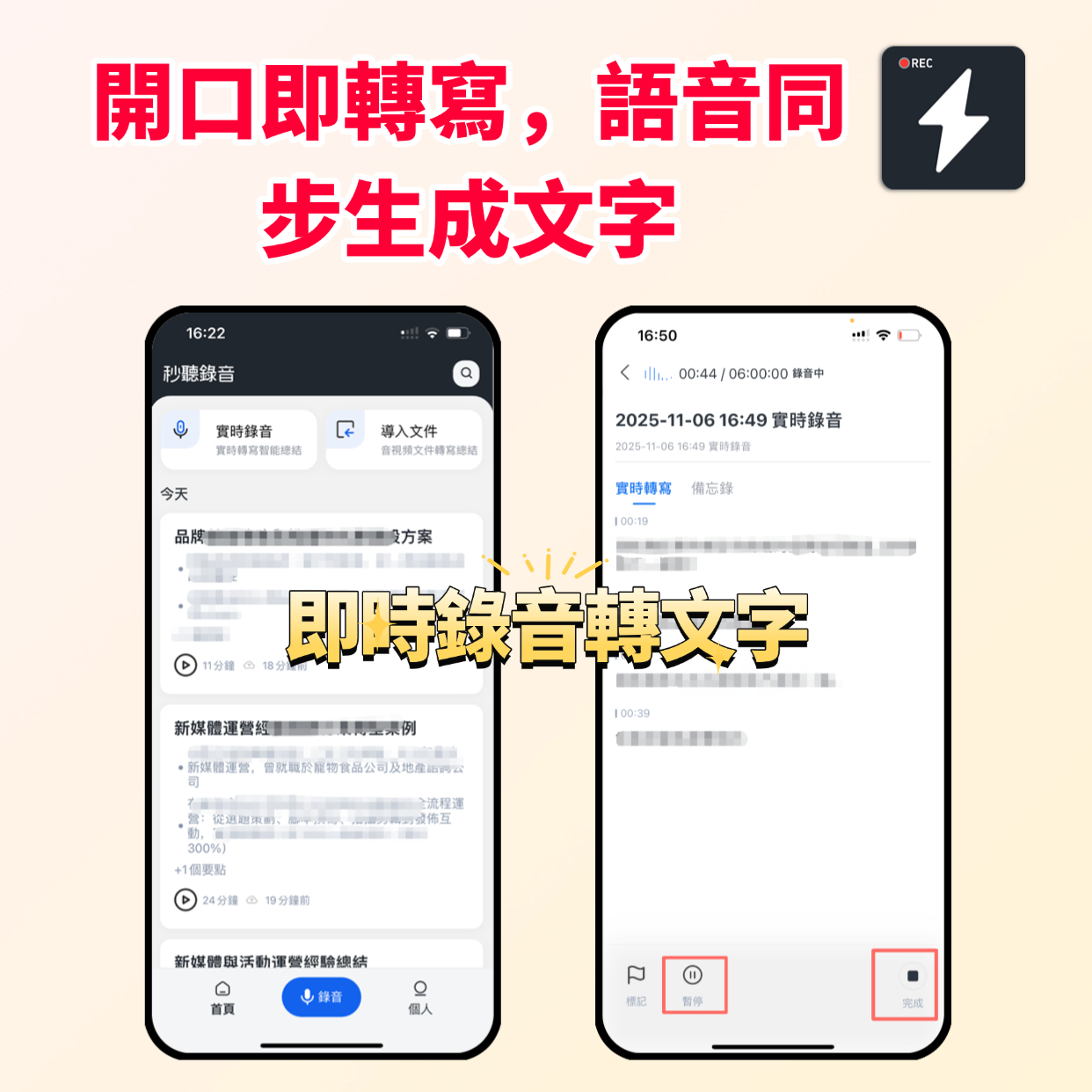

This feature is a lifesaver for meeting notes. Just open the app, tap the record button, and as soon as someone speaks, the text appears in real time—no manual typing needed.
I tested it myself: in everyday office scenarios, Mandarin transcription accuracy reaches over 98%. Even with slight accents, it stays above 95%. Terms like "ROI conversion" and "customer lifetime value" are accurately captured without typos.
With this feature, you no longer have to frantically scribble notes or keep your eyes glued to your notebook. The speaker's key points appear as text in real time, so you can fully engage in the discussion—interact with colleagues and share your ideas. Even if you zone out for a moment, you can quickly catch up by reading the text.

2. Smart Memos: One-Tap Mark Key Points, Easy to Find Later
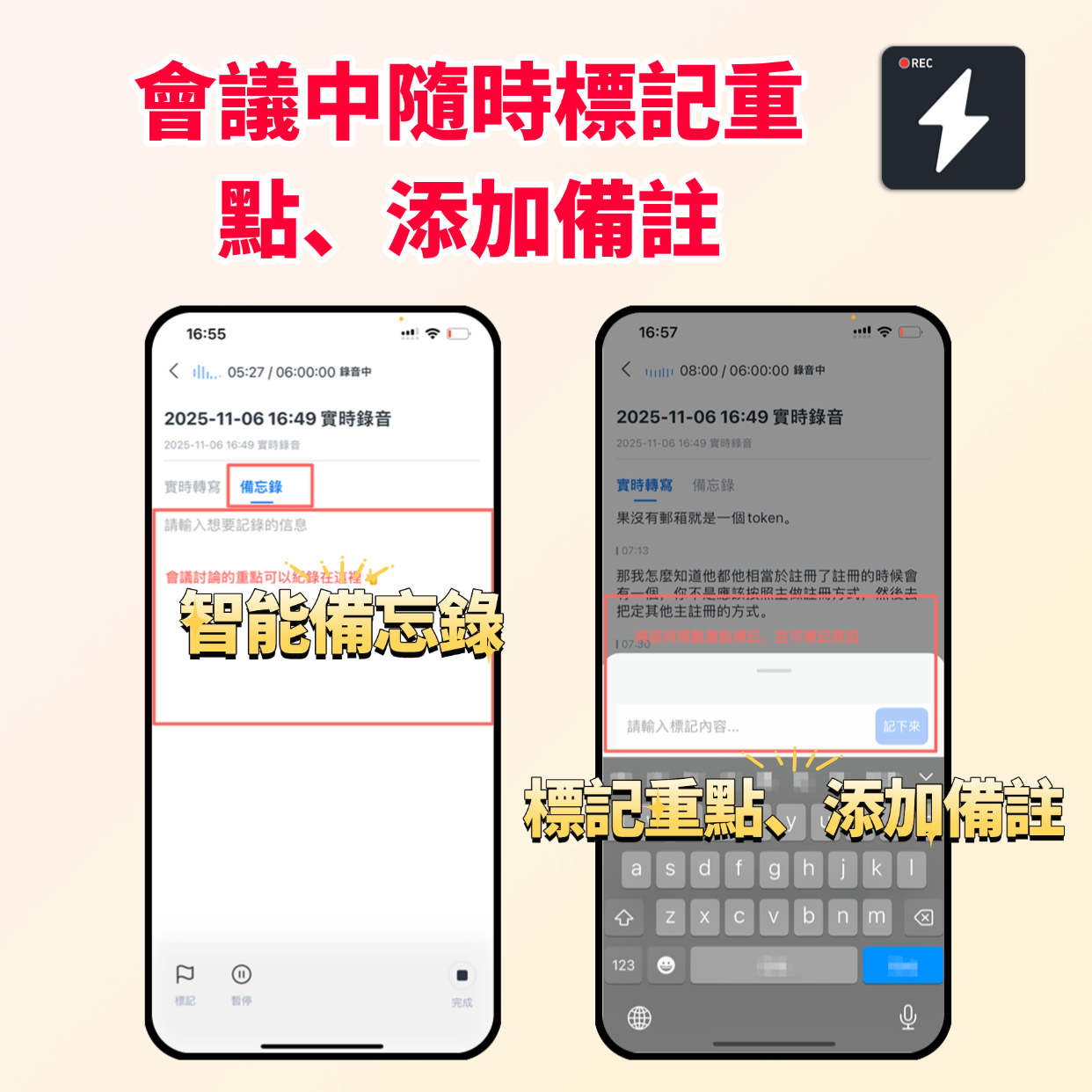

During meetings, you might get sudden inspiration or need to highlight a decision. That's when Smart Memos come in handy. No need to interrupt the meeting or jot things down hastily—just tap "Mark" on the transcribed text or add a short note, like "Execute this plan next week" or "Coordinate with Marketing."
These marks and notes are automatically saved and linked to the corresponding text. After the meeting, you don't have to search through hours of recordings or messy notes. Just open the "Marked Items" section, and all key information is right there. In short, it's like having a precise index for your meeting content—quickly locate anything you need without reading line by line.

3. Speaker Differentiation: Clear Role Labels, Easy Accountability
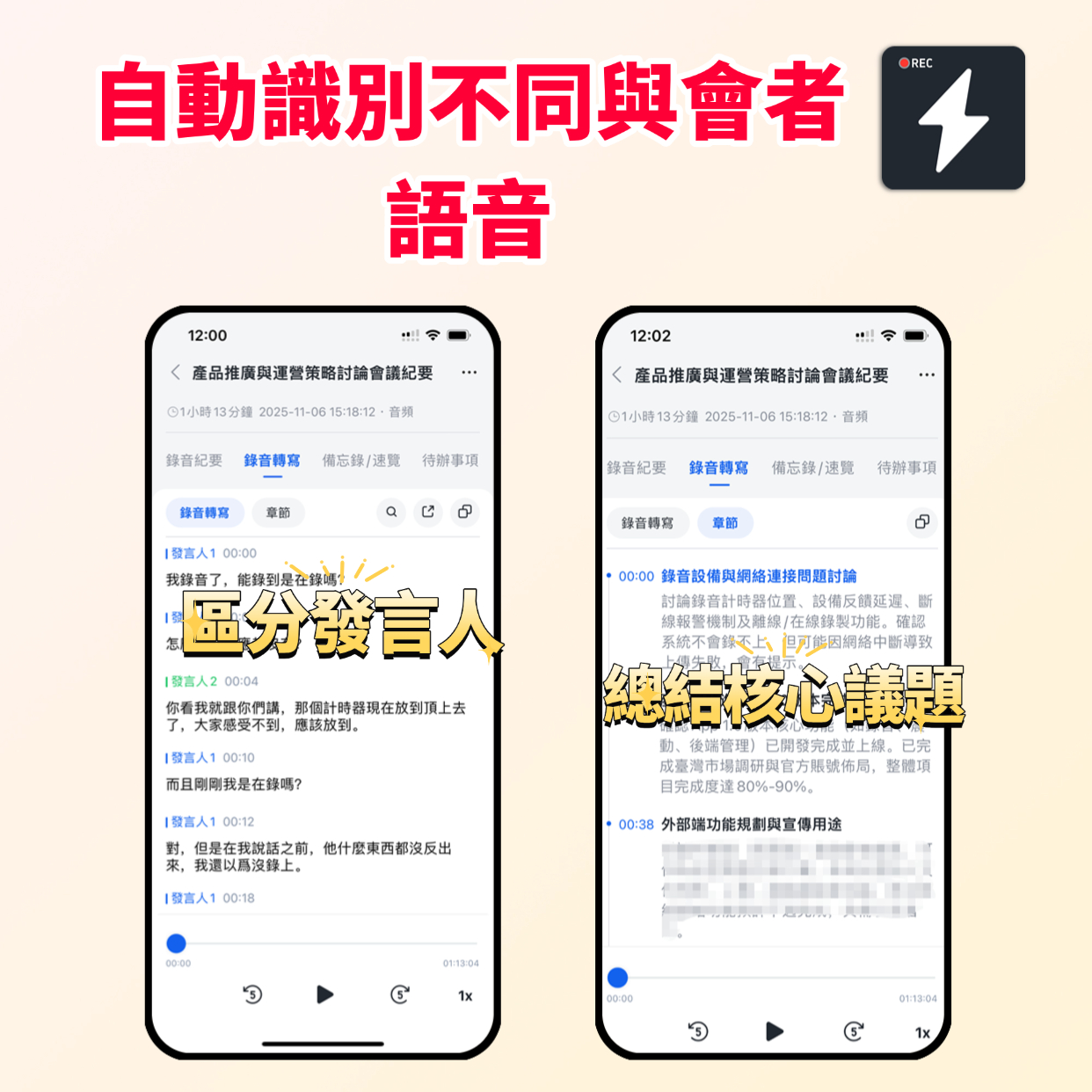

When multiple people attend, the biggest headache is keeping track of who said what. MiaoTing Recording's "Speaker Differentiation" feature automatically recognizes different speakers' voice characteristics and assigns unique labels, such as "Speaker 1" or "Speaker 2." You can also manually change them to real names.
Whether it's a ten-person department meeting or a twenty-person project review, each person's speech is clearly separated. Who raised a question, who proposed a solution, who made a commitment—all clearly labeled. When following up or tracing accountability, just look at the corresponding speaker's section. No more wondering "Who said that?" This dramatically improves work efficiency.

4. Chapter Summary Extraction: AI Auto-Summarizes, Saves Time on Minutes

Post-meeting minutes have always been a tough nut to crack. MiaoTing Recording's "Chapter Summary Extraction" feature solves it. After the meeting, you don't need to spend hours organizing. The AI automatically splits the meeting into chapters, grouping content by different topics.
At the same time, the AI extracts core topics, key conclusions, and action items, generating structured meeting minutes. I used it for a two-hour project meeting: the app produced a complete summary in just 3 minutes, clearly listing three core topics and eight action items, each with assigned owners and deadlines. Forward the minutes to attendees, and everyone grasps the key tasks immediately—saving you the time of organizing and double-checking.

3. Beyond Recording: Make Every Meeting Deliver Value

Ultimately, efficient meetings aren't just about complete records—they're about quickly extracting value and advancing work. MiaoTing Recording keeps it simple: all features are designed around "solving pain points, boosting efficiency."
From real-time voice-to-text (solving "can't keep up" issues) to Smart Memos (locking in key info), speaker differentiation (clarifying accountability), and finally chapter summaries (rapid minutes generation)—the entire workflow transforms meetings from "time-consuming and labor-intensive" to "highly productive."
Now my colleagues are all using this tool. What used to take two hours to organize now takes ten minutes. Everyone has more time to focus on core work, no longer bogged down by tedious note-taking.
If you're often frustrated with meeting notes, give MiaoTing Recording a try. No steep learning curve—just start using it. Let every meeting produce efficient and valuable outcomes. That's the work state we all deserve~

Turn every recording into actionable outcomes

Get 60 free transcription minutes when you sign in. No credit card required.

Upload audio or video for multilingual transcription, AI notes, and action items

Related Reading

You might also like

MiaoTing Voice Recorder Introduction

MiaoTing Voice Recorder Introduction

MiaoTing Voice Recorder is an AI-powered recording tool designed for meetings, classes, interviews, and daily notes. It quickly transcribes recordings into text and automatically summarizes key points, generates meeting minutes templates, and to-do lists, helping you save, understand, and utilize every piece of audio more efficiently.

2026-03-07
3 Interview Transcription Apps Tested in 2026: Which One Helps Journalists Transcribe Faster?

3 Interview Transcription Apps Tested in 2026: Which One Helps Journalists Transcribe Faster?

Journalists often spend hours transcribing interviews. We tested three apps—Tinrec, Yating Transcriber, and Notta—comparing real-time transcription, AI summaries, multi-source support, and export convenience to find the best time-saving interview tool.

2026-08-04
2026 Hands-On Comparison of 4 AI Recording Tools for Repurposing: Which One Creates the Most Accurate Presentation Outlines?

2026 Hands-On Comparison of 4 AI Recording Tools for Repurposing: Which One Creates the Most Accurate Presentation Outlines?

How can you turn meeting recordings, lecture audio, and interview content into presentation outlines quickly? This article puts four tools—Tinrec, Notta, Otter.ai, and TurboScribe—through hands-on testing, evaluating everything from transcription quality to AI organization, to help you pick the best AI recording assistant for repurposing.

2026-08-04
2026 Comparison of 3 Audio-to-Text Tools: From Real-Time Translation to AI Organization, Which One Is Right for You?

2026 Comparison of 3 Audio-to-Text Tools: From Real-Time Translation to AI Organization, Which One Is Right for You?

Do you need audio-to-text for meetings, classes, or interviews? We tested three tools, comparing transcription accuracy, AI organization, and real-time translation support to help you find the best fit.

2026-08-04
2026 Tested: 3 Smart Noise-Canceling Speech-to-Text Tools Compared for Chinese Meeting Notes – Which Saves More Time?

2026 Tested: 3 Smart Noise-Canceling Speech-to-Text Tools Compared for Chinese Meeting Notes – Which Saves More Time?

We tested three AI speech-to-text tools—Tinrec, Otter.ai, and Notta—across noise reduction, Chinese accuracy, AI summaries and Q&A, and cross-platform support, to help you find the best tool for organizing Chinese meetings and audio files.

2026-08-04
4 AI Speech Recognition Tools Tested in 2026: Custom Dictionaries Aren’t the Only Answer—AI Q&A Is the Key

4 AI Speech Recognition Tools Tested in 2026: Custom Dictionaries Aren’t the Only Answer—AI Q&A Is the Key

Struggling with misheard terminology in professional meetings, medical, or legal recordings? We tested 4 AI speech recognition tools—comparing custom vocabulary features, Chinese recognition accuracy, and AI summarization abilities—to show you which one is actually worth using.

2026-08-04
2026 Speech-to-Text App Comparison: Which of 3 Apps Offers the Best Privacy Protection?

2026 Speech-to-Text App Comparison: Which of 3 Apps Offers the Best Privacy Protection?

Worried about meeting recordings being stolen or cloud data leaks? This article tests and compares three popular speech-to-text tools, covering AES encryption, privacy policies, and real-world experience, to help you choose the most secure voice-to-text app.

2026-08-03
2026 Hands-On Comparison of 4 Training Video Summarizers: Which One Saves the Most Time with Chinese Summaries?

2026 Hands-On Comparison of 4 Training Video Summarizers: Which One Saves the Most Time with Chinese Summaries?

After attending online training or watching instructional videos, how can you quickly organize the key points? This article tests 4 video-to-text tools, with Tinrec as the top pick, analyzing each tool's AI summaries, Chinese support, and cross-platform capabilities to help you find the best training video organization solution.

2026-08-03
2026 Real-Time Speech-to-Text Tools Compared: Which One Transcribes Most Accurately?

2026 Real-Time Speech-to-Text Tools Compared: Which One Transcribes Most Accurately?

Sitting in meetings, classes, or interviews often leads to hours of manual transcription. We tested 4 real-time speech-to-text tools—comparing live transcription speed, Chinese accuracy, and AI-powered summarization—to help you find the best fit.

2026-08-03
Use Tinrec Now








