
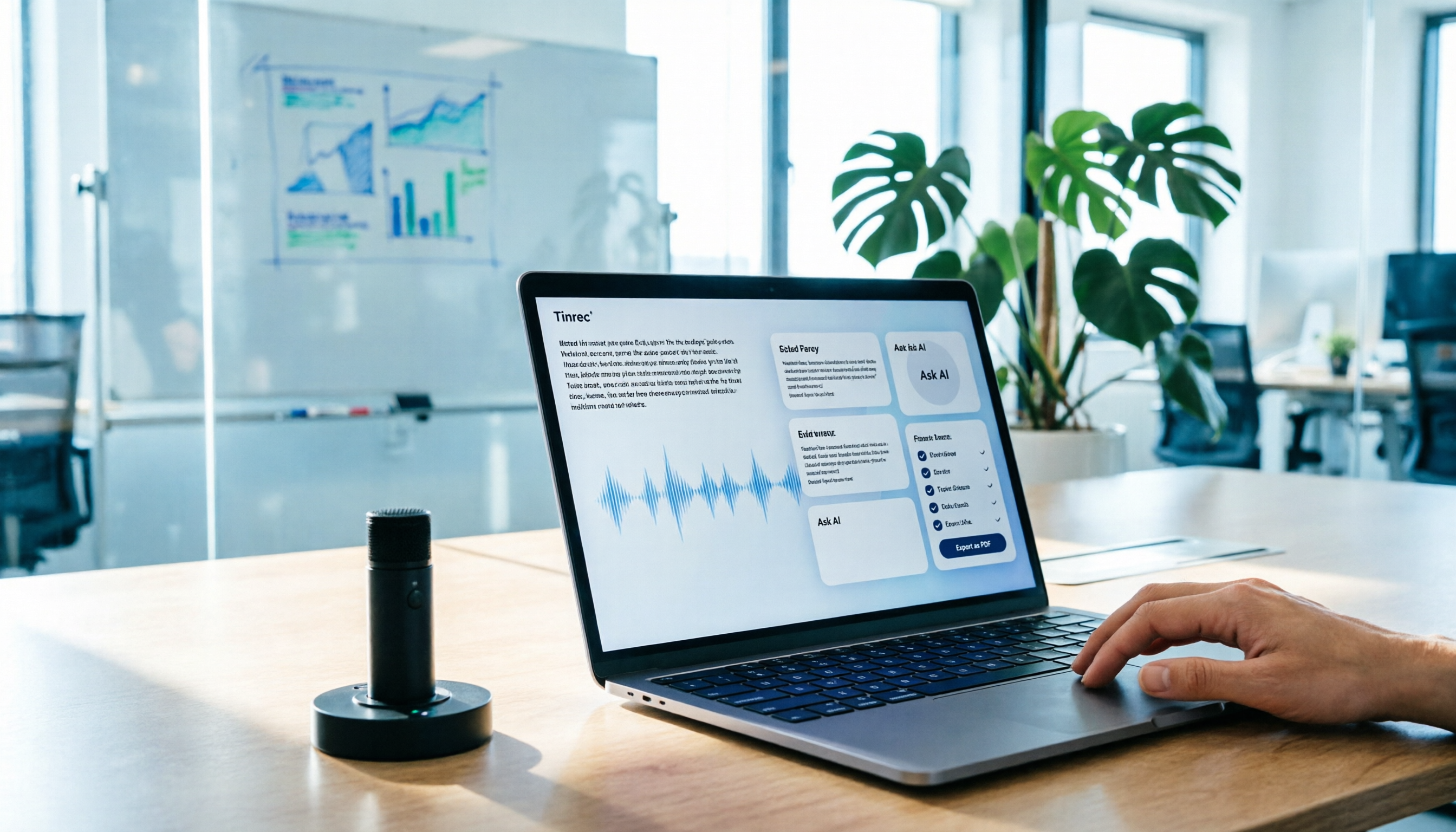
Turn recordings into transcripts and summaries in minutes
Upload audio or video for multilingual transcription, AI notes, and action items
The meeting just ended, and your manager drops a message in the group chat: "Those three decisions we just made—who's responsible, and when is it due?"
You open your notes. Half a page. The key discussion is still buried at minute 47 of the recording.
I used to be there too.
A 90-minute interview: replay, pause, type. An entire afternoon gone. And after all that typing, the few key points you actually need are still buried somewhere in the middle—you have to dig through it again anyway.
Then I changed my approach.
The question isn't "how do I type faster?" It's "which parts shouldn't be done by a human at all?"
Let AI handle the manual transcription. Keep the judgment calls for yourself. Draw that line clearly, and meeting notes go from "grunt work" to "proofreading."
In this article, I'll break down the entire workflow. The tool I use is Tinrec, but the workflow itself is what matters—swap in a different tool and the logic still holds.
What Can AI Meeting Notes Do for You?
Let's start with the results, then the method.
Scenario 1: The meeting ends, and the minutes are already there
Before, after a two-hour meeting, you'd spend another hour organizing. Now, by the time the meeting ends, the transcript, summary, chapters, and action items are already laid out. With Tinrec, for example, what you open isn't a raw transcript—it's structured data: "what topics were discussed, what were the conclusions, who's doing what next."
All you have left to do is verify.
Scenario 2: Didn't catch that part? Just ask.
Cross-department meetings are notorious for this—someone uses a term everyone else seems to follow, you didn't quite catch it, and you don't want to interrupt.
With AI Q&A, that changes. Once transcription is done, you can ask directly: "What exactly was that acceptance criteria they mentioned?" It goes back into the meeting content and finds it for you.
No need to replay from the beginning.
Scenario 3: Past meetings become searchable data
This is the most underrated part, in my opinion.
Most people treat AI meeting notes as a one-time output—meeting ends, minutes go out, done. But the real value shows up three months later: when you need to confirm "why did we make that decision back then," can you find that discussion in seconds?
With Tinrec, for example, meeting data accumulates in a team workspace—searchable, queryable, and ready for further processing. That's the difference between "meeting assets" and "meeting notes."
Scenario 4: Cross-language meetings
The other side speaks English, you speak Chinese, and the meeting still has to happen.
Tinrec supports real-time translation during recording, with options to switch between original text, translation, or bilingual view. You don't have to wait until after the meeting to understand what was said—you can keep up in the moment.
What Are the Core Capabilities of AI Meeting Notes?
This isn't a feature list—it's about which pain point each capability solves.
Capability 1: Live transcription—words appear as you speak
It's not transcribe-after-recording; text runs in real time as people talk. The point is "real-time confirmation": during the meeting, you can glance over to check if key numbers were recognized correctly, rather than discovering later that an amount was misheard.
The transcript also preserves timestamps, so you can click back to the recording when you need to verify.
Capability 2: Bot-free recording—no extra attendee needed
This is the most practical thing about Tinrec, in my view.
The desktop version captures your computer's system audio directly, handling Zoom, Google Meet, Microsoft Teams, and Webex online meetings without pulling an extra bot into the meeting room.
Why does it matter? Because when a bot joins, a "stranger on the attendee list" appears—some people mind, and some external meetings aren't suitable for it. Without that layer, recording becomes natural.
(Screenshot: Tinrec desktop recording interface, arrow pointing to system audio source option)
Capability 3: Summaries and chapters—see the skeleton, not the full text
No matter how accurate the transcript is, it's still a transcript. What really saves time is "structure."
With Tinrec, for example, it automatically generates summaries, chapters, and key points, breaking long meetings into browsable sections. My habit is to first look at chapter titles to confirm the meeting's flow is right, then decide whether to dive into a specific section.
After this step, I usually already know if there's anything in this meeting that needs my special attention.
Capability 4: Action item extraction—turn "said" into "to do"
What's most easily missed in meetings isn't the conclusions—it's the "incidental commitments."
"I'll handle this next week" "I'll ask about that later"—these lines flash by in the transcript, but they're action items. Tinrec pulls action items out of the discussion, fishing them out of conversational language.
Of course, you should review the AI-extracted action items yourself to confirm the owner and deadline match up.
Capability 5: AI Q&A—keep asking questions around the meeting content
This is the part I use most. After transcription, I don't rush to export—I ask a few questions first.
You can copy and use this directly:
Please answer based on the content of this meeting:
1. What explicit decisions were made in this meeting?
2. What are the owners and deadlines for each decision?
3. What issues were raised but not concluded in the meeting?
4. What should I prepare before the next meeting?
5. Are there any statements that seem inconsistent and need my confirmation?
Question 5 is especially important. AI isn't making decisions for you—it's helping you find "places worth a second look."
Capability 6: Export and post-processing—bring results back to your workflow
Meeting notes aren't the endpoint; they're the starting point for other work.
Tinrec supports multiple export formats, so you can take them to Notion, Google Docs, OneNote, Dropbox, and other places for continued use; it also supports Agent post-processing to turn meeting content into reports, tables, or documents.
The point is: you don't need to change your workflow for a tool.
Stop organizing recordings by hand
Upload audio or video and automatically get a transcript, summary, and action items
My Tested Workflow: From Recording to Action Items in Five Steps
Now that we've covered capabilities, let's talk operation. This is the workflow I settled on after running several real meetings.
Step 1: Decide whether this meeting is worth recording
Not every meeting deserves an archive. My criterion is simple: will this meeting produce content that "needs to be looked up three months from now"?
If yes, record. If no, use a notebook.
Step 2: Record directly with the desktop app—no bot
Thirty seconds before the meeting starts, open Tinrec desktop, confirm the system audio source is correct, and hit record.
For in-person meetings, switch to live recording—phone or computer both work.
(Screenshot: Pre-recording source check screen, arrow pointing to volume indicator)
Step 3: After transcription, look at chapters first, not the full text
This step is a matter of discipline.
The transcript is long, and you'll be tempted to read from the beginning. Don't. Look at chapter titles and summaries first to confirm the overall flow, then expand into the sections you need.
Step 4: Use the follow-up checklist to force out action items
Apply the five-question template above to turn "things that were said" into "things to do."
If an answer to a question is clearly off, go back to that minute in the transcript to verify. AI will have comprehension biases—that's normal, not an accident.
Step 5: Export to your existing workflow
Minutes go to the Notion project page, action items go to the task system, reports go to your manager.
Don't leave one copy in the tool, one in cloud storage, and another in email. That's why many people end up more disorganized after using AI.
Real-World Use Cases
Weekly project meetings
Regular weekly meetings are best suited for automation. Topics are repetitive, action items are clear—perfect for having AI produce a draft first, and you just fill in "what's different this time."
Customer interviews
Customer needs, concerns, and commitments are captured word-for-word in the transcript. Tinrec's AI Q&A can quickly pull out summaries like "what concerns did the customer mention," much faster than digging through yourself.
Courses and lectures
When attending a lecture, you don't need to take notes and listen at the same time. Record it, review chapters and summaries afterward, and go back to that segment when you need details. This is the most practical change for learning, in my view.
Content creation
Once interview material is transcribed, you can directly ask "which sentences work well as quotes" or "what's the context of this viewpoint," compressing the time needed to organize material.
Five Things to Consider When Choosing an AI Meeting Notes Tool
If you're still choosing a tool, I'd suggest looking at these five things rather than the price list.
1. Recording method: does it require a bot to join the meeting?
Some tools rely on a bot joining the meeting; others capture system audio via desktop. The former is convenient; the latter is less intrusive. Tinrec takes the latter approach—no extra attendee needed for online meetings.
First, think about whether your meeting culture can accept a bot.
2. Can you use it after transcription?
Accuracy is just the threshold. The real difference is "after transcription."
Are there summaries, chapters, action items, Q&A? Can you export to the tools you're already using? Tinrec builds this entire chain in—that's the biggest difference from pure transcription tools.
3. Performance with Chinese and mixed languages
Meetings in Taiwan often mix Chinese and English, with plenty of technical terms. When choosing a tool, it's best to run a test with your own meeting recording, paying special attention to recognition of names, product names, and numbers.
Tinrec has a team hotword feature that lets you maintain your team's commonly used terms to improve recognition of technical terms.
Actual performance will still be affected by recording quality, accents, and multiple people speaking at once—no tool can guarantee a fixed accuracy rate.
4. Are audio files retained?
Few people ask this, but it's crucial: when the AI summary is wrong, can you go back and listen to the original audio?
Tinrec retains audio, so you can replay with timestamps. If your workflow requires "verifying against the original," include this in your checklist.
5. Team collaboration and governance
Personal use and team use are two different things. For teams, the questions are: does data remain after a member leaves? Who can upload? Who can only view? How is usage calculated?
Tinrec's team plan handles these separately—roles manage governance, seats manage usage eligibility. Members who are active but don't have a seat can still view, play, and read team data, but cannot upload, edit, or export.
Currently, the team plan offers a 7-day trial, 1 free seat, and 300 minutes of shared team import quota; paid seats are USD 29.80/month or USD 199/year, with each paid seat including 2,000 minutes of shared team import quota per month. Prices and benefits are subject to the official purchase page.
(Screenshot: Team workspace member and seat management page, arrow pointing to seat allocation button)
FAQ
Is AI meeting notes accurate for Chinese?
With clear audio and non-overlapping speech, Chinese meeting transcription quality is already good enough to serve as a working draft. But don't expect zero errors—names, technical terms, and numbers are the three most common error sources. I recommend quickly scanning these fields after the meeting.
Does a meeting bot have to join?
Not necessarily. With Tinrec, for example, the desktop version captures computer system audio directly, so when handling Zoom, Google Meet, Microsoft Teams, Webex, and other online meetings, no extra bot needs to join as an attendee.
Can I organize just an audio file?
Yes. Tinrec supports audio and video file upload for transcription, suitable for organizing past meetings and interview recordings. File imports use shared import quota, which is calculated differently from live recording.
The transcript is too long—where should I start reading?
Look at chapters and summaries first, then decide which section to dive into. That's the most time-saving order, in my view—don't start from the first line.
Can I send out AI-generated minutes directly?
Not recommended. AI will miss things and misunderstand things—important numbers and external commitments must be verified against the original. My principle: AI produces a draft, humans do the final check.
Do I need to inform attendees about recording?
Yes. Recording and transcription involve local regulations and personal data protection. In practice, you should obtain attendee consent first and handle it according to company policy. This has nothing to do with which tool you use.
Conclusion
What AI meeting notes really change isn't "typing speed"—it's "the lifespan of meeting data."
Before, a meeting's value peaked the moment it ended, then decayed quickly. Now it can be searched, queried, and pulled out again by you three months later.
If you have more than three meetings a week, my suggestion is to start with one meeting: use Tinrec's free plan basic quota to run through the complete workflow once—from recording, transcription, follow-up questions, to export.
Once you've gone through it once, you'll know where you were originally stuck.
Test step by step, and you'll gradually master this method.
References
- Meeting Ink - 2026 AI Meeting Notes Tool Test | 7 Voice-to-Text and Summary Speed Comparison | Meeting Ink - AI Meeting Notes Assistant Automatic Transcription Transcript Summary Meeting Minutes
- AI Meeting Notes Software Recommendations: 5 App Test Comparisons, Automatic Transcription Makes Meetings Super Easy!
- The Most Recommended AI Meeting Notes Tool of 2026, the Must-Have Time-Saving Meeting Tool!
- Lately many people ask me, are there any AI tools for meeting notes?
- How to Use AI for Meeting Minutes? How to Organize Meeting Transcripts? | AI Voice-to-Transcript Tutorial | 104 Career Power
Turn every recording into actionable outcomes
Get 60 free transcription minutes when you sign in. No credit card required.
Related Reading
You might also like

2026 AI Meeting Notes: Record Online Meetings Without a Bot + Auto To-Dos in One Go
The latest shift in AI meeting notes for 2026 is moving from "inviting a bot into the meeting" to "getting data you can use right after the meeting." This article takes the perspective of a mid-level manager, breaks down 4 key purchasing criteria, tests Tinrec's bot-free recording, automatic to-dos, and AI Q&A, and briefly reviews who Meeting Ink, SeaMeet, and CLOVA Note are each best for.

2026 AI Meeting Notes Comparison: Which Latest Version Actually Saves You Time?
A guide to choosing the latest AI meeting notes tools in 2026, covering common pitfalls, core capabilities, real-world use cases, team seat pricing, and how Tinrec turns meetings into searchable, collaborative, actionable data.

2025 AI Meeting Notes Guide: Auto-Generate Transcripts and Action Items in One Go
How to choose an AI meeting notes tool in 2025? We break down 5 key buying factors: meeting capture methods, post-transcript organization, mixed Chinese-English recognition, team data ownership, and quota calculations. Plus, we compare Tinrec, Otter.ai, Notta, and Granola to help you find the right fit.

4 Real-Time Transcription Tools Tested for 2026: Which One Keeps Up as You Speak?
How do you do real-time transcription? We tested 4 tools with the same Chinese meeting recording, comparing live transcription, Chinese and mixed Chinese-English recognition, post-meeting summaries and AI follow-up questions, as well as free quotas, team seats, and pricing, to help you find the approach that truly keeps up during meetings.

2026 AI Meeting Notes Guide: Record Online Meetings Without Bots + Auto-Generate Action Items
How to choose the best AI meeting notes tool in 2026? This guide covers three real-world scenarios—online meetings, in-person meetings, and multilingual meetings—and outlines 4 key buying factors. It hands-on tests Tinrec's bot-free recording, transcription, AI summaries, and action item extraction, compares Otter.ai, Notta, and Granola, and includes a pitfalls guide and selection advice.
2026 AI Meeting Notes Tools Compared: How to Calculate Costs Without Wasting Money
Many people only look at the monthly fee when choosing an AI meeting notes tool, but overlook usage caps, per-meeting length limits, and post-meeting organization costs. This article recalculates using 'cost per meeting hour' and compares the pricing structures and use cases of Tinrec, Notta, Otter.ai, Granola, and PLAUD, plus four common pricing traps.
2026 AI Meeting Notes Comparison: Tinrec vs Notta Across 5 Dimensions — Which One Really Saves You Time?
The time between a meeting ending and delivering the minutes — replaying, pulling out key points, confirming action items — often wears you down more than the meeting itself. This article puts Tinrec and Notta side by side, comparing them across 5 dimensions: meeting capture, Chinese transcription, post-meeting output, team governance, and pricing/quotas. It also honestly lists each tool's limitations and best-fit scenarios to help you decide which tool should handle your meeting notes in 2026.

2026 AI Meeting Recorder Comparison: 5 Tools Tested for Chinese Transcripts and Post-Meeting Efficiency
Most people choose AI meeting recorder tools based only on free minutes, but still have to re-listen to recordings afterward. This article starts from real pain points, breaks down the core capabilities AI meeting recorder tools should have, 4 real use cases, and 5 purchase checkpoints. Using Tinrec as an example, it explains the complete workflow from bot-free recording, transcription, summaries, action items, AI Q&A, to team knowledge retention.

2026 AI Meeting Notes Free Plans Compared: Tinrec, Otter.ai, Notta, Granola Pricing at a Glance
Dcard discussions about AI meeting notes often focus on whether free versions are enough and how pricing works. This article compares Tinrec, Otter.ai, Notta, and Granola across four dimensions—free quota, per-upload limit, post-meeting output, and seat-based pricing—and highlights four common purchasing pitfalls to help you understand your meeting rhythm before spending money.