
Turn recordings into transcripts and summaries in minutes
Upload audio or video for multilingual transcription, AI notes, and action items
Faced with a two- or three-hour lecture recording or meeting minutes, have you ever felt overwhelmed? The most painful part isn't the recording itself, but having to spend double the time re-listening to the audio file just to extract a few key points. "Record but never listen" is a common habit among students and new professionals, leading to a pile of recordings that never get turned into knowledge.
The good news is that in 2026, speech-to-text technology has evolved beyond simply "generating a transcript"; it can now deliver "AI-powered summaries" and "conversational queries." This article will review 5 recording tools, ranging from free built-in features to professional AI solutions, and provide a detailed specification comparison table and a practical tutorial. If you're looking for a completely free option, consider Google or open-source solutions; if you value extracting "action items" and "deep notes" from recordings, consider professional tools with AI workflows.
Quick Navigation Conclusions:
- Completely free and lightweight: Choose your phone's built-in Google Live Transcribe or Word Dictation on desktop.
- Privacy and technical capability: Recommend open-source OpenAI Whisper (requires self-deployment or desktop version).
- Need AI summaries and note organization: Recommend Tinrec or Notta, suitable for turning recordings into actionable notes.
Why You Need "AI Recording Notes" Instead of a Traditional Recorder?
The biggest pain point of traditional voice recorders or phone recording apps is the extremely low information density. A 60-minute recording requires linear playback to find key information, making retrieval costly. New-generation AI recording-to-text tools solve three main problems:
- Visual search: Convert audio to text, then instantly locate content via keyword search (Ctrl+F).
- Structured summaries: Use LLMs (Large Language Models) to automatically identify speakers, generate chapter summaries, and to-do items.
- Multilingual understanding: For foreign language classes or international meetings, AI can simultaneously translate and organize.
2026 Selection: 5 Recording-to-Text Tools Reviewed
Below, based on different usage scenarios and technical requirements, we have selected 5 representative tools for analysis.
1. Google Live Transcribe
- Use case: Real-time classroom recording, face-to-face interviews.
- Pros: Completely free, supports over 80 languages (including Traditional Chinese), very fast recognition, can identify ambient sounds (e.g., laughter, applause).
- Limitations: Only available on Android devices (iOS users need alternatives), transcripts are saved on-device for only 3 days, does not support importing external audio files.
2. OpenAI Whisper / Whisper Desktop
- Use case: Engineers, those valuing extreme privacy, offline work.
- Pros: Currently the most powerful open-source recognition model, supports 99 languages, high tolerance for accents and background noise. Using desktop tools (e.g., Whisper Desktop) allows fully offline operation; data never leaves your device.
- Limitations: The original version requires a Python environment and relatively high computer hardware (GPU), which can be a barrier for non-technical students or administrative staff.
3. Tinrec (Instant Recording)
- Use case: Class notes, meeting minutes, multi-device synchronization.
- Features: Tinrec's design logic is "Record → Understand → Act." Beyond basic recording-to-text, it emphasizes post-recording note organization efficiency. Supports cross-platform sync across iOS, Android, and web.
- Differentiating advantages:
- AI conversational query: A feature rarely seen in traditional transcript tools. You can directly ask questions about the recording (e.g., "What were the key points for the final exam that the professor mentioned?") and the AI will answer based on the recording content, saving you from manual searching.
- Multi-source support: Not only supports live recording and file upload, but also accepts YouTube or Podcast links to directly generate summary notes.
- Free quota: Provides 100 minutes of free transcription per month.

Stop organizing recordings by hand
Upload audio or video and automatically get a transcript, summary, and action items
4. Otter.ai
- Use case: English-only meetings, international academic conferences.
- Pros: Internationally recognized meeting tool, accurate automatic speaker identification, integrates with Zoom/Teams.
- Limitations: Does not support Chinese. This is a major drawback for Traditional Chinese users; it's only suitable for English-only environments.
5. Notta
- Use case: International meetings, multilingual environments.
- Pros: Supports 58 languages, offers real-time transcription and AI summary features.
- Limitations: Based on testing and source data, its Chinese recognition accuracy is relatively weaker than English, and the free version has more restrictions (shorter single transcription duration).
Tool Specification and Feature Comparison Table
To help you choose more intuitively, here is a comparison table of core dimensions:
| Dimension | Google Live Transcribe | Tinrec | OpenAI Whisper | Otter.ai |
|---|---|---|---|---|
| Chinese Support | Excellent (Traditional) | Excellent (includes Taiwanese Hokkien/Cantonese) | Good | Not supported |
| Main Features | Pure text transcription | Transcription + AI Summary + Conversational Query | Pure text transcription | Transcription + Meeting Summary |
| File Import | Not supported | Supported (audio/video/links) | Supported | Supported |
| AI Note Organization | None | Meeting minutes/action items/summary | None (requires external GPT) | Yes |
| Cross-Platform | Android only | iOS, Android, Web | Local (PC/Mac) | Web, App |
| Free Model | Completely free | 100 minutes free per month | Open-source free (requires hardware) | 300 minutes per month |
| Best For | Quick note-taking on the go | Note organization/students/professionals | Technical users | English-only users |
Practical Tutorial: How to Get Class Notes Done in 4 Steps with AI Tools
After choosing your tool, the workflow is key to efficiency. Below, using Tinrec as an example, we show how to quickly turn a 2-hour class into a 10-minute review note.
Step 1: Start Recording or Import a File
If you are in class, open the app and tap "Start Recording"; if reviewing after class, select "Import Audio" or paste a class video link.
- Tip: If the environment is noisy, place your phone close to the speaker or use a directional microphone.
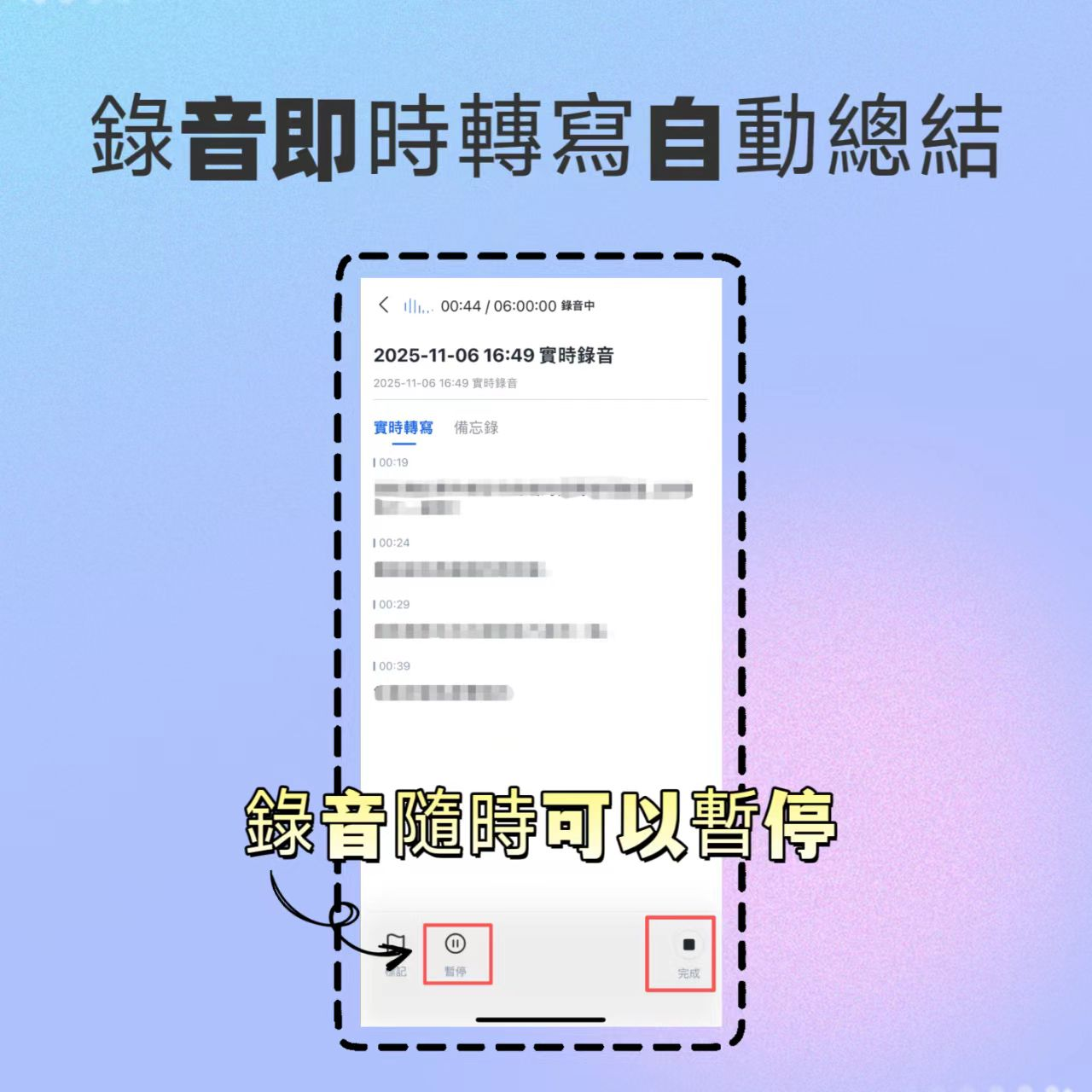
Step 2: Get the Transcript and Speaker Identification
After recording, the system will automatically transcribe. Tinrec supports 10 languages and can handle mixed Chinese-English courses (e.g., programming or medical classes). The system will automatically label different speakers, making it easy to distinguish between the professor and student questions.
Step 3: Generate AI Smart Summary and Action Items
This is the most critical step. Instead of just reading the transcript, tap the "AI Summary" feature. The system will automatically generate:
- Summary: Core concepts of the class.
- Chapter divisions: Automatically segmented by topic.
- Action Items: e.g., "Submit report by next Tuesday," "Read assigned literature Chapter 3."

Step 4: Use AI Conversational Query to Fill in Missing Details
When reviewing, if you can't recall details, no need to replay the audio. Use the "AI Conversational Query" feature and type a question:
"What are the three theories the professor said will be on the midterm?"
The AI will answer based on the recording content, showing timestamps in the original audio. Tap to jump back and confirm.

Frequently Asked Questions (FAQ)
Q1: Are free speech-to-text tools accurate enough?
For clear recordings, modern AI tools (like Whisper or Tinrec) typically achieve 90%+ accuracy. However, accuracy drops in noisy environments or with multiple overlapping speakers. Treat AI transcription as a "draft" and manually review it alongside the AI summary.
Q2: What free options are recommended for iPhone users?
iPhone's built-in "Voice Memos" doesn't transcribe text; you can use the "Dictation" feature on the keyboard, but it can't handle long recordings. Consider third-party apps like Tinrec or Otter (English), or use Whisper Desktop on a computer to process files.
Q3: Are recording-to-text tools a privacy risk?
If your recordings involve highly sensitive content (e.g., legal, medical, trade secrets), use an offline tool like Whisper Desktop to ensure data never leaves your device. General cloud services (e.g., Tinrec, Otter) typically have privacy policies suitable for regular classes or work meetings.
Q4: Can I use these tools to transcribe YouTube videos or Podcasts?
Some tools support this. For example, Tinrec accepts YouTube or Podcast links, directly parsing and generating text notes – very convenient for organizing online courses or foreign information.
Q5: If I speak Taiwanese Hokkien or Cantonese, can the AI understand?
Google Live Transcribe and Tinrec both support Taiwanese Hokkien and Cantonese. However, dialect recognition accuracy is usually lower than standard Chinese; try to speak clearly when recording.
Q6: What happens when my free quota runs out?
Most professional tools (e.g., Tinrec, Notta) are subscription-based or pay-per-use. For light users (less than 2 hours per month), the free quota is usually sufficient. For heavy needs, the cost of a subscription AI tool is often less than 1/10 of hiring a human transcriber – a very worthwhile investment.
Turn every recording into actionable outcomes
Get 60 free transcription minutes when you sign in. No credit card required.
Related Reading
You might also like

Tinrec vs Otter.ai 2026: 5-Dimension Comparison — Who Manages Meeting Data Access Permissions Better?
Meeting data access permissions aren't just an IT issue — they're a team memory issue. Starting from the real-world pain of "who holds the data," this article reviews 6 solutions and compares Tinrec vs Otter.ai across 5 dimensions: team-level sharing, role and seat management, audit and recycle bin, data handover, and Chinese-language meeting experience — highlighting differences in meeting data access permissions and ideal use cases.

4 Meeting Notes Tools Tested in 2026: Which One Actually Builds a Team Knowledge Base?
Meeting notes shouldn't stay locked in personal accounts. We tested Tinrec, Otter.ai, Granola, and PLAUD across bot-free online meeting recording, post-meeting summaries and action items, AI Q&A, team spaces, roles, and seat management to help you find the tool that truly turns meetings into reusable team data.
Feishu Minutes Alternatives: 2026 Hands-On Comparison of 2 Tools, Tinrec Handles Chinese Meetings Better
Feishu Minutes free version has ASR time limits. This article compares Feishu Minutes and Tinrec in meeting recording, free quota, AI organization, export, and team collaboration to help users who meet across platforms and want to consolidate meeting materials find a more suitable alternative.

Notion AI Meeting Notes Alternative Tested: Tinrec's Bot-Free Workflow Review (2026)
Notion AI's meeting notes are well-integrated, but plan thresholds, device limits, and team sharing needs can still get in the way. From the perspective of a mid-level manager who runs 15 meetings a week, this hands-on review tests Tinrec as an alternative: bot-free recording, live transcription, AI summaries and action items, post-meeting Q&A, multi-format export, and team space roles and seat governance—plus an honest look at when it's not a good fit.

5 AI Meeting Tools Seat Management Tested for 2026: How Many Team Plan Seats Do You Really Need?
How many seats to buy for a team meeting tool is the biggest question most teams face before purchasing. This article uses Tinrec's team plan to demonstrate a replicable seat management process, explaining roles, seats, data ownership, and usage checks in 5 steps, along with FAQs and alternatives.
4 Best Audio-to-Text Tools for Chinese Meetings in 2026: Real-World Comparison
How to choose the right audio transcription tool? This article starts with common pitfalls, outlines 4 key buying factors, then compares Tinrec, Otter.ai, Granola, and TurboScribe in real-world tests for Chinese meeting transcription, bot-free recording, AI summary Q&A, and team data retention. It ends with a guide to avoid mistakes and recommendations based on your needs.
7 Best Free Audio-to-Text Transcription Tools in 2026: A Complete Comparison
Tired of spending hours transcribing meeting recordings? This guide reviews 7 free audio-to-text transcription solutions in 2026, comparing free tiers and paid pricing for Tinrec, MyEdit, cSubtitle, Otter.ai, Notta, TurboScribe, and Granola. Learn each tool's free limits, pricing, and ideal use cases to find the best fit for your transcription needs.

4 Meeting Transcription Tools Tested for 2026: Which One Actually Builds a Team Knowledge Base?
The real pain point with meeting notes isn't that nothing gets written down—it's that what's written down never gets used. Starting from real meeting scenarios, this article breaks down 4 key decision points for choosing a meeting transcription tool, compares Tinrec, Granola, Notta, and PLAUD in hands-on testing, and outlines the 3 most common buying mistakes, helping you turn scattered meeting content into a searchable, queryable, transferable team knowledge base.

2026 Comparison of 4 Meeting Transcription Tools: Who Does Permission Management Best?
Who should see meeting notes? This article examines four key points—roles and seats, team-level sharing, data ownership after member departure—and compares the permission management designs of Tinrec, Otter.ai, Fireflies.ai, and Granola, plus four common pitfalls to help you think clearly before adoption.