
Turn recordings into transcripts and summaries in minutes
Upload audio or video for multilingual transcription, AI notes, and action items
Facing hours of meeting recordings or interview content, have you ever felt overwhelmed trying to produce a transcript? Traditional manual transcription is time-consuming and labor-intensive, often taking 3 to 4 hours to process just 1 hour of audio. The good news is, with advances in AI technology, many tools now automate this tedious task.
This article reviews the mainstream audio-to-text tools of 2026, covering free credits, language support (especially Chinese and Taiwanese), and AI summarization capabilities. If you're a student looking for a free tool, start with Google or iOS built-in features. If you're a professional handling frequent international meetings, Tinrec or Otter will be more efficient choices.
Why You Need Modern AI Audio-to-Text Tools
Before choosing a tool, let's clarify the three major pain points modern workers face, which are also key criteria for evaluating tools:
- High time cost: Traditional voice recorders only allow playback, not search. You need a tool that lets you "see text in real time."
- Difficult information retrieval: With thousands of words in a transcript, Ctrl+F isn't enough to find "what someone promised." You need AI with semantic understanding.
- Multilingual barriers: For international meetings or foreign language classes, simple recording doesn't solve comprehension issues; you need translation and bilingual alignment.
2026's Top 8 Popular Transcription Tools Reviewed
Based on market popularity and features, here is this year's most noteworthy tool list:
1. Otter.ai: A Powerful Assistant for English Meetings
Otter is a veteran AI meeting assistant, especially strong in English recognition. Its free Basic plan offers 300 minutes per month (30 minutes per session).
- Pros: High English accuracy, supports speaker labeling, integrates with Zoom/Google Meet.
- Cons: Limited language support (mainly English, Spanish, French); low support for Chinese users.
2. Google Live Transcribe: A Free Powerhouse for Android Users
This is an Android built-in or downloadable app that supports over 70 languages.
- Pros: Completely free, no time limits, supports offline mode (download packages required). Ideal for classroom notes or impromptu interviews.
- Cons: Cannot distinguish speakers, lacks export functionality (you must manually copy text); mainly for "real-time viewing," not post-event organization.
3. iOS Voice Memos (iOS 18+): A Native Benefit for iPhone Users
Apple significantly enhanced Voice Memos in iOS 18. iPhone 12 and later models can display transcripts directly in the app.
- Pros: Integrated into the system, free, high privacy (on-device processing). Supports about 10 major languages, including Traditional Chinese.
- Cons: Basic functionality, lacks AI summaries and action item extraction; suitable only for personal notes.
4. Notta: A Multilingual Meeting Helper
Notta supports transcription in up to 58 languages, making it friendly for users dealing with multiple languages. The free plan offers 120 minutes per month.
- Pros: Supports importing audio/video files and speaker separation.
- Cons: Free plan has limitations, and history storage has a cap.
5. Tinrec (formerly known as 秒聽錄音): A Complete Workflow from Recording to Action
Tinrec is not just a transcription tool; it emphasizes "understanding and action." It supports 10 languages including Chinese, Taiwanese, English, Japanese, and deeply integrates AI into post-processing.
- Pros: Besides transcripts, it automatically generates meeting minutes and to-do lists. The exclusive "AI chat query" lets you search recording content by asking questions.
- Use Cases: Ideal for business users or freelancers who need to quickly turn meeting content into project actions.
6. Whisper (OpenAI): An Open-Source Choice for Tech Enthusiasts
If you know programming or have a powerful computer, OpenAI's Whisper model is a free and powerful option, supporting 99 languages.
- Pros: Extremely high accuracy, completely free (local execution), no privacy concerns.
- Barrier: Requires technical know-how to set up the environment; no ready-made GUI, making it harder to use.
Stop organizing recordings by hand
Upload audio or video and automatically get a transcript, summary, and action items

7. Descript: An Editing Power Tool for Podcast Creators
Descript's standout feature is "editing audio like editing a document." The free plan provides 60 minutes of transcription per month.
- Pros: Deleting text removes the corresponding audio clip; great for content creators.
- Cons: Limited free credits; video exports include watermarks.
8. oTranscribe: A Web-Based Aid for Manual Transcription
This is a purely web-based tool that does not offer AI automatic transcription but provides an integrated player and editor.
- Pros: Completely free, data never uploaded to servers; ideal for academic researchers who require extreme privacy and must manually proofread.
Comparison Table: How to Choose the Right Tool for You?
| Tool | Free Credits | Chinese Support | Key Feature | Best For |
|---|---|---|---|---|
| Otter.ai | 300 min/month | No | Strong English recognition, meeting integration | Multinational workers, English meetings |
| Google Live Transcribe | Unlimited | Yes | Completely free, real-time display | Students, hearing-impaired, Android users |
| Tinrec | 100 min/month | Yes (includes Taiwanese) | AI chat query, action item extraction | PMs, administrative staff, multilingual meetings |
| Notta | 120 min/month | Yes | Multilingual translation | Cross-border business, language learners |
| iOS Voice Memos | Unlimited | Yes | System built-in, high privacy | iPhone users, personal notes |
| Descript | 60 min/month | Fair | Text-based audio editing | Podcasters, YouTubers |
Deep Dive: Tinrec's Differentiated Value in Workflow
Among many tools, Tinrec's design logic leans more toward solving the "post-transcription" problem. Most tools end after producing a transcript, leaving users to spend time summarizing key points. Tinrec aims to bridge the full path of "Recording → Understanding → Action."
1. Beyond Recording: Generating Action Items
Tinrec analyzes the entire recording and automatically extracts a to-do list. For example, if someone says, "Xiao Ming needs to submit the report by next Friday," it’s captured and listed, saving time on post-meeting minutes.

2. Find Answers by "Asking" (AI Chat)
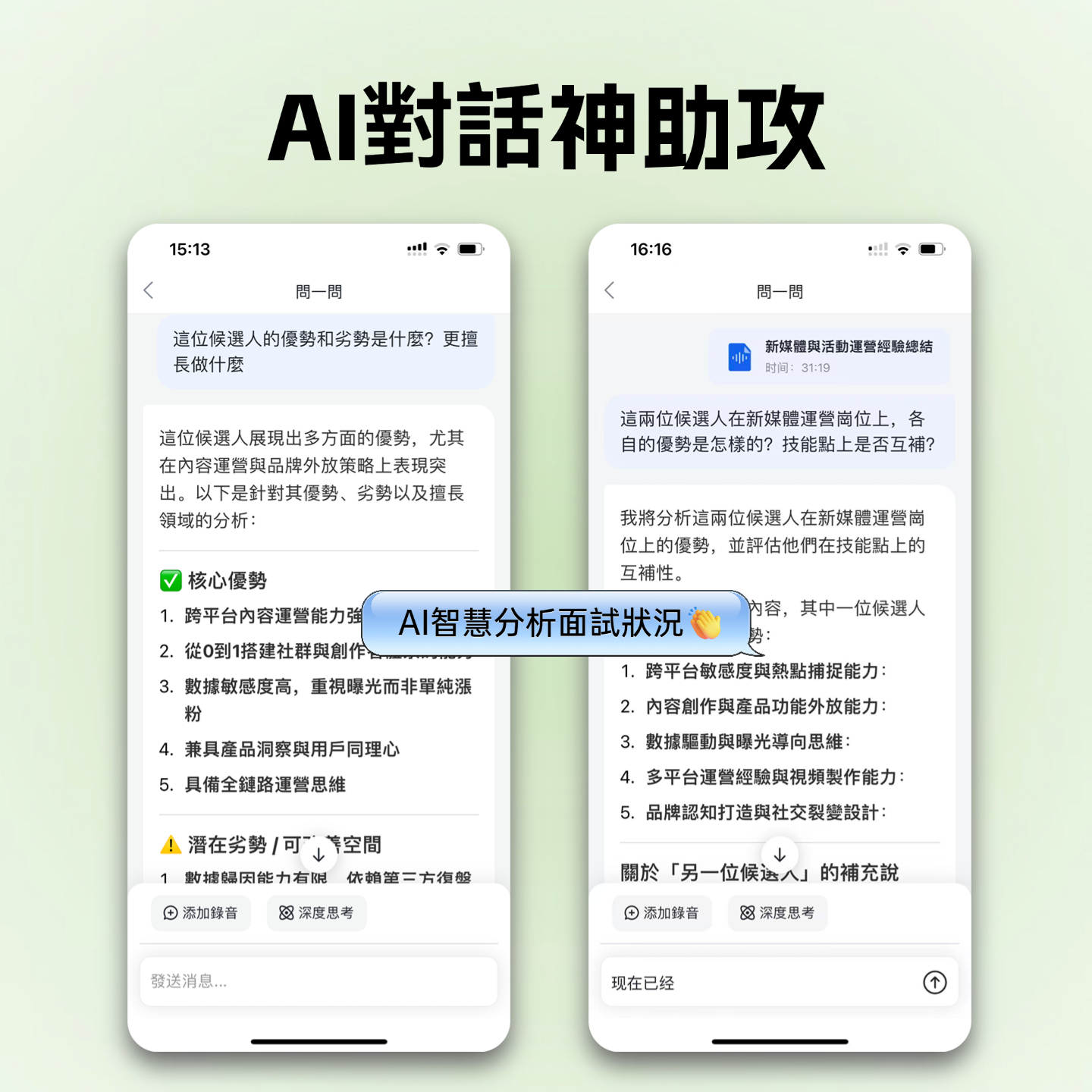
This is the biggest differentiator from traditional tools. Facing a one-hour interview, you don't need to replay from the start. Just type in the chat: "What did the interviewee think about the product price?" Tinrec's AI answers directly based on the recording content and timestamps the original audio.

3. Cross-Platform & Multi-Source Support
Besides the mobile app recording, Tinrec's web version supports uploading audio/video files and even parsing YouTube or Podcast links. This is convenient for content creators who need to organize online material.
Practical Tutorial: How to Efficiently Turn Recordings & Videos into Notes
Using Tinrec as an example, here’s how to convert audio from different sources into usable text:
Step 1: Choose Input Source
After registering and logging in, you'll see three main entry points:
- Live Recording: For on-site meetings or classes, click the microphone icon to start.
- Import File: If you have mp3/m4a files from a voice recorder or phone, choose "Upload."
- Link Parsing: To transcribe a YouTube talk, select "Video Link" and paste the URL.

Step 2: Confirm Language Settings
Before uploading or recording, set the recognition language. If the meeting mixes Taiwanese or English, choosing the corresponding auto-detection mode improves accuracy.
Step 3: View Transcript & Speaker Labeling
After transcription, the system automatically labels speakers (Speaker 1, Speaker 2). You can manually edit speaker names (e.g., change to John, Alice), and the system will apply them throughout.

Step 4: Use AI for Summaries & Queries
Click the "AI Summary" button to get meeting minutes. For specific details, use the chat window on the right to ask questions like "What was the conclusion of this meeting?" The AI will generate an answer in real time.
Frequently Asked Questions
Q1: Are free audio-to-text tools accurate enough? Currently, mainstream tools typically achieve over 90% accuracy in quiet environments. Accuracy drops in noisy settings or with overlapping speakers. For best results, keep the device close to the speaker or use a directional microphone.
Q2: Do these tools support iPhone or Android? Most third-party tools (e.g., Tinrec, Otter, Notta) support iOS, Android, and web versions. Google Live Transcribe mainly supports Android, while iOS Voice Memos is exclusive to Apple devices.
Q3: Will my recording files leak? Cloud services (e.g., Otter, Tinrec, Notta) upload files to servers for processing. For highly sensitive content (defense or patent data), use on-device computing tools (like iOS built-in features or locally deployed Whisper).
Q4: Can I export to Word or subtitle files? Most paid or freemium tools (e.g., Tinrec, Otter) support export to TXT, DOCX, PDF, and even SRT subtitle files. Google and iOS built-in features typically only allow copying text.
Q5: Does Tinrec's free plan have limitations? Tinrec offers 100 free minutes of transcription per month, a great starting point for occasional meeting or class notes. For more minutes, consider upgrading to Basic or Pro.
Q6: Can I directly convert YouTube videos to text? Yes. Use the "Link Parsing" feature of Tinrec or similar tools to paste the URL and get transcripts and summaries. This is very useful for studying online courses or analyzing competitor video content.
Turn every recording into actionable outcomes
Get 60 free transcription minutes when you sign in. No credit card required.
Related Reading
You might also like

2026 AI Meeting Assistant Comparison: 4 Tools Tested — What It Is and How to Choose
An AI meeting assistant is more than just recording and transcription. This article explains in one sentence what an AI meeting assistant is and which post-meeting pain points it solves, then compares Tinrec, Otter.ai, Granola, and Notta across four key dimensions: meeting capture method, Chinese-language experience, post-meeting output, and team data ownership. It also covers four common purchasing mistakes to help you pick the right tool.

2026 Speech-to-Text Tools Compared: Which Free Version Is Actually Good Enough?
A hands-on comparison of the latest free speech-to-text tools in 2026, focusing on four key aspects: free quota calculations, post-meeting organization capabilities, online meeting recording methods, and Chinese language performance. We compare the free plans and limitations of Tinrec, Otter.ai, Notta, and TurboScribe, and highlight four common purchasing mistakes to help you decide which free version is truly sufficient.

6 AI Meeting Assistants Tested for 2026: How to Actually Save Time After Meetings
Many people dump meeting recordings into AI and expect miracles, only to get a transcript nobody wants to read. Based on a mid-level manager's real usage across 15 meetings a week, this article compares the positioning, pricing, and ideal use cases of 6 AI meeting assistants, and explains how to use them to truly save time.

2026 AI Meeting Assistant Comparison: Tinrec vs Otter.ai — How to Use and Which Saves More Time
Starting from the workplace pain point of 'no one remembers what was assigned after the meeting,' this hands-on test compares Tinrec and Otter.ai AI meeting assistants. It breaks down five dimensions: recording methods, Chinese meeting organization, post-meeting follow-up questions, export workflows, and team knowledge retention, with practical steps and selection advice.

Best AI Meeting Assistants in 2026: 5-Step Hands-On Selection Guide
There are countless AI meeting assistants, but which one is actually useful? This guide walks you through 5 hands-on steps to filter them: how they capture meetings, post-meeting outputs, Chinese transcription performance, AI Q&A capability, and team data ownership. We also hands-on test and compare Tinrec, Otter.ai, Notta, and Granola to help you find the tool that fits your meeting habits.

4 AI Meeting Assistants Tested for 2026: Which Free Version Is Actually Enough?
The meeting ends, but the real work begins. This hands-on comparison of Tinrec, Otter.ai, Notta, and Granola looks at how meetings are captured, what happens after transcription, whether audio is retained, and how team licensing works. We break down each tool's free tier, limits, and best-fit scenarios so you can decide which one truly saves you post-meeting cleanup time.

2026 AI Meeting Assistant Comparison: Which Type Actually Saves Post-Meeting Time?
AI meeting assistants aren't just about turning speech into text. This article starts from real mid-level manager meeting scenarios, breaks down the differences between meeting bots, built-in platform transcription, and bot-free desktop recording, and uses Tinrec to demonstrate the complete workflow from transcripts and summaries to action items, AI Q&A, and team knowledge retention. It also includes 5 key buying criteria and FAQs.

2026 AI Meeting Assistant Comparison: 4 Tools Tested from Recording to Minutes—Which Saves the Most Time?
How can you use an AI meeting assistant without wasting time? Starting from real meeting scenarios, this article breaks down how AI meeting assistants capture audio, what they produce after the meeting, their Chinese-language performance, and differences in quotas. It also walks through the complete Tinrec workflow—from recording, transcription, and summary action items to AI Q&A and team sharing—while briefly reviewing when Otter.ai, Notta, and Granola are suitable.

2026 AI Meeting Assistant Free Plans Compared: 5 Options at a Glance
Which AI meeting assistant is best? Instead of comparing feature tables, first determine what level you actually need. This article uses Tinrec's five plans—Free, Weekly Pass, Pro Monthly, Pro Annual, and Team—to break down the capabilities to look for, real-world use cases, and purchasing considerations, helping you decide if the free version is enough and when to upgrade.