
Turn recordings into transcripts and summaries in minutes
Upload audio or video for multilingual transcription, AI notes, and action items
Every Friday afternoon or at the end of a project, do you find yourself anxious about writing work summaries? With fragmented information scattered across Slack, emails, recordings, and notes, manually organizing it consumes time and risks missing key decisions. Since the explosive growth of AI technology post-2025, workflow automation is no longer just for engineers—it's become essential for every professional.
This article reviews 6 different types of work summary auto-generation tools and offers detailed comparisons and hands-on tutorials to help you choose the best fit for your work scenario (text-heavy or meeting-heavy?).
Quick Navigation Conclusions:
- If you need to connect multiple apps to automatically pull data (e.g., compile completed Trello tasks): Choose Zapier or Make.com.
- If you need to expand or polish existing text notes into reports: Prioritize Notion AI.
- If your main information source comes from "verbal communication" and "meeting recordings": Use Tinrec (Second Listening Recorder) to handle transcription and key point extraction.
1. Why Work Summaries Need AI?
According to IDC, organizations implementing AI-driven frameworks improve decision-making speed by 35%. In the 2025–2026 workplace, data volume doubles every 12 months, making "human memory" and "manual copy-pasting" insufficient.
The pain points of work summaries typically revolve around three aspects:
- Information Fragmentation: Data scattered across CRM, messaging apps, and meeting recordings.
- Repetitive Labor: Weekly repetitive template filling wastes time.
- Loss of Voice Information: Meetings are forgotten; relistening to recordings is costly, leading to unclear action items.
Modern AI tools go beyond "automation" to offer "adaptive intelligence," learning from results and optimizing summary quality.
2. 2026 Curated Work Summary Tools (by Category)
2.1 Workflow Automation: Zapier & Make.com
Best for: Data aggregation, cross-platform triggers
- Zapier: Currently the most suitable automation tool for small businesses and individuals. You can set a "Zap" like: "Whenever I move a card to 'Completed' in Trello, automatically write the task title and timestamp into a Google Doc weekly draft." It can even incorporate AI steps to auto-draft email summaries.
- Make.com: Ideal for users with stronger technical skills. Its visual drag-and-drop interface allows creating complex workflows with branching logic, suitable for pulling data from multiple databases to generate monthly reports.
2.2 Document Generation & Collaboration: Notion AI & Kuse
Best for: Text note organization, project documentation
- Notion AI: Embeds AI directly into the note-taking app. When you have accumulated scattered meeting notes, simply select the text and ask AI to "generate summary" or "list to-dos," and it quickly produces structured documents. Great for maintaining product docs and internal knowledge bases.
- Kuse: A newer AI workspace that converts uploaded PDFs, spreadsheets, or notes into structured presentations or reports—ideal for knowledge workers who consume a lot of material before output.
2.3 Speech-to-Text & Meeting Intelligence: Tinrec (Second Listening Recorder)
Best for: Meeting minutes, interview transcription, video/audio content summarization
Traditional work summary tools mostly handle "text input," but 70% of key workplace information occurs in "verbal communication."
Tinrec focuses on structuring "audio information." It's not just a recorder; it's an AI assistant that "understands" content. With multilingual recognition (including Chinese, English, Cantonese, Taiwanese Hokkien, etc.), it transcribes in real-time during recording and automatically generates meeting minutes and action items, filling the gap left by Zapier and Notion in handling live speech.

3. Feature Comparison Table of Main Tools
To help you decide quickly, we compare from three dimensions: "core scenario," "input type," and "summary capability."
Stop organizing recordings by hand
Upload audio or video and automatically get a transcript, summary, and action items
| Dimension | Tinrec (Second Listening) | Notion AI | Zapier | Otter.ai |
|---|---|---|---|---|
| Core Strength | Speech-to-text + Intelligent Summarization | Document editing + Text generation | App connection + Automation | English meeting transcription |
| Primary Input | Live recording (App/Web), audio files, video links | Text notes, databases | Trigger events (Webhook/API) | Live recording (English-oriented) |
| Chinese Support | High (Supports mixed Chinese/Cantonese/Taiwanese Hokkien/English) | High (depends on underlying model) | UI in English, can process Chinese content | Weak (mainly English) |
| Summary Output | Meeting minutes, to-do list, AI Q&A | Text polishing, paragraph summary | Data aggregation reports | Meeting summary |
| Real-time | Real-time transcription + in-recording markers | Not real-time (needs text first) | Depends on trigger frequency | Real-time |
| Pricing | Free (100 min/month) / Paid plans | Add-on to Notion subscription | Free tier / Per-task pricing | Free tier / Subscription |
4. In-Depth Review: How Tinrec Solves the "Forget After Hearing" Summary Problem
When choosing tools, many overlook that recordings are extremely low-information-density but high-cost to replay. If your work summaries stem mainly from "weekly meetings" or "client interviews," using text-only tools (like Word or Notion) forces you to type while listening, which is inefficient.
Tinrec's differentiator is turning "recordings" into "searchable data":
Complete closed loop from recording to action: Unlike tools that only provide transcripts, Tinrec emphasizes "post-use." After recording, AI automatically analyzes content, identifies speakers, and extracts "decisions" and "action items." This directly solves the problem of "meeting ends, but nobody knows who does what."
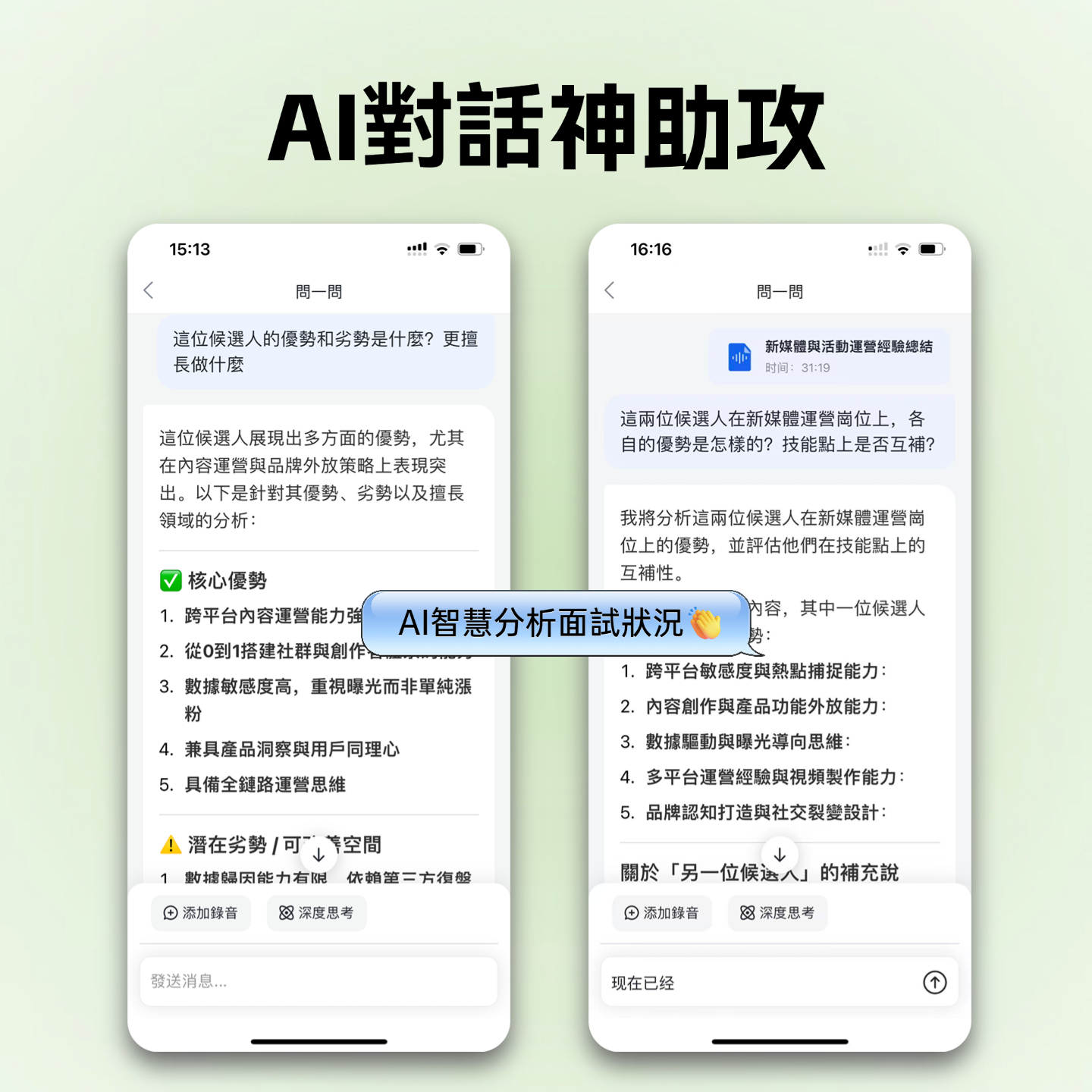
AI Chat Query (Chat with Audio): This is something traditional recorders cannot do. You can use natural language to ask the AI: "What was the conclusion about Q2 budget in the last meeting?" Tinrec answers based on the recording, like an assistant who took notes—no need to listen to 60 minutes of audio.

Multimodal input and language support: Besides live recording, Tinrec supports importing audio/video files and even parsing YouTube/TikTok video links. For marketers summarizing online courses or competitor videos, this is a huge time-saver.
5. Hands-On Tutorial: How to Quickly Generate Meeting Summaries with AI

Here's how to use Tinrec to generate a 1-hour meeting summary in 5 minutes:
Step 1: Start Recording or Import File
- In-person meeting: Open Tinrec App or web version, tap "Start Recording." Available on iOS, Android, and web, anytime, anywhere.
- Online meeting: For Google Meet or Teams meetings, you can record by playing audio from your computer's speaker, or upload pre-recorded MP4/MP3 files.

Step 2: Real-Time Transcription and Marking
- During recording, Tinrec converts speech to text in real time. When you hear something important, tap the "Mark" button on the interface for later review.
Step 3: AI Smart Summarization and Action Item Extraction
- After recording ends, the system automatically generates a transcript. Click the "AI Summary" tab to view auto-generated "Meeting Minutes" and "To-Do List."
- Tip: Copy these action items directly into your task management app (like Notion or Trello) to close the workflow loop.

Step 4: Fine-Grained AI Query
- If the summary isn't detailed enough, use the "AI Chat" feature on the right. Type: "Please summarize details about the marketing budget discussion," and AI precisely extracts relevant sections and rephrases them.
6. Frequently Asked Questions
Q1: Do these AI tools support Traditional Chinese? How accurate is recognition? Notion AI and Zapier's Chinese handling depends on their underlying models (usually GPT series), which have good support. However, for speech recognition, Tinrec specifically optimizes models for Chinese (including Taiwanese Hokkien, Cantonese) and achieves higher accuracy for mixed Chinese-English workplace conversations compared to English-centric Otter.ai.
Q2: Are there privacy risks with AI-generated work summaries? Enterprise tools like Zapier and Salesforce comply with strict regulations (e.g., GDPR). When using Tinrec, data transmission is encrypted and primarily assists personal or team efficiency. For highly sensitive legal or financial decisions, review each tool's privacy policy or consider on-premise deployment options.
Q3: Is Tinrec's free plan enough? Tinrec offers 100 minutes of free transcription per month, sufficient for users who need to record 1–2 key meetings weekly. Heavy meeting users or journalists can consider Basic or Pro plans to unlock more hours and advanced features.
Q4: Which tool is best for summarizing YouTube videos or online courses? For video content, Tinrec's "video link to text" feature is top—just paste the link to generate a summary without downloading the file. Kuse can also handle uploaded files, but Tinrec is more intuitive for streaming links.
Q5: Can these tools fully replace manual weekly report writing? AI can handle 80% of "information organization" and "draft writing," but the final 20%—"insights" and "tone adjustments"—still require human review. AI is your co-pilot, eliminating blank-page fear and data tedium.
Q6: Are there any limitations for iPhone users? iOS has strict restrictions on call recording. Tinrec provides an iOS app suitable for live recording. For phone calls, you typically record via speaker or use the system's built-in recorder, then import the file into Tinrec for transcription and summarization.
Turn every recording into actionable outcomes
Get 60 free transcription minutes when you sign in. No credit card required.
Related Reading
You might also like

4 AI Meeting Assistants Tested for 2026: No Meeting Bots—Which One Actually Saves You Two Hours After the Meeting?
A mid-level manager who holds 15 meetings a week tested 4 AI meeting assistants, comparing recording methods, post-meeting output, Chinese-language performance, and team governance. Here's why Tinrec (Miao Ting Lu Yin) was the one that stayed, and who Otter.ai, Granola, TurboScribe, and PLAUD are each best suited for.

How to Take Smart Meeting Notes in 2026: 6 Steps from Recording to AI Action Items
Smart meeting notes aren't just about hitting record. This guide starts with what a useful record should look like, compares four approaches—platform built-in, meeting bots, bot-free desktop recording, and post-meeting upload—then walks through 6 steps: define questions before the meeting, record and transcribe during, proofread after, generate AI summaries, rewrite with Topic + Next Step, and send and archive within 24 hours. It also covers team roles, seats, and pricing.

4 AI Meeting Assistants Tested in 2024: Dcard Users Weigh In—Which One Actually Saves You Post-Meeting Time?
Starting from the most common Dcard question—'How do I choose an AI meeting assistant?'—this article uses the real needs of a mid-level manager with 15 meetings a week to break down 4 key buying factors: how meetings are recorded, what you get after the transcript, whether recordings are kept, and how team seats are counted. It compares Tinrec, Otter.ai, Notta, and Granola, with a pitfalls guide and scenario-based recommendations.

5 Smart Meeting Notes Tools Tested for 2026: What Are AI Meeting Notes & Which Really Saves Time?
Many people think smart meeting notes are just automatic transcripts, but they end up with long text files and still have to find decisions and action items themselves. This article first clarifies common misconceptions about what smart meeting notes are, then reviews the features, official pricing, and ideal users for 6 solutions: Tinrec, Otter.ai, Notta, Fireflies.ai, Granola, and TurboScribe, helping you choose tools based on meeting workflows rather than marketing hype.

2025 AI Meeting Assistant Comparison: 4 Tools Tested—Which Turns Meetings into Searchable Team Knowledge?
How to choose an AI meeting assistant in 2025? This article breaks down 5 key selection criteria based on real meeting workflows, comparing Tinrec, Otter.ai, Notta, and Granola on recording, transcription, AI Q&A, team collaboration, and pricing limits to help you decide which fits Chinese-language meetings and team knowledge retention.

How to Use Smart Meeting Notes in 2026: Bot-Free Recording, Transcription, and AI Summaries with Action Items
Many people think smart meeting notes just means hitting record and waiting for AI to spit out a summary—but the resulting transcript is often something no one wants to read. This article starts with the most common misconceptions, breaks down the four key judgment points that truly matter for meeting notes, and then walks through a complete before-during-after workflow using Tinrec, including copy-paste prompt templates and a pitfalls checklist.

Best AI Meeting Notes Apps 2026: Auto Transcripts + AI Summaries & Action Items
Tired of spending two hours writing up meeting notes? This guide starts with the key question—do you need a recording or usable meeting data?—then breaks down 4 essential factors for choosing an AI meeting notes app, compares Tinrec, Otter.ai, Notta, and Granola, and covers the 3 most common pitfalls so you can pick the right tool the first time.

2026 AI Meeting Assistant Cost Comparison: Free Tiers and Paid Thresholds Dcard Users Ask About Most
Starting from the common Dcard question about free minutes, this article explains how to evaluate AI meeting assistant costs. Using Tinrec as the main test subject, it covers the quotas and pricing for the free, personal, and team plans, and compares bot-free recording, Chinese transcripts, AI summaries, action items, and team collaboration, with 6 cost FAQs.

Tinrec vs Notta 2026: 5-Dimension Comparison for Chinese Meeting Notes
How to choose the latest AI meeting assistant in 2026? This article compares Tinrec and Notta across 5 dimensions: Chinese transcription, meeting capture methods, post-meeting output, team data governance, and pricing quotas. It honestly lists free quotas and paid prices for both, and includes 4 common pitfalls when choosing an AI meeting assistant to help you decide which one fits your meeting scenarios.