
Turn recordings into transcripts and summaries in minutes
Upload audio or video for multilingual transcription, AI notes, and action items
The Complete 2026 Guide to Apple Watch Voice-to-Text: A Better Team Choice Beyond Notta
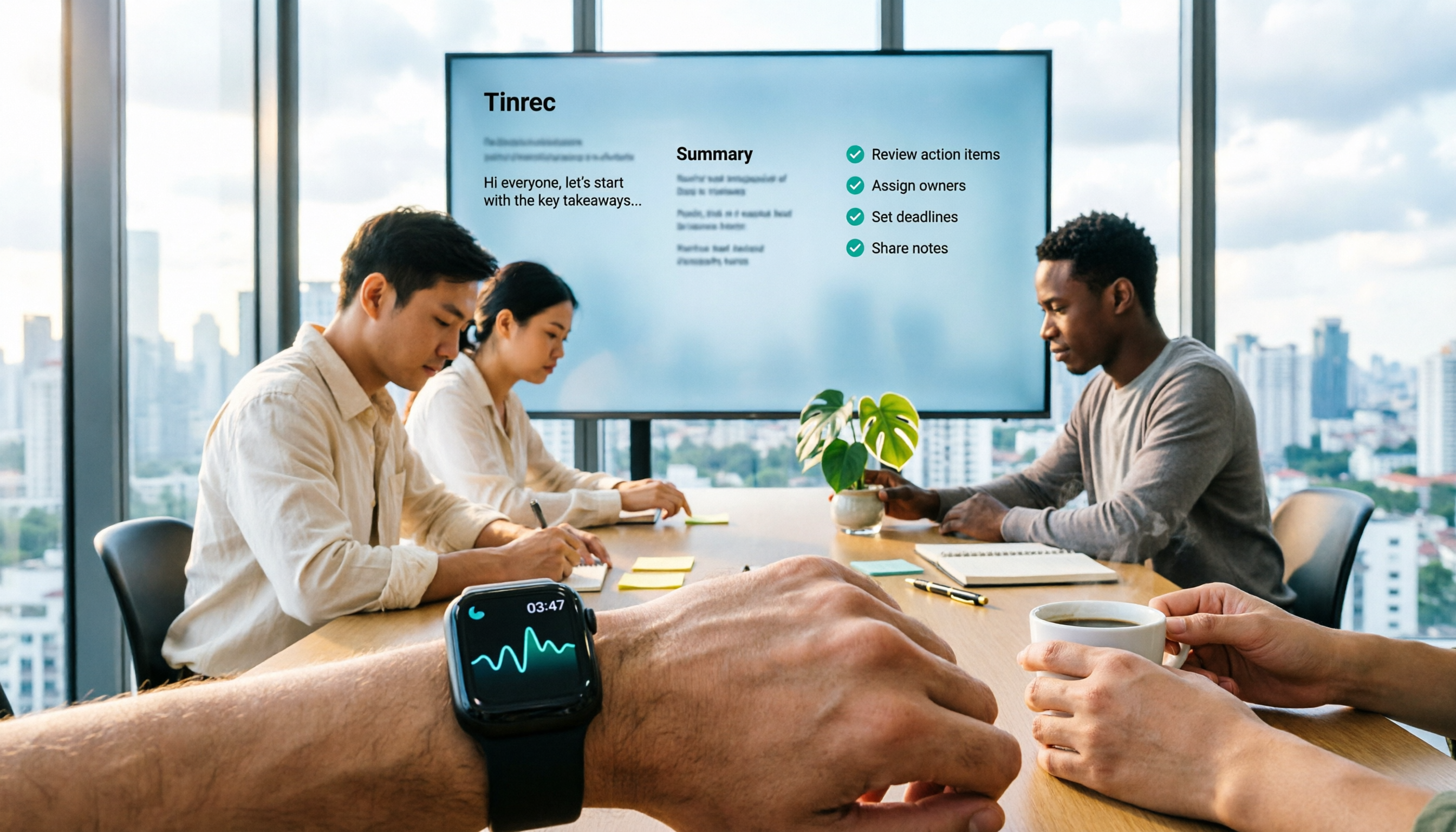
I manage 10 people and have about 15 meetings a week. Honestly, I was initially skeptical about recording on Apple Watch—the screen is tiny, and tapping to record is cool, but what happens after? Many people think the point of Apple Watch recording is "not having to pull out your phone." That's a common misconception. The real pitfall is this: the audio files from your watch are scattered across devices, with no transcript, no summary, no action items. After the meeting, you still have to spend time re-listening. In this article, I'll share how my team actually does it—how to connect Apple Watch recording to Tinrec and turn it into usable meeting data for the team. I'll also explain who Notta's Apple Watch solution is for and who it's not for.
What Can Apple Watch Recording Do for You? Three Real Scenarios
Scenario 1: No time to take notes during a meeting. Raise your wrist, tap the built-in Voice Memos app, and record. Rather than frantically writing, first make sure the audio is captured. After the meeting, the audio syncs to your iPhone via iCloud, then you import it into Tinrec, which generates a transcript, summary, and chapters. The watch ensures nothing is missed; Tinrec makes the recording usable.
Scenario 2: One-on-one meetings. Sitting down with a team member for 40 minutes, constantly holding your phone to record is actually disruptive. Recording with your watch is much more discreet. Later, import the audio into Tinrec and quickly review the summary to identify the challenges they mentioned, commitments made, and next steps. My own habit is to not re-listen after the meeting; instead, I use Tinrec's action item extraction to pull out the to-dos.
Scenario 3: Walking conversations or ad-hoc client calls. At a trade show, factory, or stairwell, when your phone isn't in hand, a tap on your watch captures the moment. These recordings are usually short and fragmented, but they add up. My approach is to sync the day's watch recordings to my iPhone every evening, batch import them into Tinrec, and let it transcribe everything. Later, I use AI Q&A to find "what objections did the client raise?" or "who is responsible for what?"
What Are the Core Capabilities of Apple Watch Voice-to-Text?
Take Tinrec as an example: watch recording is just the entry point; the real value is in the organization that follows:
Audio file transcription. Tinrec supports importing audio and video files. After Apple Watch voice memos sync to your iPhone, you can directly import them into Tinrec to generate a transcript. This is crucial for the "record on watch first, organize later" workflow, because you don't need to do complex operations on the watch.
AI summaries and chapters. Meetings recorded on a watch are often long. Tinrec automatically organizes the content into summaries, chapters, and key points, so you don't have to re-listen from minute one. For managers, this means trading "listening time" for "reading conclusions."
Action item extraction. Tinrec can extract action items from discussions—who is responsible and what needs to be done—which is more useful than a plain transcript. The biggest fear with watch recordings is "recorded but no one follows up." Once action items are pulled out, the meeting leads to next steps.
AI Q&A. After transcription, you can directly ask Tinrec: "Who mentioned the budget in this meeting?" "What were the client's concerns about the delivery schedule?" It answers based on the content, so you don't have to search for keywords yourself. This is especially useful for historical meetings.
Team spaces. If you're using it with a team, Tinrec's team edition centralizes meeting data in a team space where members can view, play, and read. Managers can manage roles, seats, usage, and audit logs. Fragmented audio files recorded on watches ultimately become searchable team data, rather than staying on someone's phone.
Real-time speech-to-text. If the situation allows you to pull out your phone or open your computer, Tinrec also supports real-time speech-to-text, generating transcripts as you record. Apple Watch is great for moments when it's inconvenient to hold your phone; Tinrec's mobile, desktop, and web apps handle situations that require full organization.
Real-World Applications: From Watch Recording to Team Action
Department weekly meetings. We don't like having meeting bots join our weekly meetings. Tinrec's desktop version can directly capture computer system audio to handle online meetings on Zoom, Google Meet, Microsoft Teams, or Webex without needing an extra bot. Apple Watch serves as a backup here: if you temporarily step out or the microphone has issues, the watch recording at least preserves the on-site audio. After the meeting, rely on Tinrec's summaries and action items; only re-listen to the watch audio when you need to verify something.
Stop organizing recordings by hand
Upload audio or video and automatically get a transcript, summary, and action items
Client interviews. When sales colleagues visit clients, placing a phone on the table to record can make the other party uncomfortable; a watch is much more discreet. After the interview, import the audio into Tinrec, first use AI summaries to review client needs, objections, and commitments, then use AI Q&A to ask follow-up questions like "Which specification does the client care about most?" This content can be directly exported as material for follow-up proposals, without re-listening to an hour-long recording.
Cross-department coordination. Cross-department meetings are prone to "agreed on the spot, forgotten afterwards." Quickly record key segments with your watch, import them into Tinrec after the meeting, extract action items and owners, and paste them into the team space or export to existing workflows. Rather than verbal reminders, let the transcript and action items from Tinrec serve as evidence.
One-on-one meetings. The content of one-on-ones can be sensitive and may not be suitable for large meeting records, but managers need to remember it. After recording with your watch, import into Tinrec, use the summary to quickly review key points, and keep action items for your own tracking. Tinrec's AI Q&A can also be used to ask "What did I promise last time?" turning management commitments into a searchable record.
5 Things to Consider When Choosing an Apple Watch Voice-to-Text Tool
First, distinguish between "watch-side recording" and "post-meeting organization." Tools like Notta do have standalone apps on Apple Watch—tap to record and transcribe in real-time, with a direct watch experience. But you need to ask yourself: what happens after recording? Tinrec's strength isn't competing head-on at the watch level, but rather turning imported audio into transcripts, summaries, action items, and team data. If you need team knowledge retention, look at the post-meeting workflow rather than just the watch app.
Can you use the transcription directly? Many tools can transcribe, but after transcription, you have to read the entire transcript yourself—time isn't saved. Tinrec breaks long meetings into chapters, extracts summaries, and pulls action items—that's the "actionable information" managers truly need.
Performance with Chinese and mixed Chinese-English. Meetings in Taiwan often mix Chinese and English. Product descriptions don't promise a fixed accuracy rate; actual results are affected by recording quality, noise, accents, overlapping speakers, and technical terminology. Tinrec covers Chinese, Traditional Chinese, and multilingual scenarios, and has team hotwords to maintain common terms. We recommend testing with your own watch recordings to judge.
Team permissions and governance. If you're using it for a team of 10, you can't just look at the personal version. Tinrec's team edition distinguishes roles and seats: roles determine who can manage the team, members, and audits; seats determine whether members can record, upload, edit, and import/export. Members without seats can still view, play, and read team data. This design is much clearer than "everyone sharing one account."
Import process and file formats. Apple Watch recordings usually need to be synced to iPhone's Voice Memos first, then imported as audio files into Tinrec. Confirm that the tool supports your formats, and that after import you can search, summarize, and export. Tinrec supports multiple export formats, so you can bring results to existing workflows like Notion, Google Docs, OneNote, Dropbox, etc.
Frequently Asked Questions
Q1: Can Apple Watch record independently with Tinrec? Currently, Tinrec's main operation entry points are on mobile, desktop, and web. For Apple Watch, we recommend using the built-in Voice Memos app to record, then syncing to iPhone after the meeting, and importing into Tinrec for transcription and organization. The benefit is stability on the watch side and completeness on the organization side.
Q2: How to choose between Notta Apple Watch solution and Tinrec? If you're an individual who just wants to tap and record on the watch and see text immediately, Notta's Apple Watch app has its convenience. But if you want post-meeting summaries, action items, AI Q&A, export, and team spaces, Tinrec is more suitable. Simply put: Notta is direct for watch-side recording; Tinrec is more complete for turning meetings into team data after the meeting.
Q3: How to import Apple Watch recordings into Tinrec? First, set up iCloud sync between your iPhone and Apple Watch. Voice memos recorded on the watch will appear in the Voice Memos app on your iPhone. Then import the audio file into Tinrec. After transcription is complete, you can view the transcript, summary, and action items. For important recordings, we recommend keeping the original audio file for later verification.
Q4: Is the free version enough? If you only occasionally record a segment with your watch, start with Tinrec's free version to run through the "import, transcribe, summarize" process and see if it fits your habits. If you have a high volume of meetings each week, then consider Pro. For team use, there's a 7-day trial with 1 free seat and 300 minutes of shared team import quota—you can have your team run a real meeting first.
Q5: How does the team edition manage members and data? Tinrec's team edition is a separate team space, not multiple people sharing a personal account. Owners, admins, and regular members have different roles; seats determine usage eligibility. When a member leaves or loses their seat, team resources are transferred to other active members, not tied to the individual. Deleted team audio can be restored from a 30-day recycle bin, but action items are currently not included in the team recycle bin.
Conclusion
The value of Apple Watch recording is "record at a raise of the wrist," but it's not the end goal. The real difference is after the meeting: does someone turn the audio into a transcript, extract summaries and action items, and put them where the team can search? Notta's Apple Watch solution solves the convenience of watch-side recording; Tinrec focuses on post-meeting organization, AI Q&A, and team collaboration. With my pace of 15 meetings a week, the watch ensures nothing is missed, and Tinrec turns recordings into actionable data. I suggest you import a watch recording into Tinrec's free version, run through the complete process once, and then decide whether to upgrade.
References
- How to use Voice Memos on Apple Watch? Sync methods and transcription explained
- Notta on Apple Watch (recording and transcription setup) - Bandicam, AutoBiz, and EdrawMind usage site
- AI transcription service Notta now available on Apple Watch
- [Notta] Foolproof recording with Apple Watch integration | First-time voice recorder dojo
- You can also use free AI transcription. Three approaches to taking notes with Apple Watch | Apple Watch Hacks | GoodsPress Web - Part 2
Turn every recording into actionable outcomes
Get 60 free transcription minutes when you sign in. No credit card required.
Related Reading
You might also like

Notta Online Transcription Review 2026: Free Plan Limits, Traditional Chinese Accuracy, and Tinrec Alternative
How does Notta online transcription work, and is the free plan enough? This article breaks down Notta's meeting bot and desktop bot-free recording, the 120-minute monthly and 3-minute per-recording limits, and Traditional Chinese recognition considerations. It also compares Tinrec across five dimensions—meeting initiation, post-meeting organization, multilingual support, team governance, and pricing—to help you choose the right online transcription solution.

2026 Notta Online Captions Review: Free Tier Limits + SRT Timecode Test
A practical breakdown of Notta's online captions and meeting transcription limits: free plan offers 120 minutes per month with a 3-minute cap per segment, and SRT export requires Pro or higher. We also compare Tinrec's no-bot meeting recording, AI Q&A, and team knowledge retention workflow, with buying tips, pitfalls to avoid, and scenario-based recommendations.

2026 AI Meeting Transcription Software Cost Comparison: Notta vs. Tinrec Subscription Plans
How much does Notta cost? This article breaks down Notta's free plan limits (120 minutes per month, 3 minutes per session), the difference between Pro annual at US$8.17/month and monthly at US$13.99, and Business per-seat pricing. It also compares actual costs and use cases for Tinrec, Otter.ai, and TurboScribe to help you understand the costs before committing to an annual plan.
Notta vs Tinrec 2026: 5-Dimension Comparison — Which Free Version Is Enough?
Notta's free plan offers 120 minutes per month but only 3 minutes per recording — is that enough? This article compares Notta and Tinrec free versions across 5 dimensions from a mid-level manager's meeting perspective, and covers how Tinrec handles recording, transcription, summaries, action items, and team collaboration in practice, helping you decide whether to upgrade.

3 AI Meeting Transcription Tools Tested for 2026: Is Notta Any Good? Is the Free Version Enough?
Is Notta worth it? This hands-on review breaks down Notta's transcription, translation, AI summaries, and three key free-plan limits (3 minutes per recording, Pro required for export, 10 summaries per month), compares Pro and Business pricing, and contrasts it with Tinrec and Otter.ai to help you decide which tool fits your meeting style.

2026 Comparison of 6 Audio-to-Text Tools: Beyond Notta, Which Is More Time-Saving for Chinese Meetings?
When choosing an audio-to-text tool, most people only look at accuracy, but the real money-wasters are quota calculations, single-recording length limits, and post-meeting organization workflows. This article compares 6 tools, starting from Notta's positioning, explaining who each is suitable for, how plans are calculated, and how to choose for Chinese meeting scenarios.

How to Use Notta's Recommended Features in 2026: 5-Step Hands-On Test and Selection Advice
Starting from a weekly meeting that couldn't reach a conclusion, this hands-on review covers Notta's 6 recommended features and free version limitations, and compares Tinrec, Otter.ai, and TurboScribe on Chinese meetings, bot-free recording, AI Q&A, and team collaboration. It also includes 3 key pitfalls to avoid when choosing a tool and scenario-based recommendations.

Notta Company Profile 2026: Japanese Entity, Parent Company, and 3 Practical Decision Points for Choosing a Tool
What company is Notta? This article covers Notta's operating entity (Japanese corporation Notta Inc.), overseas parent company NOTTA INC., founder background, and development team. It also provides three practical decision points—recording method, post-meeting workflow, and team governance and pricing—to help you decide between Notta and other AI meeting transcription tools.
2026 Subtitle & Transcript Tool Comparison: Is Notta's Free Plan Enough for Subtitles?
People searching for 'Notta subtitle recommendations' often confuse transcripts with subtitles. This article starts with the most common pitfalls in subtitle creation, compares Notta, TurboScribe, Otter.ai, and Tinrec in terms of quota calculations, export formats, Chinese language performance, and post-meeting organization capabilities, and honestly lists each tool's free limitations and pricing to help you determine which one truly meets your needs.