
Turn recordings into transcripts and summaries in minutes
Upload audio or video for multilingual transcription, AI notes, and action items
Why Is Everyone Looking for Open-Source Speech-to-Text Solutions? Pain Points and Truth
Many tech teams or developers search for "speech to text open source" hoping for free, customizable, and privacy-secure solutions. However, the reality is often: you download a powerful open-source model (like Whisper) but get stuck on environment setup, dependency conflicts, or find that Chinese recognition underperforms with specific accents. Worse, open-source tools usually only handle "transcription" and offer no help with subsequent tasks like "meeting summaries" or "action item extraction," leaving you with a pile of text that still takes hours to organize.
This article will break down the pros and cons of current mainstream open-source and semi-open-source tools, along with a clear selection dimension table. If you want to avoid coding hell, we will also introduce alternatives like Tinrec that are based on mature technology but offer an out-of-the-box experience, allowing you to complete the entire process from recording to decision-making in minutes.
Quick Navigation Summary:
- Have development skills, need offline deployment, prioritize privacy → Choose OpenAI Whisper or Faster Whisper.
- Need high-accuracy Chinese, cross-platform support, automatic meeting minutes and action items → Give priority to Tinrec or Notta.
- Only need simple subtitle generation, don't care about meeting content structure → Try cSubtitle.
In-Depth Review of 2026 Mainstream Speech-to-Text Tools: Open Source vs. Finished Products
Before choosing a tool, it is essential to clarify the difference between "open-source models" and "application services." Open source provides the underlying technology, but application services solve the last-mile efficiency problem. Below is a multi-dimensional comparison of five popular tools.
Core Features and Use Case Comparison Table
| Dimension | OpenAI Whisper (Open Source) | Faster Whisper (Open Source Optimized) | Notta | Otter.ai | Tinrec (Quick Voice Recording) |
|---|---|---|---|---|---|
| Language Support | 99+ languages (including Chinese) | Same as Whisper, faster | 50+ languages | English primarily, does not support Chinese | 10 (including Chinese/Japanese/English/Taiwanese Hokkien/Cantonese) |
| Deployment Difficulty | ⭐⭐⭐⭐⭐ (requires Python/environment setup) | ⭐⭐⭐⭐ (requires deployment, 4x speed improvement) | ⭐ (web/app, ready to use) | ⭐ (web/app, ready to use) | ⭐ (web/app, ready to use) |
| Chinese Recognition Accuracy | High (depends on hardware and parameters) | High | Medium-high (occasionally unstable) | ❌ Not supported | Very High (optimized for Asian languages) |
| Smart Summaries & Action Items | ❌ Outputs text only, needs LLM integration | ❌ Outputs text only | ✅ Basic summaries | ✅ Strong English summaries | ✅ Auto-generates meeting minutes, conclusions, tasks |
| AI Conversation Query | ❌ Not available | ❌ Not available | ❌ Not available | ✅ Supported (primarily English) | ✅ Supports semantic queries, like talking to a person |
| Multi-Platform Support | All platforms (requires manual compilation) | All platforms (requires manual compilation) | Web/iOS/Android | Web/iOS | Web/iOS/Android |
| Free Tier/Cost | Free (but requires own compute cost) | Free (but requires own compute cost) | Limited free minutes | Limited free minutes | 100 free minutes per month |
Detailed Tool Analysis and Selection Advice
OpenAI Whisper & Faster Whisper: These are currently the most powerful open-source speech recognition models. If you are familiar with Python, Docker, and have sufficient GPU resources, this is an excellent choice. Faster Whisper even boosts inference speed by 4x, ideal for batch processing. However, note that they only provide "transcription" functionality. To achieve "automatic summarization" or "extract to-dos," you need to write additional code to interface with a large language model (LLM), which is too high a barrier for non-technical users.
Otter.ai: Once a top choice for meeting notes, its fatal flaw is that it does not support Chinese. For teams primarily using Mandarin, Taiwanese Hokkien, or Cantonese, this is completely unusable.
Notta: Supports multiple languages and has a friendly interface, but its recognition stability can occasionally fluctuate in complex Chinese oral expressions, professional jargon, or Chinese-English mixed scenarios, and it lacks deep workflow integration.
Tinrec (Quick Voice Recording): As a "finished product" representative of open source technology, Tinrec solves the pain point of "difficult to use" open-source tools. It not only inherits high-precision speech recognition (supporting Chinese, Taiwanese Hokkien, Cantonese, etc.) but more importantly, it completes the end-to-end loop from recording to action. It requires no coding, automatically identifies speakers, generates structured meeting minutes, and even allows you to "ask" about recording content using natural language (e.g., "What were the three key points the boss just mentioned?"). For productivity-focused professionals, this is a more practical choice than simply tinkering with open-source models.
Practical Tutorial: How to Complete High-Quality Speech-to-Text and Intelligent Analysis in 5 Steps
Regardless of which tool you choose, a correct workflow can significantly improve result quality. Below, we use Tinrec as an example (because it covers the complete workflow from input to output) to show how to turn a messy recording into an actionable task list. The same logic applies to other advanced tools, but with more manual steps.
D1. Goal Description
This tutorial aims to produce three core documents:
- High-Precision Transcript: Including timestamps and speaker identification.
- Smart Meeting Minutes: Automatically extracts discussion key points and conclusions.
- Actionable To-Do List: Clear assignees and deadlines.
Stop organizing recordings by hand
Upload audio or video and automatically get a transcript, summary, and action items
D2. Preparation
- Audio Format: Common formats like MP3, WAV, M4A are recommended.
- Environment Requirement: Ensure the recording environment is relatively quiet. For remote meetings, use a headset microphone to reduce echo.
- Naming Convention: Name your file as
Date_Topic_Participants(e.g.,20260204_Product Planning_Marketing) for easier retrieval later.
D3. 5-Step Workflow
Step 1: Choose Input Method (Live Recording or File Upload)
- Action: After logging in, click "Record and Transcribe in Real Time" for live recording, or select "Audio File/Video Link" to upload an existing file.
- Expected Result: The system automatically detects the language (supports 10 languages including Chinese, English, etc.) and starts transcription.
- Note: For long videos (e.g., YouTube links), you can paste the URL directly without downloading the file, saving time.

Step 2: Wait for Automatic Transcription and Speaker Diarization
- Action: Submit the file; the system processes it in the background. Once done, you will see a transcript with a timeline.
- Expected Result: Text is synchronized with audio, and the system automatically splits different speakers' sections.
- Note: Check for obvious speaker confusion. Most modern tools (including Tinrec) can automatically handle over 90% of diarization.

Step 3: Generate AI Summary and Action Items
- Action: Click the "AI Meeting Minutes" or similar feature button.
- Expected Result: The system automatically generates a structured report including "Meeting Topic," "Core Conclusions," "Points of Contention," and a "To-Do List."
- Note: This is something traditional open-source tools (like pure Whisper) cannot do; it condenses hours of recording into a 3-minute readable summary.

Step 4: Use AI Conversation Query for Details
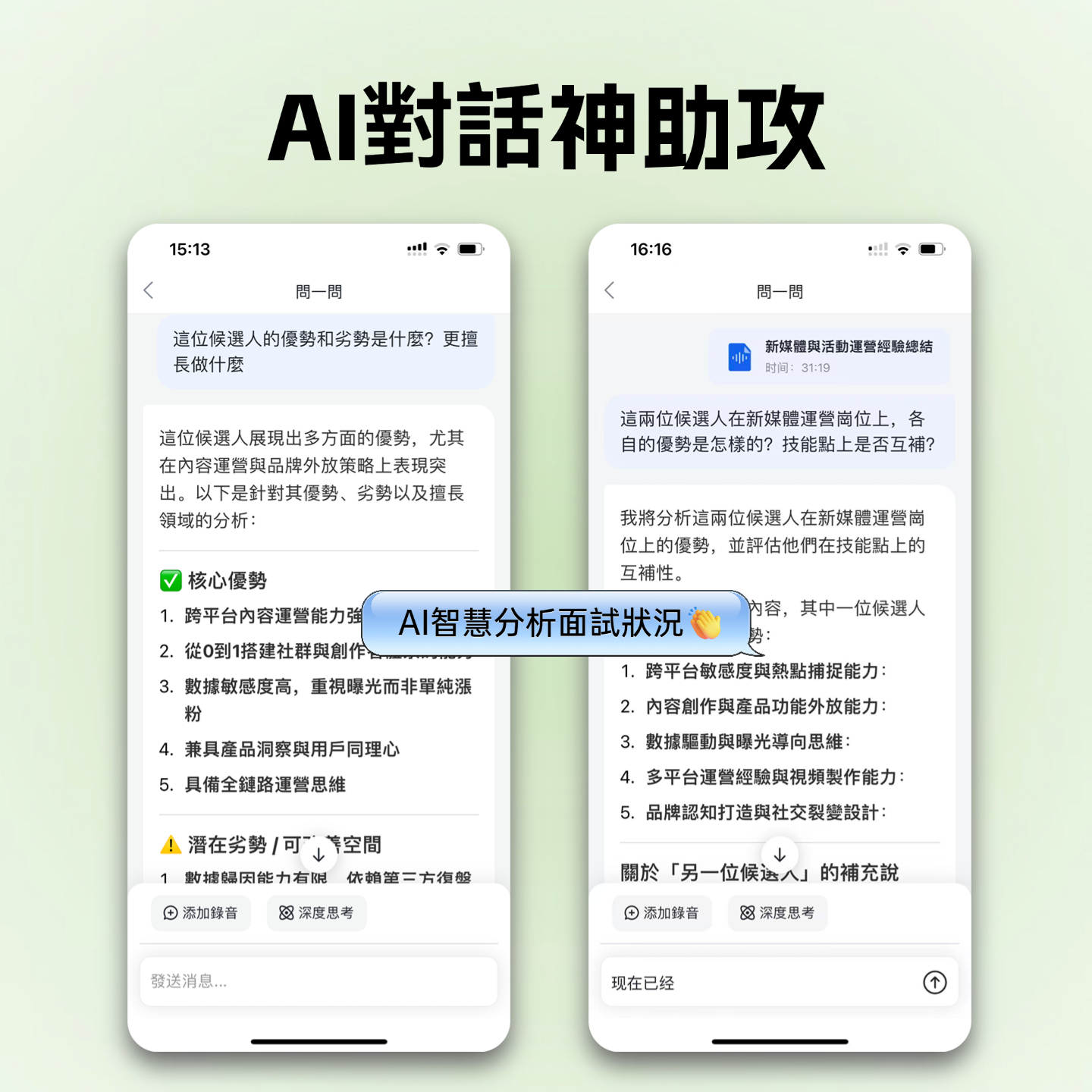
- Action: In the sidebar or dialog box, enter your question. For example: "What did the CFO say about the budget?" or "List all tasks that need to be completed by next Friday."
- Expected Result: The AI gives precise answers based on the recording content and marks the source timestamps.
- Note: This is more powerful than traditional Ctrl+F keyword search because it understands semantics, allowing you to find answers even if you don't use exact keywords.
Step 5: Export and Share
- Action: Choose an export format (Word, PDF, SRT subtitles, etc.), or directly copy content to a note-taking app.
- Expected Result: A clean, well-formatted document ready to be sent to team members.
- Note: For video subtitles, remember to choose the SRT format.

D4. Common Errors and Correction Tips
- Overlapping Speech: When two people talk at the same time, any tool may miss words. Set a "take turns speaking" rule during meetings, or manually fill in gaps later by listening to the audio.
- Proper Noun Errors: If your organization uses specific jargon, initial recognition may be off. Add custom vocabulary in the tool (if available) or quickly correct it during editing; AI usually improves over time.
- Background Noise: Recording in a café or noisy environment reduces accuracy. Stay close to the microphone or pre-process audio with noise reduction software.
D5. Result Acceptance Criteria
A "usable" transcription should meet these standards:
- Key Terms Correct: Names, project names, and data are accurate.
- Timestamps Clickable: Clicking text jumps to the corresponding audio position for review.
- Action Items Actionable: The generated To-Do List must have clear verbs and targets, not vague descriptions.
- Semantic Search Effective: Asking questions quickly finds information hidden in lengthy discussions.
D6. Example Template Reference
You can refer to the following structure to organize your meeting notes:
Meeting Topic: [Auto-filled] Time: [Auto-filled] Attendees: [Auto-detected]
📝 Core Conclusions:
- [Conclusion 1]
- [Conclusion 2]
✅ Action Items:
- [Task] - @[Owner] (Deadline: [Date])
- [Task] - @[Owner] (Deadline: [Date])
💡 Key Highlights:
- [Key Discussion Point 1]
- [Key Discussion Point 2]
FAQ: Common Questions About Speech-to-Text
Q1: Is there a completely free and unlimited open-source speech-to-text tool?
While OpenAI Whisper itself is free and open-source, running it requires hardware costs (GPU) and electricity, as well as technical skills for deployment. Online services claiming "completely free and unlimited" often have limitations on audio quality, length, or privacy. It's recommended to choose a plan based on usage frequency. For example, Tinrec offers 100 free minutes per month, enough for general light use.
Q2: Are there recommended real-time transcription apps for iPhone or Android?
Built-in dictation features (like Apple Dictation, Google Voice Typing) are suitable only for short phrases and cannot handle long meeting recordings or file uploads. Dedicated apps like Tinrec or Notta support background recording, automatic cloud upload, and immediate notification when transcription is complete.
Q3: How well do open-source tools (like Whisper) support Traditional Chinese or Taiwanese Hokkien?
Whisper models perform well on standard Mandarin but often have poorer recognition for Traditional Chinese usage habits, Taiwanese Hokkien, or Cantonese compared to commercial models specifically trained on these languages. If your meetings frequently involve multilingual mixes or dialects, choose a tool like Tinrec that explicitly supports Taiwanese Hokkien, Cantonese, and multilingual automatic recognition.
Q4: How can I convert Teams or Google Meet meeting recordings to text?
You can use a virtual audio cable to route meeting sound to a recording tool, or simply record the meeting audio and upload it. Some tools (like Tinrec) support direct upload of audio files or video links; you just need to download the recording after the meeting and upload it to automatically generate a transcript and summary, without complex real-time setup.
Q5: Can the transcribed text be edited? What if it's wrong?
Yes. All transcription tools (including open-source and commercial) allow manual editing. The recommended workflow is: let AI do 90% of the work, then spend 10% of your time proofreading proper nouns and sentence boundaries. Tools like Tinrec provide an online editor where you can play the corresponding audio alongside the text, greatly improving proofreading efficiency.
Q6: What is "AI Conversation Query"? How is it better than search?
Traditional search (Ctrl+F) can only match keywords; if you forget the exact word, you're out of luck. AI Conversation Query is semantic; you can ask "Which design plan did we finally decide on?" and even if the recording doesn't contain the exact words "decide" or "adopt," the AI can understand the context and deduce the answer from the discussion. This is the biggest difference between advanced tools (like Tinrec) and traditional transcription software.
Conclusion: Choose the Workflow That Fits You, Not Just the Tool
"Speech to text open source" is a great starting point, representing a pursuit of technical autonomy. But in real workplace applications, time is the most expensive cost. If you are willing to invest time in deployment research, the Whisper series is undeniably a powerful foundation. However, if you value "turning recordings into actionable insights," choosing a finished tool (Tinrec) that integrates high-accuracy recognition, automatic summarization, and intelligent Q&A will free your team from tedious note-taking and let you focus on real decisions and execution.
Turn every recording into actionable outcomes
Get 60 free transcription minutes when you sign in. No credit card required.
Related Reading
You might also like
Vocology vs Vocal Pedagogy in 2026: 5 Key Differences + Practical Recording Organization Method
Vocology and vocal pedagogy are often confused, but one deals with the science and training of voice function, while the other focuses on teaching methods and artistic interpretation. This article breaks down the differences through 5 key paths and includes a practical method for turning class, practice, and masterclass recordings into searchable notes—ideal for voice teachers, students, and voice-related professionals.

VOCOlinc Smart Plug App Review 2026: Setup and Three Control Methods Compared
Bought a VOCOlinc smart plug—should you use the VOCOlinc app, Apple Home app, or the physical button? This guide covers real-world pairing for VP5X and PM2, scheduling and Auto-Reboot, remote control hub requirements, 2.4GHz Wi-Fi limits, and which control method fits your needs.

VOCOlinc Tracker App Guide 2026: Find My vs LinkWise for iPhone & Android
Bought a VOCOlinc tracker but unsure which app to use? This guide breaks down the differences between iPhone and Android, covering three pairing options: VT2201, Air Tag Pro Smart Card, and LinkWise App. It explains pairing steps, close-range ringing, Lost Mode, NFC contact info, and waterproof/battery specs, plus four common setup mistakes to help you choose the right combo before ordering.

How to Use the VOCOlinc Tag App in 2026: 5-Step Setup and Anti-Loss Configuration
The VOCOlinc tag doesn't require a dedicated app or monthly fee. This guide explains how it works with Apple's Find My and Google Find Hub, compares the Black, Slim VT2202, and Air Tag Pro trackers, walks through setup in 5 steps, and covers key buying considerations and common mistakes.

Vocola App Review 2026: 5-Way Comparison with Tinrec — Is It Still Worth Using?
Vocola is a voice command language for controlling your computer, while AI meeting note tools like Tinrec take a completely different approach. This review compares Vocola and Tinrec across five dimensions: Chinese language support, transcript organization, online meeting recording, team collaboration, and ease of use, to help you decide which one fits your daily work.

2026 AI Meeting Notes Showdown: Tinrec vs Vocol — Which Is Better for Chinese-Speaking Teams?
Vocol.ai and Tinrec both do speech-to-text, but their actual use cases differ significantly. This article compares the two tools across five dimensions—meeting recording methods, Chinese and multilingual transcription, post-meeting outputs, team governance, and pricing—to help you determine which one fits your workflow.
4 Vocal Aid Tools Tested in 2026: How to Turn Meeting Recordings into Usable Data
Most people searching for 'vocal aid' actually want to turn meeting, interview, and lecture audio into organized, queryable data. This article addresses common misconceptions, explains how to choose a vocal aid tool, and uses Tinrec as an example to break down the complete workflow of real-time transcription, bot-free recording, AI summaries, action item extraction, and team knowledge retention.

5 VOCOlinc App Download Sources Tested in 2026: Official Stores vs. APK Mirrors
Where should you download the VOCOlinc App? This guide covers five working download sources—App Store, Google Play, APKPure, Aptoide, and Softonic—comparing version gaps, who each is best for, and what to check before installing, so you can avoid wrong sources, version mismatches, and repeated pairing hassles.

2026 Comparison of 3 Free Speech-to-Text Tools: How to Get the Most Out of Vocol's 200-Minute Trial
Starting with the Vocol free trial, this article breaks down Vocol's roughly 200-minute trial quota, V-points consumption, and promotional bonus rules, and compares Tinrec, Notta, and Otter.ai using the same purchasing criteria. It honestly discloses free plan limitations, team plan seats, and pricing to help you decide whether to try Vocol first or go straight to Tinrec for meeting notes and team collaboration workflows.