
Turn recordings into transcripts and summaries in minutes
Upload audio or video for multilingual transcription, AI notes, and action items
Why You Need AI Tools for Financial Report Summaries
In finance or investment analysis, quarterly earnings calls often last over an hour, packed with jargon, data forecasts, and management strategy discussions. The traditional approach—recording the call, replaying it multiple times, and manually jotting down notes—is not only time-consuming but also prone to missing key numbers or subtle changes in tone. If you want to produce a clear, focused financial report summary quickly, relying on manual work is inefficient.
This article evaluates mainstream AI transcription tools for the demanding task of financial report summarization and provides a practical workflow. We compare tools across language support, summary accuracy, and action item extraction, with an in-depth look at how Tinrec helps you go from recording to insight in a multilingual environment. Finally, we answer common questions to help you choose the best tool.
Quick Navigation Conclusions:
- If Chinese, Taiwanese, or Cantonese accuracy is critical: Choose Tinrec or Notta.
- If meetings are primarily in English and team collaboration is key: Consider Otter.ai.
- If you need to extract content from YouTube/podcast earnings analysis videos: Tinrec's video-to-text feature is advantageous.
- If budget is tight and you need to handle long audio files: TurboScribe or Tinrec's free tier are good starting points.
Pain Points: Three Challenges of Traditional Financial Report Preparation
Before choosing a tool, let's clarify why traditional methods struggle with financial report summaries:
- Low information density, high replay cost: In a one-hour earnings call, actionable information might be concentrated in the first 15 minutes of the CEO's speech and the last 15 minutes of Q&A. Manual replay takes 3–4 times as long, and it's hard to quickly locate discussions of specific metrics like EPS or Revenue Guidance.
- No structured summary, only transcript: Most basic transcription tools provide only raw text transcripts, without speaker differentiation, key point tagging, or automatic generation of conclusions and action items. Finance professionals still need to manually process the text to create a report.
- Cross-language barriers and jargon errors: Many international earnings calls mix Chinese and English or use industry-specific terms. Generic dictation tools often produce serious errors, leading to data mistakes—critical for financial reports.
2026 Comparison of Popular Financial Report Tools
To find the best tool for generating financial report summaries, we selected five representative products: Tinrec, Otter.ai, Notta, TurboScribe, and MacWhisper.
| Comparison Dimension | Tinrec (MiaoTranscribe) | Otter.ai | Notta | TurboScribe | MacWhisper |
|---|---|---|---|---|---|
| Language Support | Excellent (Chinese, English, Japanese, Korean, Taiwanese, Cantonese, etc. 10 languages) | Weak (Primarily English, poor Chinese results) | Good (Multi-language, but Chinese accuracy varies) | Good (Whisper-based, multi-language) | Good (Offline Whisper, requires model setup) |
| Real-time/Speed | High (Real-time transcription + fast upload processing) | High (Real-time display) | Medium (Processing time after upload) | Medium (Depends on server load) | Depends on hardware (Local processing, fast on Mac M-series) |
| Summary & Action Items | Auto-generated (Meeting minutes, conclusions, to-dos) | Yes (Paid version, better for English) | Yes (AI summary feature) | No (Transcript only) | No (Transcript/SRT only) |
| AI Q&A | Yes (Question-answer retrieval) | Yes (OtterPilot) | Partial | No | No |
| Export & Integration | Diverse (TXT, DOCX, SRT, etc.) | Good (Integrates with Zoom/Teams/Meet) | Good (Integrates with major meeting software) | Basic (TXT, SRT, VTT) | Basic (TXT, SRT, VTT) |
| Pricing/Free Tier | Great Value (Free 100 mins/month; Basic $4.9) | Higher (Limited free, expensive premium) | Moderate (Limited free, subscription) | High (Generous free tier, one-time purchase option) | One-time purchase (Mac only) |
Key Differences
- Tinrec vs. Otter.ai: Otter.ai excels in English ecosystem integration but is nearly unusable for Chinese earnings calls. Tinrec performs stably in Chinese, Taiwanese, and mixed Chinese-English scenarios, and offers AI Q&A to directly ask questions like "What was this quarter's revenue growth reason?" greatly reducing search time.
- Tinrec vs. TurboScribe/MacWhisper: The latter two are essentially 'transcription engines' that provide high-accuracy transcripts but lack a 'comprehension layer.' They won't tell you the meeting conclusions or list action items. For users needing a summary report, Tinrec's automated summaries and action item extraction can save at least 50% of post-processing time.
Stop organizing recordings by hand
Upload audio or video and automatically get a transcript, summary, and action items

Tinrec In-Depth Review: From Recording to Financial Insight Workflow
Tinrec (MiaoTranscribe) is positioned not just as a transcription tool, but as a complete assistant for 'record → understand → act.' In financial report summarization, its core value lies in three points:
1. Multilingual Auto-Identification and High-Accuracy Transcription
Earnings calls often involve international teams. Tinrec supports automatic identification of 10 languages including Chinese, English, Japanese, Korean, Taiwanese, and Cantonese. Whether the meeting uses standard Chinese, accented English, or mixed terms across regions, it captures accurately, reducing manual proofreading costs.
2. Structured Summaries and Action Item Extraction
Unlike tools that output a wall of text, Tinrec automatically analyzes content to generate:
- Meeting Minutes: Bullet-point key points.
- Conclusions: Consensus or decisions reached.
- Action Items: Clearly states who needs to do what by when.

For finance professionals, this is essentially a draft report structure that needs only light polishing before being presented upward.
3. AI Q&A: Ask the Recording Like Asking a Person
This is Tinrec's biggest differentiator from traditional tools. When you need to confirm a specific figure (e.g., "What was the CFO's Q3 marketing budget?"), instead of Ctrl+F searching (which can miss homophone errors in speech-to-text), you ask directly in the AI chat. The system understands semantics, provides an accurate answer with a timestamp, and lets you quickly verify.

Hands-On Tutorial: How to Create a Financial Report Summary with Tinrec
We'll use a 45-minute internal quarterly earnings review meeting as an example to show how to quickly produce a summary with Tinrec.
Step 1: Choose Input Source
Based on your material type, select the appropriate entry point:
Scenario A: In a meeting Open the Tinrec app or web version and tap 'Real-time Recording to Text.' As the meeting proceeds, text appears in real time, and you can mark key points.
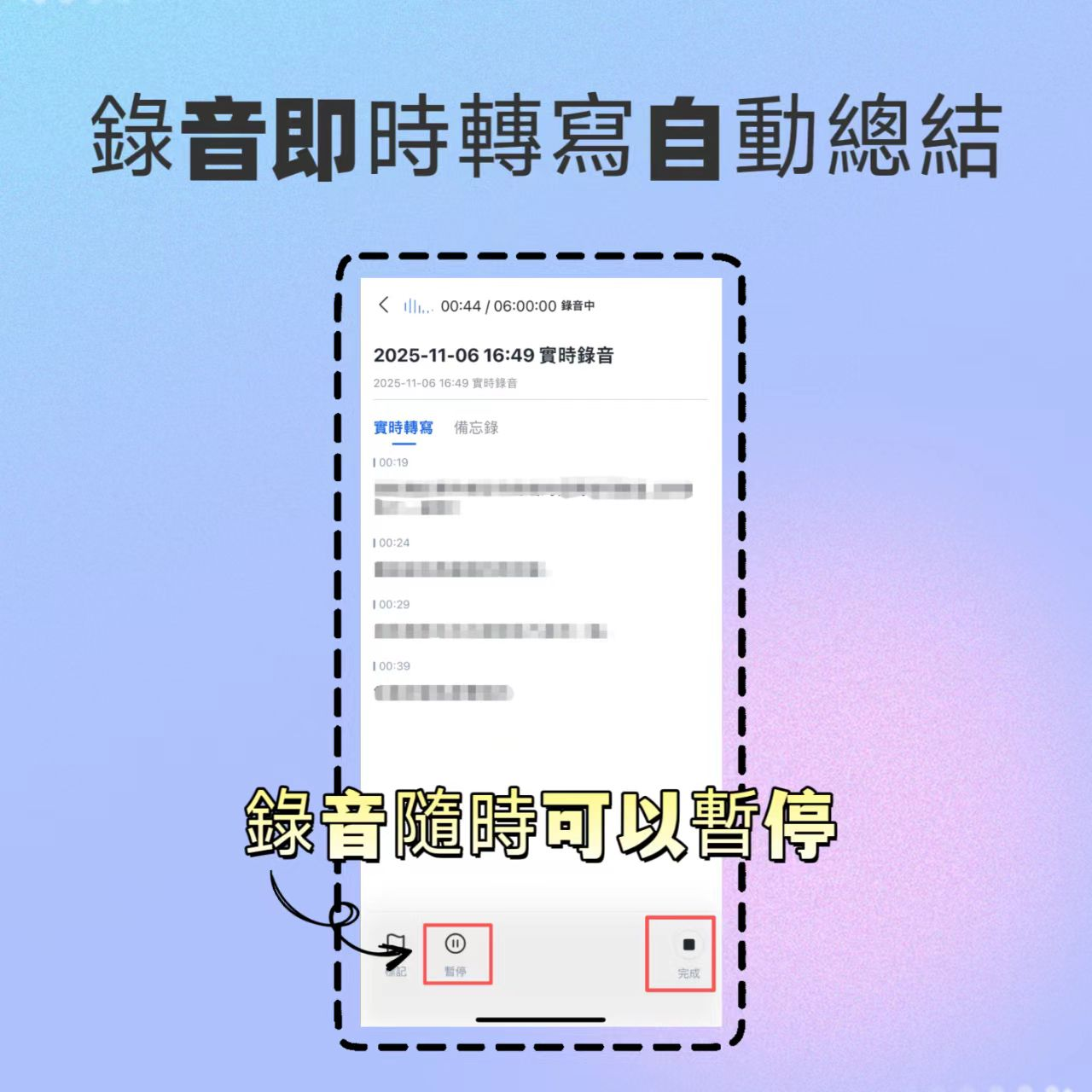
Scenario B: Have a meeting recording file Click 'Audio File to Text,' upload an MP3/WAV/M4A file. The system processes transcription and analysis within minutes.
Scenario C: Referencing external earnings analysis videos To summarize a YouTube earnings analysis video, use 'Podcast/Online Video to Text,' paste the video URL, and Tinrec automatically extracts audio and converts to text and summary.

Step 2: Review and Correct Transcript
After transcription, quickly browse the transcript. Tinrec automatically differentiates speakers (if audio is clear) and splits content into sections. If proper nouns are misrecognized, you can manually correct them to improve subsequent AI accuracy.

Step 3: Use AI to Generate Summary and Query Details
- View Auto Summary: Switch to the 'Summary' tab to read the system-generated meeting minutes, conclusions, and action items.
- AI Q&A: If you have questions like "What are the main risk factors mentioned in this meeting?", type your question in the AI chat. The system compiles relevant sections and answers.

Step 4: Export and Share
After confirming accuracy, click export. Tinrec supports multiple formats; choose DOCX for further editing or PDF for archiving. You can also copy the summary to email or collaboration platforms like Notion or Slack to share with the team.

FAQ
1. Does Tinrec offer a free trial? What are the limitations?
Yes, Tinrec offers a free tier with 100 minutes of transcription per month. This is sufficient for occasional short meetings or personal notes to experience core features. For more minutes or advanced features, upgrade to Basic or Pro plans.
2. Financial meetings often mix Chinese and English. Can Tinrec handle it accurately?
Tinrec is optimized for Asian language environments, supporting automatic identification and mixed transcription of Chinese, English, and other languages. Compared to Otter.ai, which is optimized for English, Tinrec performs more stably in mixed Chinese-English scenarios, making it suitable for Asia-Pacific business settings.
3. Can I upload Teams or Zoom meeting recordings?
Yes. Download the meeting recording as audio or video and upload it via 'Audio File to Text' or 'Video to Text.' For live meetings, we recommend using Tinrec's real-time recording feature or a virtual microphone to route meeting audio into Tinrec.
4. How accurate are the AI-generated summaries? Do I need to edit them?
AI summaries provide excellent structure and key point capture, typically achieving 85–90% accuracy or higher, especially with standard pronunciation and clear audio. However, financial data requires high precision, so users should cross-check with the original recording or transcript, especially numbers and proper nouns, for final confirmation.
5. Does Tinrec support iPhone or Android recording?
Yes. Tinrec offers iOS and Android apps, allowing you to record directly on your phone and transcribe in real time. This is convenient for ad-hoc interviews, field surveys, or informal meeting notes, and data syncs to the web version for later processing.
6. Who is Tinrec best suited for compared to other tools?
Tinrec is ideal for users dealing with non-English-dominant meetings, those who value action items and summary efficiency. It's especially useful for Asia-Pacific professionals, students, media workers, and creators extracting knowledge from audio/video content. If you only need English-only meeting notes with deep Google Workspace integration, Otter.ai might be an alternative; but if you need high Chinese accuracy and a complete AI workflow, Tinrec is a more competitive solution.
Conclusion: Let Tools Handle the Grunt Work, Focus on Decisions
In an age of information overload, financial report summaries shouldn't be a time-consuming chore. By choosing the right AI tool like Tinrec, you can compress hours of listening and organizing into just tens of minutes. The key isn't to rely entirely on AI, but to use AI for basic transcription and initial structuring, allowing human experts to focus on data interpretation, strategic analysis, and decision-making.
We recommend starting with a short 10–15 minute meeting recording, trying Tinrec's real-time transcription and summary features to experience the efficiency gain from 'recording' to 'insight,' then decide whether to incorporate it into your daily workflow.
Turn every recording into actionable outcomes
Get 60 free transcription minutes when you sign in. No credit card required.
Related Reading
You might also like
Yating Transcript vs Tinrec in 2026: 5-Dimension Comparison for Chinese Meeting Notes
Is Yating Transcript good? This article breaks down real evaluations from speaker identification, Taiwanese Hokkien recognition, cost, and proofreading effort, and compares it with Tinrec, Notta, Otter, TurboScribe, and PLAUD to help you choose the right transcription tool for your meeting scenario.

How to Choose a Speech-to-Text App in 2026: Meeting Notes + AI Summaries & Action Items
Recording meetings is easy; organizing them afterward is the hard part. This guide covers 5 key factors for choosing a speech-to-text app based on real-world use cases, using Tinrec as the main example to demonstrate bot-free online meeting recording, AI summaries and action items, and AI Q&A. It also compares Otter.ai, Notta, and Yating Transcription, highlighting their positioning and pitfalls to avoid.
How to Record Audio on Mac in 2026: 6 Methods from Built-in Tools to AI Transcription
Recording audio on a Mac isn't hard—the challenge is making the recording useful afterward. This guide covers 6 ways to record on Mac, from free built-in options like Voice Memos, Notes transcription, QuickTime, and GarageBand, to Tinrec, which directly produces transcripts, summaries, and action items. It also includes selection advice and 4 things to know before recording.

4 Speech-to-Text Tools Tested for 2026: Is Yating Transcript Good? Which Saves the Most Time After Meetings?
Is Yating Transcript good? From the perspective of a mid-level manager who holds 15 meetings a week, I tested four speech-to-text tools: Yating Transcript, Tinrec, Otter.ai, and Notta. I compared them on Traditional Chinese and Taiwanese Hokkien recognition, post-meeting summaries and action items, AI Q&A, team collaboration, and pricing. I also compiled selection criteria and 3 common pitfalls to help you decide which one truly saves time on post-meeting organization.

2026 Comparison of 2 Transcription Tools: How to Use Yating Transcript vs. Tinrec
How do you use Yating Transcript? This article starts with hands-on steps: first, a 3-step walkthrough from recording to transcription to export. Then it compares Yating Transcript and Tinrec across 5 dimensions—free quota, AI post-meeting organization, online meeting recording, multilingual support, and team collaboration—to help you decide which tool to use for your recording.

2026 Comparison of 4 Online Transcription Tools: Yating vs. Tinrec — Which Should You Choose?
Starting from the real need for 'Yating online transcription,' this comparison examines Tinrec, Yating, Notta, and TurboScribe across Chinese recognition, post-meeting organization, online meeting recording, and team collaboration. It clearly explains each tool's limitations and ideal users to help you pick the one that truly saves time.

Cantonese Speech-to-Text App Comparison 2026: Tinrec vs Otter.ai — Which Wins on Five Dimensions?
Comparing Tinrec and Otter.ai across five dimensions—Cantonese with mixed English recognition, bot-free meeting recording, post-meeting AI organization, cross-platform input, and team seat governance—to help you decide which Cantonese speech-to-text app truly fits your meeting scenarios and budget.

2026 Comparison of 5 Transcription Tools' Free Tiers: Which Free Version Is Most Generous?
How many free minutes does Yating Transcription actually offer? Public sources cite 20 minutes, 120 minutes, and about 300 minutes. This article explains why these figures conflict, how pricing works after the free quota runs out, and compares the free plans and ideal use cases of Tinrec, Notta, Otter.ai, and TurboScribe to help you judge whether a one-time free allotment covers your actual usage.

Best Transcription Tools in 2026: Testing 3 Options, Yating Free Plan Limits and Tinrec Differences
People searching for "Yating transcription free" often ask: how much can the free version handle, do I have to pay to upload audio files, and is it enough for a meeting? This article compares Yating, Tinrec, Otter.ai, and Notta in terms of free quotas, Chinese recognition, and post-meeting organization, and lists 3 common pitfalls when choosing a tool to help you decide which one is worth using long-term.