
Turn recordings into transcripts and summaries in minutes
Upload audio or video for multilingual transcription, AI notes, and action items
Spent two hours in a meeting but need half a day to sort out the transcript? Or have plenty of lecture recordings but can't find the key points when reviewing? This is the real pain point for many students and office workers needing speech-to-text. Especially on Dcard, discussions about "free speech-to-text" and "which app has the best Chinese recognition" never stop.
There are many tools on the market, from built-in phone features to professional AI services. Which one should you choose? This article starts with a hands-on test of the Xiaomi 15 and deeply compares popular tools like Tinrec (Miao Ting Lu Yin), Otter.ai, and Notta. We'll analyze from three dimensions: "Chinese recognition ability", "AI post-processing efficiency", and "cross-platform convenience", and provide specific recommendations to help you make the best choice based on your scenario.
Quick Navigation Conclusions:
- If you value recognition of Chinese accents and dialects, and need automatic meeting minutes and action items → Focus on Tinrec.
- If you mainly use English in meetings and work in an international team → Consider Otter.ai.
- If you only need simple recording-to-text, have a limited budget, and use a Xiaomi phone → Xiaomi 15 built-in Recorder is enough for daily use.
- If you need to process long videos or podcast content → Tinrec or VEED.IO are good choices.
1. Limits and Advantages of Built-in Phone Features: Taking Xiaomi 15 as an Example
For many users, the most direct tool is often in their hands. As a recently popular smartphone, the Xiaomi 15's built-in "Recorder" app performs well in speech-to-text, especially suitable for light users.
1. User Experience: Simple and Intuitive
The operation logic of Xiaomi 15 is very intuitive. Users just open the "Recorder" app and tap "Start Recording". During recording, the system automatically performs noise reduction, which is crucial for improving later transcription accuracy. After recording, tap the "Transcribe" button, and the system will automatically convert the audio to text displayed on the screen.

2. Recognition Ability: Balance Between Mandarin and Accents
According to actual tests, the Xiaomi 15 performs stably in recognizing standard Mandarin and has some tolerance for slightly accented dialects. This is thanks to its advanced speech recognition technology. However, in complex scenarios with many professional terms, fast speech, or mixed languages, the built-in feature's accuracy may fluctuate, and it lacks further AI organization features (e.g., automatic summarization of key points).
3. Suitable Scenarios
- Personal memos: Quickly record ideas, shopping lists.
- Monologue-style notes: Classroom lectures with clear explanation and little interaction.
- Short recordings: Brief conversations or commands lasting a few minutes.
If your need is simply "turning voice into text" and you don't require much post-editing, the built-in phone feature is the most economical and convenient choice. But once you need long meetings, multi-party conversations, or to extract action items, you need more professional third-party tools.
2. Why Dcard Users Are Turning to Professional AI Tools? Core Pain Points
Although built-in phone features are convenient, more and more users in Dcard discussion threads are seeking professional solutions like Tinrec, Notta, or Otter.ai. This reflects three core pain points:
- Low information density, high cost of re-listening: Traditional transcripts are full of filler words, making reading inefficient.
- Lack of structured organization: Only text, no conclusions. Users still need to spend time reading the full text to find key points.
- Difficulty in search and retrieval: Traditional tools only support Ctrl+F keyword search, without understanding semantics.
For these pain points, let's see how some mainstream tools perform.
3. In-Depth Comparison of Mainstream Speech-to-Text Tools
1. Tinrec (Miao Ting Lu Yin): Complete Workflow from Recording to Action
Tinrec is a multi-device AI recording assistant that emphasizes "post-use efficiency", supporting iOS, Android, and Web. Unlike traditional tools that only handle transcription, Tinrec's core difference is completing the "Record → Understand → Act" loop.
Core Advantages:
- Strong Chinese and multilingual support: Tinrec supports automatic recognition of 10 languages including Chinese, Japanese, English, Korean, German, Taiwanese Hokkien, and Cantonese. For users in Taiwan, support for Taiwanese Hokkien and Cantonese is a highlight, and it performs excellently in Chinese recognition accuracy, handling professional terms well.
- AI Chat with Audio: This is Tinrec's most differentiated feature. Users can directly ask questions about the recording content, like "asking a person". For example: "What next steps were decided in this meeting?" "What budget limit did the client mention?" The system directly gives answers based on semantics, not just marking keyword locations.

Stop organizing recordings by hand
Upload audio or video and automatically get a transcript, summary, and action items
- Automatic generation of meeting minutes and action items: Tinrec not only provides a transcript but also automatically generates structured meeting minutes, conclusions, and to-do action items. This greatly reduces post-meeting organization time.
- Multiple input sources supported: In addition to live recording, Tinrec supports uploading audio files and even entering YouTube or podcast URLs to convert video/audio content into text and generate summaries.

Price and Barrier: Tinrec offers a free plan with up to 100 minutes of recording per month, suitable for light users to try. For higher frequency needs, Basic ($4.9/month) and Pro ($8.25/month) plans provide more minutes and full features. Its pricing is competitive in the market and supports various payment methods.
2. Otter.ai: Top Choice for English Meetings, but Weak in Chinese
Otter.ai is a globally known meeting transcription tool, famous for its excellent speaker diarization and real-time sync features.
- Strengths: Performs exceptionally well in English environments, has a beautiful interface, and integrates well with Zoom, Teams, and other meeting software.
- Weaknesses: Does not support Chinese. This is a fatal limitation for users who primarily communicate in Chinese. Also, its free plan has relatively tight limits.
- Target users: Users mainly engaged in cross-border business, with English as the primary meeting language.
3. Notta: Multilingual Support, but Chinese Stability Needs Improvement
Notta claims to support 50+ languages and has some AI summarization capabilities.
- Strengths: Wide language coverage, user-friendly interface.
- Weaknesses: According to some user feedback, its stability in Chinese recognition is not as good as tools specializing in Asian languages, occasionally having sentence segmentation errors or homophone confusion.
- Target users: Users who need to handle many minority languages and do not require the highest Chinese accuracy.
4. MacWhisper / OpenAI Whisper: Localized Choice for Developers
For Mac users who value privacy and have technical skills, MacWhisper or the open-source OpenAI Whisper model are common choices.
- Strengths: Data processed locally, high privacy and security; Whisper model itself has strong recognition capabilities.
- Weaknesses: High usage barrier, requires self-deployment or purchase of specific software; lacks cloud sync and collaboration features; does not support real-time mobile use.
- Compared to Tinrec: Tinrec offers an out-of-the-box experience without technical background, and cross-platform sync is more convenient.

4. How to Choose the Right Tool for You? Decision Guide
To help you decide faster, you can filter based on the following dimensions:
1. Language Needs
- Pure Chinese/Taiwanese/Cantonese: Prefer Tinrec or Xiaomi built-in (if only short phone recordings).
- Pure English: Otter.ai or Tinrec (Tinrec also performs well in English).
- Mixed languages: Tinrec (supports automatic language recognition) or Notta.
2. Use Scenario
- Meeting minutes/business negotiations: Need automatic summarization, action item extraction → Tinrec.
- Class notes/self-study: Need long recordings, key point query → Tinrec (AI Chat with Audio helps with review).
- Content creation/podcast organization: Need video-to-text, subtitle generation → Tinrec or VEED.IO.
- Quick memos: Phone built-in Recorder.
3. Platform and Convenience
- Need phone and computer sync: Tinrec (supports iOS, Android, Web).
- Mac local only: MacWhisper.
- Android real-time captions only: Google Live Transcribe (but cannot save as a full transcript for later editing).
5. Practical Tutorial: How to Use Tinrec to Improve Meeting Efficiency
Since Tinrec has obvious advantages in Chinese processing and AI organization, here is a brief guide on how to use it to optimize your workflow:
Step 1: Start Recording Open the Tinrec app or web version and tap "Start Recording". During the meeting, you can mark important moments at any time (if supported) or just let the AI record everything. Tinrec supports real-time transcription, allowing you to confirm audio quality on the spot.
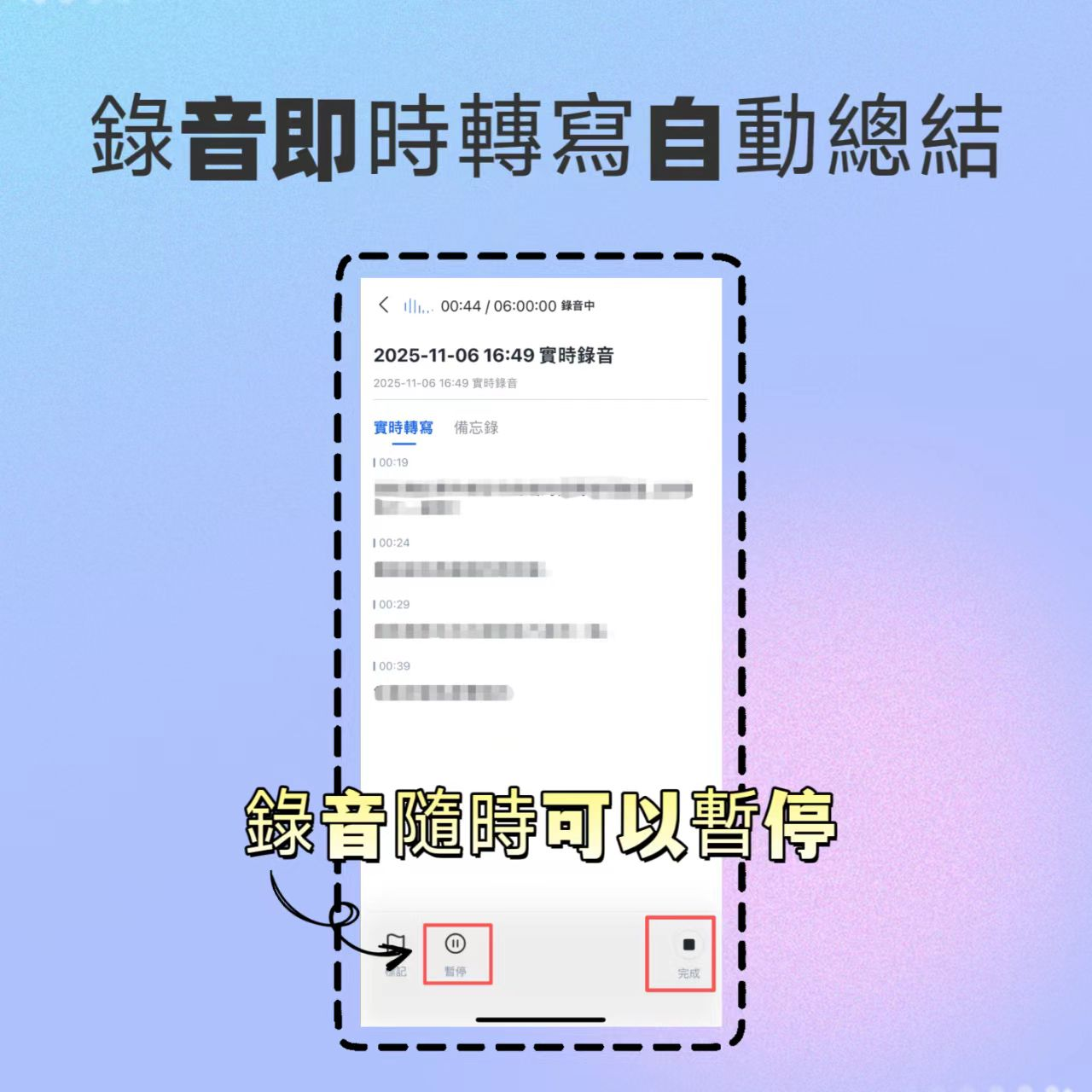
Step 2: Wait for AI Processing After recording ends, upload to the cloud (or auto-sync if recorded locally). Tinrec will automatically generate a transcript and distinguish different speakers.
Step 3: Review AI Summary and Action Items Switch to the "Summary" view to see auto-generated meeting highlights, decisions, and to-do items. Check for any omissions or misunderstandings and adjust.
Step 4: Use AI Chat to Query Details If you forget a detail, no need to re-listen. Just type a question in the chat box, e.g., "What was the project deadline mentioned earlier?", and the AI will extract the answer from the recording.

Step 5: Export and Share Export the organized minutes as PDF or Word, and send to meeting participants via email or messaging apps.
6. Frequently Asked Questions (FAQ)
Q1: Are free speech-to-text tools really sufficient? A: For occasional personal use, the Xiaomi built-in feature or Tinrec's free plan (100 minutes/month) is usually enough. But for frequent meetings or long recordings, paid plans often offer better value because the time saved far exceeds the subscription cost.
Q2: Which is better, Otter.ai or Tinrec? A: It depends on the language. If your work language is mainly English, Otter.ai is a classic choice; but if you involve Chinese, Taiwanese, or need deeper AI semantic queries and summaries, Tinrec has an edge in localization and feature depth.
Q3: What affects speech-to-text accuracy? A: Mainly recording quality (noise, distance), speaker's accent, speed, and density of professional terms. Using an external microphone, recording in a quiet environment, and choosing a tool optimized for professional vocabulary (like Tinrec) can effectively improve accuracy.
Conclusion
In today's era of digital work and learning, choosing the right speech-to-text tool is no longer a "nice-to-have" but a "necessary gear". Built-in features like those on the Xiaomi 15 solve the "have-or-not" problem, while professional AI tools like Tinrec solve the "efficiency" and "insight" problems.
We suggest readers first clarify their core needs: is it simple text conversion, or extracting value from messy conversations? If the latter, start with Tinrec's free plan and experience how AI can transform lengthy recordings into actionable guides, truly unleashing your productivity.
Turn every recording into actionable outcomes
Get 60 free transcription minutes when you sign in. No credit card required.
Related Reading
You might also like

2026 Comparison of 5 Online Meeting Tools: Top Chinese Transcription Picks After Co-Life Shutdown
NCHC's Co-Life online meeting system officially shut down on April 30, 2025. This article compares 5 online meeting transcription tools from four angles: recording method, Chinese language performance, post-meeting output, and team handover. It explains how to choose after Co-Life and identifies Tinrec as the top pick in testing.

2026 Top 3 Video Conferencing Tools Tested: Built-in Recording Falls Short, How Tinrec Fills the Gap
Looking for a video conferencing tool? This hands-on comparison tests the meeting recording capabilities of Zoom, Microsoft Teams, and Google Meet, and takes a deep dive into how Tinrec's bot-free recording, AI summaries, action item extraction, AI Q&A, and team spaces fill the post-meeting organization gap left by video conferencing tools. From buying tips to pitfalls to avoid, this guide helps you master both the meeting and the follow-up.
2026 Tinrec Online Meeting Real-Time Translation: Live Bilingual Subtitles + Post-Meeting AI Summary
How to choose real-time translation for online meetings? This article starts from two decision points: 'understanding during the meeting' and 'usability after the meeting.' It reviews Tinrec's real-time bilingual subtitles, bot-free online meeting recording, AI summary and action item extraction, team spaces, and compares positioning and free tier differences with Otter.ai, Notta, Fireflies.ai, and Granola, with purchasing considerations and FAQs.

4 Cisco Webex Meeting Transcription Tools Tested for 2026: Can You Get Transcripts Without a Bot?
Cisco Webex is widely used by businesses, but after meetings end, transcripts, summaries, and action items often go unorganized. This article starts from the decision points of Webex users and compares four meeting transcription tools: Tinrec, Otter.ai, Notta, and Granola. It explains selection criteria, differences in bot-free recording, pricing and limitations of each tool, and provides pitfalls to avoid and scenario-based recommendations.

2026 Comparison of 5 Online Meeting Systems: Which Saves More Time on Chinese Meeting Minutes and Team Archiving?
How do you compare online meeting systems? This article examines three key decision factors: how meeting audio is captured, what is produced after transcription, and who owns the meeting data. It analyzes Tinrec's bot-free online meeting recording, AI summaries and action items, AI Q&A, and team plan role and seat management, and compiles 5 purchasing considerations and FAQs.

5 Online Video Chat Rooms Tested and Compared in 2026: How to Choose Between Anonymous Dating and Meeting Notes?
A review of UT Chat, Dreamland Chat, Random Chat, Knock Knock, and AntiLand, covering their positioning and safety considerations. Also explains how Tinrec fills the gap with bot-free desktop recording and post-meeting workflows for meeting transcripts, AI summaries, action items, and team knowledge retention.

Tinrec 2026 Review: AI Meeting Transcription Beyond Yating Coupons
Searching for Yating transcription coupons? This guide explains Yating's pricing and free tier, then compares what really matters: how meetings are recorded, who organizes transcripts afterward, and how team data is retained. It covers Tinrec's bot-free online meeting recording, real-time translation, AI summaries and action items, AI Q&A, multi-format export, and team workspace, with a comparison table, use cases, and a buying checklist to help you calculate the time saved after purchase.

4 Online Meeting Tools Compared for 2026: Cisco Webex, Otter, Notta, and Tinrec — Which Should You Choose?
This article compares four online meeting tools—Cisco Webex, Otter.ai, Notta, and Tinrec—across meeting recording methods, Chinese transcription, post-meeting summaries and action items, team collaboration, and pricing limits to help you find the best fit for your workflow.

Lifesize vs Tinrec 2026: 5-Factor Comparison for Chinese Online Meeting Notes
Lifesize is an enterprise cloud video conferencing platform, while Tinrec is an AI meeting notes and team collaboration tool. This article compares them across five dimensions: tool positioning, meeting capture method, Chinese language experience, post-meeting output, and team data ownership. It also includes a guide to avoiding pitfalls when choosing online meeting tools, helping you decide which type fits your meeting scenario.