

Turn recordings into transcripts and summaries in minutes
Upload audio or video for multilingual transcription, AI notes, and action items
Boost Productivity|Press Release
TinRec Makes Real-Time Transcription Easier for Zoom, Microsoft Teams, and Google Meet
Key Takeaways
- What is TinRec's real-time transcription and meeting summary?
- Benefits of using it
- How to use it
TinRec assistant is a powerful AI meeting assistant that helps you maximize your meeting productivity. It can automatically join your Zoom, Microsoft Teams, and Google Meet meetings, transcribe speech to text in real-time, and provide live meeting summaries during the meeting. This ability to view the transcript and key summaries simultaneously is still rare among most other meeting recording tools.
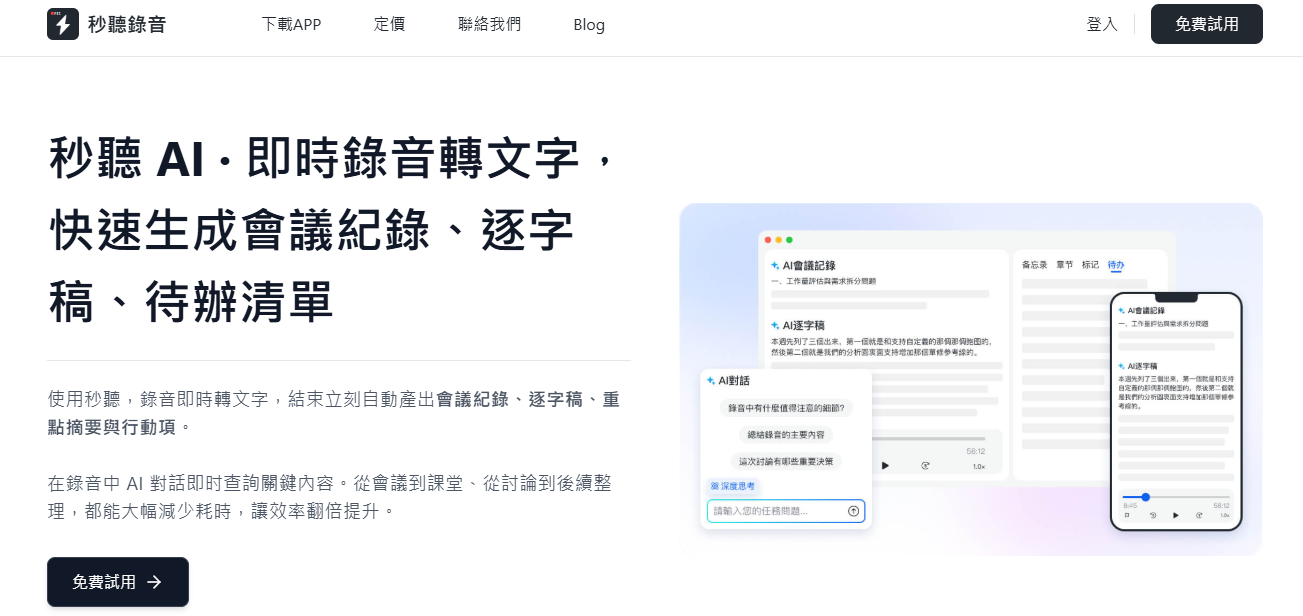
This feature offers many practical benefits:
- Stay Focused: Eliminate the pressure of manual note-taking, allowing you to fully engage in the discussion.
- Complete Records: Capture all conversation accurately even if you get distracted or join late.
- Quickly Grasp Key Points: Real-time summaries clearly highlight action items, decisions, and next steps, greatly improving information absorption.
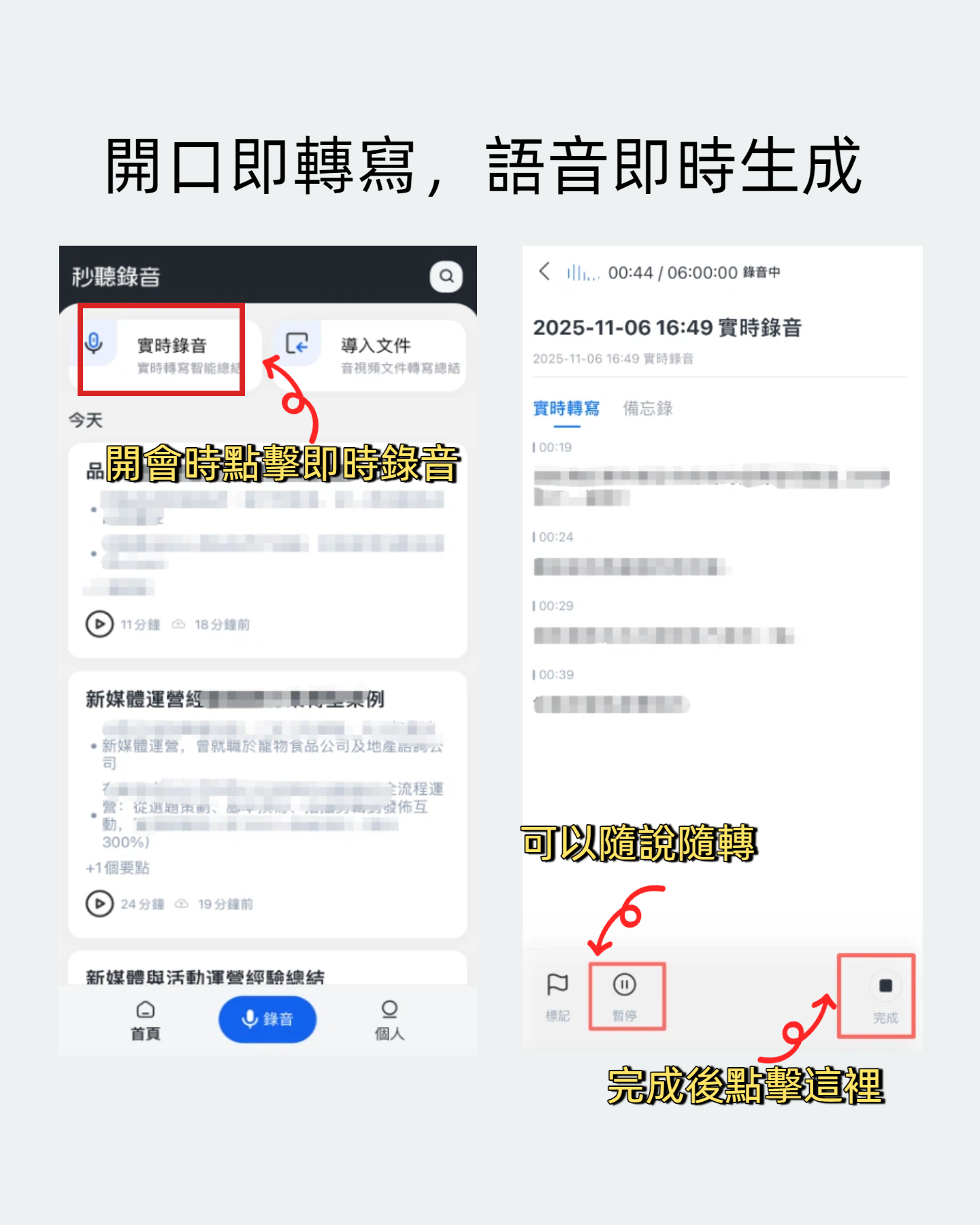
During the meeting, you can follow the transcript in real-time via the TinRec web or mobile app, mark important points, assign tasks to colleagues, or catch up on missed content.
Stop organizing recordings by hand
Upload audio or video and automatically get a transcript, summary, and action items
Using it is very simple: just link your calendar account to your TinRec account, and TinRec will automatically join scheduled meetings and start real-time transcription. You can adjust auto-join and sharing permissions anytime in the "Meetings" tab of your account settings.
In addition to the real-time transcript, TinRec also provides live meeting summaries, which compile key conclusions during the meeting, making it easy for latecomers or those who step away briefly to catch up quickly. These summaries can be viewed in the TinRec web or mobile app, and can be instantly shared with other participants to enhance team collaboration.
Benefits of Using TinRec for Real-Time Transcription
- Boost Focus and Productivity: No need to divide attention with note-taking, allowing all participants to concentrate on the meeting itself, improving overall efficiency.
- More Complete and Accurate Meeting Records: Supports multi-language recognition including Chinese, English, Japanese, Cantonese, and Minnan, ensuring all speech is fully captured without missing important details.
- Quickly Understand Meeting Highlights: AI-generated summaries mark action items, decisions, and next steps in real-time, helping you quickly grasp core information.
- Enhance Team Collaboration: Summaries and transcripts can be shared in real-time, promoting transparent communication and task delegation.
Overall, TinRec is a powerful tool for improving meeting quality. It is easy to use and feature-rich, not only enhancing focus and efficiency but also ensuring record completeness, accelerating decision execution, and strengthening team collaboration.
If you are looking for a solution to improve meeting effectiveness, we invite you to try TinRec today.
300 minutes of transcription per month
Up to 30 minutes per meeting
Upload up to 3 audio or video files
Industry-leading transcription technology
Advanced AI conversation analysis
Custom integrations and workflows
Schedule a demo now
Turn every recording into actionable outcomes
Get 60 free transcription minutes when you sign in. No credit card required.
Related Reading
You might also like

4 Ways to Transcribe LINE Voice Messages in 2026: Which One Turns Audio into Searchable Data?
Can't listen to all your LINE voice messages or search them? It's a common pain point for many users in Taiwan. This article compares 4 methods for transcribing LINE recordings and uses Tinrec to demonstrate how to turn voice messages, call recordings, and online meetings into transcripts, summaries, action items, and queryable team data. It also includes 5 key purchasing checkpoints and team plan pricing details.

4 LINE Call Recording Methods Tested for 2026: Which One Actually Captures the Other Person's Voice on iPhone and Android?
LINE has no built-in call recording feature, and iPhone screen recording often captures only your own voice. This article tests four LINE call recording methods, covering system limitations, common failure reasons, and legal reminders, and explains how to use Tinrec to turn recordings into transcripts, summaries, and action items so the call content can be reused.

5 Best Online Audio-to-Text Tools in 2026: Free vs. Paid vs. Team Plans Compared
A practical comparison of 5 online audio transcription tools, covering free tiers, meeting capture methods, post-meeting AI processing, and team collaboration. Tinrec is the primary hands-on test subject, helping you decide which tool fits your meeting style and budget.

3 Audio-to-Text Tools Tested: Which Is Best for Chinese Meeting Transcripts in 2026?
How can you transcribe audio efficiently? Based on real meetings and interviews, this guide covers 5 key factors for choosing a tool, compares Tinrec, Otter.ai, Notta, and TurboScribe on input sources, Chinese handling, post-meeting organization, and pricing, and includes a full walkthrough plus 3 common pitfalls to help you find the most time-saving solution.

4 LINE Call Recording Methods Tested for 2026: How to Turn Recordings into Transcripts
LINE doesn't have a built-in call recording feature, but there are workable methods on both iPhone and Android. This article compares four LINE call recording methods in practice, including iOS 26's native capture, Android's built-in call recording, screen recording, and speakerphone with computer recording. It also covers the legal risks of recording and how to use Tinrec to turn audio files into searchable transcripts, summaries, and action items.

LINE vs Tinrec 2026: 5-Dimension Comparison — Why LINE Can't Record Calls and How to Solve It
LINE has no official call recording feature—not because you're missing a setting, but due to privacy policy, VoIP protocol, and system permission restrictions. This article explains the real reasons LINE can't record, compares Android screen recording, iPhone built-in options, external recording devices, and Tinrec, and shows how to turn recordings into searchable, queryable, deliverable meeting data.

2026 Audio-to-Text App Comparison: Which One Turns Meetings into Usable Data?
There are plenty of audio-to-text apps, but most people get stuck not on transcription but on what comes after. This article starts with common pitfalls, explains the four key points to consider when choosing, and compares Tinrec, Notta, TurboScribe, and Granola on meeting recording, Chinese transcription, post-meeting organization, and team collaboration, with a guide to avoiding pitfalls and selection advice.

Tinrec vs Word Built-in Transcription in 2026: 5-Dimension Comparison — Which Should You Choose for Audio-to-Word Transcription?
When converting audio recordings to text and exporting to Word, should you use Microsoft 365's built-in Word transcription or a dedicated AI meeting tool? This article compares Tinrec and Word built-in transcription across 5 dimensions: audio import, document export, post-meeting organization, Chinese recognition, and quota pricing. It also covers suitable scenarios for cSubtitle and Notta to help you decide which approach saves more time.