

Turn recordings into transcripts and summaries in minutes
Upload audio or video for multilingual transcription, AI notes, and action items
Great Notes Are the Foundation of High Productivity
Whether you're planning a project, capturing ideas during a meeting, or jotting down sudden bursts of creativity, having the right note-taking app is essential. Microsoft OneNote is a common choice, but it may not suit everyone—some find it clunky or not aligned with their personal workflow. Fortunately, there are plenty of OneNote alternatives available, catering to different note-taking styles, from minimalist distraction-free writing spaces to powerful all-in-one tools.
Next, we'll introduce the top ten OneNote alternatives to watch in 2026, and take a closer look at how TinRec redefines the smart note-taking experience.
What Is Microsoft OneNote?
Microsoft OneNote is a digital notebook that supports text notes, web clipping, and organizing content into sections and pages. As part of the Microsoft 365 suite, OneNote syncs across devices and integrates seamlessly with tools like Word, Excel, and Outlook. The free version offers 5GB of cloud storage; upgrading to a paid plan provides more capacity or local file storage.
Despite its comprehensive features, some users find OneNote's interface cluttered and the learning curve steep. Additionally, limited integration with third-party apps may hinder smooth collaboration outside the Microsoft ecosystem (e.g., Google tools).
10 OneNote Alternatives Worth Considering
If you're looking for an alternative to OneNote, the following popular options are worth considering:
- 1. TinRec
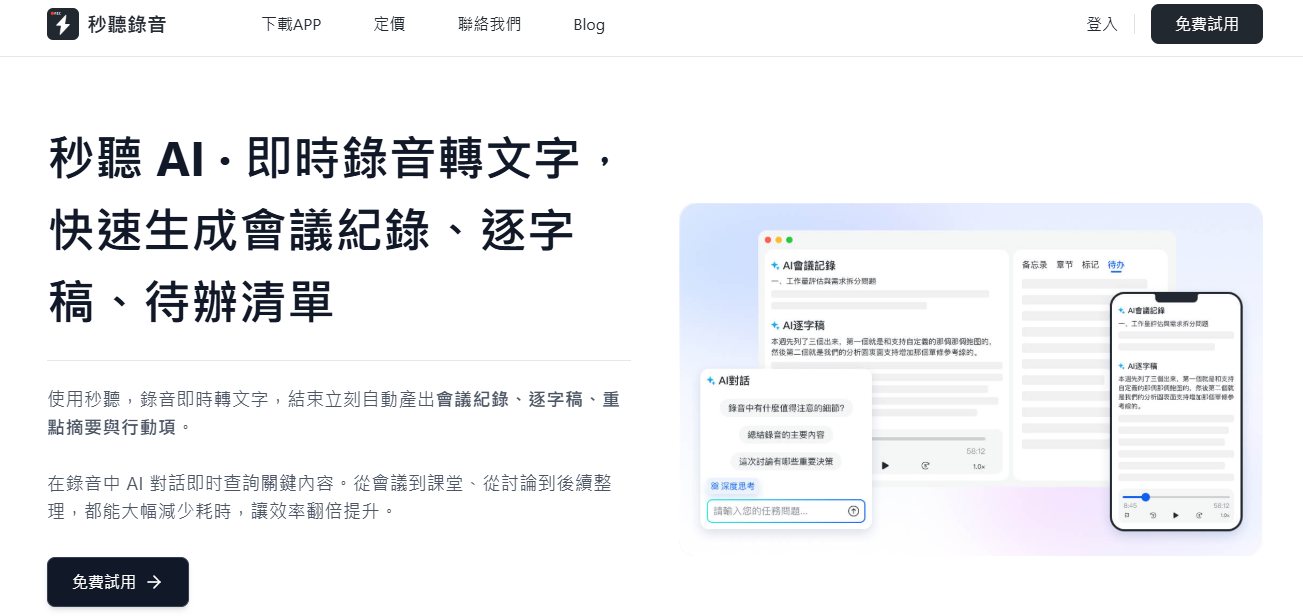
If you frequently attend meetings or need to record conversations in bulk, TinRec is your perfect companion. This AI-powered smart note-taking tool is especially suitable for students, professionals, and anyone looking to boost efficiency. It automatically records, transcribes speech to text in real time, and uses AI to generate summaries, to-do lists, and key highlights.
TinRec features high-accuracy voice recognition that can clearly distinguish speakers even in multi-person meetings. It supports multiple languages including Chinese, English, Japanese, Cantonese, and Minnan, and automatically adds timestamps for easy reference. All records are stored securely, and you can edit, annotate, or share them with your team at any time.
Whether it's face-to-face meetings, Zoom, Google Meet, or Microsoft Teams online meetings, TinRec works perfectly. The free plan offers 300 minutes of transcription per month, and you can upgrade to unlock more features.
Stop organizing recordings by hand
Upload audio or video and automatically get a transcript, summary, and action items
Evernote is a digital note-taking app similar to OneNote, offering a structured interface for managing text, images, web clippings, PDFs, or scanned documents. Its powerful search can even recognize handwritten content, and it supports cross-device sync.
However, the free version is limited to two devices, and advanced features like AI search, offline access, more storage, and task management require a paid subscription.
Notion is a versatile workspace that integrates notes, tasks, databases, and wikis. Its drag-and-drop interface lets you design layouts freely, with real-time collaboration, deadlines, and tagging features, making it great for managing complex workflows.
While the free plan offers robust features, upgrading to a paid plan is recommended for version history or unlimited file uploads.
Bear is a minimalist note-taking app with a clean interface and Markdown support. Its focus-oriented design is ideal for creators and students, avoiding unnecessary distractions.
Basic features are free, but cross-device sync, custom themes, and advanced export options require a subscription. Note that Bear is only available on Apple iOS devices.
Simplenote offers plain text notes with no frills, perfect for quickly jotting down thoughts. While it doesn't support images, audio, or multimedia, it features tagging, full-text search, and real-time collaboration, making it a lightweight choice for team note-taking.
Apple Notes is a simple choice for iOS and macOS users, supporting lists, document scanning, hand-drawn sketches, and multimedia insertion. It syncs via iCloud across all Apple devices seamlessly.
However, it lacks cross-platform support—Android users cannot use it—and has limited integration with non-Apple apps, hindering cross-system collaboration.
Google Keep supports notes in various formats including text, web clippings, and photos, with tagging and color coding. Its strength lies in deep integration with Google Drive and Google Docs, making it ideal for users heavily invested in the Google ecosystem.
However, its organization and customization features are basic, suitable only for simple notes and temporary reminders.
Zoho Notebook offers diverse creative recording options including text notes, voice memos, and hand-drawn sketches. The app is free, but some users report a lack of advanced collaboration features, limiting team use.
Goodnotes is a note-taking app for iOS, offering a smooth handwriting experience with PDF annotation, drawing, and folder management. Based on user feedback, occasional stability issues have been reported.
Notability combines typing, handwriting, and audio recording, ideal for users who need to sync audio with notes. The downside is that it's only available for Apple users, and advanced features require a paid subscription.
Upgrade Your Note-Taking Experience with TinRec
Whether you're in a meeting, class, or interview, TinRec's real-time recording and transcription ensure you never miss a single piece of critical information. All content is automatically organized, synced across devices, and TinRec's AI assistant generates summaries and to-do lists automatically.
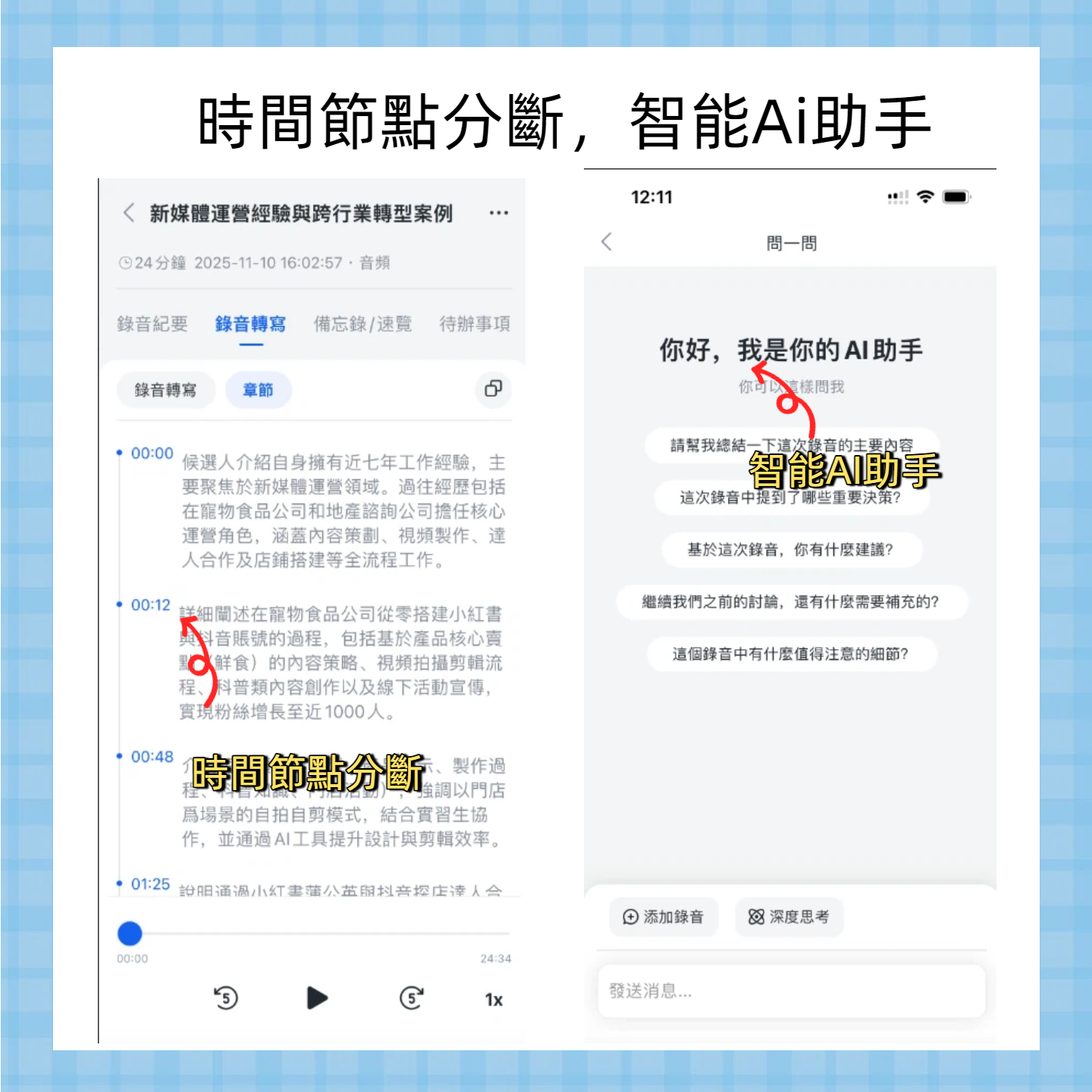
As the first AI meeting assistant to support automatic meeting joining, automatic record sharing, and automatic summary generation, TinRec saves professionals and teams an average of 4 hours of work per week.
Try TinRec now and start a new chapter in smart note-taking!
Turn every recording into actionable outcomes
Get 60 free transcription minutes when you sign in. No credit card required.
Related Reading
You might also like

4 Best iPhone Cantonese Transcription Tools in 2026: Is Apple's Built-in Transcript Enough?
Apple's Voice Memos on iOS 18.4 and later can transcribe Cantonese recordings, but a raw transcript isn't the same as meeting-ready notes. This comparison breaks down four iPhone-compatible options—Tinrec, Apple Voice Memos, Notta, and PLAUD Note—covering Cantonese recognition accuracy, post-meeting organization, cross-platform export, and free-tier limits. We also flag the four most common mistakes buyers make, so you can tell when the built-in tool is enough and when you need something more.
2026 Video Summarizer Comparison: Is Tinrec Better for Chinese Long Videos Than Monica and NoteGPT?
Before choosing a video summarizer, clarify whether you're summarizing public videos or your own meeting and interview recordings. This article compares Tinrec, Monica, NoteGPT, and others across five dimensions: source material, output depth, Chinese language performance, audio retention, and team governance. It also covers Tinrec's core features, practical use cases, team pricing, and FAQs to help you decide if the free version is enough.

Tinrec vs Notta 2026: 5-Dimension Comparison of AI Meeting Summary Generators — Which Is Better for Chinese-Language Scenarios?
Compare Tinrec and Notta across five dimensions, and see how Otter.ai and Granola differ. This article explains how to choose a meeting summary generator—meeting capture method, Chinese recognition experience, post-meeting output, team collaboration governance, and pricing—to help you decide which tool truly saves time on post-meeting organization.

2026 Comparison of 4 Meeting Speaker Organization Tools: Can Transcripts Be Traced Back to Speakers and Topics?
After a meeting, you have dozens of pages of transcripts but can't trace who said what or which topic was finalized? Starting from the real pain points of 'meeting speaker organization,' this article outlines 4 key points for choosing a tool and compares Tinrec, Otter.ai, Notta, and Granola in terms of transcript review and positioning, post-meeting output, and team collaboration. It also includes a pitfalls guide and selection advice.

Tinrec vs Otter.ai: Which AI Meeting Recorder Is Better for Chinese Meetings in 2026?
After a meeting, you're left with a recording and messy notes. This article compares Tinrec and Otter.ai across five dimensions—Chinese and mixed-language transcription, bot-free meeting recording, post-meeting summaries and action items, team roles and seat management, and free tiers and pricing—to help you decide which tool fits your workflow.

2026 Audio Summarizer Guide: Auto Summaries + AI Q&A to Find Key Points
How do you choose an audio summarizer? This guide covers common pitfalls and key factors like summary quality, AI Q&A, and cross-platform export. We recommend Tinrec, which supports bot-free online meeting recording, automatic summaries, action item extraction, and team spaces. Also includes alternatives like Granola and PLAUD, plus tips to avoid mistakes.

5 Best AI Transcription Tools in 2026: Which One Saves the Most Time?
We tested 5 recording-to-transcript tools, comparing Chinese recognition, post-meeting organization, AI Q&A, and team collaboration. See how Tinrec stacks up against Otter.ai, Notta, and TurboScribe, plus key buying tips and pitfalls to avoid.

Tinrec vs Otter.ai: Which AI Meeting Summary Tool Is Better for Chinese-Speaking Teams in 2026?
Many people think a transcript means the meeting notes are done, but the real time sink is post-meeting organization. This hands-on comparison of Tinrec and Otter.ai—two tools that automatically generate meeting summaries from recordings—evaluates them across six dimensions: Chinese-language meeting experience, recording method, post-meeting outputs, audio retention, team governance, and pricing/quotas, helping Chinese-speaking teams decide which tool better fits their workflow.

4 Best Meeting Transcription Tools in 2026: Free Tiers, Chinese Accuracy, and Post-Meeting Efficiency Compared
Tired of spending hours writing meeting minutes? This article compares Tinrec, Notta, Granola, and PLAUD Note across four key areas: how they record online meetings, Chinese and mixed-language transcription accuracy, post-transcription summarization and AI Q&A, and team data ownership. It also includes a pitfalls guide and selection advice.