

Turn recordings into transcripts and summaries in minutes
Upload audio or video for multilingual transcription, AI notes, and action items
Best Meeting Transcription Tools in 2026: We Tested 5, and This One Excels for Chinese Meetings
Many people think meeting transcription is just "throwing an audio file at AI and waiting for a transcript." But once you try it, you'll find three common pitfalls: poor audio quality leads to countless errors, you get a transcript but don't know how to extract key points, and team members use different tools, scattering meeting data everywhere.
This article uses Tinrec to demonstrate a more sensible approach in 2026: from recording, transcription, proofreading, generating minutes, to team sharing—turning "recording" into "usable meeting data."
Before You Start | What You Need to Prepare
- A phone or computer: Tinrec supports web, desktop, and mobile, compatible with iPhone and Android.
- A meeting recording: can be live recording, online meeting, or an existing audio/video file.
- A stable internet connection: real-time transcription and AI summaries require internet; for sensitive content, check your team's privacy and authorization policies first.
- Team plan needs: if meeting data needs to be shared among multiple people, set up a team space first. The first eligible team trial is 7 days, 1 free seat, and 300 minutes of shared import quota.
(Illustrative image: An office worker in a meeting room opens a laptop, phone on the table, screen showing real-time transcription, professional and natural atmosphere)
Step 1 | Record the Content You Want to Transcribe
The goal of this step is to get a clear recording—it's the foundation for all subsequent steps.
Tinrec supports two main recording methods. The first is live recording, suitable for offline meetings, interviews, and on-site notes; open Tinrec, tap record, place your phone or computer in the center of the meeting table for even audio pickup. The second is online meeting recording; the desktop version directly captures system audio, handling Zoom, Google Meet, Microsoft Teams, Webex, etc., without inviting a meeting bot.
Why emphasize recording methods? Because many transcription tools only handle "dictation," and for online meetings they rely on a bot to join. Some companies don't allow external bots in meetings. Tinrec's desktop version uses system audio capture, adding no extra participants—more friendly for internal meetings.
After completion, you'll see the recording in Tinrec, with duration and file status displayed.
(Illustrative image: Laptop with Zoom meeting open, no extra bot participants, desktop corner shows Tinrec capturing system audio and generating text in real-time)
Step 2 | Let AI Transcribe for You
The focus here is "turning sound into searchable text."
If you just recorded live, Tinrec transcribes as it records, and by the end of the meeting, the transcript is mostly ready. If you have existing audio or video files, upload them to Tinrec, and the system will quickly transcribe. Chinese, Traditional Chinese, mixed Chinese-English, and multilingual meetings are all within Tinrec's capabilities.
Note that transcription accuracy is affected by recording quality, background noise, accents, overlapping speakers, and technical terms. Rather than regret later, spend 30 extra seconds checking microphone placement during recording; in noisy environments, enable smart noise reduction in settings.
After completion, you'll get a time-stamped transcript that you can search by keywords like a document.
(Illustrative image: Left side shows audio file, right side shows real-time transcript text, with different colors for different speakers)
Step 3 | Quickly Proofread the Transcript
The goal here is not to "retype every word," but to correct key information.
Tinrec automatically distinguishes speakers. You can quickly scan names, numbers, technical terms, and decision conclusions. Keep terminology consistent, e.g., use the same spelling for a person's name throughout, making batch edits with "find and replace" easier later.
If you encounter unclear sections, click the timestamp next to the text to jump back to the corresponding audio position and re-listen. This is much faster than playing from the beginning—a key time-saver of AI transcripts over traditional typing.
After completion, you'll have a more reliable meeting transcript.
(Illustrative image: A person wearing headphones, looking at the transcript while clicking timestamps, screen shows audio waveform and corresponding text)
Step 4 | Let AI Generate Meeting Minutes
This step is the difference between "transcript" and "meeting minutes"—and what most people really want.
Transcripts record "what was said," while meeting minutes focus on "what was done." Tinrec automatically generates AI summaries, chapters, and key points, and extracts action items from discussions. You can condense thousands of words into a few hundred words of meeting minutes, quickly grasping decisions, controversies, and next steps.
If the meeting involves cross-language content, Tinrec supports real-time translation, viewable in original, translated, or bilingual mode. This is especially useful for international teams or mixed Chinese-English meetings.
After completion, you'll have summaries, chapters, to-do lists, and if needed, reports, tables, and documents.
(Illustrative image: Meeting room whiteboard with action items, tablet on table shows Tinrec's auto-generated summary and To-Do List, titled "Q3 Budget Meeting")
Step 5 | Export, Share, and Team Retention
The goal here is to integrate meeting results into your existing workflow.
Stop organizing recordings by hand
Upload audio or video and automatically get a transcript, summary, and action items
Tinrec supports multiple export formats and can send results to Notion, Google Docs, OneNote, Dropbox, etc. If you're using it alone, this is sufficient.
For teams, it's recommended to put meeting data into Tinrec's team space. The team plan offers independent space, member invitations, role and seat management, usage analytics, and audit logs. Team resources belong to the team; when a member leaves or loses their seat, their resources can be transferred to other active members, so meeting data doesn't disappear with the individual.
Note that the team plan currently focuses on team-level sharing: active members without a seat can view, play, and read team data; but only seat holders can record, upload, edit, import/export. This is not a file-level permission system; understand the difference between roles and seats before purchasing.
After completion, your meeting data moves from personal devices to a team database, becoming searchable, collaborative, and traceable assets.
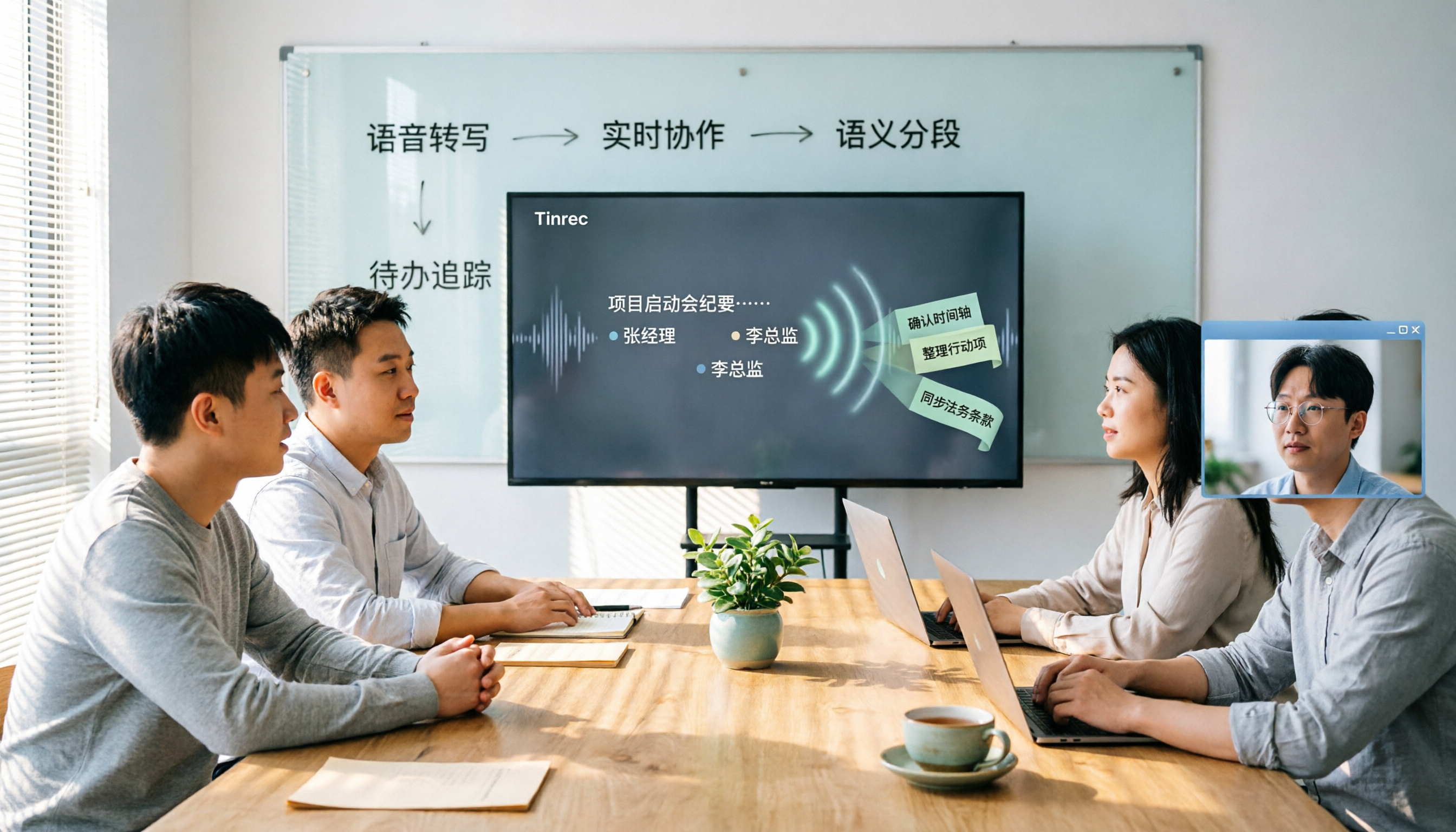
(Illustrative image: Team members viewing the same meeting database on a shared screen, showing transcript, summary, to-dos, and member list, each with their role)
FAQs and Troubleshooting
Q: The Chinese transcription has many errors. What can I do? Usually due to noisy recording environment, distance, or multiple people speaking at once. Tinrec has built-in smart noise reduction; enable it in settings before recording. For imported files, you can also select the corresponding environment mode. Most basic transcription tools use the same default mode for all recordings, making errors more likely in noisy meetings.
Q: Do online meetings always require inviting a meeting bot? No. Tinrec's desktop version directly captures system audio, handling Zoom, Google Meet, Microsoft Teams, Webex, etc., without a bot joining as a participant. Users need to actively open Tinrec to start recording; it's not currently a mode that automatically joins all calendar meetings.
Q: Is the free plan enough? The free plan offers basic quota to experience recording, import, summary, and transcription. If you only occasionally organize a recording, the free plan is fine. For short-term intensive meetings or interviews, consider a weekly pass; for steady weekly needs, the Pro monthly plan is more suitable; for long-term retention of recording data, the annual plan has a lower monthly equivalent.
Q: Can transcripts be exported to Notion or Google Docs? Yes. Tinrec supports multiple export formats and can send results to Notion, Google Docs, OneNote, Dropbox, etc. for further processing. The output is organized data, not just plain text.
Q: If a team member leaves, will meeting data disappear? It won't be taken away by the individual. Team resources belong to the team; when a member leaves, is removed, or loses their seat, their team resources can be transferred to other active members. Team audio moved to trash can be restored before permanent deletion; the current retention period is 30 days.
Q: Can team members without a seat see data? They can view, play, and read team data, but cannot upload, edit, import/export, or perform other resource usage operations. The team plan distinguishes "roles" and "seats": roles determine governance permissions, seats determine content usage eligibility.
Advanced Tips | 3 Ways to Double Tinrec's Efficiency
1. Use AI chat queries instead of Ctrl+F Tinrec supports AI Q&A around meeting content. You can directly ask: "What risk did Wang mention in the last budget discussion?" The system will summarize an answer in Chinese based on the meeting content. Traditional transcripts only allow keyword search, giving you a bunch of sentences containing "budget" or "Wang," not a comprehensive answer like asking a person. Actual effect: time to find decision context drops from over ten minutes to tens of seconds.
2. Bot-free desktop recording, suitable for internal meetings Tinrec's desktop version records online meetings via system audio capture, without an extra bot. Tools like Otter and Fireflies often join as meeting bots, and some organizations don't allow external bots; Granola also takes a bot-free approach but doesn't support uploading pre-recorded files or retaining meeting audio. Tinrec's difference is retaining recordings, supporting file import, and combining Chinese experience with post-meeting organization.
3. Team hotwords and team space, so technical terms aren't misheard The team plan allows maintaining team hotwords, adding internal product names, project codes, and industry terms to improve recognition of specialized vocabulary. Meeting data is stored in the team space; new members can view past meetings, and managers can view usage trends and audit logs. Standalone transcription tools usually lack such team governance capabilities. Actual effect: fewer terminology errors in cross-department meetings, and new members don't have to ask "where was that decision last time?"
If You Don't Use Tinrec, Here Are Other Options
- Otter.ai: A mature choice for English business meetings. Basic free plan offers 300 minutes per month; Pro annual billing is about USD 8.49/month. For Chinese, Taiwanese, or mixed Chinese-English meetings, recognition is usually not as good as localized tools.
- Notta: Good multilingual transcription and file processing. Free plan offers 120 minutes per month, max 3 minutes per session. Suitable for those mainly transcribing files with fewer real-time meeting needs.
Both have strengths, but if you need bot-free online meeting recording, Chinese post-meeting organization, AI Q&A, and team data retention, Tinrec is a better fit for Taiwanese teams' workflows.
Conclusion
In 2026, meeting transcription is no longer about "having a transcript," but whether you can turn it into searchable, summarizable, queryable, and collaborative meeting data. This article demonstrated 5 steps with Tinrec: recording, transcription, proofreading, generating minutes, exporting and team retention.
If you're looking for a Chinese meeting transcription tool, start with Tinrec's free plan and try it with your own meeting recording. The free quota is enough to experience the full workflow, then decide whether to upgrade to personal or team plan. The first team trial is 7 days, 1 free seat, 300 minutes shared import quota; paid seats are USD 29.80/month, annual USD 199 (about USD 16.58/month). Actual prices and benefits are subject to the official purchase page.
Before recording, don't forget: comply with local laws and company policies, and obtain participant consent when necessary.
References
- How to quickly create meeting transcripts? 2026 complete guide | Audio to text, AI automatic meeting notes in one go
- Meeting Ink - 2026 AI meeting notes tool test | 7 voice-to-text and summary speed comparison | Meeting Ink - AI meeting notes assistant automatic transcription and summary
- 2026 meeting notes efficiency bottleneck, 5 audio-to-text transcript AI recommendations and practical guide - Tinrec Blog
- How to write meeting minutes in 2026? 5 efficient templates and AI auto-generation tool review - Tinrec Blog
- 2026 latest 6 AI transcript tools recommendation: easily handle English meeting audio to Chinese - Tinrec Blog
Turn every recording into actionable outcomes
Get 60 free transcription minutes when you sign in. No credit card required.
Related Reading
You might also like

4 Meeting Recording Transcription Methods Compared: Which Turns a 2-Hour Recording into Usable Meeting Data?
How should you choose a meeting recording transcription method in 2025? This article examines four key decision points and compares approaches like Tinrec, Otter.ai, Granola, and PLAUD, covering bot-free online meeting recording, post-transcription summaries and action items with AI follow-up, and team spaces and seat management, to help you find a method that turns meetings into actionable data.
2026 Meeting Transcription Tools Comparison: Why Tinrec Is Better for Chinese-Speaking Teams
Should you choose software or hardware for meeting transcription? This article compares Tinrec and PLAUD Note, two products with completely different approaches, across five dimensions: hardware requirements, online meeting handling, Chinese language experience, post-meeting workflow, and team collaboration. It also covers pricing, plans, and FAQs to help you decide which 2026 version best fits your work situation.

2026 Meeting Transcription Showdown: Tinrec vs PLAUD Note — Which AI Meeting Assistant Saves More Time?
Many people think meeting transcription is as simple as feeding audio to an AI and getting a perfect transcript. But the real pain point is what happens after transcription: organizing and collaborating. This article compares Tinrec and PLAUD Note across five practical dimensions—meeting capture, Chinese language experience, post-meeting organization, team collaboration, and pricing—to help you decide which is better suited for your meeting scenarios.

2026 Comparison of 4 Meeting Transcription Tools: Which One Turns Recordings into Usable Meeting Notes?
Turning meeting recordings into transcripts isn't just about feeding audio to AI—it's a workflow from pre-recording prep to transcription, organization, and archiving. This hands-on review breaks down 5 key selection criteria, takes a deep dive into Tinrec's bot-free meeting recording, AI Q&A, and team spaces, briefly evaluates Notta, Granola, and Otter.ai for different use cases, and includes a pitfalls guide plus copy-paste prompt templates.

2026 Comparison of 4 Meeting Transcription Tools: Which Saves More Time for Chinese Meetings and AI Summaries?
Starting from the pain points of meeting notes discussed by Dcard users, this article compares four meeting transcription tools: Tinrec, Otter.ai, Granola, and PLAUD Note. It breaks down four key purchasing factors: language support, recording capture methods, post-meeting outputs, and team collaboration. It also includes a guide to avoid pitfalls and scenario-based selection advice to help you say goodbye to nights spent re-listening and typing transcripts.

2026 Meeting Transcription Buyer's Guide: 5 Key Testing Points and Getting Started Tutorial
How exactly do you use meeting recording-to-text tools? This guide breaks down the complete workflow from live recording, bot-free online meeting capture, AI summaries, and action item extraction, based on hands-on experience. It covers 5 key buying factors including Chinese recognition, recording sources, export and integration, team management, and pricing quotas. Tinrec is used as the primary demonstration tool, with FAQs and practical insights included.

4 Meeting Transcription Tools Tested and Compared in 2026: Can Any of Them Handle Chinese Transcripts and AI Summaries That PTT Users Care About Most?
The most common question on PTT about meeting transcription tools is answered here. From Chinese transcripts, mixed Chinese-English recognition, and bot-free online meeting recording to AI summaries, action item extraction, and team knowledge retention, this article compares 4 common tool approaches and explains how Tinrec turns meetings into searchable, collaborative, and traceable team data.

How to Transcribe Meeting Recordings in 2026: 5-Step Guide Comparing Tinrec and Otter.ai
Transcribing meeting recordings isn't just about getting a transcript—it's about organizing, searching, asking questions, and collaborating. This article compares Tinrec and Otter.ai across 5 steps: choosing a tool, importing recordings, correcting transcripts, organizing summaries and action items, and exporting for archiving. It also explains the differences between free and paid plans.

Tinrec Meeting Transcription 2026: Real-Time Transcription + Automatic Meeting Minutes
How to choose a meeting transcription tool in 2026? Based on real meeting scenarios, this article explains how Tinrec performs real-time transcription in Chinese and mixed Chinese-English meetings, records online meetings without a bot using its desktop version, and automatically generates summaries, chapters, and action items. It also objectively compares Otter.ai and Notta, and summarizes key purchasing considerations and FAQs.