

Turn recordings into transcripts and summaries in minutes
Upload audio or video for multilingual transcription, AI notes, and action items
What is an Objective Summary? How to Write an Objective Summary
An objective summary is a clear, concise restatement of the main ideas of a piece of content. Although it sounds simple, writing a good summary is more skillful than you might think. To capture the essence of the content without oversimplifying, you must balance brevity and clarity.
Mastering this skill brings great rewards. It helps you better understand the material and share information in a way that is easy for others to digest.
Let's explore what an objective summary is and how to write one step by step. We'll also provide some excellent examples of objective summaries and a few practical tips.
What is an Objective Summary?
Objective summaries give readers a quick overview of the material being summarized. Think of them as "summaries of summaries." They are often used in academic and professional settings to deal with lengthy and complex reports, meetings, or presentations.
Suppose you have a regular meeting where different teams report project progress. The objective summary of the meeting captures the key points of each update—such as current status, challenges encountered, and upcoming milestones—while omitting extra details.
An objective summary contains three main components:
- Main idea: The core message or theme of the material
- Key details: Important facts, examples, or data that support the main idea
- Conclusion: Any final thoughts, recommendations, outcomes, or decisions
Objective summaries must be accurate and neutral. That's why they are called "objective" summaries. Focus on facts and avoid including personal opinions or biases. Objective summaries should also be clear and concise—quick to read and easy to understand, allowing readers to grasp essential information without having to sift through pages of notes.
How to Write an Objective Summary: 5 Key Steps
Now that you know what an objective summary is, let's talk about how to write one. Follow these five steps:
1. Understand the Material
Before you start summarizing, you need to fully understand the material. This is crucial because if you don't grasp its content, you might miss important points or misinterpret its meaning.
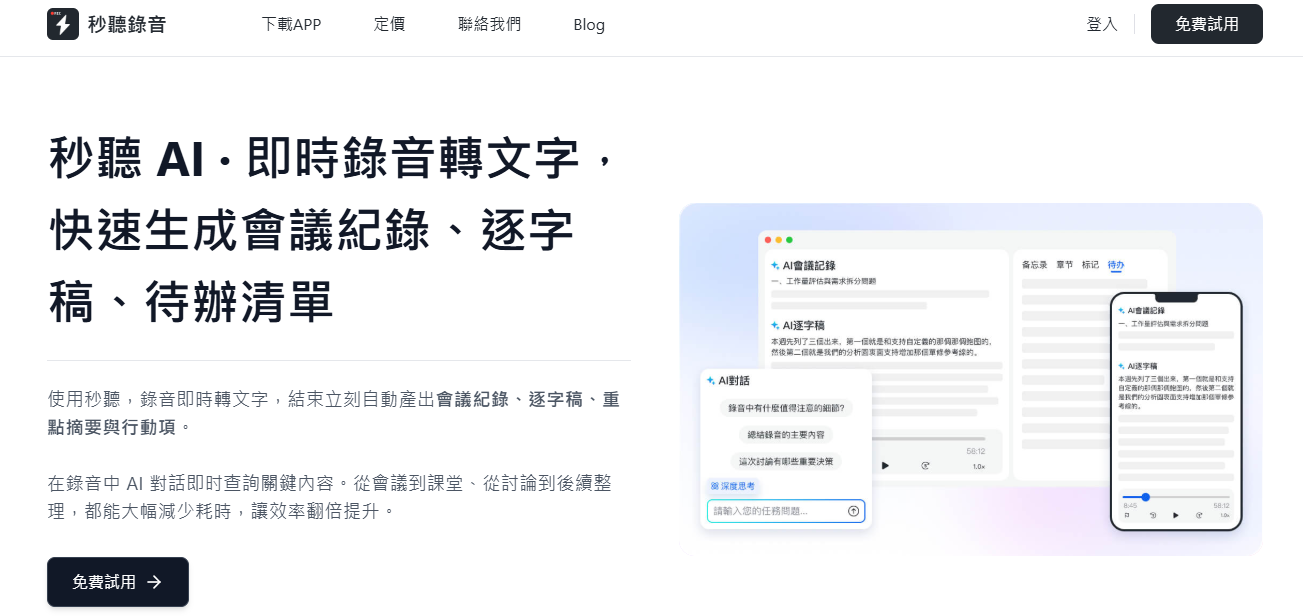
Take time to read or watch the content, and take notes if necessary. If you are summarizing a discussion or meeting, you can use 秒聽錄音 to record—it generates notes in real time, helping you follow along.
2. Identify the Main Idea
Now, identify the core message and key points of the material. What is the main argument or theme? What supporting details explain or reinforce this idea? For example, if you are summarizing a sprint retrospective meeting, you might focus on key takeaways such as what went well, what didn't go as expected, and how to improve next time.
秒聽錄音 can also help here. It automatically organizes transcripts into key sections with informative headings, making it easy to pick out important details. You can manually mark main ideas in the transcript or ask 秒聽錄音助手 to summarize key points and action items.
3. Summarize in Your Own Words
Express the key points in your own words. When writing, aim for clarity, neutrality, and conciseness. Imagine you are explaining the material to someone who did not attend the meeting or read the document you are summarizing. Give them only the facts—no more, no less, just enough to convey the gist.
Write your summary in paragraphs or bullet points. You might find it helpful to use an objective summary template, such as:
- Type of content (meeting, report, or presentation)
- Who wrote or presented the content
- Main idea
- Key supporting points
- Conclusion (summary of discussion, final outcomes, next steps, or decisions)
Stop organizing recordings by hand
Upload audio or video and automatically get a transcript, summary, and action items
If you are short on time or want to get a head start, you can use 秒聽錄音助手 to generate a summary from the transcript.
4. Review for Accuracy
After writing your summary, review it to ensure you have accurately captured the main points. Cross-check with the original material to avoid missing anything or distorting the meaning. Alternatively, ask 秒聽錄音助手 to check your summary. It can help you spot anything you might have missed.
5. Edit as Needed
Finally, give your summary a thorough review for clarity, conciseness, and flow. Edit any awkward sentences or unclear parts to ensure the summary is easy to read. Also, trim your sentences and smooth out transitions to make your summary polished and professional.
If needed, you can use 秒聽錄音助手 to polish or reformat the summary. Just say something like "Make it more concise" or "Can you improve the flow?"
秒聽錄音 will handle the editing for you.
Examples of Objective Summaries
To show you what a great summary looks like, here are some real examples based on different types of content. Notice how each example sticks to the main ideas, omits personal opinions, and stays clear and concise.
Example 1: Meeting Summary
In a product development meeting, team leads provided updates on the current sprint. The engineering team reported that core features were completed ahead of schedule. The design team shared new wireframes for the mobile app, and marketing outlined the timeline for an upcoming campaign.
Afterward, challenges with cross-team communication were briefly discussed, and a plan was made to streamline updates through a shared Slack channel. The meeting ended with a reminder about next week's user testing.
Example 2: Report Summary
The Q4 sales report detailed revenue performance by region. The Northeast region achieved a 12% sales increase through new customer acquisition strategies. The West region saw a slight decline due to supply chain delays.
The report also highlighted top-performing sales representatives and outlined areas for improvement, including consistency in customer follow-ups. Recommendations included investing in CRM training and adjusting targets based on regional trends.
Example 3: Presentation Summary
A student gave a classroom presentation on the history of printing and its impact on communication. The presentation explained how Johannes Gutenberg's invention in the 15th century revolutionized access to books, boosting literacy and facilitating the spread of ideas across Europe.
The presentation highlighted key events, such as the publication of the Gutenberg Bible, and included images of early printing presses. It concluded by discussing how printing technology evolved into the technology we use today.
5 Tips for Writing Objective Summaries
Writing effective objective summaries becomes easier with practice. Here are five tips to help you write clear, concise, and neutral summaries every time:
1. Use 秒聽錄音
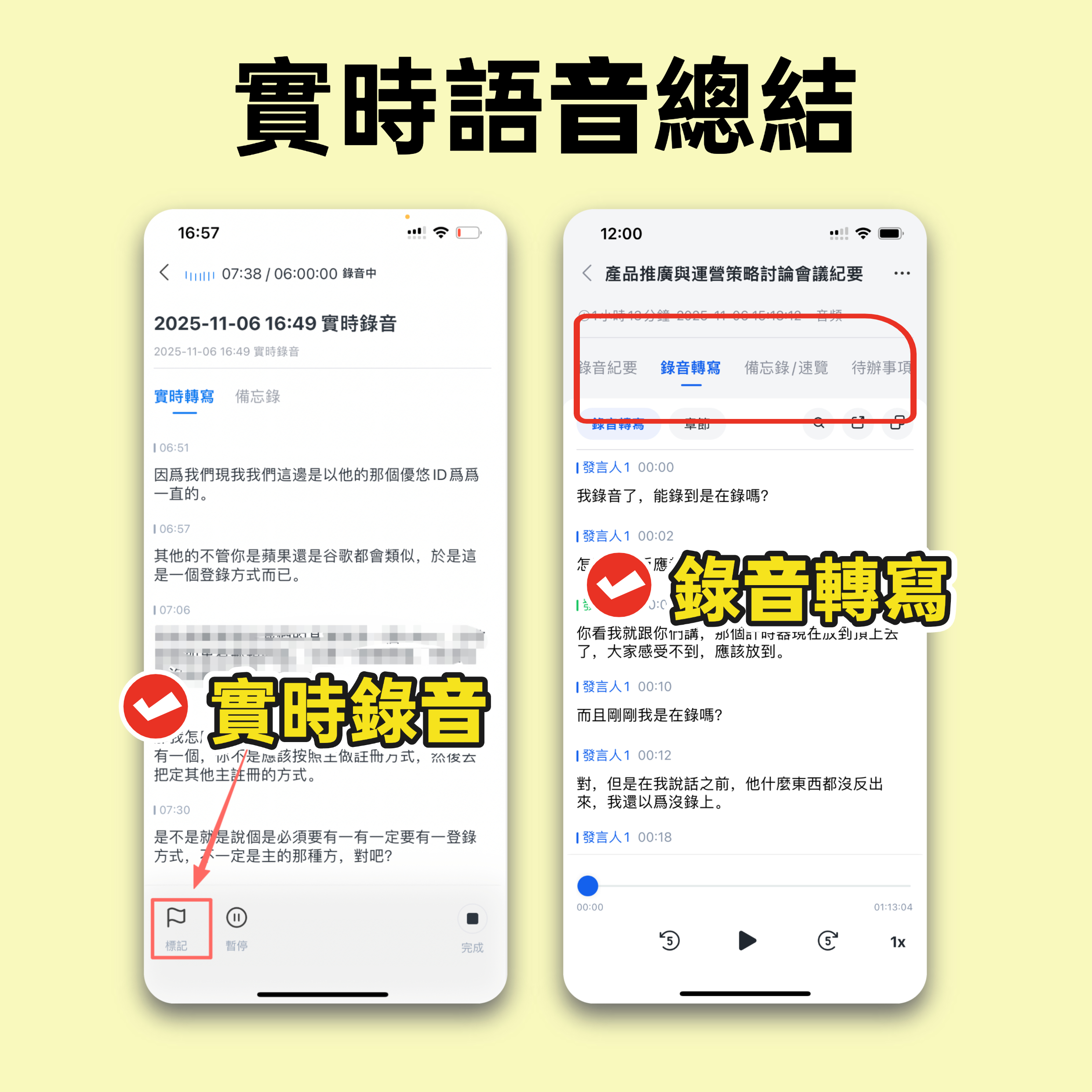
When it comes to summarizing, 秒聽錄音 is a game-changing tool. Whether you need to summarize a meeting, a university lecture, or even a conversation between friends, 秒聽錄音 can help.
Use 秒聽錄音 to take notes in your meetings, or upload your audio/video files to 秒聽錄音, and it will automatically transcribe every word, generate AI summaries, and mark key action items. 秒聽錄音 supports multiple languages, including Chinese, English, Japanese, Cantonese, and Min Nan, making it easy to handle content in different languages.
2. Maintain a Professional Tone
Even if you are writing in your own words, maintain a professional and neutral tone. Avoid inserting personal opinions, jokes, or unnecessary comments. This helps your readers digest the content easily without distraction.
3. Avoid Oversimplification
While you should keep your summary concise, don't oversimplify. Include enough context for readers to fully understand the information. If you cut too many details, you may confuse readers.
4. Use Clear Transitions
To ensure your summary flows smoothly, use clear transition words like "first," "next," and "finally." These words organize the summary logically, helping readers follow and understand the flow of information.
5. Consider Your Audience
Consider who will be reading the summary. This will affect how much detail to include and what language to use.
For example, if your summary is for colleagues in a professional setting, you might want to focus on key action items and business-related details, and use a more formal tone. On the other hand, if your audience is a group of students or casual readers, you might choose to simplify technical terms and provide more context to help them understand the main ideas.
Ready to Simplify Your Summaries? Try 秒聽錄音助手 Today
With 秒聽錄音, creating summaries that capture the essence of any conversation has never been easier. Its AI-powered note-taking and summarization features help you focus on the key points, and its multilingual support (including Chinese, English, Japanese, Cantonese, and Min Nan) makes cross-language communication a breeze.
秒聽錄音 also automatically marks action items from your conversations so you never miss a step. Plus, you can ask 秒聽錄音助手 questions about the content, and it will provide insightful answers to help you better understand the material. Try 秒聽錄音 now.
Turn every recording into actionable outcomes
Get 60 free transcription minutes when you sign in. No credit card required.
Related Reading
You might also like

4 AI Meeting Note Tools Tested in 2026: Which One Saves the Most Time on Auto-Organizing Transcripts?
The pain of meeting notes isn't slow typing—it's time-consuming organization. This article addresses common misconceptions, tests 4 AI meeting note tools, breaks down key buying factors, Tinrec's bot-free recording and AI Q&A workflow, team plan seats and data ownership, plus a pitfalls guide and selection advice.

2026 Teams Meeting Transcription Comparison: 4 Methods Tested — Is Avoiding a Meeting Bot Really Easier?
Teams built-in transcription requires both the organizer and each user to enable the policy, and live captions are not saved—so many people only discover after the meeting that there is no transcript at all. This article reviews four ways to transcribe Teams meeting recordings, from Teams built-in, Otter.ai, and Notta to Tinrec, comparing bot-free desktop recording, AI Q&A, action item extraction, and team seat management, with a pitfalls guide and scenario-based recommendations.

4 Video-to-Transcript Tools Tested and Compared in 2026: 3 Pitfalls to Understand Before Importing Video
Importing a video to generate a transcript looks simple, but the real bottlenecks are usually format support, time codes, and how usage limits are calculated. This article starts with common misconceptions, outlines 4 key points for choosing a tool, then shares a hands-on test of Tinrec from video import to AI summaries, action items, and team knowledge retention, and compares TurboScribe, Notta, and Granola for use cases and pitfalls to avoid.

How to Transcribe Classroom Recordings in 2026: A Complete 5-Step Guide
When it comes to transcribing classroom recordings, most people only ask which tool is the most accurate. But what really determines whether you'll be overwhelmed all semester is the audio source, the classroom language, and the total number of hours. This article uses university and graduate school classroom scenarios to compare Tinrec and Otter.ai across 5 dimensions, and provides a 5-step process you can follow directly, along with purchasing advice.

How to Transcribe Zoom Meeting Recordings in 2026: No-Bot Recording + Automatic Meeting Minutes
Done with a Zoom meeting but still need to organize the transcript and minutes yourself? This guide covers the complete process for transcribing Zoom meeting recordings, including no-bot recording, real-time transcription, AI summaries and action items, AI Q&A, and 5 key points to consider when choosing a tool. It also demonstrates the workflow using Tinrec.

2026 AI Meeting Recorder Comparison: 4 Tools Tested for Chinese Meetings
Two-hour meetings followed by two hours of note organization is a daily reality for most office workers. This hands-on test of 4 AI recording and note-taking tools covers bot-free recording, Chinese transcription, AI Q&A, team knowledge retention, pricing, and limitations to help you decide which one is worth keeping.

5 Speaker Summary Tools Tested for 2026: Why Tinrec Is Less Work for Chinese Meetings
Starting from the question 'What exactly do you need a tool to do for you?', this hands-on comparison of common speaker summary tools explains how Tinrec performs in Chinese meeting transcription, bot-free online meeting recording, AI summaries and action items, AI chat queries, multi-format export, and team spaces. It also covers five key points to consider when choosing a tool and answers common questions.

2026 AI Meeting Notes: Automatic Speaker Identification + AI Q&A Summaries
Why do you still have to manually organize meeting transcripts even when speakers are automatically labeled? This article starts with common misconceptions about automatic speaker identification, breaks down 4 key dimensions for choosing a meeting notes tool, tests Tinrec's bot-free online meeting recording, AI summaries and Q&A, team spaces, and other features, compares it with Otter.ai, PLAUD Note, and Notta, and includes a pitfalls guide and buying advice.

4 Best AI Meeting Note Takers in 2026: Which One Actually Captures Action Items?
The hardest part of a meeting isn't recording it—it's turning two hours of discussion into an action list with names and deadlines. This article compares Tinrec, Otter.ai, Notta, and Granola across four key criteria: action item accuracy, AI Q&A, post-meeting workflow, and team data ownership. We explain who each tool is best for and highlight key buying considerations to help you choose the right tool and stop wasting time on manual transcripts.