
Turn recordings into transcripts and summaries in minutes
Upload audio or video for multilingual transcription, AI notes, and action items
The professor lectures like a machine gun, your hand hurts from taking notes and you still miss key points? This is a common pain point for all students in large lectures or intensive courses. Simply recording audio preserves the sound, but 're-listening' to an hour-long audio file to find a specific passage often takes longer than the class itself.
This article compiles the mainstream 'speech-to-text' tools on the market in 2026. We will evaluate them from three dimensions: recognition accuracy, price (including free quotas), and feature completeness. If you need simple transcription, Google or SpeechTexter might be good choices; if you value AI auto-extraction of key points and after-class review efficiency, this article will also introduce new-type tools like Tinrec that integrate 'recording + summary + chat'.
Quick Navigation Conclusions:
- Seeking maximum accuracy and professional use: Choose Dragon Anywhere.
- Limited budget and using Android: Prioritize SpeechTexter or ListNote.
- Need Google ecosystem integration: Directly use Google Speech-to-Text.
- Need AI to help extract key points and ask questions: Try Tinrec.
Why Students Need 'Speech-to-Text' Tools? Three Core Pain Points
Before diving into tool recommendations, let's clarify why traditional voice recorders or built-in phone recording apps are no longer sufficient:
- Low information density, high retrieval cost: A one-hour audio file is a black box; you can't quickly find 'final exam focus' at a specific time point like scanning text.
- Manual transcription is extremely time-consuming: Manually transcribing a 1-hour audio file typically takes 3 to 4 hours, severely cutting into study time.
- Lack of structured organization: Plain text transcripts are hard to read; students need 'bulleted key points' and 'action items' (e.g., what assignment is due next week).
Therefore, choosing an app that can automatically transcribe and even summarize is key to improving learning efficiency.
7 Mainstream Speech-to-Text Apps in 2026 Review (Based on Market Data)
Based on the latest market reviews, here are the analyses of 7 popular tools for the student demographic:
1. Professional Accuracy: Dragon Anywhere
If you are a student in fields like law or medicine that require extremely high accuracy, Dragon Anywhere is a veteran powerhouse. It offers up to 98% recognition accuracy and supports unlimited dictation length. Its strength lies in custom dictionaries (for adding specialized terms), but the downside is the higher price (approx. $14.99/month) and it's primarily a pure dictation tool.
2. Free and Practical: SpeechTexter & Speechnotes
These two tools are top choices for budget-conscious students.
- SpeechTexter: Has 95% accuracy, supports 60+ languages, and has a simple interface. Although offline mode is slower, it is completely free.
- Speechnotes: Also free, features automatic backup to Google Drive and offline recording, no account registration needed, suitable for situations requiring quick notes on the go.
3. Organization and Management: Evernote
Although Evernote is essentially a note-taking app, its built-in recording function is very convenient for students who prefer to integrate 'handout images, recordings, and text' together. Its advantage is cross-device sync and organizational management, but its transcription ability in noisy environments is weaker (about 92% accuracy).
4. Android-Only: ListNote
This is a lightweight app designed specifically for Android. It uses Google's speech recognition engine and features password protection, making it suitable for recording interviews or research content with privacy concerns. The interface is simple but effective.
5. Feature Integration: KwiCut & Google Speech-to-Text
- KwiCut: Uses AI for noise reduction and speaker identification, suitable for recording group discussions. Although the monthly fee is about $7.99, its keyword search function is very helpful for review.
- Google Speech-to-Text: Backed by Google's powerful AI, supports 120+ languages, and integrates directly with Google Docs. For students already accustomed to Google Workspace, this is the most seamless choice.
A New Choice in the AI Era: In-Depth Analysis of Tinrec (Miao Ting Lu Yin)
In addition to the traditional tools above, emerging AI voice assistants like Tinrec (Miao Ting Lu Yin) offer a different approach. Unlike traditional tools that only provide 'verbatim transcripts', Tinrec emphasizes the complete workflow of 'From Recording to Understanding'.
Stop organizing recordings by hand
Upload audio or video and automatically get a transcript, summary, and action items

Tinrec's Differentiating Features:
AI Smart Summary and Action Items: For a two-hour general education class, you may not need the full transcript; you need 'what the professor concluded' and 'what's due next week'. Tinrec automatically generates meeting minutes and to-do items, filtering out filler words.

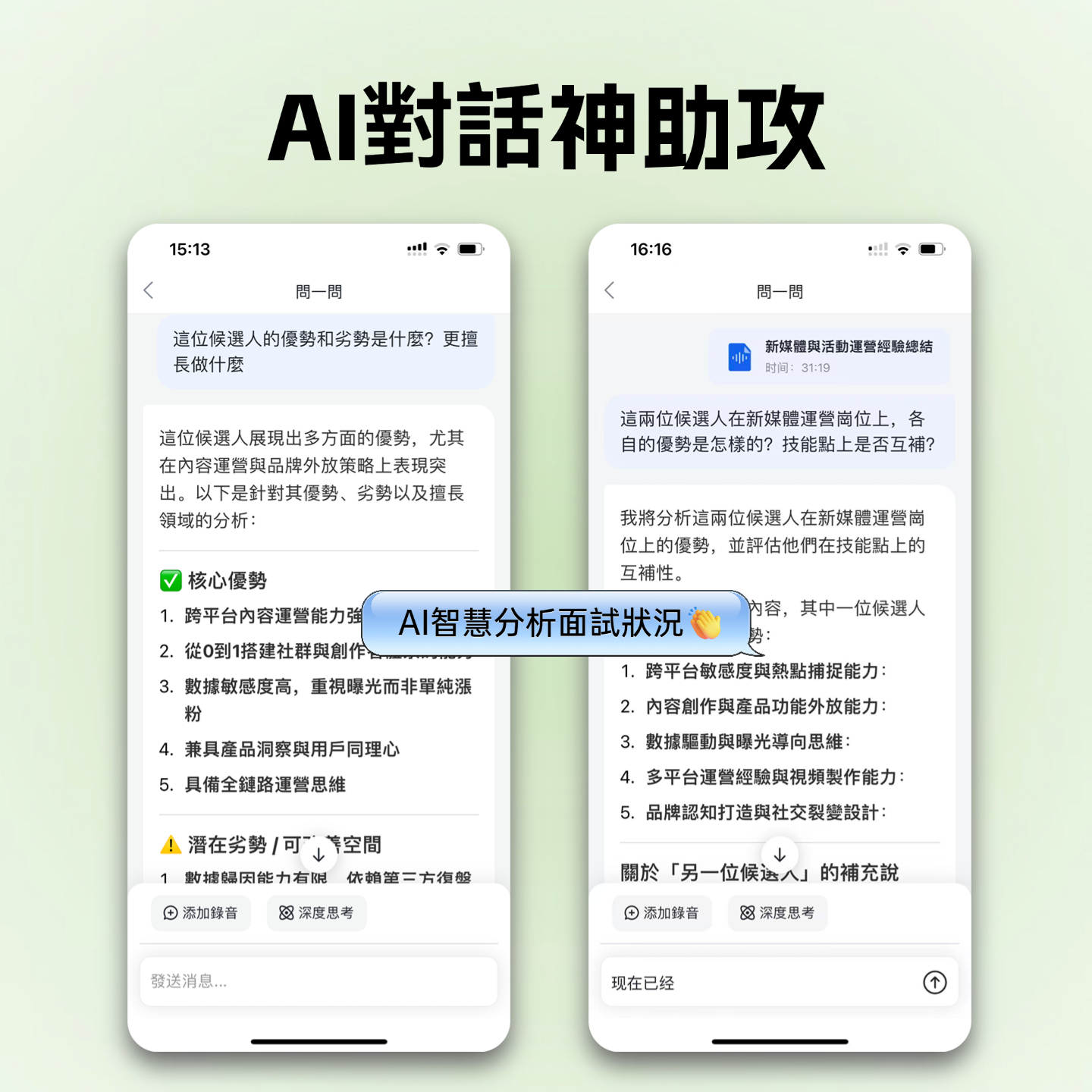
AI Conversational Query (Chat with Audio): This is a feature many traditional apps lack. You can ask your audio file like ChatGPT: 'Where did the professor say the midterm range is?' Tinrec will answer based on the recording content, saving you manual searching time.

Multilingual and Video-to-Text: Besides recordings, Tinrec also supports uploading YouTube links or podcast audio for transcription, which is very useful for students organizing online courses or foreign language materials.
Head-to-Head Comparison: Specification Table of 8 Recording Note Apps
The following table helps you quickly filter based on budget and needs:
| Tool Name | Core Strength | Price/Free Quota | Platform Support | Best for |
|---|---|---|---|---|
| Tinrec | AI summary, conversational query, action items | Free 100 min/month (Paid from $4.9) | iOS, Android, Web | Class review, group discussion, online course organization |
| Dragon Anywhere | 98% high accuracy, professional vocabulary | $14.99/month (no free version) | iOS, Android | Professional dictation for law/medicine |
| Google Speech | 120+ languages, real-time integration | Free (basic features) | Web, Android, iOS | Multilingual learning, Google Docs users |
| SpeechTexter | Simple to use, offline mode | Free | Web, Android | Budget-conscious Android users |
| Evernote | Note organization and management | Free / Premium $7.99 | All Platforms | Users needing integrated text and image notes |
| ListNote | Password protection, lightweight | Free / Pro $4.99 (one-time) | Android Only | Privacy-focused interview recording |
| KwiCut | Noise reduction, speaker identification | $7.99/month | iOS, Android, Web | Group discussions in noisy environments |
| Speechnotes | No registration, Google Drive backup | Free | Web, Android | Quick ad-hoc notes |

Practical Tutorial: How to Efficiently Organize Class Notes with AI Tools
Choosing the right tool is only the first step; establishing an efficient note-taking workflow truly saves time. Below, using Tinrec's interface logic as an example, we demonstrate a three-step 'Record-Transcribe-Review' process:
Step 1: Start Live Recording or Import a File
At the beginning of a class or group meeting, start recording with the app. If you are watching an online course (e.g., YouTube tutorial) or have existing audio files, you can choose the 'Import Audio/Video' feature.
- Tip: Place your phone as close to the speaker as possible, or use an external microphone to improve recognition accuracy.

Step 2: Automatic Transcription and Speaker Diarization
After recording, the system automatically converts speech to text. Advanced tools like Tinrec or KwiCut have 'speaker diarization' features that label which part the professor said and which part a classmate asked, which is very useful for organizing group discussion reports.

Step 3: Use AI for Conversational Review
The traditional approach is to read the entire transcript from beginning to end. Now you can directly use the 'AI Conversational Query' feature. For example, type: 'What are the 3 key points of this class?' or 'What reference books did the teacher mention?' Let AI extract the essence from the thousands of words of transcript and automatically generate a to-do list.
Frequently Asked Questions
Q1: What is the typical accuracy of speech-to-text apps? Most mainstream apps (like Dragon, Google, Tinrec) can achieve over 95% accuracy in quiet environments. However, accuracy is affected by background noise, microphone distance, and speaker accent severity.
Q2: Are there limitations on iPhone recording? iOS has strict restrictions on background recording; some apps may stop recording when switching to the background. It is recommended to use tools that support background execution or are optimized for iOS (e.g., Tinrec iOS version or Evernote) to ensure uninterrupted long recordings.
Q3: Is the free version sufficient? If you only occasionally record short meetings, the free features of SpeechTexter or Speechnotes are adequate. If you need to record large amounts of class time (dozens of hours per month), tools like Tinrec offer a monthly free quota of 100 minutes for trial; long-term use may require a subscription plan to unlock more hours.
Q4: Can I translate foreign language classes? Yes. Google Speech-to-Text and Tinrec both support multilingual recognition. Tinrec further supports post-recording translation, making it suitable for organizing notes from English or other foreign language lectures.
Q5: Do audio files take up a lot of phone storage? Audio files are typically large. It is recommended to choose tools that support cloud sync (such as Google Drive backup or Tinrec's multi-device sync), upload files to the cloud after recording, and free up phone space.
Q6: Can I directly convert YouTube videos to text? Some tools support this. Tinrec has a 'video link parsing' feature: paste the URL to generate transcripts and summaries, which is very convenient for organizing online public classes or TED Talks.
Turn every recording into actionable outcomes
Get 60 free transcription minutes when you sign in. No credit card required.
Related Reading
You might also like

How to Create a Sales Meeting Notes Template in 2026: 5 Steps from Template to AI Organization
The problem with sales meeting notes rarely lies in the format—it's that no one is available to take notes during the meeting, and no one reviews them afterward. This article starts with three common misconceptions, outlines 7 essential fields and a 5-step process, and explains how to use Tinrec's bot-free recording, AI summaries, and AI Q&A to turn a one-hour client meeting into a trackable record within 10 minutes after it ends.

How to Take Sales Meeting Notes in 2026: 5 Steps from Recording to AI Summaries
How do you take sales meeting notes? This article examines four key decision points—free tier limits, recording methods, post-meeting organization, and team data ownership—and compares Tinrec, Otter.ai, Notta, and TurboScribe. It also outlines 5 practical steps from recording to AI meeting summaries and highlights pitfalls to avoid when choosing a tool.

2026 Comparison of 4 Sales Meeting Recording Tools: Plus 3 Sales Books to Make Every Client Meeting Count
After a sales meeting, having the recording stuck on your phone and key points only in your memory is a common waste. This article starts from real client meeting workflows and compares Tinrec, Notta, Otter.ai, and Granola on recording methods, post-meeting organization, Chinese recognition, and team data retention. It also includes 3 sales books worth reading alongside these tools to help you turn every client conversation into a trackable asset.

2026 Smart Meeting Collaboration Platforms Free Plans Compared: 4 Options at a Glance
Starting from the real pain points of mid-level managers juggling a dozen meetings a week, this guide organizes the free plans and selection criteria for 2026 smart meeting collaboration platforms. It hands-on compares Tinrec, Dcard's newly established GNTC (EntryDesk, VibeHost), Notta, and Otter.ai, explaining who each suits, how free quotas work, and pitfalls to watch for in team seats and governance.

2026 Sales Meeting Notes Tools Compared: Which One Turns Customer Words into Next Steps?
Sales meeting notes aren't about transcribing conversations verbatim—they're about capturing customer needs, decisions, and action items. This article starts with the most common mistakes, outlines the 5 essential fields for sales meeting notes, and shares 4 key factors for choosing a tool. It also compares Tinrec, Granola, Notta, and PLAUD in real Chinese-language sales meeting scenarios to help you pick an approach that people will actually use after the meeting.

5 Sales Meeting Notes Templates Tested for 2026: Which Free Download Actually Saves Time?
Downloaded a bunch of free meeting notes templates but still missing decisions and action items after the meeting? This article starts with the three most common pitfalls, then tests and compares five sales meeting notes templates: Word, Excel, Notion, built-in app templates, and AI auto-generation. It also breaks down what fields a usable template should have and how Tinrec automates the form-filling part.

2026 Comparison of 4 Sales Meeting Notes Solutions: How Can Free Templates Really Save Time?
Free sales meeting notes templates are available everywhere, but if the fields are wrong, filling them out can still take an hour. This article breaks down the 12 essential fields for sales meeting notes and compares four solutions—Tinrec, Notion templates, Excel template libraries, and Otter.ai—through actual workflows, explaining which one can truly automate the organization of customer needs, objections, and next steps into actionable records.

2026 Comparison of 4 Sales Meeting Note-Taking Apps: From Free to Team Plans
Sales and customer success teams often spend hours after meetings organizing notes. This side-by-side comparison of Tinrec, Notta, Fireflies.ai, and Otter.ai breaks down transcription quality, meeting capture methods, post-meeting usability, and team data ownership. It includes hands-on observations, pitfalls to avoid, and selection advice to help you find the free or paid option that fits your needs.

Best Sales Meeting Notes Templates? 5 Free Methods Tested in 2026 — This One Works Best for Chinese Meetings
Free sales meeting notes templates are easy to find; the hard part is filling them out and still having your manager send them back. This article first breaks down the three most common pitfalls, gives you a copy-ready skeleton of sales meeting note fields, then reviews five free methods — Word, Excel, Notion, built-in platform transcription, and AI meeting tools — and compares Tinrec and Granola dimension by dimension to help you decide which fits your meeting volume and team size.