

Turn recordings into transcripts and summaries in minutes
Upload audio or video for multilingual transcription, AI notes, and action items
Cornell Note-Taking Method: How to Use It Effectively with TinRec to Boost Efficiency
Effective note-taking often reflects how a person absorbs and processes information. Visual learners may prefer organizing thoughts through diagrams and sketches, while logical thinkers tend to break down concepts with structured lists. Regardless of your learning style, good note-taking skills are key to mastering and remembering knowledge.
The popular Cornell Note-Taking Method divides a page into distinct sections—keywords, details, and summary—greatly improving comprehension and review efficiency. This article introduces the core structure and practical tips of this method and explains how combining it with TinRec can make your notes smarter and more efficient.
What Is the Cornell Note-Taking Method?
The Cornell Note-Taking System was developed by Professor Walter Pauk at Cornell University in the 1950s to help students organize lecture content systematically and enhance understanding and thinking.
The method divides each page into four main areas:
- Header: Located at the top, include the topic, date, or project name for easy retrieval and context recall later.
- Cue Column (left, about 1/4 of page): Record keywords, questions, terms, or main ideas as an index for quick review.
- Notes Column (right main area): During lectures, meetings, or reading, write down key points, examples, and supplementary explanations in detail.
- Summary (bottom of page): Condense the core ideas of the page into one or two sentences to reinforce understanding and facilitate quick scanning.
Although originally designed for classroom notes, the Cornell method is highly flexible and works well for research notes, brainstorming sessions, and even personal project planning.
Maximize the Benefits of Cornell Notes with the 5R Strategy
Pairing the method with the "5R strategy" can further optimize note quality and memory retention:
Stop organizing recordings by hand
Upload audio or video and automatically get a transcript, summary, and action items
- Record: Immediately write down important information in the notes column, focusing on main concepts, explanations, and examples.
- Reduce: Right after the session, review your notes, distill key points into the cue column, and write a brief summary in the summary section.
- Recite: Cover the notes column, and use the keywords in the cue column to verbally recall the content. This verifies your understanding and allows you to correct notes.
- Reflect: Think about the meaning of what you learned, how it connects to existing knowledge, and real-world applications.
- Review: Regularly revisit your notes, using the cue column for active recall to solidify long-term memory.
Four Practical Tips to Enhance Cornell Notes
1. Create self-test questions in the left column
Convert the cue column into self-test questions, e.g., "What are B2B sales methods?" or "What is gap selling?" Ensure answers exist in the notes column to strengthen memory connections.
2. Write a summary even if notes are incomplete
Even if content is incomplete, try to summarize key points in your own words. This deepens understanding and integrates concepts.
3. Use color coding for clarity
Use different colors for keywords (yellow), definitions (green), and examples (blue) to make notes more intuitive and easier to recall later.
4. Add "next actions" in the summary area
Transform notes into an action-oriented tool. List to-dos below the summary, such as "read a certain paper" or "clarify a concept," to keep the learning process moving.
Diverse Applications of the Cornell Note-Taking Method
1. Meeting and Interview Notes
Record discussion points and action items in the notes column, label topics in the cue column, and present decision summaries in the summary section for clear follow-up.
2. Brainstorming Session Notes
Put all ideas into the notes column, use the cue column to categorize them, and in the summary section select the most promising ideas for further development.
3. Project Planning and Task Management
List goals and milestones in the notes column, mark deadlines and resources in the cue column, and turn the summary into an action plan to ensure steady progress.
Upgrade Your Cornell Note-Taking Experience with TinRec
The Cornell Method is already practical, but combining it with TinRec can greatly boost efficiency.
TinRec is an AI-powered smart note-taking tool that supports real-time speech-to-text, multilingual recognition (Chinese, English, Japanese, Cantonese, Taiwanese Hokkien), and automatically generates AI summaries and action items. You just focus on listening; TinRec produces structured content in real time, making it easy to organize using the Cornell format.
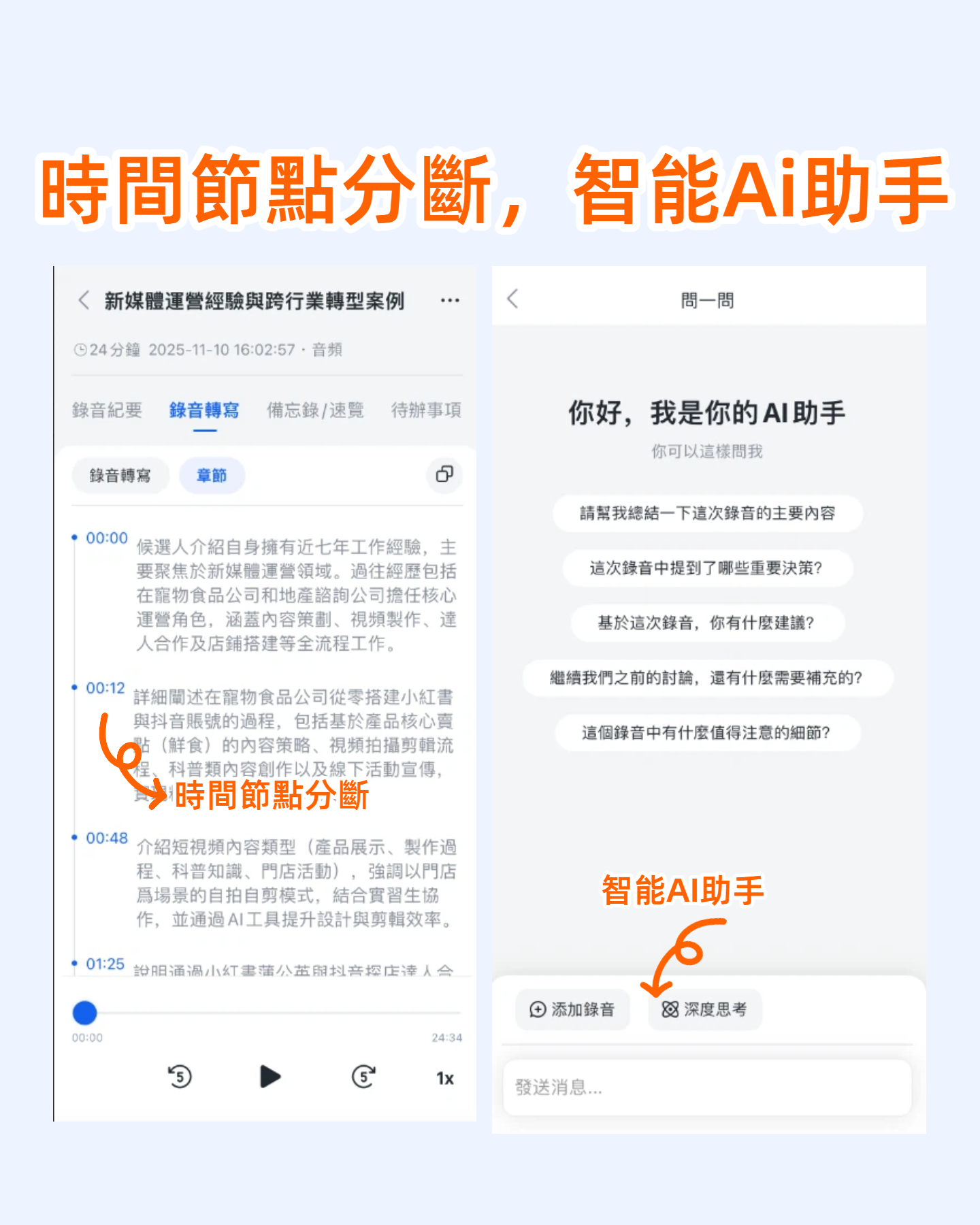
Additionally, built-in digital highlighters and editing features make highlighting and content adjustments intuitive. Whether in class, meetings, or interviews, TinRec helps you create high-quality notes that are easier to review, learn from, and act on.
Try TinRec Now
300 minutes of transcription per month
30 minutes per session
Supports audio and video file uploads
Enterprise Plan Trial
Industry-leading transcription technology
Advanced AI conversation features
Custom integration workflow
\
Turn every recording into actionable outcomes
Get 60 free transcription minutes when you sign in. No credit card required.
Related Reading
You might also like

4 Best iPhone Cantonese Transcription Tools in 2026: Is Apple's Built-in Transcript Enough?
Apple's Voice Memos on iOS 18.4 and later can transcribe Cantonese recordings, but a raw transcript isn't the same as meeting-ready notes. This comparison breaks down four iPhone-compatible options—Tinrec, Apple Voice Memos, Notta, and PLAUD Note—covering Cantonese recognition accuracy, post-meeting organization, cross-platform export, and free-tier limits. We also flag the four most common mistakes buyers make, so you can tell when the built-in tool is enough and when you need something more.

2026 Video Summarizer Comparison: Is Tinrec Better for Chinese Long Videos Than Monica and NoteGPT?
Before choosing a video summarizer, clarify whether you're summarizing public videos or your own meeting and interview recordings. This article compares Tinrec, Monica, NoteGPT, and others across five dimensions: source material, output depth, Chinese language performance, audio retention, and team governance. It also covers Tinrec's core features, practical use cases, team pricing, and FAQs to help you decide if the free version is enough.

Tinrec vs Notta 2026: 5-Dimension Comparison of AI Meeting Summary Generators — Which Is Better for Chinese-Language Scenarios?
Compare Tinrec and Notta across five dimensions, and see how Otter.ai and Granola differ. This article explains how to choose a meeting summary generator—meeting capture method, Chinese recognition experience, post-meeting output, team collaboration governance, and pricing—to help you decide which tool truly saves time on post-meeting organization.

2026 Comparison of 4 Meeting Speaker Organization Tools: Can Transcripts Be Traced Back to Speakers and Topics?
After a meeting, you have dozens of pages of transcripts but can't trace who said what or which topic was finalized? Starting from the real pain points of 'meeting speaker organization,' this article outlines 4 key points for choosing a tool and compares Tinrec, Otter.ai, Notta, and Granola in terms of transcript review and positioning, post-meeting output, and team collaboration. It also includes a pitfalls guide and selection advice.

Tinrec vs Otter.ai: Which AI Meeting Recorder Is Better for Chinese Meetings in 2026?
After a meeting, you're left with a recording and messy notes. This article compares Tinrec and Otter.ai across five dimensions—Chinese and mixed-language transcription, bot-free meeting recording, post-meeting summaries and action items, team roles and seat management, and free tiers and pricing—to help you decide which tool fits your workflow.

2026 Audio Summarizer Guide: Auto Summaries + AI Q&A to Find Key Points
How do you choose an audio summarizer? This guide covers common pitfalls and key factors like summary quality, AI Q&A, and cross-platform export. We recommend Tinrec, which supports bot-free online meeting recording, automatic summaries, action item extraction, and team spaces. Also includes alternatives like Granola and PLAUD, plus tips to avoid mistakes.

5 Best AI Transcription Tools in 2026: Which One Saves the Most Time?
We tested 5 recording-to-transcript tools, comparing Chinese recognition, post-meeting organization, AI Q&A, and team collaboration. See how Tinrec stacks up against Otter.ai, Notta, and TurboScribe, plus key buying tips and pitfalls to avoid.

Tinrec vs Otter.ai: Which AI Meeting Summary Tool Is Better for Chinese-Speaking Teams in 2026?
Many people think a transcript means the meeting notes are done, but the real time sink is post-meeting organization. This hands-on comparison of Tinrec and Otter.ai—two tools that automatically generate meeting summaries from recordings—evaluates them across six dimensions: Chinese-language meeting experience, recording method, post-meeting outputs, audio retention, team governance, and pricing/quotas, helping Chinese-speaking teams decide which tool better fits their workflow.

4 Best Meeting Transcription Tools in 2026: Free Tiers, Chinese Accuracy, and Post-Meeting Efficiency Compared
Tired of spending hours writing meeting minutes? This article compares Tinrec, Notta, Granola, and PLAUD Note across four key areas: how they record online meetings, Chinese and mixed-language transcription accuracy, post-transcription summarization and AI Q&A, and team data ownership. It also includes a pitfalls guide and selection advice.