

Turn recordings into transcripts and summaries in minutes
Upload audio or video for multilingual transcription, AI notes, and action items
What happens in meetings shouldn't stay in meetings. Follow-up emails are an indispensable strategy for keeping momentum and tracking action items. A great follow-up email not only clearly outlines next steps but also demonstrates professionalism and care, strengthening connections and improving project outcomes. But not everyone is a natural writer. Balancing tone, clarity, and purpose can be challenging.
To leave a lasting impression, here are the best practices for writing effective follow-up emails, including when to send them, what to include, and ready-to-use templates for expressing thanks, summarizing discussions, or driving next steps.
6 Key Tips for Writing Follow-up Emails
Whether you're a follow-up pro or just starting out, mastering these basics will significantly improve your written communication:
- Write a clear subject line: With overflowing inboxes, a strong subject line is key to grabbing attention. It's also the first impression, so make it count. Keep it specific and relevant, like "Next steps on [topic]" or "Additional info on [topic]."
- Choose the right greeting: Start with a friendly, personalized salutation that includes the recipient's name (and double-check spelling). Avoid overly formal "To Whom It May Concern" or "Dear Sir/Madam," which can feel distant. A simple "Good morning" or "Hi" sets a warm tone.
- Personalize your opening: For less formal professional relationships, like colleagues or frequent clients, adding a personal touch like "How's the family?" or "Did you enjoy your time off?" helps deepen the connection.
- Recap key points and next steps: Summarize the main discussion and clearly list follow-up actions to ensure alignment. For example: "As discussed, I'll send the project plan by Friday EOD. Could you please provide feedback by next Wednesday so we can finalize revisions by end of week?"
- End with a clear call to action (CTA): A clear conclusion encourages continued engagement. For example: "Would you be available next week to discuss the details of [topic] further?"
- Proofread! Proofread! Proofread!: Typos, grammar errors, or long-winded sentences can come across as careless. You don't need to be a professional editor—use AI tools or ask someone to review your draft before hitting send.
5 Follow-up Email Templates for Different Scenarios
Different situations call for different follow-up approaches. A deadline reminder differs from a sales proposal follow-up. Here are five practical templates:
1. Post-Meeting Follow-Up
Keep momentum after a meeting, capture key insights, and confirm next steps.
Subject: Great talking today!
Hi [Name],
I really enjoyed our conversation this afternoon about [topic], especially the part about [specific discussion point]. It was incredibly insightful.
Just a quick reminder: I'll be handling [your next steps], and you'll be working on [their next steps]. Let me know if you have any additional thoughts. Looking forward to connecting again on [next meeting date].
Thanks again for your time—excited to collaborate!
Best,
[Your Name]
[Contact Info]
Stop organizing recordings by hand
Upload audio or video and automatically get a transcript, summary, and action items
2. Post-Job Interview Follow-Up
Show gratitude and enthusiasm to stand out to the hiring manager.
Subject: Thank you for the interview opportunity
Hi [Name],
Thank you so much for taking the time to interview me for the [Position] role at [Company Name]. I really enjoyed our conversation, especially the discussion about [specific topic].
I'm excited about the possibility of joining [Company Name] and contributing to [specific project or goal]. Please let me know if you need any additional information from me.
Thanks again, and I look forward to hearing from you.
Best,
[Your Name]
[Contact Info]
3. Post-Sales Discovery Call Follow-Up
Stand out in a competitive market by reinforcing the relationship and providing decision-making resources.
Subject: [Your Company] & [Prospect Name or Company]
Dear [Name],
I hope you're doing well. Thank you for taking the time to speak with me on [Date]. I enjoyed learning about your needs, and I was particularly impressed by [unique insight]. I believe I can help you with [specific issue discussed].
Attached, please find the meeting notes, presentation, and relevant resources for you and your team to review and see if it's a good fit.
If you have any questions, feel free to reach out or schedule another call—I'm happy to help.
Looking forward to your response.
[Your Name]
[Contact Info]
4. Post-Networking Event Follow-Up
Deepen a connection among many interactions and open doors for future collaboration.
Subject: Great meeting you at [Event Name]!
Hi [Name],
It was a pleasure chatting with you about [specific topic] at [Event Name]. That was a highlight for me. As promised, here is the link to [book/podcast/article] I mentioned.
Let's stay in touch! Will you be attending [Event Name] on [Date]?
Thanks again for the great conversation.
Best,
[Your Name]
[Contact Info]
5. Post-Proposal or Quote Follow-Up
Gently remind a prospect who hasn't responded, offering additional value or a demo opportunity.
Subject: Checking in: [Your Company] proposal review status
Hi [Name],
Hope you're doing well. This is a gentle reminder about the quote for [specific topic or proposal]. I'm excited about our discussion and wanted to see if you have any questions or thoughts.
If it helps, I'm happy to arrange a product demo for your team at your convenience.
Looking forward to hearing from you!
Best,
[Your Name]
[Contact Info]
Follow-Up Email Do's and Don'ts
Remote communication lacks body language and tone of voice, so word choice and timing matter even more. Here are tips to boost your reply rate:
- Do: Be quick and courteous—concise and respectful of their time.
- Don't: Overload with information—if it's too long, suggest a call instead.
- Do: Use data and insights—reference previous discussion points to show you were paying attention.
- Don't: Be pushy—avoid aggressive demands or seeming desperate.
- Do: Include a clear CTA—specify the next step, deadline, or meeting time.
- Don't: Neglect tracking results—analyze response rates to optimize future strategies.
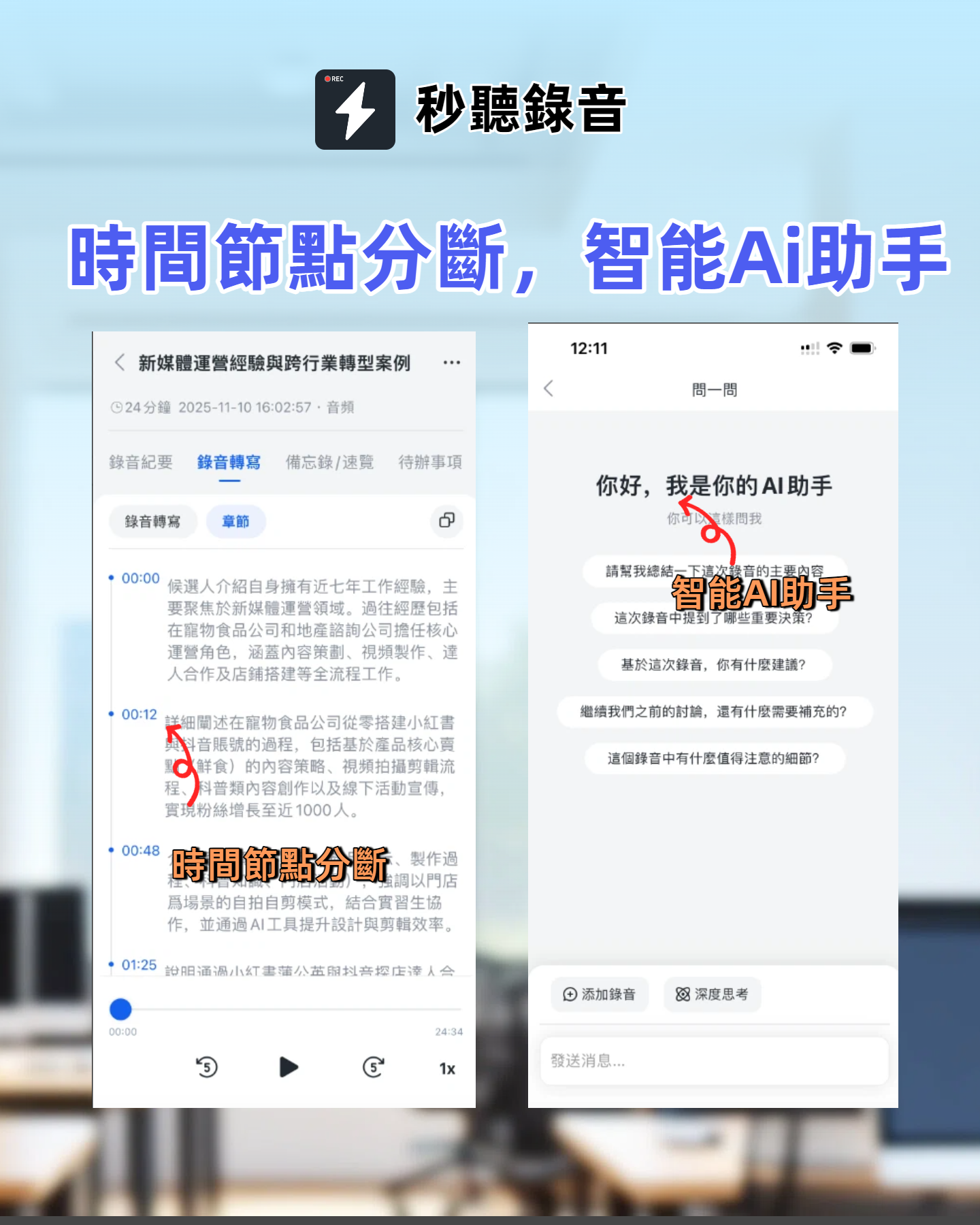
- Do: Use Miaojing Recording to improve follow-up quality—Miaojing Recording automatically extracts key points, action items, and even emotional tone from meetings, helping you craft precise follow-ups. It supports real-time transcription and AI summaries in Chinese, English, Japanese, Cantonese, and Taiwanese Hokkien, making your emails more persuasive.
Say Goodbye to Missed Opportunities with Miaojing Recording
Whether during a meeting or following up afterward, Miaojing Recording is your best companion. Besides auto-generating meeting notes, summaries, and to-do lists, you can use Miaojing Recording's AI chat feature to quickly create customized follow-up email content.
You focus on creating memorable meeting experiences; we help you find the right words to keep driving productivity.
300 minutes of transcription per month
30 minutes per meeting
Supports 3 audio or video file uploads
Industry-leading transcription technology
Advanced AI conversation features
Custom integration workflows
Turn every recording into actionable outcomes
Get 60 free transcription minutes when you sign in. No credit card required.
Related Reading
You might also like

4 Best iPhone Cantonese Transcription Tools in 2026: Is Apple's Built-in Transcript Enough?
Apple's Voice Memos on iOS 18.4 and later can transcribe Cantonese recordings, but a raw transcript isn't the same as meeting-ready notes. This comparison breaks down four iPhone-compatible options—Tinrec, Apple Voice Memos, Notta, and PLAUD Note—covering Cantonese recognition accuracy, post-meeting organization, cross-platform export, and free-tier limits. We also flag the four most common mistakes buyers make, so you can tell when the built-in tool is enough and when you need something more.
2026 Video Summarizer Comparison: Is Tinrec Better for Chinese Long Videos Than Monica and NoteGPT?
Before choosing a video summarizer, clarify whether you're summarizing public videos or your own meeting and interview recordings. This article compares Tinrec, Monica, NoteGPT, and others across five dimensions: source material, output depth, Chinese language performance, audio retention, and team governance. It also covers Tinrec's core features, practical use cases, team pricing, and FAQs to help you decide if the free version is enough.

Tinrec vs Notta 2026: 5-Dimension Comparison of AI Meeting Summary Generators — Which Is Better for Chinese-Language Scenarios?
Compare Tinrec and Notta across five dimensions, and see how Otter.ai and Granola differ. This article explains how to choose a meeting summary generator—meeting capture method, Chinese recognition experience, post-meeting output, team collaboration governance, and pricing—to help you decide which tool truly saves time on post-meeting organization.

2026 Comparison of 4 Meeting Speaker Organization Tools: Can Transcripts Be Traced Back to Speakers and Topics?
After a meeting, you have dozens of pages of transcripts but can't trace who said what or which topic was finalized? Starting from the real pain points of 'meeting speaker organization,' this article outlines 4 key points for choosing a tool and compares Tinrec, Otter.ai, Notta, and Granola in terms of transcript review and positioning, post-meeting output, and team collaboration. It also includes a pitfalls guide and selection advice.

Tinrec vs Otter.ai: Which AI Meeting Recorder Is Better for Chinese Meetings in 2026?
After a meeting, you're left with a recording and messy notes. This article compares Tinrec and Otter.ai across five dimensions—Chinese and mixed-language transcription, bot-free meeting recording, post-meeting summaries and action items, team roles and seat management, and free tiers and pricing—to help you decide which tool fits your workflow.

2026 Audio Summarizer Guide: Auto Summaries + AI Q&A to Find Key Points
How do you choose an audio summarizer? This guide covers common pitfalls and key factors like summary quality, AI Q&A, and cross-platform export. We recommend Tinrec, which supports bot-free online meeting recording, automatic summaries, action item extraction, and team spaces. Also includes alternatives like Granola and PLAUD, plus tips to avoid mistakes.

5 Best AI Transcription Tools in 2026: Which One Saves the Most Time?
We tested 5 recording-to-transcript tools, comparing Chinese recognition, post-meeting organization, AI Q&A, and team collaboration. See how Tinrec stacks up against Otter.ai, Notta, and TurboScribe, plus key buying tips and pitfalls to avoid.

Tinrec vs Otter.ai: Which AI Meeting Summary Tool Is Better for Chinese-Speaking Teams in 2026?
Many people think a transcript means the meeting notes are done, but the real time sink is post-meeting organization. This hands-on comparison of Tinrec and Otter.ai—two tools that automatically generate meeting summaries from recordings—evaluates them across six dimensions: Chinese-language meeting experience, recording method, post-meeting outputs, audio retention, team governance, and pricing/quotas, helping Chinese-speaking teams decide which tool better fits their workflow.

4 Best Meeting Transcription Tools in 2026: Free Tiers, Chinese Accuracy, and Post-Meeting Efficiency Compared
Tired of spending hours writing meeting minutes? This article compares Tinrec, Notta, Granola, and PLAUD Note across four key areas: how they record online meetings, Chinese and mixed-language transcription accuracy, post-transcription summarization and AI Q&A, and team data ownership. It also includes a pitfalls guide and selection advice.