

Turn recordings into transcripts and summaries in minutes
Upload audio or video for multilingual transcription, AI notes, and action items
TinRec vs. Microsoft 365 Copilot: AI Assistant Comparison for Efficient Meetings
In today's high-productivity work environments, AI meeting assistants have become indispensable tools. Both TinRec and Microsoft 365 Copilot aim to help teams record, summarize, and execute meeting content more efficiently. However, they differ significantly in features, pricing, and integrations. Below is a detailed comparison to help you choose the best solution.
Core Feature Comparison
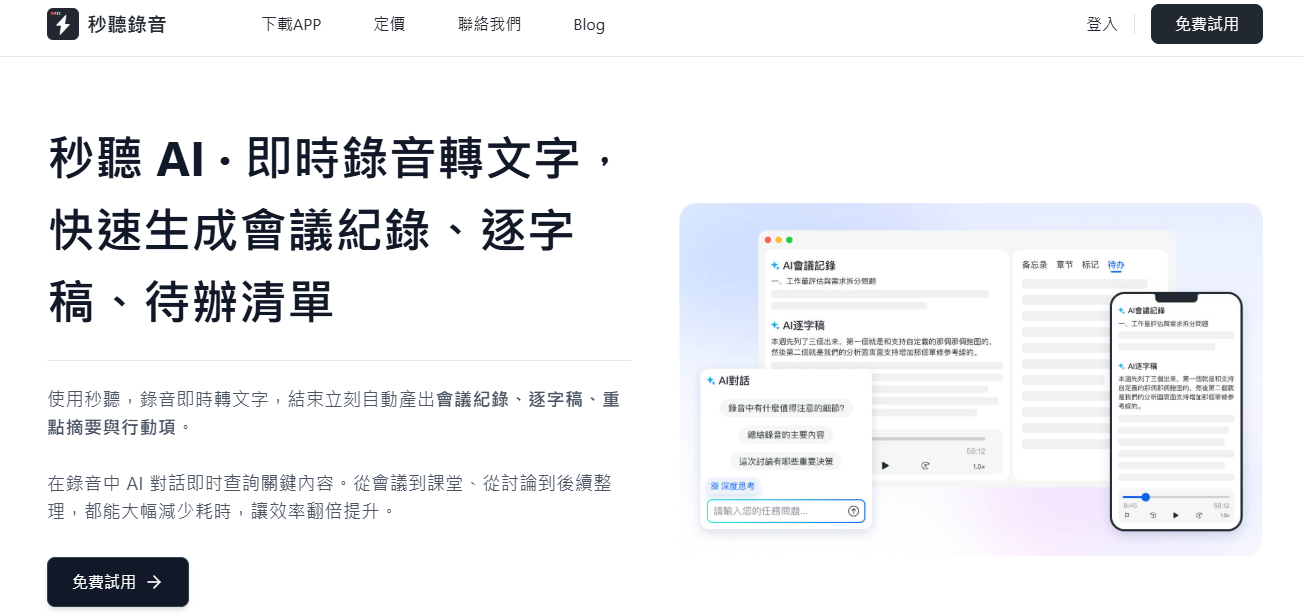
Real-time Recording & Speech-to-Text: Both offer real-time meeting recording and speech-to-text services. TinRec supports multi-language recognition, including Chinese, English, Japanese, Cantonese, and Hokkien, and allows custom vocabulary and terminology to improve accuracy.
Meeting Summaries & Action Items: Both automatically generate meeting summaries and extract action items. TinRec's action list features dynamic updates, allowing team members to edit task content, assignees, and completion status directly, ensuring everyone stays aligned.
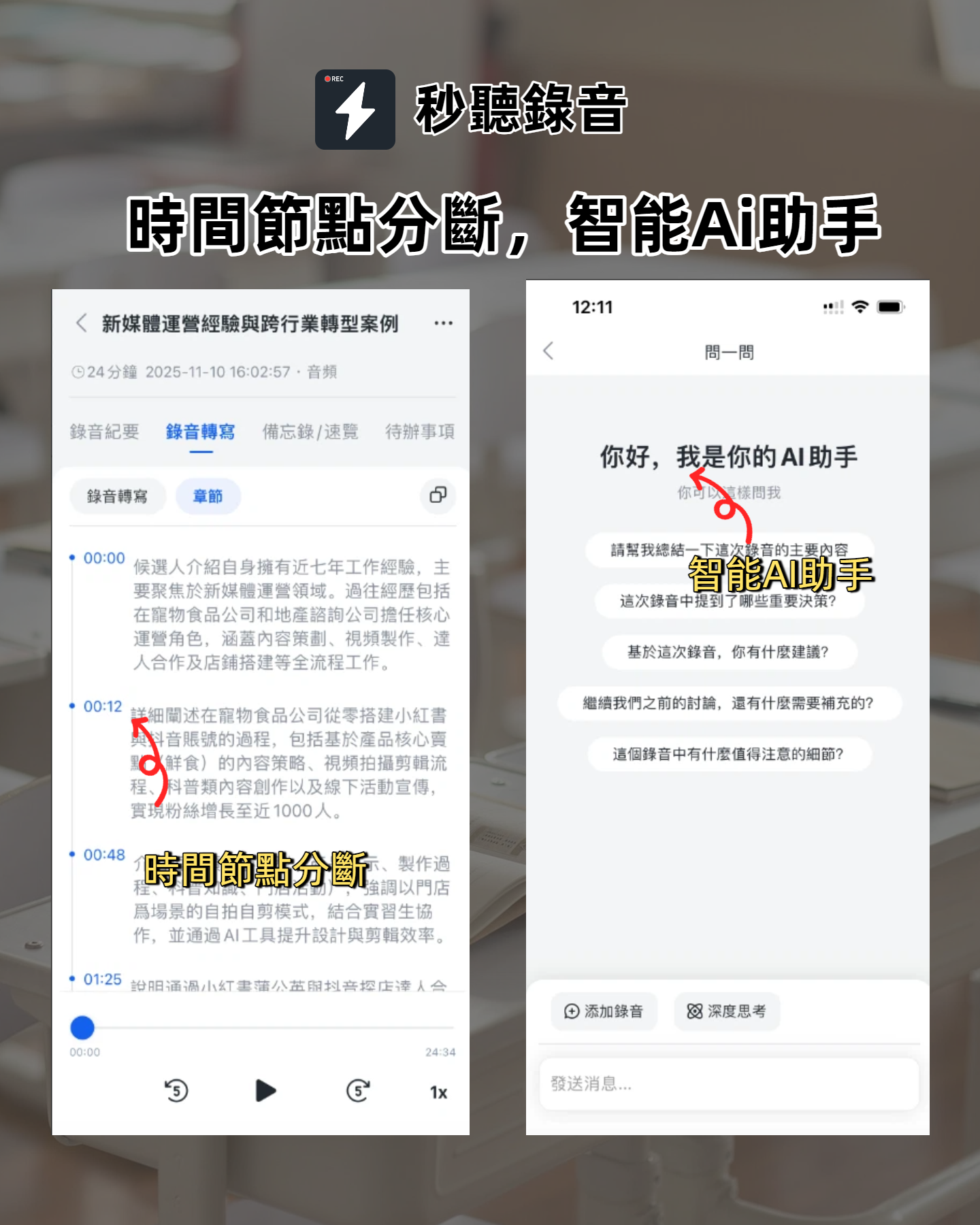
AI Chat Function: Both have built-in AI chat for asking questions during or after meetings and receiving responses based on transcripts. However, Microsoft 365 Copilot's AI responses are private and can only query a single meeting at a time. TinRec offers both "Shared" and "Private" modes: in Shared mode, all participants can see AI responses and ask follow-ups, fostering collaboration; Private mode allows users to query across multiple meetings for comprehensive context.
Calendar Integration: Microsoft 365 Copilot only supports Outlook, while TinRec supports both Outlook and Google Calendar, offering more flexibility.
Platform Support & Speaker Identification: Copilot works only with MS Teams meetings; TinRec supports Zoom, Google Meet, and MS Teams, as well as in-person meetings. Using voice tagging, TinRec can accurately identify each speaker's contributions.
Stop organizing recordings by hand
Upload audio or video and automatically get a transcript, summary, and action items
Video & Slide Capture: Copilot records videos including speakers and screen content, with chapter markers for easy navigation. TinRec automatically captures presentation slides and embeds them into the transcript, synchronizing text and visuals.
Other Features: Microsoft 365 Copilot highlights @mentions for tracking individual discussions. TinRec goes further with cross-platform @notifications and task assignments, enabling a more complete collaboration workflow.
Pricing
TinRec: Offers a free plan with 300 minutes of recording per month, including full AI features. The Pro plan provides 1,200 minutes per month, with an annual subscription at NT$3,599/user/year; the Business plan gives 6,000 minutes per month, with an annual subscription at NT$7,200/user/year. Monthly plans are also available, suitable for teams of all sizes.
Microsoft 365 Copilot: Requires a Microsoft 365 Business Standard or Premium subscription, costing NT$10,800/user/year. Not available with the Basic plan, and no free trial.
System Integration
TinRec: Deeply integrates with Slack, Google Chrome, Dropbox, and other common tools. Enterprise plans also support CRMs like Salesforce and HubSpot, automating sales and customer management processes.
Microsoft 365 Copilot: Seamlessly integrates with Teams, PowerPoint, Word, Excel, and Outlook, ideal for businesses heavily invested in the Microsoft ecosystem.
User Experience
TinRec: Intuitive interface that can be set up quickly without IT support, perfect for teams seeking immediate productivity gains.
Microsoft 365 Copilot: Requires familiarity with the Microsoft 365 environment and typically needs IT admin setup, resulting in a higher adoption barrier.
How to Choose?
Choose TinRec if you:
- Need support for in-person meetings and cross-platform online meetings (Zoom, Google Meet, MS Teams).
- Want AI chat to work across multiple meetings and enable team collaboration on Q&A.
- Expect action items to update in real time and share status for greater team transparency.
- Seek a unified platform that integrates diverse software ecosystems and centralizes all meeting data.
Choose Microsoft 365 Copilot if you:
- Are fully committed to the Microsoft 365 ecosystem and want deep integration with existing tools.
- Hold all meetings within MS Teams and have no need for in-person meeting support.
The final choice depends on your specific needs and technical environment. We recommend trying TinRec's free plan to experience its efficiency and ease of use firsthand. Microsoft 365 Copilot currently does not offer a free trial.
Turn every recording into actionable outcomes
Get 60 free transcription minutes when you sign in. No credit card required.
Related Reading
You might also like

4 Best iPhone Cantonese Transcription Tools in 2026: Is Apple's Built-in Transcript Enough?
Apple's Voice Memos on iOS 18.4 and later can transcribe Cantonese recordings, but a raw transcript isn't the same as meeting-ready notes. This comparison breaks down four iPhone-compatible options—Tinrec, Apple Voice Memos, Notta, and PLAUD Note—covering Cantonese recognition accuracy, post-meeting organization, cross-platform export, and free-tier limits. We also flag the four most common mistakes buyers make, so you can tell when the built-in tool is enough and when you need something more.
2026 Video Summarizer Comparison: Is Tinrec Better for Chinese Long Videos Than Monica and NoteGPT?
Before choosing a video summarizer, clarify whether you're summarizing public videos or your own meeting and interview recordings. This article compares Tinrec, Monica, NoteGPT, and others across five dimensions: source material, output depth, Chinese language performance, audio retention, and team governance. It also covers Tinrec's core features, practical use cases, team pricing, and FAQs to help you decide if the free version is enough.

Tinrec vs Notta 2026: 5-Dimension Comparison of AI Meeting Summary Generators — Which Is Better for Chinese-Language Scenarios?
Compare Tinrec and Notta across five dimensions, and see how Otter.ai and Granola differ. This article explains how to choose a meeting summary generator—meeting capture method, Chinese recognition experience, post-meeting output, team collaboration governance, and pricing—to help you decide which tool truly saves time on post-meeting organization.

2026 Comparison of 4 Meeting Speaker Organization Tools: Can Transcripts Be Traced Back to Speakers and Topics?
After a meeting, you have dozens of pages of transcripts but can't trace who said what or which topic was finalized? Starting from the real pain points of 'meeting speaker organization,' this article outlines 4 key points for choosing a tool and compares Tinrec, Otter.ai, Notta, and Granola in terms of transcript review and positioning, post-meeting output, and team collaboration. It also includes a pitfalls guide and selection advice.

Tinrec vs Otter.ai: Which AI Meeting Recorder Is Better for Chinese Meetings in 2026?
After a meeting, you're left with a recording and messy notes. This article compares Tinrec and Otter.ai across five dimensions—Chinese and mixed-language transcription, bot-free meeting recording, post-meeting summaries and action items, team roles and seat management, and free tiers and pricing—to help you decide which tool fits your workflow.

2026 Audio Summarizer Guide: Auto Summaries + AI Q&A to Find Key Points
How do you choose an audio summarizer? This guide covers common pitfalls and key factors like summary quality, AI Q&A, and cross-platform export. We recommend Tinrec, which supports bot-free online meeting recording, automatic summaries, action item extraction, and team spaces. Also includes alternatives like Granola and PLAUD, plus tips to avoid mistakes.

5 Best AI Transcription Tools in 2026: Which One Saves the Most Time?
We tested 5 recording-to-transcript tools, comparing Chinese recognition, post-meeting organization, AI Q&A, and team collaboration. See how Tinrec stacks up against Otter.ai, Notta, and TurboScribe, plus key buying tips and pitfalls to avoid.

Tinrec vs Otter.ai: Which AI Meeting Summary Tool Is Better for Chinese-Speaking Teams in 2026?
Many people think a transcript means the meeting notes are done, but the real time sink is post-meeting organization. This hands-on comparison of Tinrec and Otter.ai—two tools that automatically generate meeting summaries from recordings—evaluates them across six dimensions: Chinese-language meeting experience, recording method, post-meeting outputs, audio retention, team governance, and pricing/quotas, helping Chinese-speaking teams decide which tool better fits their workflow.

4 Best Meeting Transcription Tools in 2026: Free Tiers, Chinese Accuracy, and Post-Meeting Efficiency Compared
Tired of spending hours writing meeting minutes? This article compares Tinrec, Notta, Granola, and PLAUD Note across four key areas: how they record online meetings, Chinese and mixed-language transcription accuracy, post-transcription summarization and AI Q&A, and team data ownership. It also includes a pitfalls guide and selection advice.