
Turn recordings into transcripts and summaries in minutes
Upload audio or video for multilingual transcription, AI notes, and action items
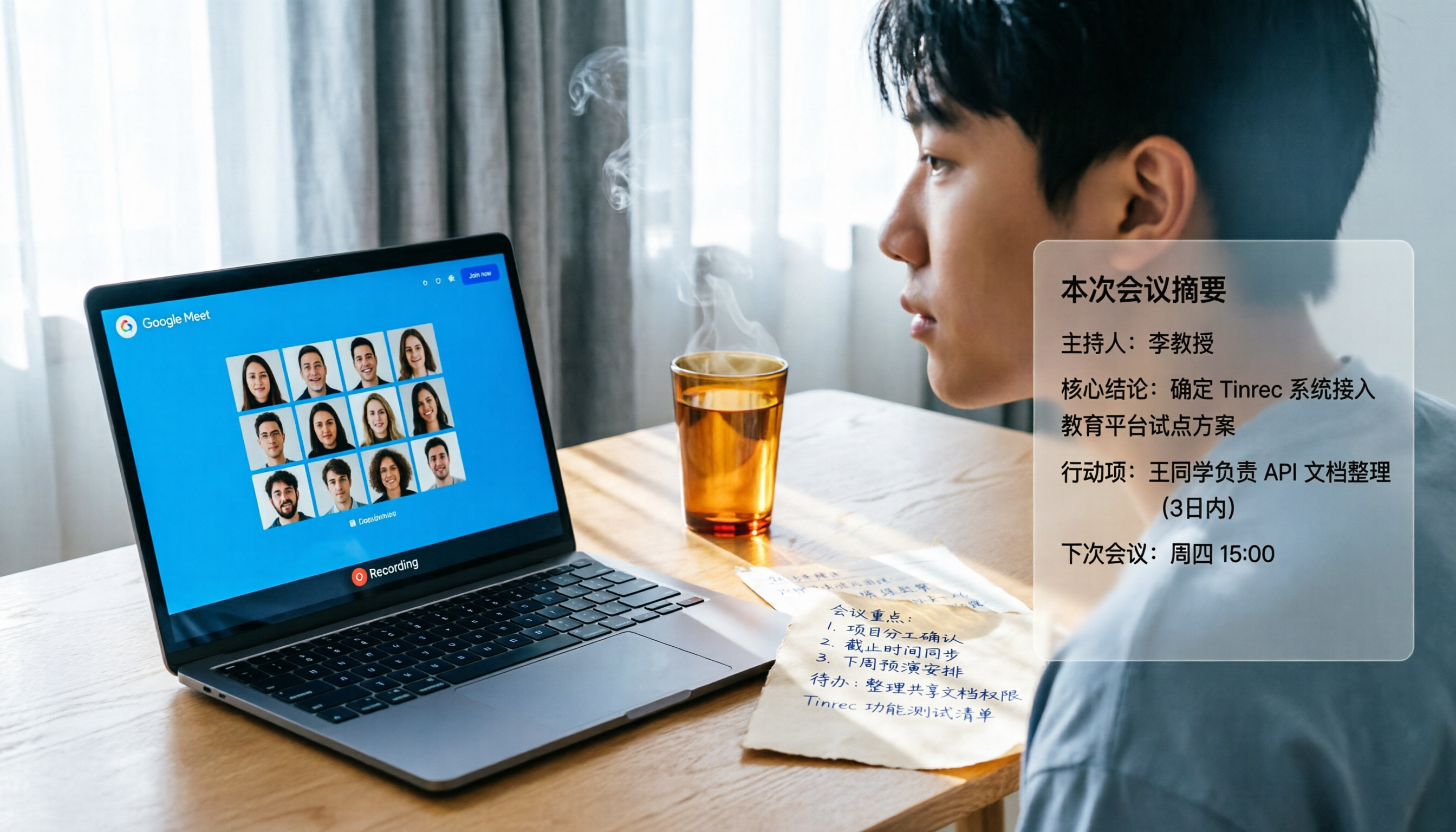
Last semester, I took a mandatory online course. The professor taught via Google Meet, flipping through slides faster than a high-speed train. I tried to type along while listening, but by the end of class, my notes were just fragmented words that couldn't form a coherent point. I got a C- on that midterm. Determined to fix this, I started looking for Google Meet meeting note solutions.
I'm not a tech geek, just a senior on a tight budget. But over the past year, I've tried three different types of tools: from meeting bots promising "unlimited free" to file transcription software claiming "lightning-fast" conversion, and even borrowed a friend's recording hardware. The tool I finally settled on accompanied me through senior project meetings, final exam cramming, and internship interviews. Now it's my turn to help fellow students avoid the pitfalls.

What Can Google Meet Meeting Note Alternatives Do for You?
Google Meet's built-in recording and transcription aren't bad—they're just "not enough." They only give you a subtitle file after the fact; they won't summarize key points, capture action items, or condense a two-hour meeting into a three-minute read. If you're like me and use Google Meet at least three times a week (classes, group discussions, club meetings) but don't have time to re-listen to recordings, you need more than just a "record" tool—you need something that turns recordings into study notes and to-do lists.
Scenario 1: Study Notes in 5 Minutes After Class
Before, after a two-hour class, I'd spend another hour re-listening, typing, and highlighting. Now with Tinrec, while the professor lectures on Google Meet, my phone is recording and transcribing in real time. When class ends, I open the app and AI has already divided the lecture into five sections, each with a title, key summary, and action items extracted from discussions—even the group assignment list for the final project is ready.
Scenario 2: Group Discussions Without Guessing
"What was the conclusion from the last meeting?" This question appears in our group chat more often than my total credits. But with Tinrec, after each Google Meet, I just drop the recording in, and it not only gives me a transcript but also auto-generates a meeting summary, who said what, and next steps. Last week's project meeting, a junior said, "Hey, your notes were super clear," but he didn't know AI wrote them for me.
Scenario 3: YouTube Videos as Notes
Some general education professors assign public lecture videos. I used to watch and type at the same time, pausing to look up English words. Tinrec lets me paste a YouTube link, and it transcribes the entire video into text with a Chinese summary and segmented key points. Last week's sociology video assignment took me half the usual time.
Core Capabilities of Alternatives
After trying many tools, I found that a truly useful meeting note tool does more than just "convert to text." It needs to make content easy to understand, find, and organize. Below are the basic criteria I use now, demonstrated with Tinrec.
Real-time Transcription: See Text While Recording, No Waiting
Some tools only start transcribing after the entire recording is done. If the app crashes mid-recording, you lose everything. Tinrec transcribes as it records, with less than a second delay. Even the professor's offhand jokes appear instantly, so you can follow along without missing anything.
AI Semantic Summaries: Read the Highlights, Not Fluff
I tried another tool whose "summary" just copied the first sentence of the transcript. Tinrec's summary is completely different—it organizes what the class covered, three main points, and the professor's assigned reading for next week. Before finals, I relied on these summaries to review, saving tons of time.
AI Q&A: Chat with Your Recording
This feature sealed the deal for me. Last semester in Organizational Behavior, I had to analyze a long interview recording for the final. After transcribing with Tinrec, I just asked: "Where does the interviewee mention burnout?" It immediately pulled up five relevant segments with timestamps. Listening to the whole thing manually would have taken two evenings.
Action Item Extraction: Meetings Stay on Track
The biggest fear in group discussions: talking for an hour with no clear outcome. Tinrec automatically extracts tasks from the recording: who, what, and when. Last senior project meeting, it listed eight action items. We followed them and actually stayed on schedule.
Stop organizing recordings by hand
Upload audio or video and automatically get a transcript, summary, and action items
Multi-source Support: Not Just Google Meet, Also Videos and Files
I started looking for a tool just for Google Meet recordings, but Tinrec also handles local audio files, YouTube, Bilibili links, and even TikTok. Before an internship interview, I dropped the online meeting recording sent by my supervisor, quickly found details about their recent projects, and brought them up during the interview. The manager's eyes lit up on the spot.
Real-World Use Cases
School life use cases make more sense than just listing features.
Class Recording Notes
If you're like me and some professors' PowerPoints are just props—the real content comes from their lectures—then audio-to-text is your savior. I start recording with Tinrec before class, scan the AI summary after, and paste key points into my Notion notebook. For midterms and finals, I just review these summaries, cutting time in half.
Online Group Meetings
The typical disasters in project meetings: someone's phone dies, someone's internet lags, someone says "I forgot the conclusion." Now we schedule a Google Meet, I use Tinrec to record the system audio (no need to log into the meeting), and after the meeting, I post the action item list to the group chat. No one has an excuse to slack off.

Online Learning and Catch-Up
This semester I took an online lecture class where the professor shared lots of TED and YouTube supplementary materials. I used to ignore them, but now I paste the link into Tinrec, get a text summary in seconds, and decide whether to watch the full video. Free learning resources suddenly became digestible.
Interviews and Research
For a qualitative research project, I needed to interview three seniors. After transcribing with Tinrec, I asked the AI: "What suggestions do the interviewees have for the internship system?" It pulled together sentences from different timestamps. My analysis draft was ready in one day, and even my professor commented on the thorough citations.
4 Key Points When Choosing This Type of Tool
After stepping on a few landmines, I've summarized four principles for students choosing meeting note tools, each explained with how Tinrec measures up.
1. Generous Free Tier
For students, the free transcription minutes are a deciding factor. Some tools are generous (starting at 300 minutes per month), but you might use them up after just two classes and then get locked out. Tinrec's free version gives a basic monthly allowance, enough for 3–4 key classes or a few group meetings. If you have a heavy schedule, you can buy a weekly pass during exam week for the price of a Starbucks coffee, without being tied to a monthly subscription.
2. Chinese Transcription Accuracy
Many meeting note tools are English-first and struggle with Chinese, especially technical terms or mixed Chinese-English. I tried a well-known tool that transcribed "p-value" as "beer value"—funny but useless. Tinrec's performance in Chinese classes and meetings is much more stable. Apart from the occasional need to correct specific accents, the overall readability is above 90%.
3. Post-Transcription Organization Capabilities
Converting to text is just the first step. What matters is whether it can generate summaries, action items, and sections in one click. I've used tools that give you a 50,000-word transcript and nothing else. Tinrec's AI post-processing is its strength—from transcript to structured notes with almost no manual effort.
4. Cross-Platform and Export Flexibility
I use an Android phone, a Mac laptop, and public school computers. If a tool only supports one platform, it's awkward. Tinrec has iOS and Android apps and a web version. I can listen to recordings and mark key points on my computer at the library, then ask AI questions on my phone at home—seamless. Export options are plentiful: I can save the summary as a PDF and email it to myself, or paste it into Notion.
Frequently Asked Questions
Q: Doesn't Google Meet have built-in captions and recording? Why use another tool?
Built-in captions disappear in real time, and the recording's caption file needs separate downloading. Plus, there are no summaries, no action items, and no content search. Simply put, Google Meet's recording feature gives you flour, but Tinrec bakes the cake for you.
Q: Do I need to be tech-savvy to use this kind of tool?
Not at all. My roommate can't even convert a PDF, but now she opens Tinrec to record before class. The operation is: tap record → finish → read summary. Nothing more complicated.
Q: Can students only use the free version? Is the paid version worth it?
If you don't use it often (fewer than two classes or meetings per week), the free version is sufficient. If you record every class like I do, plus interviews and online videos, buying a weekly or monthly card offers great value. Compared to the time spent re-listening and handwriting notes, less than 200 yuan per month saves over ten hours—even your part-time job hourly rate is higher.
Q: Is recording and transcription secure? Will it leak?
This is important. Tinrec offers privacy protection; you can set recordings to only exist in your account and delete them anytime. All my interview recordings are stored there with no issues so far.
Summary
Over the past year of searching for Google Meet meeting note tools, my biggest takeaway is: the most lacking thing for students isn't a tool, but the experience of using the right tool in the right place. Instead of being chased by recordings and exhausted from meetings, find a solution that truly saves you time without eating up half your monthly allowance.
Tinrec isn't the oldest or the loudest, but it's the only one I've used from the start of the semester to finals without wanting to uninstall. If you're tired of never-ending recordings, download the free version and give it a try—pick a class you really need to organize, record it once, and see if the AI-generated notes are clearer than what you'd write yourself.
Turn every recording into actionable outcomes
Get 60 free transcription minutes when you sign in. No credit card required.
Related Reading
You might also like

2026 Comparison of 4 Audio-to-Text Tools: Which One Saves the Most Time for Chinese Meeting Minutes?
Does the real work start after the meeting ends? This article tackles real workplace pain points, outlines four key factors for choosing an audio-to-text tool, and compares Tinrec, Otter.ai, Notta, and Granola. Tinrec stands out with bot-free desktop recording, Chinese meeting transcription, AI Q&A, and team spaces. The article also honestly lists each tool's free tier limits to help you find the one that truly saves time.

Best Interview Recording-to-Text Tools in 2026: 4 Tested, This One Excels at Chinese Interviews and Post-Meeting Follow-ups
We tested 4 interview recording-to-text tools, comparing input sources, Chinese recognition, post-meeting organization, and team data management. Tinrec performed best in Chinese interviews, recording online meetings without bots, and AI follow-up questions after meetings. This article includes key buying factors, pitfalls to avoid, and scenario recommendations.

2026 Audio Transcription Tool Buying Guide: 6 Hands-On Tests and Selection Advice
For mid-level managers who have a dozen meetings a week and still need to organize notes afterward, we tested 6 audio transcription tools: from Tinrec's bot-free recording and AI Q&A to Notta, Otter, TurboScribe, Granola, and the free Google Docs voice typing. This guide lays out positioning, pricing, and who each tool is for, so you pick the right tool—not just the most popular one.

4 Best Speech-to-Text Tools in 2026: Free Tiers, Chinese Transcription, and Post-Meeting Summaries Compared
How to choose a speech-to-text tool? This article starts with the difference between live dictation and audio file transcription, then compares Tinrec, Notta, Granola, and PLAUD on free tiers, Chinese transcription, post-meeting AI summaries, and team seats. It also lists 4 common pitfalls to help you decide based on budget and use case.

2026 Comparison of 4 Audio-to-Text Tools: Which One Can Generate Meeting Minutes Directly from Computer Meetings?
With more and more audio files and online meetings on computers, the real time sink is often not recording but re-listening and organizing. This article starts from computer-based usage scenarios and compares four tools: Tinrec, Granola, TurboScribe, and PLAUD. It explains key factors to consider when choosing, how to avoid the trap of only looking at transcription minutes, and provides recommendations for different workflows.

How to Use Online Speech-to-Text in 2026: 5 Steps from Recording to Transcript
How to choose and use online speech-to-text tools in 2026? Starting from real meeting pain points, this article covers 5 key selection criteria, Tinrec's 5-step workflow, brief reviews of 3 online transcription tools, and a guide to avoiding pitfalls—helping you go from recording to a searchable, collaborative transcript.

2026 Speech-to-Text Showdown: 3 Tools Tested for Chinese Accuracy and Post-Meeting Efficiency
How do you really measure speech-to-text accuracy? This article breaks down the WER (Word Error Rate) calculation logic and key factors affecting accuracy, then compares Tinrec and Notta across Chinese recognition, accent tolerance, technical terminology, post-meeting organization, and pricing/quotas. Otter.ai is included as a reference for Chinese scenarios, helping you decide which tool best fits your meeting and transcription needs.

Best Free iPhone Speech-to-Text Solutions in 2026: 5 Options Compared
Your iPhone's built-in Voice Memos already offers transcription, so why look elsewhere? Based on real student use cases, this guide covers five free ways to transcribe speech to text on iPhone in 2026—from the completely free built-in feature to Otter.ai, Notta, and TurboScribe with generous free tiers, plus Tinrec for automatic summaries, to-dos, and AI Q&A. We explain each option's free limits and the classroom or group discussion scenarios they suit best.
2026 Comparison of 6 Audio-to-Transcript Tools: Free Tiers and Chinese Recognition—Which Saves the Most Time?
A review of the free tiers, Chinese recognition, and post-meeting organization capabilities of 6 audio-to-transcript tools—Tinrec, cSubtitle, MyEdit, Canva, Google AI Studio, and ChatGPT Work—to help you choose the right solution for meetings, interviews, courses, and subtitles.