
Turn recordings into transcripts and summaries in minutes
Upload audio or video for multilingual transcription, AI notes, and action items
Faced with interview recordings mixing Mandarin and Taiwanese Hokkien, or oral history interviews with elders, are you still using the most primitive method of "listen one sentence, type one sentence"? For users in Taiwan, although there are many speech-to-text tools on the market, options that can accurately handle "Taiwanese Hokkien" or "Taiwanese accent" are quite limited. Traditional manual transcription takes 3 to 5 hours for one hour of recording, extremely inefficient.
This article will deeply compare the popular tools Yating, GoodTape, LexiTranscript, and the emerging AI recording assistant Tinrec based on three dimensions most important to Taiwanese users: "Taiwanese Hokkien/Taiwanese accent support," "affordability," and "AI feature completeness." Whether you are a journalist needing accurate Taiwanese Hokkien transcripts or a project manager focusing on meeting action items, this review will tell you directly:
- Prioritize local Taiwanese Hokkien recognition → Consider Yating first
- Prioritize workflow and action item management → Recommend trying Tinrec
- Prioritize price and unlimited usage → Consider LexiTranscript
Why is it so hard to find a speech-to-text tool that "supports Taiwanese Hokkien"?
Before going into the comparison, we must clarify the unique pain points Taiwanese users face. While powerful international models like OpenAI's Whisper exist, they often have recognition gaps when dealing with "Taiwanese Hokkien" or Taiwan's unique "Mandarin-Hokkien code-switching" context. Therefore, when choosing a tool, you cannot just look at "supports Chinese"; you must confirm whether the model has been optimized for Taiwan's local language.
Furthermore, simply "converting to text" is no longer enough to meet modern work needs. Users want tools that can further perform "automatic summarization," "speaker diarization," and "extract action items" to truly free productivity from recordings.
In-depth analysis of 4 popular speech-to-text apps
Below we have compiled the most discussed tools in the Taiwan market in 2026, and added the emerging multi-language support tool Tinrec for comprehensive comparison.
1. Yating: Locally developed top choice for Taiwan
Developed by Taiwan AI Labs, "Yating" is one of the few tools on the market specifically designed for Taiwanese accent and Taiwanese Hokkien.
- Core feature: Claims "100% Made in Taiwan," with deep training on Taiwanese accent and Taiwanese Hokkien vocabulary. For pure Taiwanese Hokkien or mixed Mandarin-Hokkien recordings, its recognition accuracy is among the best on the market.
- Pros: High privacy (data not sent abroad), free real-time recording, hearing-impaired assist mode.
- Cons: Slower conversion speed (1 minute of audio takes about 10 minutes to process), pay-per-hour pricing (approx. NT$100/hour), costly for heavy users. The summary feature sometimes fails according to user reports.
2. GoodTape: A popular choice among journalists
Originating from Denmark, built on OpenAI Whisper technology, favored by media professionals for its minimalist interface and speed.
- Core feature: Extremely fast processing with high accuracy (claimed 99.98%). Although not specifically trained for Taiwanese Hokkien, its strong underlying model handles general languages well.
- Pros: Useful speaker labeling, intuitive interface.
- Cons: Priced in euros (Pro version approx. NT$480/month), strict free tier (only 3 files per month, 30 minutes per file). May not understand Taiwanese slang as well as local tools.
3. LexiTranscript: Budget-friendly option with high value
A service targeting budget-sensitive users, emphasizing "cheap and abundant."
- Core feature: Offers unlimited recording time, highly competitive during promotion.
- Pros: Daily free quota, low paywall (promotional membership about NT$260 for unlimited use), no per-file length limit.
- Cons: Newer service, features still being optimized, brand awareness and long-term stability yet to be further verified by the market.
4. Tinrec: From transcription to action — the AI assistant
Tinrec is more than just a transcription tool; it emphasizes converting recordings into "actionable work results."
- Core feature: Supports automatic recognition of 10 languages including Taiwanese Hokkien, Chinese, English, Japanese, and more. Tinrec's strength lies in post-recording "AI processing," automatically generating structured meeting notes and action items.
- Pros:
- Multi-device sync: Supports iOS, Android, and web; record on phone, organize on computer.
- AI chat query: No need to re-listen to entire recording; just ask (e.g., "What did the boss say about the deadline?") and AI answers based on the recording.
- Wide application: Supports importing audio/video files, even pasting YouTube links for transcription.
Stop organizing recordings by hand
Upload audio or video and automatically get a transcript, summary, and action items

Annual tool comparison table
For a more intuitive selection, here is a multi-dimensional comparison:
| Comparison Item | Yating | GoodTape | LexiTranscript | Tinrec |
|---|---|---|---|---|
| Taiwanese Hokkien Optimization | ⭐⭐⭐⭐⭐ (Specialized) | ⭐⭐⭐ (General model) | ⭐⭐⭐ (General model) | ⭐⭐⭐⭐ (Multi-language) |
| Key Strength | Most accurate for local accent, security | Super fast, clean interface | Cheap, no time limit | AI meeting notes, chat query |
| Processing Speed | Slow | Very fast | Fast | Fast (real-time transcription) |
| AI Added Features | Summary (basic) | Summary | Summary, editing | Chat query, action item extraction |
| Free Quota | Real-time recording free / upload requires payment | 3 files/month (30 min each) | Daily free quota | 100 minutes/month |
| Pricing Model | Per hour (approx. NT$100/hr) | Subscription (approx. NT$480/month) | Subscription (promo NT$260/month) | Subscription (approx. NT$150-$250/month) |
| Platform Support | App / Web | Web | Web | App / Web multi-device sync |
Practical tutorial: How to efficiently handle Taiwanese Hokkien/multilingual recordings with AI tools?
Once you choose a tool, integrating it into your workflow is key. Below, using the more feature-rich Tinrec as an example, we demonstrate steps from recording to generating action items.
Scenario 1: Real-time recording at meetings/interviews
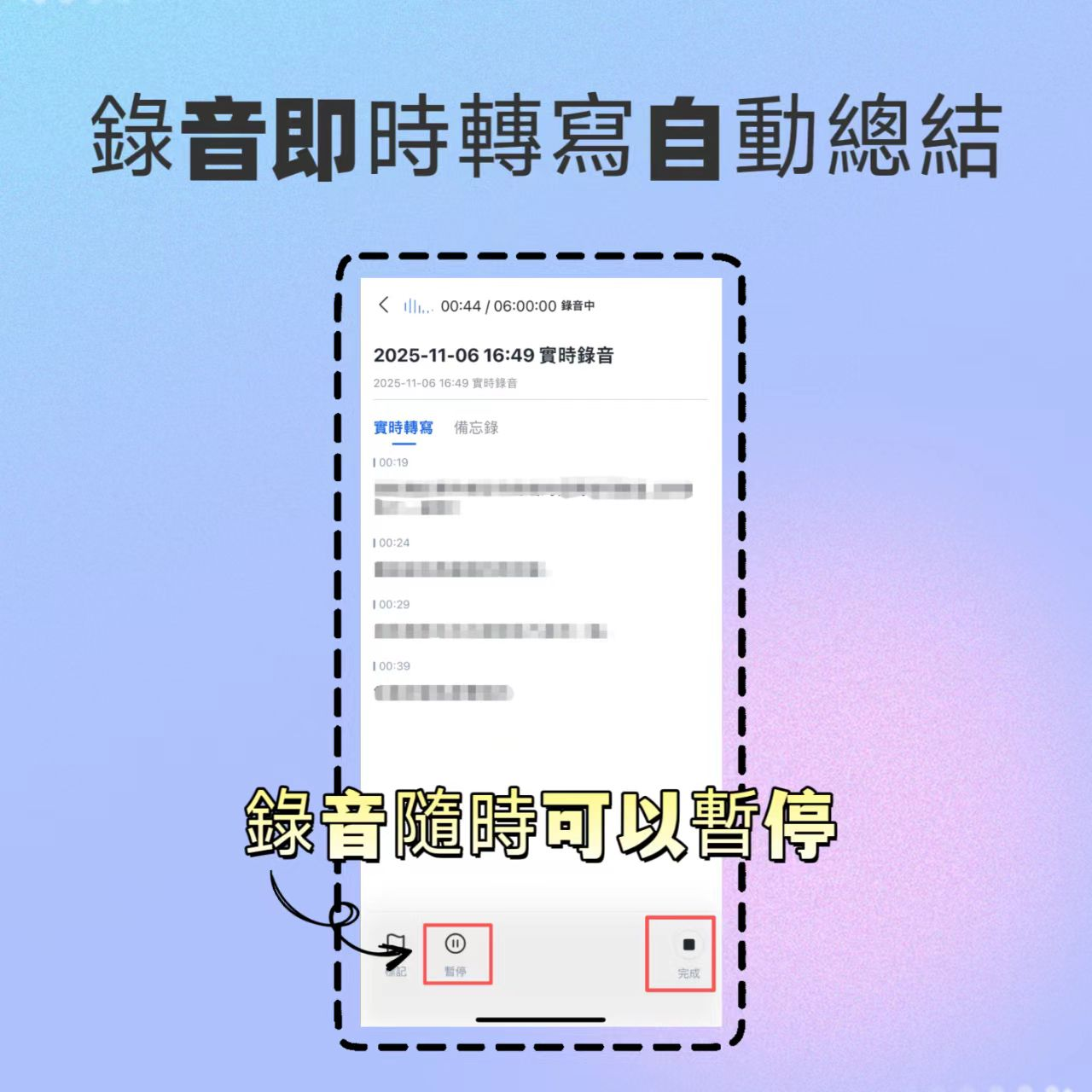
- Start recording: At the start of a meeting or interview, open Tinrec's real-time transcription feature.
- Language setting: The system supports automatic multi-language recognition; if the meeting includes Taiwanese Hokkien, AI will attempt to transcribe it.
- Mark highlights: During recording, if you hear a key decision, tap the mark button for easy review later.
- View in real time: Text generates as you speak, so you can "see" the recording and ensure nothing is missed.
Scenario 2: Organizing existing audio or video files
- Import files: If you have files from a voice recorder or online podcasts/YouTube videos, use the audio file transcription or podcast/web video transcription feature.
- Wait for analysis: After uploading, cloud AI quickly performs speaker diarization and transcription.
- Generate summary: After transcription, the system automatically generates a "full summary" and "action items," extracting key points for you.


Scenario 3: Quickly find specific information (AI chat)
Traditional transcripts only allow keyword search (Ctrl+F), but if the keyword is not spoken clearly, you might miss it. Tinrec offers an AI chat query feature:
- Open the AI chat window on the completed transcription file page.
- Enter a natural language question, e.g., "What was the conclusion about the marketing budget in this meeting?"
- AI reads the entire transcript, considers context, and gives a precise answer, saving you from re-listening.

FAQ
Q1: Can these tools achieve 100% accuracy for Taiwanese Hokkien recognition? No tool on the market can achieve 100% accuracy, especially with "Taiwanese slang" or "rapid Mandarin-Hokkien switching." Yating performs better on local vocabulary, while Tinrec and GoodTape have advantages in semantic fluency and subsequent AI organization. Manual proofreading after transcription is still recommended.
Q2: Can they be used on iPhone or Android? Yating and Tinrec offer dedicated apps for iOS and Android, convenient for on-the-go recording. GoodTape and LexiTranscript are primarily web-based, and mobile experience may be limited by the browser.
Q3: What export formats are available? Most professional tools (like Tinrec, Yating) support export to Word (.docx), plain text (.txt), and even subtitle files (.srt). This is important for users who need to create video subtitles or formal meeting records.

Q4: What are the limitations of free versions? Most free versions have time or feature limits. For example, GoodTape limits file length to 30 minutes, Yating charges for upload transcription. Tinrec offers 100 free minutes per month, suitable for light users to experience full features.
Q5: My meeting content is confidential. Are these tools safe? Yating emphasizes servers in Taiwan; Tinrec uses encrypted transmission, and audio is only used for transcription, not for other purposes without authorization. If you handle highly confidential national security-level information, consider enterprise private deployment solutions.
Q6: Can I directly convert a YouTube link to text? Yes, Tinrec supports direct transcription from YouTube or podcast links, very convenient for students and creators who need to process interview videos or online course recordings.
Conclusion: How to choose the best tool for you?
- If you are a professional writer needing the highest accuracy for Taiwanese Hokkien transcription, consider paying for Yating.
- If you are a professional or student who needs "conclusions right after meetings" and seamless switching between phone and computer, Tinrec's AI summarization and chat query features will be your best productivity partner.
- If you have a limited budget and high recording volume, LexiTranscript's unlimited plan is worth a try.
Turn every recording into actionable outcomes
Get 60 free transcription minutes when you sign in. No credit card required.
Related Reading
You might also like

What Is Real-Time Transcription in 2026: Definition, 4 Key Factors, and Tool Comparison
What is real-time transcription and how does it differ from transcribing recordings? This article explains the definition and how it works in plain language, outlines 4 key factors to consider, and compares Google Live Transcribe, Yating, Notta, and Tinrec in Chinese meetings, post-meeting organization, and team collaboration, with scenario-based recommendations.

4 Meeting Transcription Tools Tested: Which AI Saves the Most Time on Chinese Transcripts and Summaries?
After a meeting, do you spend another two hours organizing the audio recording? This article compares four meeting transcription tools—Tinrec, Notta, Otter.ai, and Granola—on Chinese transcription, AI summaries and action items, bot-free recording, team collaboration, and pricing to help you find the most time-saving solution.

3 iPhone Audio-to-Text Apps Tested in 2026: How Long Can You Record and Which Saves the Most Time After Meetings?
How long can an iPhone actually record? This article first breaks down the storage, battery, and file interruption risks of the built-in Voice Memos app, then compares 3 audio-to-text tools from a student's perspective—covering free quotas, single-recording limits, post-meeting organization, and AI Q&A capabilities—to help you decide whether the built-in recorder is enough or if you need an AI recording assistant that delivers key points right after recording.

Google Live Transcribe vs Tinrec in 2026: 5-Dimension Comparison — Which Is Better for Meeting Notes?
Google Live Transcribe & Sound Notifications is an Android accessibility tool known for being free, providing real-time transcripts, and sending environmental sound alerts. Tinrec focuses on meeting notes and team collaboration. This article compares them across 5 dimensions—transcription and organization, online meeting recording, AI Q&A, audio file import, and team management—to help you decide which one to use for meeting notes.

3 iPhone Call Recording Solutions Compared: iOS 18 Built-in vs Tinrec in 2026
iPhone call recording finally has a built-in solution with iOS 18, but regional restrictions, legal issues, and post-call organization are the real pain points. This article compares 3 solutions: iOS 18 built-in call recording, Tinrec, and PLAUD Note with Otter.ai, helping you understand how to record calls and quickly turn them into transcripts, summaries, and action items.

2026 Real-Time Recording Tools Compared: Which Can Transcribe While Recording?
How do you choose a real-time recording tool? This article tests and compares Tinrec, free online voice recorders, Bandicam, and Granola in real meeting scenarios, explaining why what happens after recording is key, plus 4 buying tips, pitfalls to avoid, and scenario-based recommendations.

5 Meeting Recording Apps Compared in 2026: From Transcripts to Team Collaboration
Meeting recording apps aren't just about audio quality—they're about what happens after the meeting. This guide breaks down five common tool approaches, covering live transcription, AI summaries, action item extraction, AI Q&A, team spaces, and seat management. Using Tinrec as an example, we walk through bot-free online meeting recording, Chinese transcription, summaries, and exports, and compare the free, Pro, and Team plans to help you decide which solution fits your meeting needs.

What Is Instant Messaging in 2026? 5 Steps to Understand the Definition and Choose Tools
What does instant messaging (IM) mean? This article starts with the definition, history, and message storage methods to help you understand the essence of synchronous communication, 4 key points for choosing tools, and compares meeting and communication organization tools like Tinrec, Otter.ai, Notta, and Granola. Finally, a pitfall guide helps you choose the right tool.

Can You Share a Recording with Others in 2026? 5 Key Legal Points and How Tinrec Helps You Organize
Whether you can share a recording with others depends on your role, purpose, and content. This article summarizes key legal points on invasion of privacy and personal data protection, and explains how to use Tinrec to turn recordings into transcripts or summaries so you only share necessary information, reducing privacy and legal risks.