
Turn recordings into transcripts and summaries in minutes
Upload audio or video for multilingual transcription, AI notes, and action items
Facing a one- or two-hour meeting recording or interview file, the most painful part is spending twice the time replaying it to produce a transcript. If the audio quality is poor or multiple people interrupt, efficiency drops even further. With AI maturing, today's speech-to-text tools go beyond simple dictation—they can automatically identify speakers, generate meeting summaries, and extract action items.
This article tests and reviews popular speech-to-text tools on the market, helping you choose based on the following dimensions:

- Accuracy and Languages: Supports Traditional Chinese and multilingual recognition.
- AI Smart Features: Includes summarization, action item extraction, or conversation query.
- Ease of Use: Cross-platform support and file management.
- Pricing and Quota: Free tier limits and paid plan value.
Quick Navigation Conclusion:
- If you need multilingual translation and global support, consider Transkriptor or Notta.
- If you value post-meeting action conversion (e.g., to-do items, AI Q&A), Tinrec offers more comprehensive workflow integration.
- If you only need simple short-phrase translation, iTranslate Converse is a lightweight choice.
Why Do You Need an AI Speech-to-Text Tool?
Traditional voice recorders or built-in phone recorders can save audio, but information density is extremely low. Finding a key decision point often requires blindly scrubbing through the timeline. AI speech-to-text tools solve three major pain points:
- Information Visualization: Convert auditory information into visual text, making content searchable and scannable.
- Decision Efficiency: AI automatically generates summaries and action items, saving time on manual meeting notes.
- Cross-Language Understanding: Real-time transcription and translation for foreign meetings or classes significantly reduce comprehension barriers.
2026 In-Depth Comparison of Selected Speech-to-Text Apps
Below are tools worth noting, chosen for market popularity and feature completeness.
1. Notta
Notta is a well-known AI transcription tool on the market, excelling in real-time transcription across 50+ languages. Its strength lies in cross-device synchronization, supporting phones, computers, tablets, and even smartwatches. Notta transcribes while recording and identifies speakers, making it ideal for journalists or those in international meetings. According to reviews on mybest, accuracy is stable across various accents.
2. Transkriptor
Transkriptor supports over 100 languages, making it very user-friendly for those dealing with multilingual environments. A standout feature is the ability to transcribe from links (e.g., online videos) and an AI assistant to discuss the transcript. For academic researchers or students organizing large amounts of foreign materials, it's a powerful aid.
3. Tinrec (Miao Ting Lu Yin)
Tinrec emphasizes a complete workflow "from recording to action." Unlike tools that only provide transcripts, Tinrec focuses on "information usage efficiency" after recording. It supports Traditional Chinese, English, Japanese, Cantonese, and 10 other languages, and automatically distinguishes speakers.

Its core difference lies in deep AI processing:
- AI Conversation Q&A: Instead of reading the entire transcript, users can ask the AI directly (e.g., "What was the conclusion about the budget?"). The system answers based on the recording content.
- Action Item Extraction: Automatically captures to-do items from the conversation, ideal for project management and meeting tracking.
- Cross-Platform Support: iOS, Android, and web versions; offers a free quota of 100 minutes per month, very friendly for light users.
4. iTranscribe
iTranscribe combines recording, transcription, and real-time translation, supporting multiple export formats (TXT, SRT, etc.). Its unique feature is the ability to search for specific words in the audio file and play back that segment—useful for editors or lawyers who need precise transcript verification.
Stop organizing recordings by hand
Upload audio or video and automatically get a transcript, summary, and action items
5. Google Recorder App (Pixel/Android)
For Android users, especially Pixel phone owners, the built-in recorder app already has powerful real-time transcription. Although export formats and advanced AI features (like deep summary analysis) are not as rich as third-party paid apps, it's completely free and works offline, making it a top choice for privacy-conscious users.
Feature Comparison Table
To help readers choose intuitively, here's a comparison of key dimensions:
| Dimension | Tinrec (Miao Ting Lu Yin) | Notta | Transkriptor | iTranscribe | Google Recorder |
|---|---|---|---|---|---|
| Main Languages | Traditional Chinese, English, Japanese, Korean, Cantonese, etc. (10 languages) | 58 languages | 100+ languages | 71 languages | Varies by system |
| Real-Time Transcription | Yes | Yes | Yes | Yes | Yes |
| Speaker Diarization | Yes | Yes | Yes | Yes | Yes |
| AI Summary/Action Items | Emphasis (including AI conversation Q&A) | Yes | Yes (AI assistant) | Basic | Only on select models |
| File Import Transcription | Yes (audio/video/links) | Yes | Yes | Yes | No |
| Free Plan | 100 minutes per month free | Basic free allowance | Trial period | Limited features | Completely free |
| Best For | Meeting decisions, class review, content creation | Interviews, international meetings | Academic research, multilingual translation | Legal/transcription proofreading | Everyday quick notes |
Tutorial: How to Turn Meeting Recordings into Actionable To-Do Lists
Choosing the right tool is only half the battle. Here's a step-by-step guide using Tinrec as an example to turn a chaotic meeting into clear text.
Step 1: Start Recording or Import a File
- Live Meeting: Open the app or web version and click "Start Recording." The system transcribes speech to text in real time; you can mark key points anytime. Place the phone close to the speaker for best audio capture.
- Feature link: Live Recording to Text
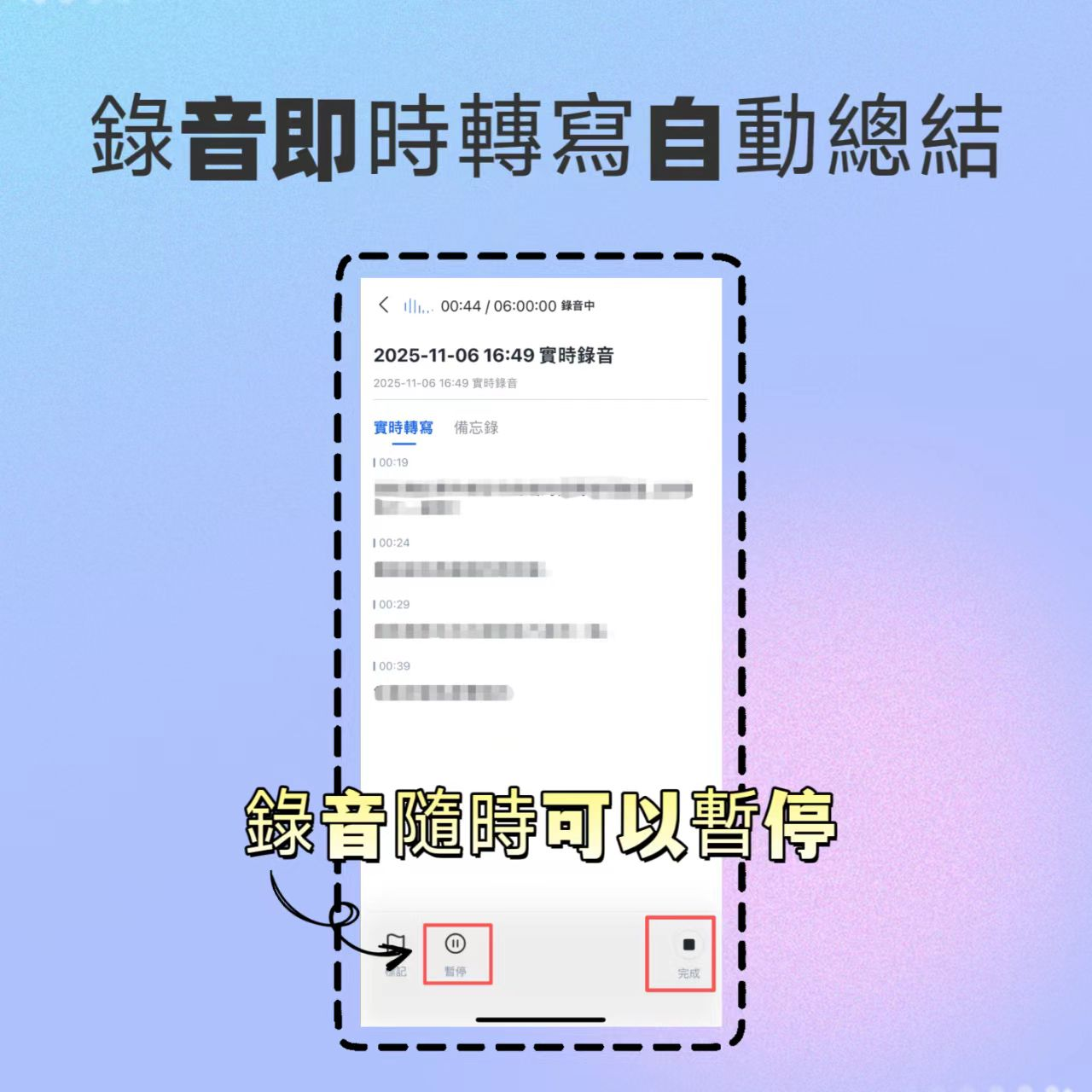
Existing Files: If you have audio from a recorder or recorded meetings from Zoom/Teams, upload the file for transcription.
- Feature link: Audio File to Text
Online Content: For YouTube tutorials or podcast episodes, just paste the link to parse the content.
- Feature link: Podcast/Video to Text
Step 2: Review the Transcript and Identify Speakers
After recording, the system automatically generates a transcript. Advanced tools autodetect different speakers (Speaker A, Speaker B); you can manually rename them to "Project Manager," "Client," etc., for easier reading.

Step 3: Use AI to Extract Key Points and Action Items
This step is key to boosting efficiency. Instead of reading the entire transcript, use AI to generate "Meeting Summary" and "To-Do Items."

If you have questions about specific details (e.g., forgot a number), use the "AI Conversation Q&A" feature to ask about the recording like a chat; AI locates the relevant passage and answers you.
- Feature link: AI Conversation Q&A

Frequently Asked Questions
Q1: Do speech-to-text apps support Traditional Chinese? Will it output Simplified Chinese? Most international apps (like Notta, Transkriptor, Tinrec) support Traditional Chinese recognition. Before recording, be sure to set the language to "Traditional Chinese" in settings to ensure output matches reading habits.
Q2: Are there any restrictions when using these apps on iPhone? Due to iOS privacy restrictions, third-party apps generally cannot directly record phone calls or LINE calls. These apps are mainly used for recording external ambient sounds (e.g., in-person meetings, classes). For recording internal meeting audio (e.g., Google Meet on phone), using a desktop web version is more stable.
Q3: What are the typical restrictions of free plans? Most tools use a subscription or time-based model. Free plans usually limit monthly recording minutes (e.g., Tinrec offers 100 min/month, Notta has trial allowances), restrict export formats, or limit AI summary usage. It's recommended to test the free quota to confirm accuracy before upgrading.
Q4: Does transcription work well in noisy environments? Background noise is a major factor affecting accuracy. Although many apps have noise reduction, it's best to use a directional microphone in noisy settings or stand close to the speaker. Poor audio quality may result in many transcription errors, increasing correction time.
Q5: Can I export to Word or subtitle files? Yes, professional tools (like Tinrec, Notta) usually support export as TXT, DOCX, PDF, and SRT (subtitle) formats for further editing or video production.
Q6: Is it safe to upload recorded files to the cloud? Choose service providers with clear privacy policies and encrypted transmission. For highly sensitive business information, carefully review the app's privacy terms to confirm whether data is used only for transcription, or consider fully offline solutions.
Turn every recording into actionable outcomes
Get 60 free transcription minutes when you sign in. No credit card required.
Related Reading
You might also like

2026 Top 5 Real-Time AI Meeting Notes Compared: Tinrec vs Notta vs Plaud — Which One Should You Choose?
The real pain point of meeting notes isn't whether they can be transcribed, but how to use them after transcription. This article starts with common misconceptions, outlines the positioning of 5 highly discussed real-time AI meeting note tools, and focuses on the differences between Tinrec, Notta, and Plaud. It compares meeting capture methods, post-meeting outputs, audio retention, team governance, and pricing plans to help you decide which one fits your meeting scenario.

2026 AI Meeting Notes Guide: Tinrec's Bot-Free Recording & Auto-Generated To-Dos
How do you choose an AI meeting notes tool? This article examines Chinese recognition, recording methods, post-meeting organization, and team data ownership, comparing Tinrec, Notta, Otter.ai, and Granola, plus four common pitfalls to help you find a solution that truly saves time after meetings.

5 Best Meeting Notes Apps of 2026: Which Free Version Is Actually Enough?
Still spending an hour after every meeting writing up notes? This comparison puts five common meeting notes app approaches side by side—covering Chinese recognition, how meetings are captured, post-meeting organization, team permissions, and pricing—and explains how Tinrec handles recording, transcription, summaries, action items, and AI Q&A within its free tier.

2026 Meeting Recording Tools: Bot-Free Recording + AI Action Item Management
A mid-level manager who attends 15 meetings a week shares hands-on insights: starting from the decision point of whether to let a meeting bot join, this article breaks down 4 key factors for choosing a meeting recording tool, and explains the real-world experience, limitations, and use cases of Tinrec's desktop bot-free recording, AI summary and action items, Q&A, and team plan roles and seat management.

Tinrec vs Otter.ai: Which AI Transcription Tool Is Right for You in 2026?
Choosing an AI transcription tool isn't just about speed—it's about language support, meeting capture methods, post-meeting organization, and team data governance. This comparison of Tinrec and Otter.ai breaks down key dimensions to help you decide which tool fits your meeting needs.

What Is Real-Time Transcription in 2026: Definition, 4 Key Factors, and Tool Comparison
What is real-time transcription and how does it differ from transcribing recordings? This article explains the definition and how it works in plain language, outlines 4 key factors to consider, and compares Google Live Transcribe, Yating, Notta, and Tinrec in Chinese meetings, post-meeting organization, and team collaboration, with scenario-based recommendations.

4 Meeting Transcription Tools Tested: Which AI Saves the Most Time on Chinese Transcripts and Summaries?
After a meeting, do you spend another two hours organizing the audio recording? This article compares four meeting transcription tools—Tinrec, Notta, Otter.ai, and Granola—on Chinese transcription, AI summaries and action items, bot-free recording, team collaboration, and pricing to help you find the most time-saving solution.

3 iPhone Audio-to-Text Apps Tested in 2026: How Long Can You Record and Which Saves the Most Time After Meetings?
How long can an iPhone actually record? This article first breaks down the storage, battery, and file interruption risks of the built-in Voice Memos app, then compares 3 audio-to-text tools from a student's perspective—covering free quotas, single-recording limits, post-meeting organization, and AI Q&A capabilities—to help you decide whether the built-in recorder is enough or if you need an AI recording assistant that delivers key points right after recording.

Google Live Transcribe vs Tinrec in 2026: 5-Dimension Comparison — Which Is Better for Meeting Notes?
Google Live Transcribe & Sound Notifications is an Android accessibility tool known for being free, providing real-time transcripts, and sending environmental sound alerts. Tinrec focuses on meeting notes and team collaboration. This article compares them across 5 dimensions—transcription and organization, online meeting recording, AI Q&A, audio file import, and team management—to help you decide which one to use for meeting notes.