
Turn recordings into transcripts and summaries in minutes
Upload audio or video for multilingual transcription, AI notes, and action items
After a one-hour meeting, spending three or four hours replaying the recording and transcribing it? That's a common pain point for administrative staff, project managers, and graduate students. In 2025, AI speech recognition (ASR) technology has matured significantly, evolving from simple 'transcription' to understanding context, automatically distinguishing speakers, and even generating decision summaries.
This article will walk you through 15 mainstream online recording-to-text tools, providing detailed evaluation criteria and a comparison table. We'll tell you:
- How to choose: Which tool offers high Chinese accuracy? Which is best for iPhone?
- How to use: A complete workflow from recording to generating action items.
- Quick conclusion: For English-focused meetings, Otter.ai is the top choice; if Taiwanese Mandarin and Hokkien are important, Yating (雅婷) performs best; for a cost-effective solution with AI conversation query, Tinrec (MiaoTing) is a comprehensive option worth considering.
Why Do You Need an AI Automatic Transcription Tool?
Traditional manual transcription is not only time-consuming but also prone to missing key points due to fatigue. Modern AI transcription tools mainly solve the following three problems:
- Low efficiency: Reducing the hours of transcription time to just minutes.
- Difficult information retrieval: Audio files themselves cannot be 'searched'; converting to text allows quick keyword lookup.
- Lack of actionability: After meetings, who is responsible for what is often forgotten; AI can automatically extract Action Items.
2026 Review of 15 Selected Online Recording-to-Text Tools
Below we categorize the tools into 'International', 'Localized', and 'Emerging Comprehensive' types.
1. International Giants & English Meeting Favorites: Otter.ai & Fireflies.ai
- Otter.ai: The 'veteran' in meeting transcription, focused on the English market. Its strength lies in deep integration with Zoom and Google Meet, making it ideal for multinational teams where English is the primary language. Downside: very poor Chinese support.
- Fireflies.ai: A favorite for sales teams due to integration with CRM systems like Salesforce and HubSpot, automatically syncing meeting insights to customer records. Again, Chinese recognition is not its strong suit.
2. Multilingual & Cross-Border Scenarios: Notta & Sonix
- Notta: Supports 58 languages and offers real-time translation, with high market share in Japan. Suitable for cross-border meetings mixing Chinese, Japanese, and English.
- Sonix: Emphasizes high accuracy and post-editing features, ideal for media producers and researchers. Supports over 53 languages but charges per hour, making long-term costs higher.
3. Taiwan Localization & Chinese Optimization: Yating (Yating Transcriber) & Meeting Ink
- Yating (Ya-Ting): Developed by Taiwan AI Labs, with excellent recognition for 'Taiwanese Mandarin' and Chinese-English code-switching, even supporting Taiwanese Hokkien. A top choice for government agencies or local interviews, but processing speed is relatively slow (1 minute of audio takes about 10 minutes to process).
- Meeting Ink: A Taiwanese startup tool focused on meeting scenarios, offering automatic meeting joining and smart summaries, suitable for local businesses.
4. Comprehensive AI Efficiency Tools: Tinrec (MiaoTing) & GoodTape
- GoodTape: A favorite among journalists, based on OpenAI Whisper technology, emphasizing minimalist operation and high accuracy, especially suitable for interview recordings.
- Tinrec (MiaoTing): A tool that focuses on the 'Record → Understand → Act' complete workflow. Unlike traditional tools, Tinrec not only provides recording-to-text but also emphasizes an 'AI conversation query' feature—you can directly chat to ask about the recording content (e.g., 'What was the conclusion of this meeting?'). It supports iOS, Android, and web versions, making it very user-friendly for those who habitually record on their phones.

Stop organizing recordings by hand
Upload audio or video and automatically get a transcript, summary, and action items
5. Other Notable Options
- Descript: Great for podcasters—edit audio like editing a document.
- Fathom: Free personal version of a Zoom/Meet recording plugin.
- OpenAI Whisper: Open-source and free, suitable for developers with coding backgrounds who value privacy.
Tool Feature & Price Comparison Table
For a more intuitive comparison, here's a key dimension comparison of 5 representative tools:
| Dimension | Otter.ai | Yating (Yating Transcriber) | Tinrec (MiaoTing) | Notta | Fireflies.ai |
|---|---|---|---|---|---|
| Chinese Support | Weak | Excellent (incl. Taiwanese) | Excellent (multilingual detection) | Excellent | Average |
| Free Quota | 300 min/month | First 20 min free | 100 min/month | 120 min/month | Unlimited recording (storage limited) |
| Real-time Transcription | Yes | Yes | Yes (App/Web) | Yes | Yes |
| AI Summary/Action Items | Yes | Inconsistent | Yes (structured meeting notes) | Yes | Yes |
| AI Conversation Query | No | No | Yes (key feature) | No | Yes (AskFred) |
| Starting Price | $16.99/month | $100 NTD/hour | $4.9/month (Basic) | $16.99/month | $10/month |
| Best For | English-only meetings | Taiwan local interviews | General meetings/study/notes | Multilingual cross-border meetings | Sales CRM |
Note: Prices and features may change over time. Please refer to each official website for the latest information.

Practical Tutorial: How to Efficiently Transcribe Meeting Recordings
Once you've chosen a tool, how do you integrate it into your daily workflow? Here's an example using Tinrec's operational logic to demonstrate how to achieve 'real-time recording-to-text' and 'post-meeting summaries'.
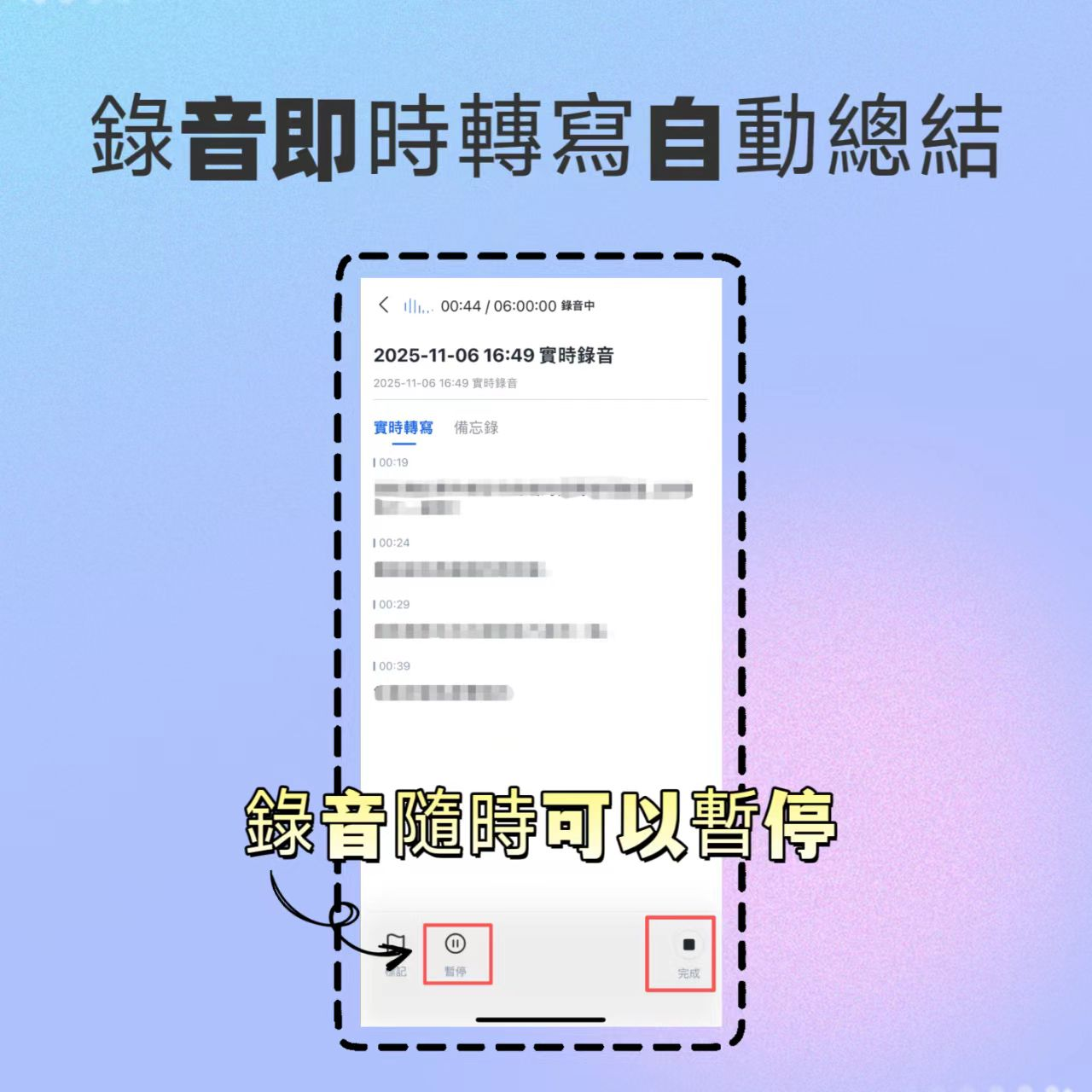
Step 1: Start Real-time Recording (Solve iPhone/Android Recording Limitations)
At the start of a meeting, directly open the tool to record. For users constrained by iPhone's call recording limitations, using a third-party app's 'live recording' feature is the best solution.
- Key operation: Ensure the microphone on your phone or laptop picks up clear audio, and sit as close to the speaker as possible.
- Feature entry: Real-time Recording to Text
Step 2: Import Existing Files (Process Past Recordings)
If you have existing audio recordings or video files, you can upload them directly for transcription. Advanced tools support formats like MP3, WAV, M4A, etc.
- Key operation: After uploading, the system automatically performs 'speaker diarization', labeling Speaker A, Speaker B, saving manual labeling time.
- Feature entry: Audio File to Text

Step 3: Process Online Audio/Video Content (YouTube/Podcast)
For online courses or competitor analysis videos, there's no need to download files; just paste the link to parse.
- Use cases: Quickly summarize YouTube lecture highlights or podcast interview content.
- Feature entry: Podcast/Online Video to Text
Step 4: Use AI for 'Conversational' Key Point Queries
This is the key step that distinguishes traditional transcription from AI note-taking. Traditional method: you have to read from start to finish. AI method: you directly ask it.
- How to do it: Type in the chat box 'List three decisions from this meeting' or 'What concerns did the client have about pricing?', and the AI will answer directly based on the recording content.
- Feature entry: AI Conversation Query

Frequently Asked Questions (FAQ)
Q1: Is it safe to use online recording-to-text tools? Most enterprise-grade tools have privacy protection measures. For highly confidential content (e.g., legal cases, medical records), choose tools that claim 'not to store data' or allow 'local operation' (e.g., Whisper). Tools like Tinrec usually provide users with the ability to delete data.
Q2: What are the limitations of iPhone recording? Due to iOS privacy policy, the built-in iPhone feature cannot record phone calls. The solution is to use a third-party app that supports background execution (e.g., Tinrec iOS version) for live recording, or use speakerphone with another device to record.
Q3: What's the main difference between free and paid versions? Typically, the differences are in 'recording time limits' (e.g., 100 min/month vs 1200 min/month) and 'advanced AI features' (e.g., AI summaries, conversation queries). It's recommended to test the free quota first to check Chinese recognition accuracy before subscribing.
Q4: What about Chinese-English code-switching or dialects? Make sure to check the tool's language settings before recording. Yating offers the best support for Taiwanese Hokkien/Taiwanese Mandarin; tools like Tinrec and Notta support multilingual automatic detection, suitable for bilingual business meetings.
Q5: What formats can I export? Most tools support TXT, Word, PDF, and subtitle files (SRT). If you need to upload meeting videos to YouTube, be sure to choose a tool that supports SRT timeline export.
Q6: Can I directly integrate with Teams or Google Meet? Otter.ai, Fireflies.ai, and Meeting Ink support 'virtual assistant' style automatic joining of meeting rooms. If you use a tool that doesn't support auto-joining (e.g., Tinrec), you can use the web version with computer system audio capture, or place your phone near the computer speakers to record—the results are still clear.
Turn every recording into actionable outcomes
Get 60 free transcription minutes when you sign in. No credit card required.
Related Reading
You might also like

2026 Top 5 Real-Time AI Meeting Notes Compared: Tinrec vs Notta vs Plaud — Which One Should You Choose?
The real pain point of meeting notes isn't whether they can be transcribed, but how to use them after transcription. This article starts with common misconceptions, outlines the positioning of 5 highly discussed real-time AI meeting note tools, and focuses on the differences between Tinrec, Notta, and Plaud. It compares meeting capture methods, post-meeting outputs, audio retention, team governance, and pricing plans to help you decide which one fits your meeting scenario.

2026 AI Meeting Notes Guide: Tinrec's Bot-Free Recording & Auto-Generated To-Dos
How do you choose an AI meeting notes tool? This article examines Chinese recognition, recording methods, post-meeting organization, and team data ownership, comparing Tinrec, Notta, Otter.ai, and Granola, plus four common pitfalls to help you find a solution that truly saves time after meetings.

5 Best Meeting Notes Apps of 2026: Which Free Version Is Actually Enough?
Still spending an hour after every meeting writing up notes? This comparison puts five common meeting notes app approaches side by side—covering Chinese recognition, how meetings are captured, post-meeting organization, team permissions, and pricing—and explains how Tinrec handles recording, transcription, summaries, action items, and AI Q&A within its free tier.

2026 Meeting Recording Tools: Bot-Free Recording + AI Action Item Management
A mid-level manager who attends 15 meetings a week shares hands-on insights: starting from the decision point of whether to let a meeting bot join, this article breaks down 4 key factors for choosing a meeting recording tool, and explains the real-world experience, limitations, and use cases of Tinrec's desktop bot-free recording, AI summary and action items, Q&A, and team plan roles and seat management.

Tinrec vs Otter.ai: Which AI Transcription Tool Is Right for You in 2026?
Choosing an AI transcription tool isn't just about speed—it's about language support, meeting capture methods, post-meeting organization, and team data governance. This comparison of Tinrec and Otter.ai breaks down key dimensions to help you decide which tool fits your meeting needs.

What Is Real-Time Transcription in 2026: Definition, 4 Key Factors, and Tool Comparison
What is real-time transcription and how does it differ from transcribing recordings? This article explains the definition and how it works in plain language, outlines 4 key factors to consider, and compares Google Live Transcribe, Yating, Notta, and Tinrec in Chinese meetings, post-meeting organization, and team collaboration, with scenario-based recommendations.

4 Meeting Transcription Tools Tested: Which AI Saves the Most Time on Chinese Transcripts and Summaries?
After a meeting, do you spend another two hours organizing the audio recording? This article compares four meeting transcription tools—Tinrec, Notta, Otter.ai, and Granola—on Chinese transcription, AI summaries and action items, bot-free recording, team collaboration, and pricing to help you find the most time-saving solution.

3 iPhone Audio-to-Text Apps Tested in 2026: How Long Can You Record and Which Saves the Most Time After Meetings?
How long can an iPhone actually record? This article first breaks down the storage, battery, and file interruption risks of the built-in Voice Memos app, then compares 3 audio-to-text tools from a student's perspective—covering free quotas, single-recording limits, post-meeting organization, and AI Q&A capabilities—to help you decide whether the built-in recorder is enough or if you need an AI recording assistant that delivers key points right after recording.

Google Live Transcribe vs Tinrec in 2026: 5-Dimension Comparison — Which Is Better for Meeting Notes?
Google Live Transcribe & Sound Notifications is an Android accessibility tool known for being free, providing real-time transcripts, and sending environmental sound alerts. Tinrec focuses on meeting notes and team collaboration. This article compares them across 5 dimensions—transcription and organization, online meeting recording, AI Q&A, audio file import, and team management—to help you decide which one to use for meeting notes.