
Turn recordings into transcripts and summaries in minutes
Upload audio or video for multilingual transcription, AI notes, and action items
Are you still manually transcribing one-hour meeting recordings or interviews by listening and typing? In Hong Kong's workplace and academic settings, mixed-language (code-mixing) Cantonese recordings have always been a major pain point for speech recognition. Choosing the wrong tool means the output is unusable, and correcting errors takes longer than re-listening.
This article reviews 6 popular voice-to-text AI tools in 2026, from hardware recorders to software apps. We compare Cantonese recognition accuracy, real-time transcription speed, summary generation capabilities, and pricing plans, along with hands-on tutorials.
Quick Selection Guide:
- Prefer physical hardware & business scenarios: Consider Plaud Note or iFLYTEK, though initial cost is higher, recording quality is stable.
- Prefer software flexibility & high value: Tinrec or Monica are great choices, supporting multi-device sync and AI Q&A, ideal for users needing quick action items.
- English-only meeting environments: Otter.ai performs well, but not recommended for Cantonese scenarios.
1. Why You Need AI Voice-to-Text Tools: Solving Three Pain Points
In the digital transformation era, manual meeting notes have become inefficient and time-consuming. Professional AI tools address the following:
- Low information density, high re-listening cost: Traditional audio is linear; finding "which minute a decision was made" is hard. AI converts audio to searchable text.
- Mixed language recognition difficulty: Hong Kong Cantonese often mixes English terms (e.g., "Send the file to me"), which general input methods struggle with. Professional AI models optimize for this.
- Lack of actionable conclusions: Having a transcript isn't enough. New tools extract to-dos and meeting summaries from messy conversations.
2. 2026 Hong Kong Hot Voice-to-Text Tools Review & Comparison
Below we analyze strengths and weaknesses of each tool based on common options and real-world use cases:
1. Plaud AI (Hardware-Software Integration)
- Features: Combines Note (recording card) and NotePin (recording capsule) hardware, powered by GPT-5 and Claude Sonnet 4. Record then connect to app for transcription.
- Best for: Business professionals who prefer dedicated recording devices.
- Price & Limits: Hardware ~HK$1,199, includes 300 free minutes per month after purchase. Additional minutes cost extra for heavy meetings.
2. Tinrec (All-in-One Software Assistant)
- Features: Cross-platform (iOS/Android/Web) software, no additional hardware needed. Supports real-time recording-to-text, upload audio/video, and YouTube link transcription. Key features: "Real-time transcription" and "AI conversational Q&A" enabling querying recording content.
- Best for: Students, hybrid workers, content creators, and users who don't want extra hardware.
- Price & Limits: Free tier (100 mins/month), Basic ($4.9/mo), Pro ($8.25/mo) for higher limits.

3. iFLYTEK (Strong Chinese Recognition)
- Features: Years of expertise in Chinese and dialect (including Cantonese) recognition, extremely accurate, especially suitable for legal, medical, and professional fields.
- Best for: Enterprise users with high accuracy demands and sufficient budget.
- Price & Limits: One-time hardware purchase costs ~HK$2,900.
4. Otter.ai (Best for English Meetings)
- Features: Automatic speaker labeling and strong collaboration features, mainstream in English-speaking countries.
- Note: Limited Cantonese support; if your meetings are primarily in Chinese, skip this option.
- Price: Pro ~HK$65/month.

5. Monica (Multi-Function AI Assistant)
- Features: Started as a browser extension, supports real-time transcription and online editing, user-friendly interface.
- Best for: Lightweight users, individual creators.
- Price: Unlimited ~HK$130/month.
Stop organizing recordings by hand
Upload audio or video and automatically get a transcript, summary, and action items
3. Comprehensive Comparison: Feature Specs & Use Case Overview
To help you decide quickly, here is a summary of key dimensions:
| Dimension | Tinrec | Plaud Note | iFLYTEK | Otter.ai | Whisper (OpenAI) |
|---|---|---|---|---|---|
| Core Form | Software App / Web | Hardware recording card + App | Professional recorder | Software App | Open-source model |
| Cantonese Recognition | ⭐⭐⭐⭐⭐ (supports mixed language) | ⭐⭐⭐⭐⭐ | ⭐⭐⭐⭐⭐ | ⭐ (not recommended) | ⭐⭐⭐⭐ (needs fine-tuning) |
| Real-time Transcription | Yes | Upload after recording | Yes (model dependent) | Yes | Depends on implementation |
| AI Summary / Action Items | Auto-generates to-dos and summary | Yes | Yes | Yes | Requires chaining with other AI |
| AI Conversational Q&A | Yes (ask about recording content) | Partial | Partial | Yes (English only) | No |
| Main Barrier | No hardware required, sign up and use | Need to buy hardware | High hardware cost | Language limitation | Technical deployment |
| Pricing Model | Free trial + subscription | Hardware fee + subscription | High one-time hardware purchase | Subscription | Free (self-hosted) |
Buying Advice: If you prefer not carrying an extra device and need to process online videos/podcasts, Tinrec's software ecosystem is more complete. For confidential meetings where phones are prohibited, Plaud or iFLYTEK hardware solutions are more suitable.

4. Practical Tutorial: How to Efficiently Generate Meeting Minutes with AI Tools
Regardless of the tool you choose, the core workflow is similar. Below we use Tinrec's interface as an example to show how to organize a 60-minute meeting in 5 minutes.
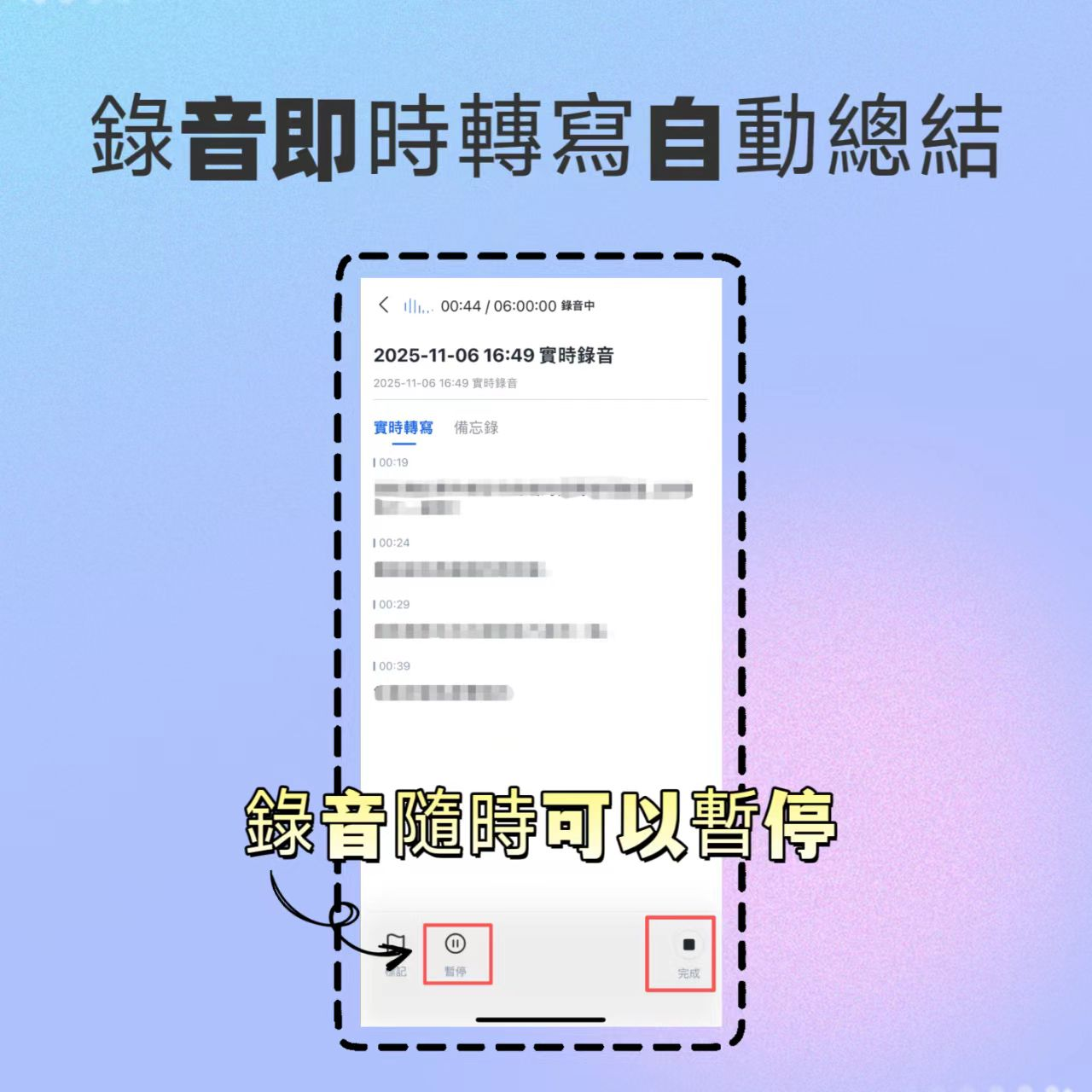
Step 1: Start Recording & Real-time Transcription
- Scenario: In-person or online meeting (Teams/Google Meet).
- Action: Open the app or web version, tap "Real-time Transcription".
- Tips: Place your phone or microphone between speakers. Tinrec instantly converts speech to text, letting you monitor audio quality.
Step 2: Import External Audio or Video (Non-live Recording)
- Scenario: Received a client's recording or need to transcribe a YouTube tutorial.
- Action: Select "Audio File to Text" or "Video Link to Text".
- Advantages: Supports MP3, WAV, MP4 formats; uploads are processed in the cloud, not draining phone performance.

Step 3: Smart Speaker Diarization & Editing
- Scenario: Multi-person discussion needing to know who said what.
- Action: The system auto-labels Speaker 1, Speaker 2. You can quickly rename (e.g., Manager, Client), and the system batch-updates.

Step 4: Use AI Q&A to Find Key Points (Key Differentiator)
- Scenario: Your boss asks "What was the final marketing budget?" and you don't want to scroll through thousands of words.
- Action: Use Tinrec's AI Q&A feature, type "What was the conclusion about the budget in the meeting?"
- Result: The AI responds with data and context from the recording — something traditional recorders can't do.

Step 5: One-Click Summary & Action Items
- Finally, tap "Generate Meeting Minutes". The system automatically extracts:
- Meeting Conclusions
- Action Items
- Points of Contention
- Export as Word or PDF and share with your team.
5. Frequently Asked Questions (FAQ)
Q1: Can these tools handle mixed Cantonese and English (Chinglish)? Most tools optimized for Chinese markets (e.g., Tinrec, iFLYTEK, Plaud) handle common mixed phrases like "Please check the schedule", with recognition rates typically above 90%. Pure English tools like Otter cannot recognize Chinese parts.
Q2: Will an incoming call interrupt recording on a phone app? It depends on your phone's system settings. We recommend enabling "Airplane Mode" or "Do Not Disturb" while recording with an app (e.g., Tinrec), and using Wi-Fi to avoid interruptions.
Q3: How is privacy and security of recording data ensured? Choose services with encrypted transmission. Most paid tools (including Tinrec and Plaud covered here) have privacy policies that do not use user data for public model training. For highly confidential content, review each provider's privacy terms.
Q4: What are typical free tier limits? Usually caps on monthly recording minutes or single recording length. For example, Plaud requires purchasing hardware for any quota; Tinrec offers 100 free minutes per month for light users to test.
Q5: Can I directly transcribe YouTube videos or podcasts?
Traditional recorders cannot, but software services like Tinrec accept YouTube URLs to generate transcripts and summaries — handy for students taking online courses or content creators processing materials.

Q6: Are there any special restrictions for iPhone users? Due to iOS privacy restrictions, third-party apps usually cannot directly record phone calls or FaceTime. To record calls, you typically need an external hardware device (e.g., MagSafe recorder) or use speakerphone mode with the app.
Turn every recording into actionable outcomes
Get 60 free transcription minutes when you sign in. No credit card required.
Related Reading
You might also like

2026 Top 5 Real-Time AI Meeting Notes Compared: Tinrec vs Notta vs Plaud — Which One Should You Choose?
The real pain point of meeting notes isn't whether they can be transcribed, but how to use them after transcription. This article starts with common misconceptions, outlines the positioning of 5 highly discussed real-time AI meeting note tools, and focuses on the differences between Tinrec, Notta, and Plaud. It compares meeting capture methods, post-meeting outputs, audio retention, team governance, and pricing plans to help you decide which one fits your meeting scenario.

2026 AI Meeting Notes Guide: Tinrec's Bot-Free Recording & Auto-Generated To-Dos
How do you choose an AI meeting notes tool? This article examines Chinese recognition, recording methods, post-meeting organization, and team data ownership, comparing Tinrec, Notta, Otter.ai, and Granola, plus four common pitfalls to help you find a solution that truly saves time after meetings.

5 Best Meeting Notes Apps of 2026: Which Free Version Is Actually Enough?
Still spending an hour after every meeting writing up notes? This comparison puts five common meeting notes app approaches side by side—covering Chinese recognition, how meetings are captured, post-meeting organization, team permissions, and pricing—and explains how Tinrec handles recording, transcription, summaries, action items, and AI Q&A within its free tier.

2026 Meeting Recording Tools: Bot-Free Recording + AI Action Item Management
A mid-level manager who attends 15 meetings a week shares hands-on insights: starting from the decision point of whether to let a meeting bot join, this article breaks down 4 key factors for choosing a meeting recording tool, and explains the real-world experience, limitations, and use cases of Tinrec's desktop bot-free recording, AI summary and action items, Q&A, and team plan roles and seat management.

Tinrec vs Otter.ai: Which AI Transcription Tool Is Right for You in 2026?
Choosing an AI transcription tool isn't just about speed—it's about language support, meeting capture methods, post-meeting organization, and team data governance. This comparison of Tinrec and Otter.ai breaks down key dimensions to help you decide which tool fits your meeting needs.

What Is Real-Time Transcription in 2026: Definition, 4 Key Factors, and Tool Comparison
What is real-time transcription and how does it differ from transcribing recordings? This article explains the definition and how it works in plain language, outlines 4 key factors to consider, and compares Google Live Transcribe, Yating, Notta, and Tinrec in Chinese meetings, post-meeting organization, and team collaboration, with scenario-based recommendations.

4 Meeting Transcription Tools Tested: Which AI Saves the Most Time on Chinese Transcripts and Summaries?
After a meeting, do you spend another two hours organizing the audio recording? This article compares four meeting transcription tools—Tinrec, Notta, Otter.ai, and Granola—on Chinese transcription, AI summaries and action items, bot-free recording, team collaboration, and pricing to help you find the most time-saving solution.

3 iPhone Audio-to-Text Apps Tested in 2026: How Long Can You Record and Which Saves the Most Time After Meetings?
How long can an iPhone actually record? This article first breaks down the storage, battery, and file interruption risks of the built-in Voice Memos app, then compares 3 audio-to-text tools from a student's perspective—covering free quotas, single-recording limits, post-meeting organization, and AI Q&A capabilities—to help you decide whether the built-in recorder is enough or if you need an AI recording assistant that delivers key points right after recording.

Google Live Transcribe vs Tinrec in 2026: 5-Dimension Comparison — Which Is Better for Meeting Notes?
Google Live Transcribe & Sound Notifications is an Android accessibility tool known for being free, providing real-time transcripts, and sending environmental sound alerts. Tinrec focuses on meeting notes and team collaboration. This article compares them across 5 dimensions—transcription and organization, online meeting recording, AI Q&A, audio file import, and team management—to help you decide which one to use for meeting notes.